
table 单列宽度设置
参考:https://blog.csdn.net/lunhui1994_/article/details/81120579
效果:
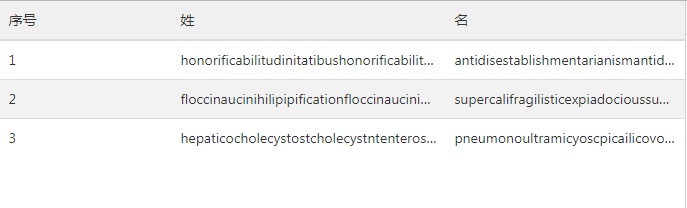
html:
<!DOCTYPE html>

<html>

    <head>

        <meta charset="UTF-8">

        <meta name="viewport" content="width=device-width, initial-scale=1.0, maximum-scale=1.0, user-scalable=0">

        <title>test</title>

        <link rel="stylesheet" href="css/amazeui.css">

        <script type="text/javascript" src="js/jquery.min.js"></script>

        <style>

            .table-items {

                table-layout: fixed;//td的宽度固定,不随内容变化

            }

            .table-items>tbody>tr>td {//文字超出显示省略号

                overflow: hidden;

                white-space: nowrap;

                text-overflow: ellipsis;

            }

        </style>

    </head>

    <body>

        <div class="am-cf">

            <table class="am-table am-table-hover table-items">

                <thead>

                    <tr>

                        <th style="width:25%">序号</th>

                        <th style="width:40%">姓</th>

                        <th style="width:35%">名</th>

                    </tr>

                </thead>

                <tbody id="table-body"></tbody>

            </table>

        </div>

        <script type="text/javascript">

            var dataList = [{

                id: 1,

                first_name: 'honorificabilitudinitatibushonorificabilitudinitatibus',

                second_name: 'antidisestablishmentarianismantidisestablishmentarianism'

            }, {

                id: 2,

                first_name: 'floccinaucinihilipipificationfloccinaucinihilipipification',

                second_name: 'supercalifragilisticexpiadocioussupercalifragilisticexpiadocious'

            }, {

                id: 3,

                first_name: 'hepaticocholecystostcholecystntenterostomyhepaticocholecystostcholecystntenterostomy',

                second_name: 'pneumonoultramicyoscpicailicovolcanoconiosispneumonoultramicyoscpicailicovolcanoconiosis '

            }];

            $(function() {

                var str = '';

                for (var i = 0; i < dataList.length; i++) {

                    str = "<tr><td title=" + dataList[i].id + ">" + dataList[i].id + "</td>" +

                        "<td title=" + dataList[i].first_name + ">" + dataList[i].first_name + "</td>" +

                        "<td title=" + dataList[i].second_name + ">" + dataList[i].second_name + "</td>" +

                        "</tr>";

                    $('#table-body').append(str);

                }

            })

        </script>

    </body>

</html>
td里的title属性是鼠标悬停上方时显示内容。
table 单列宽度设置的更多相关文章
- table 的宽度设置无效
1.在table 标签添加样式 table-layout: fixed; 必须设置width的值:<table style="table-layout: fixed"> ...
- table表格宽带研究(附带:table表格为什么设置td宽度无效)
情况1:下面代码定义了表格宽带为为600px,未设置td宽带,3个td内容为1,2,3,可以看到3个内容平分table的宽度. 也就是每个td都是200px(请注意:如果用chrome调试宽度,会有一 ...
- 表格Table宽度设置无效的解决方法
表格Table宽度设置无效的解决方法 bootstrap中使用table时发现不管用width赋值方式都无法改变table>td的宽度 解决方法: 设置table:table-layout:fi ...
- table表格宽度固定,同时td内容过长也不会被撑开
table表格宽度固定,同时td内容过长也不会被撑开,设置如下css: table{table-layout:fixed;word-break:break-all;}
- css中关于table的相关设置
一.设置好看的单边框表格 1.一种实现方式 分别给table标签和td标签设置不在同一方向的border属性,如下table设置‘左上’边框,td设置‘右下’边框.其他设置方式同样可以实现. tabl ...
- Table的一些设置(自适应以及溢出)
table的两个属性 单行溢出点点显示 表格的宽度设置 双栏自适应连续连续英文符换行 1.table重置的两个属性: ①border-collapse: collapse; /* 为表格设置 ...
- TD中INPUT的宽度设置
最近在用C#做Web程序时,碰到一个问题: 将TextBox的asp控件放在Table中的TD里面时,不设置宽度,自动会将TD撑的很大. 查看运行后页面的源代码发现,其实TextBox控件最终在客户端 ...
- 如何固定table表格宽度,样式不受容器影响
之前有篇关于LODOP打印超文本表格,两个样式相同的表格,出现错位的情况.该博文地址:LODOP打印表格错位的几种情况该文试验了两种现象,第一种浏览器页面显示错位,打印预览也错位,第二种浏览器页面表格 ...
- LODOP打印table表格宽度固定-超宽隐藏
之前有博文介绍关于超出div隐藏内容的:LODOP打印超过后隐藏内容样式里面提到了overflow:hidden;控制超出后隐藏,但是前面那篇用的是div,如果是在table中,由于table默认的t ...
随机推荐
- TortoiseGit密钥设置
需要用到TortoiseGit的puttykey generator工具来生成既适用于github的rsa密钥也适用于TortoiseGit的ppk密钥. 1. 安装完成TortoiseGit后 ...
- Feign 系列(02)Why Feign
Feign 系列(02)Why Feign [toc] 1. 什么是 Feign Feign 的英文表意为"假装,伪装,变形", 是一个 Http 请求调用的轻量级框架,可以以 J ...
- C语言static和局部变量
#include <stdio.h> void test(); int main() { /************************************************ ...
- 22-4-isarry
<!DOCTYPE html> <html lang="en"> <head> <meta charset="UTF-8&quo ...
- Simple example of use of __setstate__ and __getstate__
class Foo(object): def __init__(self, val=2): self.val = val def __getstate__(self): print ("I' ...
- IIS查找报错信息
1.打开IIS,选择日志 2.选择 日志文件和ETW事件 ---->应用 3.在发布网站的根目录下找一个logs文件(如果没有则创建) 4.浏览网站,如果报错,logs文件夹下面就会生成一个 ...
- Jenkins配置gitlab
一.免密公钥登陆1 登陆gitlab 搜ssh Keys 2 添加在Jenkins 服务器本地创建好的公钥 保存完成 也可以手动添加 到/var/opt/gitlab/.ssh/authorized_ ...
- Django -- 高级知识点
Django -- 高级知识点 高级知识点包括: 静态文件处理 中间件 上传图片 Admin站点 分页 使用jquery完成ajax 管理静态文件 项目中的CSS.图片.js都是静态文件 配置静态文件 ...
- checkbox与文字对齐
checkbox和后面的文字如果不加样式,会导致checkbox和文字对齐,解决办法是对checkbox和文字同时添加如下样式: vertical-align:middle;
- iptables开通某些端口
#!/bin/bash #define all variance or parameter WAH_INT="eth0" WAH_INT_IP="222.222.101. ...