
table 单列宽度设置
参考:https://blog.csdn.net/lunhui1994_/article/details/81120579
效果:
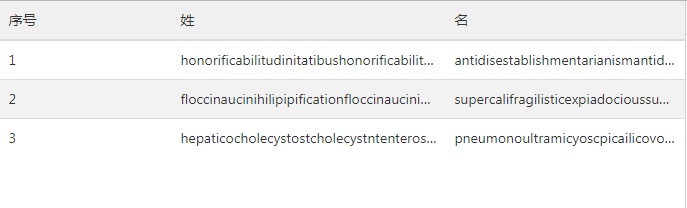
html:
<!DOCTYPE html>

<html>

    <head>

        <meta charset="UTF-8">

        <meta name="viewport" content="width=device-width, initial-scale=1.0, maximum-scale=1.0, user-scalable=0">

        <title>test</title>

        <link rel="stylesheet" href="css/amazeui.css">

        <script type="text/javascript" src="js/jquery.min.js"></script>

        <style>

            .table-items {

                table-layout: fixed;//td的宽度固定,不随内容变化

            }

            .table-items>tbody>tr>td {//文字超出显示省略号

                overflow: hidden;

                white-space: nowrap;

                text-overflow: ellipsis;

            }

        </style>

    </head>

    <body>

        <div class="am-cf">

            <table class="am-table am-table-hover table-items">

                <thead>

                    <tr>

                        <th style="width:25%">序号</th>

                        <th style="width:40%">姓</th>

                        <th style="width:35%">名</th>

                    </tr>

                </thead>

                <tbody id="table-body"></tbody>

            </table>

        </div>

        <script type="text/javascript">

            var dataList = [{

                id: 1,

                first_name: 'honorificabilitudinitatibushonorificabilitudinitatibus',

                second_name: 'antidisestablishmentarianismantidisestablishmentarianism'

            }, {

                id: 2,

                first_name: 'floccinaucinihilipipificationfloccinaucinihilipipification',

                second_name: 'supercalifragilisticexpiadocioussupercalifragilisticexpiadocious'

            }, {

                id: 3,

                first_name: 'hepaticocholecystostcholecystntenterostomyhepaticocholecystostcholecystntenterostomy',

                second_name: 'pneumonoultramicyoscpicailicovolcanoconiosispneumonoultramicyoscpicailicovolcanoconiosis '

            }];

            $(function() {

                var str = '';

                for (var i = 0; i < dataList.length; i++) {

                    str = "<tr><td title=" + dataList[i].id + ">" + dataList[i].id + "</td>" +

                        "<td title=" + dataList[i].first_name + ">" + dataList[i].first_name + "</td>" +

                        "<td title=" + dataList[i].second_name + ">" + dataList[i].second_name + "</td>" +

                        "</tr>";

                    $('#table-body').append(str);

                }

            })

        </script>

    </body>

</html>
td里的title属性是鼠标悬停上方时显示内容。
table 单列宽度设置的更多相关文章
- table 的宽度设置无效
1.在table 标签添加样式 table-layout: fixed; 必须设置width的值:<table style="table-layout: fixed"> ...
- table表格宽带研究(附带:table表格为什么设置td宽度无效)
情况1:下面代码定义了表格宽带为为600px,未设置td宽带,3个td内容为1,2,3,可以看到3个内容平分table的宽度. 也就是每个td都是200px(请注意:如果用chrome调试宽度,会有一 ...
- 表格Table宽度设置无效的解决方法
表格Table宽度设置无效的解决方法 bootstrap中使用table时发现不管用width赋值方式都无法改变table>td的宽度 解决方法: 设置table:table-layout:fi ...
- table表格宽度固定,同时td内容过长也不会被撑开
table表格宽度固定,同时td内容过长也不会被撑开,设置如下css: table{table-layout:fixed;word-break:break-all;}
- css中关于table的相关设置
一.设置好看的单边框表格 1.一种实现方式 分别给table标签和td标签设置不在同一方向的border属性,如下table设置‘左上’边框,td设置‘右下’边框.其他设置方式同样可以实现. tabl ...
- Table的一些设置(自适应以及溢出)
table的两个属性 单行溢出点点显示 表格的宽度设置 双栏自适应连续连续英文符换行 1.table重置的两个属性: ①border-collapse: collapse; /* 为表格设置 ...
- TD中INPUT的宽度设置
最近在用C#做Web程序时,碰到一个问题: 将TextBox的asp控件放在Table中的TD里面时,不设置宽度,自动会将TD撑的很大. 查看运行后页面的源代码发现,其实TextBox控件最终在客户端 ...
- 如何固定table表格宽度,样式不受容器影响
之前有篇关于LODOP打印超文本表格,两个样式相同的表格,出现错位的情况.该博文地址:LODOP打印表格错位的几种情况该文试验了两种现象,第一种浏览器页面显示错位,打印预览也错位,第二种浏览器页面表格 ...
- LODOP打印table表格宽度固定-超宽隐藏
之前有博文介绍关于超出div隐藏内容的:LODOP打印超过后隐藏内容样式里面提到了overflow:hidden;控制超出后隐藏,但是前面那篇用的是div,如果是在table中,由于table默认的t ...
随机推荐
- flask json
导入 from flask import Flask,jsonify 1.列表 def index(): arr=['mkdir','md','touch'] return jsonify(arr) ...
- 假如Kafka集群中一个broker宕机无法恢复,应该如何处理?
假如Kafka集群中一个broker宕机无法恢复, 应该如何处理? 今天面试时遇到这个问题, 网上资料说添加新的broker, 是不会自动同步旧数据的. 笨办法 环境介绍 三个broker的集群, z ...
- HDU 1392 Surround the Trees (凸包周长)
题目链接:HDU 1392 Problem Description There are a lot of trees in an area. A peasant wants to buy a rope ...
- new delete
malloc/free是标准的库函数,而new/delete是操作符 匹配使用原则:malloc(calloc/realloc)和free 以及new/new[] 和delete/delete[]; ...
- Lung Nodule Detection------work log
有时候真的不知道自己是怎么走上,模式识别,人工智能的这条路上的.但既然走上了这条路,我就没有理由荒废我所学到的东西.在学校里面研究了很长的时间的肺结节检测,但那都是只限于研究和写论文,现在我想把大家的 ...
- 高并发下的缓存架构设计演进及redis常见的缓存应用异象解决方案
待总结 缓存穿透 缓存击穿 缓存雪崩等
- 用redis实现悲观锁(后端语言以php为例)
1479 锁机制 通常使用的锁分为乐观锁,悲观锁这两种,简单介绍下这两种锁,作为本文的背景知识,对这类知识已经有足够了解的同学可以跳过这部分. 乐观锁 先来看下百度百科上的解释:大多是基于数据版本( ...
- dev 中 字符串转中文拼音缩写,对grid列表进行模糊匹配,grid获取焦点行,gridlookupedit控件用拼音模糊匹配下拉选项
番外篇:. //该方法是将字符串转化为中文拼音的首写字母大写, public static string RemoveSpecialCharacters(string str){try{if (str ...
- 2.Struts2配置文件
1.配置文件的加载顺序 0. 需要掌握 * 加载了哪些个配置文件(重点的) * 配置文件的名称是什么 * 配置文件的位置 * 配置文件的 ...
- 转: 工作中用的C++库
转:https://www.mhftz.com/archives/42.html 个人学习C/C++的开源代码: 0.STL 1.osmium 2.leveldb 3.glog 4.redis 个人使 ...