
.net core 根据环境变量区分正式、测试 配置文件
新建测试、正式环境下所用的 配置信息文件
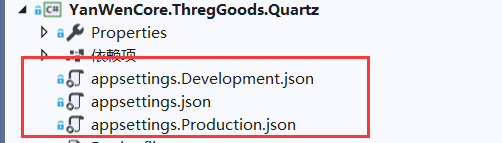
appsettings.Development.json 文件信息:
{

  "Logging": {

    "LogLevel": {

      "Default": "Warning"

    }

  },

  "AllowedHosts": "*",

  "db": {

    "mysql": {

      "conStr": "xxxxxxxxxxxxxxxxx", //测试

      "providerName": "MySql.Data.MySqlClient"

    },

    "redis": {

      "conStr": "xxxxxxxxxxxxxxxxx", //测试

      "dbId": "3"

    }

  },

  "ThOcUrl": "xxxxxxxxxxxxxxxxx", //测试

  "ThSftpInfo": "xxxxxxxxxxxxxxxxx", //测试

  "ThFileUrl": "xxxxxxxxxxxxxxxxx" //测试

}
加入相关nuget引用

添加获取配置信息帮助类
using Microsoft.AspNetCore.Hosting;

using Microsoft.Extensions.Configuration;

using System;

using System.IO;

using Microsoft.Extensions.DependencyInjection;

namespace YanWenCore.ThregGoods.Common

{

    public static class MyServiceProvider

    {

        public static IServiceProvider ServiceProvider

        {

            get; set;

        }

    }

    public class AppSettingHelper

    {
        //根据环境变量配置获取json文件的名称

        private static readonly string AppSettingName = String.Format("appsettings.{0}.json", MyServiceProvider.ServiceProvider.GetRequiredService<IHostingEnvironment>().EnvironmentName);

        private static IConfigurationRoot configR;

        static AppSettingHelper()

        {

            var builder = new ConfigurationBuilder().SetBasePath(Directory.GetCurrentDirectory()).AddJsonFile(AppSettingName);

            configR = builder.Build();

        }

        public static IConfigurationRoot GetRotConfig()

        {

            if (configR == null)

            {

                configR = new ConfigurationBuilder().SetBasePath(Directory.GetCurrentDirectory()).AddJsonFile(AppSettingName).Build();

            }

            return configR;

        }

        //Mysql连接

        public static string MysqlConnectionStringSettings

        {

            get

            {

                return GetRotConfig().GetSection("db").GetSection("mysql").GetSection("conStr").Value;

            }

        }

        //Redis连接信息

        public static string RedisConnectionStringSettings

        {

            get

            {

                return GetRotConfig().GetSection("db").GetSection("redis").GetSection("conStr").Value;

            }

        }

        //OC平台接口地址

        public static string GetbatteryCertUrl

        {

            get

            {

                return GetRotConfig().GetSection("ThOcUrl").Value;

            }

        }

        //sftp服务器信息

        public static string ThSftpInfo

        {

            get

            {

                return GetRotConfig().GetSection("ThSftpInfo").Value;

            }

        }

        //文件服务器地址

        public static string ThFileUrl

        {

            get

            {

                return GetRotConfig().GetSection("ThFileUrl").Value;

            }

        }

    }

}
应用程序期间提供初始化提供服务容器的对象
 public void Configure(IApplicationBuilder app, IHostingEnvironment env)

        {

            if (env.IsDevelopment())

            {

                app.UseDeveloperExceptionPage();

            }

            else

            {

                app.UseExceptionHandler("/Error");

            }

            MyServiceProvider.ServiceProvider = app.ApplicationServices;

        }
执行docker run 之前,设置环境变量
set ASPNETCORE_ENVIRONMENT= Development
.net core 根据环境变量区分正式、测试 配置文件的更多相关文章
- JAVA_SE基础——2.环境变量的配置&测试JDK
哈喽,利用晚上的空余时间再写篇心的~~~ 谢谢大家 前一篇文章 JAVA_SE基础--JDK&JRE下载及安装http://blog.csdn.net/thescript_j/article ...
- ASP.NET Core使用环境变量
前言 通常在应用程序开发到正式上线,在这个过程中我们会分为多个阶段,通常会有 开发.测试.以及正式环境等.每个环境的参数配置我们会使用不同的参数,因此呢,在ASP.NET Core中就提供了相关的环境 ...
- 在ASP.NET Core配置环境变量和启动设置
在这一部分内容中,我们来讨论ASP.NET Core中的一个新功能:环境变量和启动设置,它将开发过程中的调试和测试变的更加简单.我们只需要简单的修改配置文件,就可以实现开发.预演.生产环境的切换. A ...
- ASP .NET CORE 根据环境变量支持多个 appsettings.json
0.背景 在开发项目的过程当中,生产环境与调试环境的配置肯定是不一样的.拿个最简单的例子来说,比如连接字符串这种东西,调试环境肯定是不能连接生产数据库的.在之前的话,这种情况只能说是你 COPY 两个 ...
- ASP.NET Core配置环境变量和启动设置
在这一部分内容中,我们来讨论ASP.NET Core中的一个新功能:环境变量和启动设置,它将开发过程中的调试和测试变的更加简单.我们只需要简单的修改配置文件,就可以实现开发.预演.生产环境的切换. A ...
- [转]ASP.NET Core配置环境变量和启动设置
本文转自:https://www.cnblogs.com/tdfblog/p/Environments-LaunchSettings-in-Asp-Net-Core.html 在这一部分内容中,我们来 ...
- .net core 中环境变量的配置
配置文件: Properties目录下的launchSettings.json IISExpress配置 "ASPNET_ENV": "EnvironmentOne&qu ...
- Web开发之tomcat配置及使用(环境变量设置及测试,一个简单的web应用实例)
Tomcat的配置及测试: 第一步:下载tomcat,然后解压到任意盘符 第二步:配置系统环境变量 tomcat解压到的D盘 (路径为: D:\tomcat), 配置环境变量: 启动tomcat需要两 ...
- [.net core] 12.环境变量
异常给开发人员提供了很大好的排错功能. 但是其背后的技术细节很复杂,会损耗性能,也会使.net core web app更容易被反派攻击. 于是我们要学会使用环境变量, 通过环境变量,控制一些逻辑 当 ...
随机推荐
- jmeter 5 参数化
文件: 文件编码 注意: 如果文件另存为utf-8,文件第一行头会带bom头(不可见字符),jmeter读取参数后,会把头读取到请求报文中,提示不存在该用户 什么是bom头? 在utf-8编码文件中B ...
- Linux NIO 系列(04-4) select、poll、epoll 对比
目录 一.API 对比 1.1 select API 1.2 poll API 1.3 epoll API 二.总结 2.1 支持一个进程打开的 socket 描述符(FD)不受限制(仅受限于操作系统 ...
- 开发效率优化之Git分布式版本控制系统(一)
阿里P7移动互联网架构师进阶视频(每日更新中)免费学习请点击:https://space.bilibili.com/474380680本篇文章将先从Git分布式版本控制系统来阐述开发效率优化 一,企业 ...
- __attribute__((regparm(3))) from GNU C
在 x86 上,regparm 属性会传递一个数值给编译器,这个数值会告诉编译器要用多少个寄存器来传递函数参数(EAX, EDX 或 ECX,最多 3 个寄存器),通常情况下函数是用堆栈来传递参数的. ...
- 我的.eslintrc.js
module.exports = { root: true, env: { node: true }, extends: ["plugin:vue/essential", &quo ...
- 对malloc与free函数的浅识
本文介绍malloc和free函数的内容. 在C中,对内存的管理是相当重要.下面开始介绍这两个函数: 一.malloc()和free()的基本概念以及基本用法: .函数原型及说明: void *mal ...
- 微信小程序 滚动到底部
1.html <view id="bottom"></view> 2. onReady: function () { //滚动到底部 let query = ...
- vue组件参数校验与非props特性
组件参数校验 <!DOCTYPE html> <html> <head> <meta charset="UTF-8"> <ti ...
- 简单API接口签名验证
前言 后端在写对外的API接口时,一般会对参数进行签名来保证接口的安全性,在设计签名算法的时候,主要考虑的是这几个问题: 1. 请求的来源是否合法 2. 请求参数是否被篡改 3. 请求的唯一性 我们的 ...
- magento 为用户注册增加一个字段
步骤 I. 加一个occupation/title字段到用户注册页,差不多在register.html的54行,在email下方加一个Occupation显示代码 代码: <li>< ...