
AutoCad 二次开发 Jig操作之墙块的拖动
测试结果:
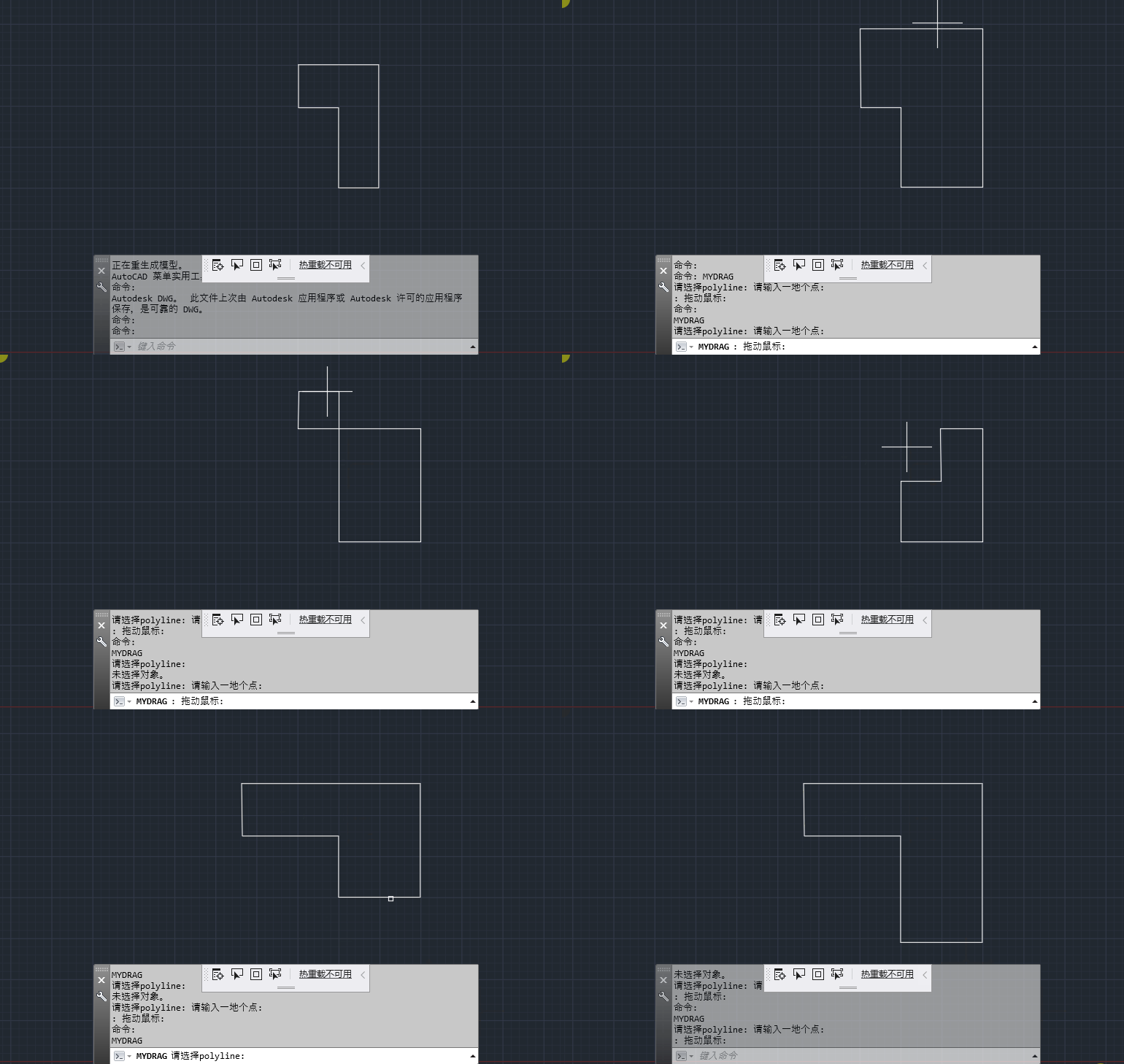
主要思路:选择一段多段线,使用封装的jig类进行实时拖动,其原理就是在拖动的时候,确定被拖动的边,我是选择离输入第一个点最近的边作为拖动边,有了这条边,就能确定需要实时更改的点了,然后当鼠标拖动的时候,限制拖动方向只能是X轴或者Y轴变换,详细我在代码里都写了注释的。不足之处就是选择之后,我是把原来的对象复制一份,在删除了原对象,不知道是不是这个原因,Polyline会在选择之后消失,再次点击又出现了。我试了如果直接以写的方式操作原对像,cad会报错,说NotOpenForWrite,我也不知道这是什么原因。下面贴出所有的代码。
Jig操作类:
public class MyJig : DrawJig

    {

        public Point3d Point = Point3d.Origin;

        Func<JigPrompts, SamplerStatus> InputFunc;

        public List<Entity> JigEnts = new List<Entity>();

        Action<MyJig> JigUpdateAction;

        public MyJig()

        {

            JigEnts.Clear();

            InputFunc = null;

        }

        public void SetJigUpdate(Action<MyJig> action)

        {

            JigUpdateAction = action;

        }

        public void PromptInput(JigPromptPointOptions pointOpts, string msg)

        {

            InputFunc = (prmpts) =>

            {

                pointOpts.Message = msg;

                var res = prmpts.AcquirePoint(pointOpts);

                //Point就是我们要更新实体数据的点

                if (res.Value == Point)

                {

                    return SamplerStatus.NoChange;

                }

                else if (res.Value != Point)

                {

                    Point = res.Value;

                    return SamplerStatus.OK;

                }

                else

                {

                    return SamplerStatus.Cancel;

                }

            };

        }

        protected override SamplerStatus Sampler(JigPrompts prompts)

        {

            if (InputFunc == null)

            {

                return SamplerStatus.NoChange;

            }

            return InputFunc.Invoke(prompts);

        }

        protected override bool WorldDraw(WorldDraw draw)

        {

            if (JigEnts.Count > )

            {

                //这是个委托,主要实现你要如何去更新你的实体

                JigUpdateAction(this);

                foreach (var ent in JigEnts)

                {

                    ent.WorldDraw(draw);

                }

            }

            return true;

        }

        public PromptStatus Drag()

        {

            return Application.DocumentManager.MdiActiveDocument.Editor

                .Drag(this).Status;

        }

    }
这个类在我的另一篇jig操作里做了点介绍的:
https://www.cnblogs.com/HelloQLQ/p/12000879.html
命令类:
public class MyDrag

    {

        Document doc = Application.DocumentManager.MdiActiveDocument;

        Editor ed = Application.DocumentManager.MdiActiveDocument.Editor;

        Database db = Application.DocumentManager.MdiActiveDocument.Database;

        Polyline pl = null;

        bool IsDrag = false;

        [CommandMethod("MyDrag")]

        public void DragIt()

        {

            IsDrag = false;

            PromptEntityOptions entOpts = new PromptEntityOptions("请选择Polyline");

            entOpts.SetRejectMessage("请选择多段线");

            entOpts.AddAllowedClass(typeof(Polyline), true);

            var pEntRes = ed.GetEntity(entOpts);

            if (pEntRes.Status != PromptStatus.OK)

                return;

            Polyline plCo = null;

            using (var trans = db.TransactionManager.StartTransaction())

            {

                pl = trans.GetObject(pEntRes.ObjectId, OpenMode.ForWrite) as Polyline;

                //这里如果不复制,直接操作pl,虽然是以写的方式打开的实体,但是会报错说NotOpenForWrite

                plCo = pl.Clone() as Polyline;

                pl.Erase();

                trans.Commit();

            }

            List<LineSegment2d> listL2d = new List<LineSegment2d>();

            for (int i = ; i < pl.NumberOfVertices - ; i++)

            {

                listL2d.Add(pl.GetLineSegment2dAt(i));

            }

            var pointRes = ed.GetPoint(new PromptPointOptions("请输入一地个点:\n"));

            if (pointRes.Status != PromptStatus.OK) return;

            Vector2d v2d = new Vector2d(, );

            JigPromptPointOptions jigOpts = new JigPromptPointOptions();

            MyJig myJig = new MyJig();

            myJig.PromptInput(jigOpts, "拖动鼠标");

            myJig.JigEnts.Add(plCo);

            int dir = -;

            myJig.SetJigUpdate((jig) =>

            {

                if (jig.JigEnts == null || jig.JigEnts.Count == )

                {

                    return;

                }

                Polyline p = jig.JigEnts[] as Polyline;

                var pt1 = pointRes.Value;

                var pt2 = jig.Point;

                var vec = pt2 - pt1;

                /*获取鼠标拖动方向,主要思路

                 *当拖动的距离拖动前按下的那个点的

                 * 距离>1的时候,计算是X轴方向还是Y轴方向

                 * 因为第一次判断,如果距离过下方向不准确。

                 * 并且这个方向一确定,就不在更改。

                 */

                if (!IsDrag)

                {

                    if (vec.Length > )

                    {

                        IsDrag = true;

                        if (Math.Abs(vec.X) > Math.Abs(vec.Y))

                        {

                            dir = ;

                        }

                        else

                        {

                            dir = ;

                        }

                    }

                }

                //向右或者向左

                if (dir == )

                {

                    v2d = new Vector2d(vec.X, );

                }

                else//向上或者向下

                {

                    v2d = new Vector2d(, vec.Y);

                }

                /*

                 * 确定要拖动的边是选择距离鼠标按下的那个点最近的边

                 */

                double minLength = double.MaxValue;

                int index = -;

                foreach (var i in Enumerable.Range(, listL2d.Count))

                {

                    var l = listL2d[i];

                    double dis = l.GetDistanceTo(new Point2d(pointRes.Value.X, pointRes.Value.Y));

                    if (dis < minLength)

                    {

                        minLength = dis;

                        index = i;

                    }

                }

                var l2d = listL2d[index];

                Matrix2d mtx2d = Matrix2d.Displacement(v2d);

                var ptGet1 = l2d.StartPoint;

                var ptGet2 = l2d.EndPoint;

                //实时得到变化的点

                var ptStart = ptGet1.TransformBy(mtx2d);

                var ptEnd = ptGet2.TransformBy(mtx2d);

                var vecGet = ptGet2 - ptGet1;

                //判断鼠标移动的方向和被拖动的边是否是在大致的同一方向

                //如果不是,就允许拖动

                if (dir ==  && (Math.Abs(vecGet.X) < Math.Abs(vecGet.Y)) ||

                dir ==  && (Math.Abs(vecGet.X) > Math.Abs(vecGet.Y)))

                {

                    p.SetPointAt(index, ptStart);

                    p.SetPointAt(index + , ptEnd);

                    //如果polyline是封闭的,要判断被拖动的点是否是闭合位置上的点,

                    //如果是,要一致更改起点和封闭点

                    if (p.Closed)

                    {

                        if (index == )

                        {

                            p.SetPointAt(p.NumberOfVertices - , ptStart);

                        }

                        if (index +  == )

                        {

                            p.SetPointAt(p.NumberOfVertices - , ptEnd);

                        }

                        if (index == p.NumberOfVertices - )

                        {

                            p.SetPointAt(, ptStart);

                        }

                        if (index +  == p.NumberOfVertices - )

                        {

                            p.SetPointAt(, ptEnd);

                        }

                    }

                }

            });

            if (myJig.Drag() != PromptStatus.OK)

            {

                return;

            }

            IsDrag = false;

            //加入到模型空间

            myJig.JigEnts.ToSpace();

            myJig.JigEnts.ForEach(a => a.Dispose());

        }

    }
AutoCad 二次开发 Jig操作之墙块的拖动的更多相关文章
- AutoCad 二次开发 jig操作之标注跟随线移动
AutoCad 二次开发 jig操作之标注跟随线移动 在autocad当中,我认为的jig操作的意思就是即时绘图的意思,它能够实时的显示出当前的操作,以便我们直观的感受到当前的绘图操作是什么样子会有什 ...
- AutoCad 二次开发 文字镜像
AutoCad 二次开发 文字镜像 参考:https://adndevblog.typepad.com/autocad/2013/10/mirroring-a-dbtext-entity.html 在 ...
- AutoCAD二次开发——AutoCAD.NET API开发环境搭建
AutoCAD二次开发工具:1986年AutoLisp,1989年ADS,1990年DCL,1993年ADS-RX,1995年ObjectARX,1996年Active X Automation(CO ...
- AutoCad 二次开发 .net 之层表的增加 删除 修改图层颜色 遍历 设置当前层
AutoCad 二次开发 .net 之层表的增加 删除 修改图层颜色 遍历 设置当前层 AutoCad 二次开发 .net 之层表的增加 删除 修改图层颜色 遍历 设置当前层我理解的图层的作用大概是把 ...
- 1,下载和部署开发环境--AutoCAD二次开发
环境需求为: AutoCAD 2020版 ObjectARX SDK 下载地址:https://www.autodesk.com/developer-network/platform-technolo ...
- AutoCAD二次开发-使用ObjectARX向导创建应用程序(HelloWorld例子)
AutoCAD2007+vs2005 首先自己去网上搜索下载AutoCAD2007的ARX开发包. 解压后如下 打开后如下 classmap文件夹为C++类和.net类的框架图,是一个DWG文件. d ...
- 我的AutoCAD二次开发之路 (一)
原帖地址 http://379910987.blog.163.com/blog/static/33523797201011184552167/ 今天在改代码的时候,遇到了AddVertexAt方法的用 ...
- Autocad中使用命令来调用python对Autocad二次开发打包后的exe程序
在Autocad中直接调用Python二次开发程序是有必要的,下面介绍一种方法来实现这个功能: 其基本思路是:先将二次开发的程序打包为可执行程序exe,然后编写lsp文件,该文件写入调用exe程序的语 ...
- 承接 AutoCAD 二次开发 项目
本人有多年的CAD开发经验,独立完成多个CAD二次开发项目.熟悉.net及Asp.net开发技术,和Lisp开发技术. 现在成立了工作室,独立承接CAD二次开发项目.结项后提供源码及开发文档,有需要的 ...
随机推荐
- Python多版本pip安装库的问题
引 机器上总是会有Python2.7的版本和Python3.x的版本,今天接触到一台服务器上面有Python2.7和Python3.4,想在Python3.4下安装一个TensorFlow,但不管怎么 ...
- ural 1519 Formula 1(插头dp)
1519. Formula 1 @ Timus Online Judge 干了一天啊!!!插头DP入门. 代码如下: #include <cstdio> #include <cstr ...
- 一个项目看java TCP/IP Socket编程
前一段时间刚做了个java程序和网络上多台机器的c程序通讯的项目,遵循的是TCP/IP协议,用到了java的Socket编程.网络通讯是java的强项,用TCP/IP协议可以方便的和网络上的其他程序互 ...
- oracle函数 INSTRB(C1,C2[,I[,J]])
[功能]在一个字符串中搜索指定的字符,返回发现指定的字符的位置; [说明]多字节符(汉字.全角符等),按2个字符计算 [参数] C1 被搜索的字符串 C2 希望搜索的字符串 I 搜 ...
- 初识 Knative: 跨平台的 Serverless 编排框架
Knative 是什么 Knative 是 Google 在 2018 的 Google Cloud Next 大会上发布的一款基于 Kubernetes 的 Serverless 框架.Knativ ...
- @codeforces - 414E@ Mashmokh's Designed Problem
目录 @description@ @solution@ @accepted code@ @details@ @description@ 给定一棵 n 个点的树,每个点的儿子是有序的. 现给定 m 次操 ...
- List of open source software
List of open source software https://www.ibm.com/developerworks/community/wikis/home?lang=en#!/wiki/ ...
- hdu 4114 Disney's FastPass(最短路+状态压缩)
Disney's FastPass Time Limit: 20000/10000 MS (Java/Others) Memory Limit: 32768/32768 K (Java/Othe ...
- Android 设置ImageView宽度固定,其高度按比例缩放适应
今天和项目经理对喷了一下,他说在应用的列表数据中的图片应该宽度固定,高度按比例缩放自适应,我说,那岂不是很丑!直接让运营那边把图片处理成固定宽高比不就好了,省的我客户端麻烦了. 这家伙不同意,为毛呢, ...
- hdu 1289 Hat’s IEEE
Problem - 1289 好题.其实就是模拟IEEE754的格式,不过要注意的是,这里用的32位是float,用double就不对了. 代码如下: #include <cstdio> ...