
android rsa 示例
1.参考资料
1.1 android的Cipher官方文档
https://developer.android.com/reference/javax/crypto/Cipher
其中 构造Cipher实例时要提供加密算法参数 transformation 它的格式有两种:
- "algorithm/mode/padding"
- "algorithm"
代码如下:
Cipher c = Cipher.getInstance("DES/CBC/PKCS5Padding");
其中关于rsa的部分:
| Algorithm | Modes | Paddings | Supported API Levels |
| RSA | ECB NONE |
NoPadding OAEPPadding PKCS1Padding |
1+ |
| OAEPwithSHA-1andMGF1Padding OAEPwithSHA-256andMGF1Padding |
10+ | ||
| OAEPwithSHA-224andMGF1Padding OAEPwithSHA-384andMGF1Padding OAEPwithSHA-512andMGF1Padding |
23+ |
1.2 关于算法、Modes、Paddings
https://docs.oracle.com/javase/8/docs/technotes/guides/security/StandardNames.html#Cipher
其中 rsa 的mode ECB的介绍如下:注意红色部分。
| ECB | Electronic Codebook Mode, as defined in FIPS PUB 81 (generally this mode should not be used for multiple blocks of data). |
2.生成密钥
2.1 使用openssl
第1步:生产私钥文件,rsa_private_key.pem
openssl genrsa -out rsa_private_key.pem 2048
查看下它的内容:
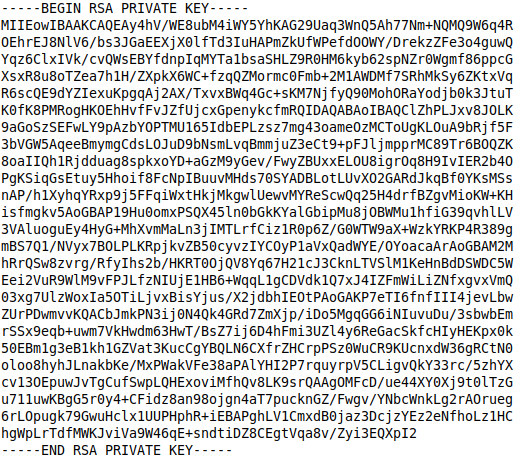
其中
- -----BEGIN RSA PRIVATE KEY----- 与 -----END RSA PRIVATE KEY----- 之间就是私钥经过base64编码后的字符。
- 解码后就可以得到私钥的字节数组。
第2步:根据私钥生产公钥,rsa_public_key.pem
openssl rsa -in rsa_private_key.pem -out rsa_public_key.pem -pubout
它的内容与私钥相似。
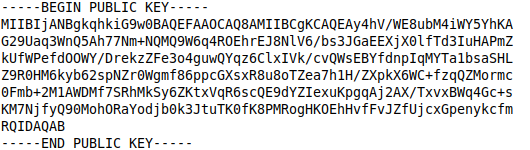
其中
- -----BEGIN PUBLIC KEY----- 与 -----END PUBLIC KEY----- 之间就是公钥经过base64编码后的字符。
- 解码后就可以得到公钥的字节数组。
第3步:对私钥进行PKCS#8编码
openssl pkcs8 -topk8 -in rsa_private_key.pem -out rsa_pkcs8_private_key.pem -nocrypt
第4步:认证(收费)
如果担心公钥的可靠性,可去权威机构认证一下,得到数字证书。
创建证书请求文件,填写各项信息,如国家、城市、公司,邮箱、密码等等。
openssl req -new -key rsa_private_key.pem -out rsa_cert.csr
用生成的 rsa_cert.csr文件 去权威机构(CA)申请证书,CA会给你数字证书文件。
2.2 用java代码生成密钥
除了上面方法外,也可以用java代码生成公钥、私钥。
       try {

             KeyPairGenerator kpg = KeyPairGenerator.getInstance("RSA");

             kpg.initialize();

             KeyPair keyPair =  kpg.genKeyPair();

             RSAPublicKey publicKey = (RSAPublicKey) keyPair.getPublic();

             RSAPrivateKey privateKey = (RSAPrivateKey) keyPair.getPrivate();

         } catch (NoSuchAlgorithmException e) {

             e.printStackTrace();

         }
3.示例
3.1 加密、解密(支持分段)
公钥加密--->私钥解密
     // 公钥加密,支持分段。最大 MAX_ENCRYPT_SIZE 字节

     public static byte[] encryptByPublicKey(@NonNull byte[] data,RSAPublicKey key) throws Exception {

         // 加密数据

         Cipher cipher = Cipher.getInstance(ANDROID_TRANSFORMATION);

         cipher.init(Cipher.ENCRYPT_MODE, key);

         int inOffset = ,outOffset = ;

         int olen = cipher.getOutputSize(data.length);

         byte output[] = new byte[olen];

         Log.e("RSAUtil", "encryptByPublicKey: data.len = " + data.length + " outLen = " + olen);

         int loop = data.length / MAX_ENCRYPT_SIZE;

         for (int i =  ; i < loop; ++i){

             int inLen = MAX_ENCRYPT_SIZE;

             int outLen = cipher.update(data,inOffset,inLen,output,outOffset);

             Log.e("RSAUtil", "encryptByPublicKey: outLen = " + outLen + " inLen = " + inLen);

             inOffset += inLen;

             outOffset += outLen;

         }

         if (inOffset <= data.length){

             cipher.update(data,inOffset,data.length - inOffset,output,outOffset);

         }

         return cipher.doFinal();

     }

     // 私钥解密,支持分段。最大 MAX_DECRYPT_SIZE 字节

     public static byte[] decryptByPrivateKey(@NonNull byte[] encrypted,RSAPrivateKey key) throws Exception {

         // 解密数据

         Cipher cipher = Cipher.getInstance(ANDROID_TRANSFORMATION);

         cipher.init(Cipher.DECRYPT_MODE, key);

         int inOffset = ,outOffset = ;

         int olen = cipher.getOutputSize(encrypted.length);

         byte output[] = new byte[olen];

         Log.e("RSAUtil", "decryptByPrivateKey: data.len = " + encrypted.length + " outLen = " + olen);

         int loop = encrypted.length / MAX_DECRYPT_SIZE;

         for (int i =  ; i < loop; ++i){

             int inLen = MAX_DECRYPT_SIZE;

             int outLen = cipher.update(encrypted,inOffset,inLen,output,outOffset);

             Log.e("RSAUtil", "decryptByPrivateKey: outLen = " + outLen + " inLen = " + inLen);

             inOffset += inLen;

             outOffset += outLen;

         }

         if (inOffset <= encrypted.length){

             cipher.update(encrypted,inOffset,encrypted.length - inOffset,output,outOffset);

         }

         return cipher.doFinal();

     }
私钥加密--->公钥解密
     // 私钥加密,支持分段。最大 MAX_ENCRYPT_SIZE 字节

     public static byte[] encryptByPrivateKey(@NonNull byte[] data,RSAPrivateKey key) throws Exception {

         // 数据加密

         Cipher cipher = Cipher.getInstance(ANDROID_TRANSFORMATION);

         cipher.init(Cipher.ENCRYPT_MODE, key);

         int inOffset = ,outOffset = ;

         int olen = cipher.getOutputSize(data.length);

         byte output[] = new byte[olen];

         Log.e("RSAUtil", "encryptByPrivateKey: data.len = " + data.length + " outLen = " + olen);

         int loop = data.length / MAX_ENCRYPT_SIZE;

         for (int i =  ; i < loop; ++i){

             int inLen = MAX_ENCRYPT_SIZE;

             int outLen = cipher.update(data,inOffset,inLen,output,outOffset);

             Log.e("RSAUtil", "encryptByPrivateKey: outLen = " + outLen + " inLen = " + inLen);

             inOffset += inLen;

             outOffset += outLen;

         }

         if (inOffset <= data.length){

             cipher.update(data,inOffset,data.length - inOffset,output,outOffset);

         }

         return cipher.doFinal();

     }

     // 公钥解密,支持分段。最大 MAX_DECRYPT_SIZE 字节

     public static byte[] decryptByPublicKey(@NonNull byte[] data,RSAPublicKey key) throws Exception {

         // 数据解密

         Cipher cipher = Cipher.getInstance(ANDROID_TRANSFORMATION);

         cipher.init(Cipher.DECRYPT_MODE, key);

         int inOffset = ,outOffset = ;

         int olen = cipher.getOutputSize(data.length);

         byte output[] = new byte[olen];

         Log.e("RSAUtil", "decryptByPublicKey: data.len = " + data.length + " outLen = " + olen);

         int loop = data.length / MAX_DECRYPT_SIZE;

         for (int i =  ; i < loop; ++i){

             int inLen = MAX_DECRYPT_SIZE;

             int outLen = cipher.update(data,inOffset,inLen,output,outOffset);

             Log.e("RSAUtil", "decryptByPublicKey: outLen = " + outLen + " inLen = " + inLen);

             inOffset += inLen;

             outOffset += outLen;

         }

         if (inOffset <= data.length){

             cipher.update(data,inOffset,data.length - inOffset,output,outOffset);

         }

         return cipher.doFinal();

     }
3.2 签名、验证
    // 签名

     public static byte[] sign(@NonNull byte [] data,RSAPrivateKey key) throws Exception {

         Signature signature = Signature.getInstance("SHA256withRSA");

         signature.initSign(key);

         signature.update(data);

         return signature.sign();

     }

     // 验签

     public static boolean verify(byte [] data, byte [] signed,RSAPublicKey key) throws Exception {

         Signature signature = Signature.getInstance("SHA256withRSA");

         signature.initVerify(key);

         signature.update(data);

         return signature.verify(signed);

     }
4.注意事项
- 加密最多(秘钥长度/8-11)个字节的数据,2048为245,1024为117。
- android系统的RSA实现是"RSA/None/NoPadding",标准JDK实现是"RSA/ECB/PKCS1Padding" ,有可能在android机上加密后无法在服务器上解密。
5.代码
完整示例
android rsa 示例的更多相关文章
- 二维码(2)二维码登录原理及Android客户端示例
1,原理 服务器: 数据库: 建立一个2维码登录的数据表,产生一个登录页时,插入一条记录X,X含将要登录的用户名字段(初始为空),2维码中的数据字段(唯一) 登录页面: 在产生的2维码中包含关键数据Y ...
- Android程序示例
目录 Android代码示例 OptionsMenu ImageButton CheckBox & RadioButton Context Menu快捷菜单 Key Event ListVie ...
- Android RSA加密解密
概述 RSA是目前最有影响力的公钥加密算法,该算法基于一个十分简单的数论事实:将两个大素数相乘十分容易,但那时想要对其乘积进行因式分解却极其困 难,因此可以将乘积公开作为加密密钥,即公钥,而两个大素数 ...
- 导入cocos2d-x samples android官方示例
导了一晚上samples android示例,查了一晚上资料,费了很大的劲,终于成功导入并运行成功,分享一下经验: 1.下载eclipse与ADT跟android SDK,相信大家都会装了吧. 2.下 ...
- Android RSA加密对象数据
前几天说了手头项目用MD5和双向加密DES来进行加密的,因为产品是在不断的改造中完善的.考虑到DES和MD5加解密还是会存下一定的风险,于是产品一拍,不行,听你们说MD5加密是不安全的,咱们产品以后做 ...
- Android编程示例:创建机场计划模拟器应用程序
在本文中,我们将演示如何使用Android Studio和Java编程语言创建一个示例Android应用程序,从“临时”实现高级响应用户界面的功能.本文中讨论的应用程序将实现机场航班时刻表模拟的功能. ...
- Android系统示例分析之AndroidBeamDemo
在这个示例工程中,只有一个Activity: public class Beam extends Activity implements CreateNdefMessageCallback, ...
- Android系统示例之ActionBarCompat
导入工程ActionBarCompat时,出现错误.从其他工程下拷贝project.propertiest文件过来,问题仍在.拷贝后需要重启Eclipse才解决.问题如下: [2013-07-03 1 ...
- Android系统示例分析之AccelerometerPlay
程序界面: 创建 SimulationView , 实现接口 SensorEventListener , 实现接口中两个抽象方法 public void onSensorChanged(SensorE ...
随机推荐
- iOS之CGPath相关属性(一)
#ifndef CGPATH_H_ #define CGPATH_H_ForeverGuard博客园 #include <CoreFoundation/CFBase.h> #include ...
- Python学习day06-Python基础(4)流程控制之while和for循环
Python学习day06-流程控制之while和for循环 Python学习day06-流程控制之while和for循环while循环1. 语法2. while+break,while+contin ...
- 最全的CSS hack没有之一
1.何为HACK? 简单的说,HACK就是只有特定浏览器才能识别这段hack代码.Hack也可以说是让前端最为头疼的问题,因为要写N多种兼容代码.当然,IE是最让人蛋疼的. 一般来说,CSS HACK ...
- POSIX基本正则表达式和扩展正则表达式的比较
转自:http://book.51cto.com/art/201303/385961.htm 在读者正觉得正则表达式已经复杂得不能再复杂时,又会发现POSIX规范将正则表达式的实现方法分为了两种:基本 ...
- python 日记 day1
1.python2 与 python3 的区别: a. python2 源码不标准,混乱,重复代码太多.默认方式是ascii码,解决方式:#-*- encoding:utf-8 -*- b. ...
- Intelij Idea 2016破解
在注册时选择License server,输入http://www.iteblog.com/idea/key.php,点击OK
- 使用Tomcat过程中的常见问题
1.点击startup.bat,启动Tomcat DOS弹窗一闪而过 鼠标选中startup.bat这个文件,右键选择“编辑“,在末尾添加 pause
- 如何处理HTML5新标签的浏览器兼容问题?
方法一 : 1.使用静态资源的html5shiv包 <!--[if lt IE9]> <script src="http://cdn.static.runoob.com/l ...
- 使用 WPF 生成图形
下载代码示例 基于一组与测试有关的数据来生成图形是一项常见的软件开发任务.根据我的经验,最常用的方法是将数据导入 Excel 电子表格,然后使用 Excel 内置的绘图功能手动生成图形.这种做法适用于 ...
- 读书笔记--Apache.Tomcat.6高级编程 目录
1.Apache Tomcat 2.web的应用:Servlet.JSP及其他 3.Tomcat安装 4.Tomcat架构 5.Tomcat基本配置 6.高级Tomcat特性 7.Web应用程序配置 ...