
装配SpringBean(六)--配置文件加载方式
spring中的配置文件有两种:
- 以XML结尾的spring配置文件
- 以properties结尾的属性配置文件
在spring中有两种方式加载这两种文件:
- 通过注解+java配置的方式
- 通过XML的方式
详细配置且看下文:
一、加载spring配置文件*.xml
假设有一个关于数据源的配置文件spring-database.xml,它的配置内容如下:
 <?xml version="1.0" encoding="UTF-8"?>

 <beans xmlns="http://www.springframework.org/schema/beans"

     xmlns:context="http://www.springframework.org/schema/context"

     xmlns:xsi="http://www.w3.org/2001/XMLSchema-instance"

     xsi:schemaLocation="http://www.springframework.org/schema/beans

         http://www.springframework.org/schema/beans/spring-beans.xsd

         http://www.springframework.org/schema/context

         http://www.springframework.org/schema/context/spring-context-4.0.xsd">

     <!-- 配置数据源 -->

     <bean id="dataSource" class="org.apache.commons.dbcp.BasicDataSource">

         <property name="driverClassName" value="org.postgresql.Driver" />

         <property name="url" value="jdbc:postgresql://localhost:5433/postgres" />

         <property name="username" value="postgres" />

         <property name="password" value="postgres" />

     </bean>

 </beans>
1⃣️通过注解+java配置方式
第一步:通过注解+配置方式时需要创建一个配置类AppConfig.java
 @ComponentScan(basePackages= {"com.hyc.config"})

 @ImportResource({"classpath:spring-database.xml"})

 public class AppConfig {

 }
上面的配置中:
1⃣️使用注解@ImportResource引入配置文件,可以是多个;
2⃣️通过注解@ComponentScan定义spring扫描的包(因为下面有个bean的类我定义在这个包下,所以这里加上这个扫描路径)
第二步:写一个获取数据库连接的类
 package com.hyc.config;

 /*

  * 通过注解+配置的方式加载spring配置文件

  */

 import java.sql.Connection;

 import java.sql.SQLException;

 import javax.sql.DataSource;

 import org.springframework.beans.factory.annotation.Autowired;

 import org.springframework.stereotype.Component;

 @Component("dbba")

 public class DatasourceByAnnotation {

     @Autowired

     DataSource dataSource = null;

     // 获取数据库连接

     public Connection getConnection() {

         Connection conn = null;

         try {

             conn = dataSource.getConnection();

             if (null != conn) {

                 System.out.println("获取数据库连接成功");

             } else {

                 System.out.println("获取数据库连接失败");

             }

         } catch (SQLException e) {

             e.printStackTrace();

         }

         return conn;

     }

 }
上面代码中加粗部分:
- 此类所在的包,需要告知spring在哪个包下扫描,如果配置文件类和这个类在同意包下,则不需要配置
- @Component注解:定义此bean的名称,这样可以通过getBean方法获取到
第三步:编写测试方法
 public class GetDatasourceByConfigTest {

     @Test

     public void testGetByConfig() {

         AnnotationConfigApplicationContext context = new AnnotationConfigApplicationContext(AppConfig.class);

         DatasourceByAnnotation dba = (DatasourceByAnnotation) context.getBean("dbba");

         dba.getConnection();

     }

 }
这里就是使用注解+java配置方式获取bean,调用其方法,测试结果:
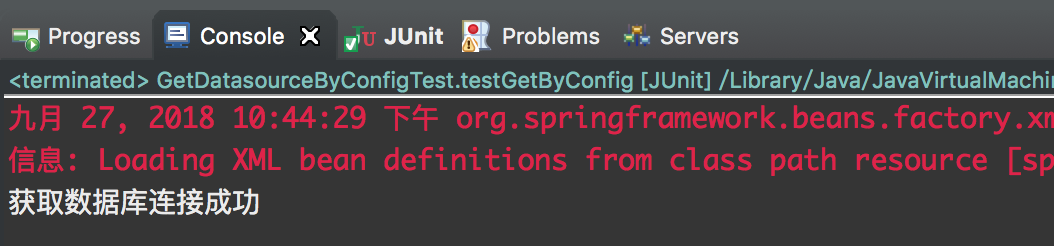
配置成功,有些书上说这个地方获取DataSource时可以使用自动注解,我试了一下是不可以的,其实按理说也是不行的,因为DataSource是第三方包中的类,我们无法对它进行修改,如果使用自动注解获取,必定要给他增加@Component注解进行定义,所以这种方式只能通过配置获取。
2⃣️通过XML方式
使用XML的方式,假设我要在spring-bean.xml中引入spring-database.xml文件,只需要在spring-bean.xml中加入一句代码即可:
<import resource="spring-database.xml"/>
这样就可以当作spring-bean.xml文件进行使用了,其实这种方式主要是为了将不同业务的配置通过文件区分开来,不要是spring-bean.xml文件变得很庞大复杂,具体实现不做介绍。
二、加载属性配置文件*.properties
依然是数据源的配置文件,只不过这次将其写在属性配置文件db.properties中,配置如下:
 db.driver=org.postgresql.Driver

 db.url=jdbc:postgresql://localhost:5433/postgres

 db.username=postgresql

 db.pwd=postgresql
1⃣️通过注解+java配置方式
第一步:通过注解+配置方式时需要创建一个配置类AppConfig.java
 @Configuration

 @PropertySource(value = { "classpath:db.properties" }, ignoreResourceNotFound = true)

 public class AppConfig {

 }
上面的配置中:
- 使用注解@PropertySource引入配置文件,可以是多个;
- 通过注解@Configuration不能缺失,否则将找不到这个配置
第二步:测试
 @Test

     public void testGetPropByConfig() {

         AnnotationConfigApplicationContext context = new AnnotationConfigApplicationContext(AppConfig.class);

         String url = context.getEnvironment().getProperty("db.url");

         System.out.println(url);

     }
获取属性文件中的数据库连接URL,看能不能获取到,测试结果如下:
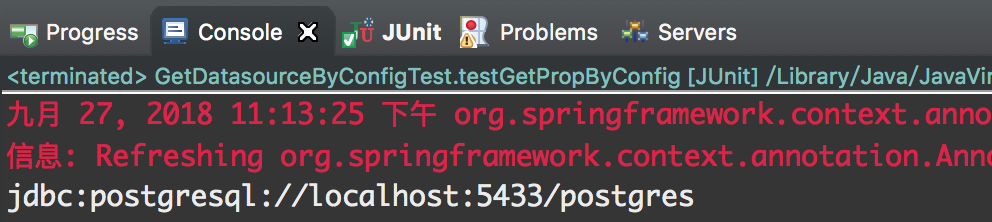
可见获取成功。
上面的测试中是通过环境来获取对应的配置属性,但如果这样在spring中是没有解析属性占位符的能力,spring推荐使用一个属性文件解析类PropertySourcePlaceholderConfigurer,使用它就意味允许spring解析对应的属性文件,并通过占位符去引用对应的配置。
修改上述的配置类为如下:
 @Configuration

 @ComponentScan(basePackages = { "com.hyc.config" })

 @PropertySource(value = { "classpath:db.properties" }, ignoreResourceNotFound = true)

 public class AppConfig {

     /**

      * 定义一个PropertyPlaceholderConfigurer类的bean,它的作用是为了让spring能解析占位符

      * @return

      */

     @Bean

     public PropertyPlaceholderConfigurer propertyPlaceholderConfigurer() {

         return new PropertyPlaceholderConfigurer();

     }

 }
有了上面的配置,就可以通过占位符引用属性值了,如下:
 @Component("dsb")

 public class DataSourceBean {

     @Value("${db.driver}")

     private String driver = null;

     @Value("${db.url}")

     private String url = null;

     @Value("${db.username}")

     private String userName = null;

     @Value("${db.pwd}")

     private String pwd = null;

     public void getDataSourceUrl() {

         System.out.println(url);

     }

 }
编写测试类:
 @Test

     public void testGetPropByConfig1() {

         @SuppressWarnings("resource")

         AnnotationConfigApplicationContext context = new AnnotationConfigApplicationContext(AppConfig.class);

         DataSourceBean ds = (DataSourceBean) context.getBean("dsb");

         ds.getDataSourceUrl();

     }
这样就能获取到了
2⃣️通过XML方式
XML方式的配置如下:
 <?xml version="1.0" encoding="UTF-8"?>

 <beans xmlns="http://www.springframework.org/schema/beans"

     xmlns:context="http://www.springframework.org/schema/context"

     xmlns:xsi="http://www.w3.org/2001/XMLSchema-instance"

     xsi:schemaLocation="http://www.springframework.org/schema/beans

         http://www.springframework.org/schema/beans/spring-beans.xsd

         http://www.springframework.org/schema/context

         http://www.springframework.org/schema/context/spring-context-4.0.xsd">

     <!-- 配置单个属性文件 -->

     <context:property-placeholder

         ignore-resource-not-found="false" location="classpath*:db.properties" />

     <!-- 配置多个属性文件 -->

     <bean

         class="org.springframework.beans.factory.config.PropertyPlaceholderConfigurer">

         <property name="locations">

             <array>

                 <value>classpath:db.properties</value>

                 <value>classpath:log4j.properties</value>

             </array>

         </property>

         <property name="ignoreResourceNotFound" value="false"></property>

     </bean>

 </beans>
如上,可以配置多个,也可以配置一个,这样以来,就能在spring的配置文件中通过占位符引用属性了。
装配SpringBean(六)--配置文件加载方式的更多相关文章
- Spring之配置文件加载方式
spring在org.springframework.core.io包中提供了多种配置文件加载方式.无论是XML.URL还是文件,都有很好的支持.比如基于URL的UrlResource.基于输入流的I ...
- log4j配置文件加载方式
使用背景: apache的log4j是一个功能强大的日志文件,当我们使用eclipse等IDE在项目中配置log4j的时候,需要知道我们的配置文件的加载方式以及如何被加载的. 加载方式: (1).自动 ...
- Spring Cloud配置文件加载优先级简述
Spring Cloud中配置文件的加载机制与其它的Spring Boot应用存在不一样的地方:如它引入了bootstrap.properties的配置文件,同时也支持从配置中心中加载配置文件等:本文 ...
- Spring使用环境变量控制配置文件加载
项目中需要用到很多配置文件,不同环境的配置文件是不一样的,因此如果只用一个配置文件,势必会造成配置文件混乱,这里提供一种利用环境变量控制配置文件加载的方法,如下: 一.配置环境变量 如果是window ...
- log4j加载方式导致的bae和sae部署异常
这2天改在bae上部署代码,为了便于程序的功能测试,引入了log4j日志,但是问题来了..测试程序采用的是spring3.2.8框架搭建,web.xml引入日志代码为: <context-par ...
- javascript 的加载方式
本文总结一下浏览器在 javascript 的加载方式. 关键词:异步加载(async loading),延迟加载(lazy loading),延迟执行(lazy execution),async 属 ...
- asp.netcore 深入了解配置文件加载过程
前言 配置文件中程序运行中,担当着不可或缺的角色:通常情况下,使用 visual studio 进行创建项目过程中,项目配置文件会自动生成在项目根目录下,如 appsettings.json, ...
- bash 的配置文件加载顺序
bash配置文件的加载顺序和登陆方式有关,下面先介绍下登陆方式. 1 登陆方式有2种 登陆式SHELL: su - oracle su -l oracle 正常从终端登陆 非登录式SHELL: ...
- springboot的yaml基础语法与取值,配置类,配置文件加载优先级
1.基本语法k:(空格)v:表示一对键值对(一个空格必须有):以空格的缩进来控制层级关系:只要是左对齐的一列数据,都是同一个层级的属性和值也是大小写敏感: server: port: 8081 pat ...
随机推荐
- Linux课程---15、域名相关
Linux课程---15.域名相关 一.总结 一句话总结: 先购买域名,再备案,再解析,域名即可使用 1.域名备案是怎么回事(比如二级域名,三级域名)? 每个二级域名需要备案一次,三级域名不需要备案, ...
- 使用SharpZipLib实现zip压缩
使用国外开源加压解压库ICSharpCode.SharpZipLib实现加压,该库的官方网站为http://www.icsharpcode.net/OpenSource/SharpZipLib/D ...
- 命令学习_IPCONFIG: DNS cache操作
IPCONFIG: DNS cache操作 Windows会将解析到的DNS信息缓存,这个机制可以加速重复的域名访问.从DNS Server返回的DNS Response消息中带有"Time ...
- 进程通信类型 管道是Linux支持的最初Unix IPC形式之一
管道 Linux环境进程间通信(一) https://www.ibm.com/developerworks/cn/linux/l-ipc/part1/index.html 管道及有名管道 郑彦兴200 ...
- 建立ftp服务器和客户端
参考:https://www.cnblogs.com/judes/p/9546447.html 补充: 权限设置:如下所示,如果需要上传文件需要勾选write权限,需要在文件中添加内容勾选append ...
- javaSpring学习总结day_02
使用注解注入: 1.用于创建bean对象 @Component: 作用:相当于配置了一个bean标签 位置:类上面 属性:value,含义是bean的id,当不写时,有默认值,默认值是当前类的短名,首 ...
- JavaScript中对象的3种定义方式
对象是有特性(属性)和功能(方法)的集合体. 定义对象有以下3种方式: 1.使用系统的new Object()方式定义对象 2.使用对象字面量定义对象( 即使用{}语法糖结构定义对象 ) 3.使用自定 ...
- Android 开发 MediaRecorder音频录制
前言 MediaRecorder类是Android sdk提供的一个专门用于音视频录制,一般利用手机麦克风采集音频和摄像头采集图像.这个类是属于简单的音频录制类,录制音频简单容易但是对音频流的控制也比 ...
- springboot中pageHelper插件 list设置不进去 为null
分页pageHelper中list放不进去值 为null,可能的解决方案如下: 1. 注意代码顺序,PageHelper.startPage(pageNumber,pageSize)要放在查询Lis ...
- git归纳总结
1,git 是分布式版本控制:单个电脑就是一个完整的版本库,只需向中央服务器(远程服务器)提交修改的部分.在没有网络情况下也能正常想本机服务器提交代码管理版本,有网时再推送到远程服务器. svn是 ...