
Unable to load the Wrapper's native library because none of the following files及解决方法
在有几个应用中,在启动的时候发现下列警告:
The version of the script (3.5.29) doesn't match the version of this Wrapper (3.5.27). This might cause some problems
--> Wrapper Started as Daemon
Java Service Wrapper Community Edition 64-bit 3.5.27
Copyright (C) 1999-2015 Tanuki Software, Ltd. All Rights Reserved.
http://wrapper.tanukisoftware.com
Launching a JVM...
WrapperManager: Initializing...
WrapperManager:
WrapperManager: WARNING - Unable to load the Wrapper's native library because none of the
WrapperManager: following files:
WrapperManager: libwrapper-linux-x86-64.so
WrapperManager: libwrapper.so
WrapperManager: could be located on the following java.library.path:
WrapperManager: /data/src/osm-route/bin/../lib
WrapperManager: Please see the documentation for the wrapper.java.library.path
WrapperManager: configuration property.
WrapperManager: System signals will not be handled correctly.
WrapperManager:
17-02-04 11:26:13.164 INFO WrapperSimpleAppMain org.springframework.context.support.AbstractApplicationContext.prepareRefresh(AbstractApplicationContext.java:578): Refreshing org.springframework.context.suppor
t.ClassPathXmlApplicationContext@6ca9bb2b: startup date [Sat Feb 04 11:26:13 CST 2017]; root of context hierarchy
但是,程序是可以正常起来的(如果不能起来,则多半不是因为缺少上面两个so之一的原因)。
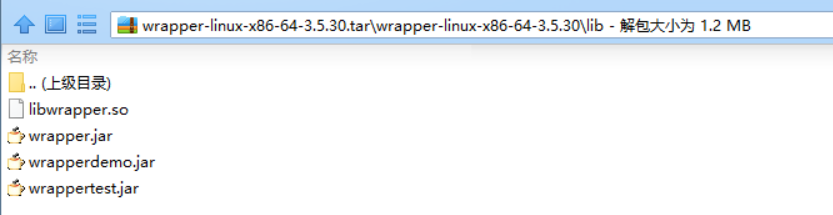
于是,笔者再看了下几个其他应用的lib,如下:
[root@iZ23nn1p4mjZ lib]# ll
total 344
-rw-r--r-- 1 root root 44664 Jan 16 13:35 libwrapper.so
-rw-r--r-- 1 root root 67882 Jan 16 13:35 wrapperdemo.jar
-rw-r--r-- 1 root root 124041 Jan 16 13:35 wrapper.jar
-rw-r--r-- 1 root root 106706 Jan 16 13:35 wrappertest.jar
[root@iZ23nn1p4mjZ lib]# cd ../../osm-all/lib
[root@iZ23nn1p4mjZ lib]# ll
total 344
-rw-r--r-- 1 root root 44664 Jan 16 13:35 libwrapper.so
-rw-r--r-- 1 root root 67882 Jan 16 13:35 wrapperdemo.jar
-rw-r--r-- 1 root root 124041 Jan 16 13:35 wrapper.jar
-rw-r--r-- 1 root root 106706 Jan 16 13:35 wrappertest.jar
[root@iZ23nn1p4mjZ lib]# cd ../../osm-route/lib
[root@iZ23nn1p4mjZ lib]# ll
total 632
-rw-r--r-- 1 root root 67882 Jan 16 13:35 wrapperdemo.jar
-rw-r--r-- 1 root root 337176 Jan 16 13:35 wrapper.dll
-rw-r--r-- 1 root root 124041 Jan 16 13:35 wrapper.jar
-rw-r--r-- 1 root root 106706 Jan 16 13:35 wrappertest.jar
[root@iZ23nn1p4mjZ lib]# cd ../../osm-trade/lib
[root@iZ23nn1p4mjZ lib]# ll
total 344
-rw-r--r-- 1 root root 44664 Jan 16 13:35 libwrapper.so
-rw-r--r-- 1 root root 67882 Jan 16 13:35 wrapperdemo.jar
-rw-r--r-- 1 root root 124041 Jan 16 13:35 wrapper.jar
-rw-r--r-- 1 root root 106706 Jan 16 13:35 wrappertest.jar
其中一个确实没有libwrapper.so,再看下这个so的作用,如下:
|
The Java component of Java Service Wrapper requires that a native library be loaded to be able to handle system signals and perform other functions which are not possible using the Java API. This property allows the name of the library to be modified to suit the needs of a particular application. In general, most users should not need to use this property. The Java language specifies some rules about how Java Native Libraries (JNI) can be named. The Wrapper's library is no exception and must follow these naming conventions. To explain this, we will use the default base name "wrapper" as an example.
If this property is given any other value, that base-name will be used to construct the actual name of the native library file using the above rules. Library Path: Regardless of the name specified, the native library must be located within a directory specified using thewrapper.java.library.path.<n> property. |
Platform specific native libraries: |
|
The Wrapper also provides a facility to make it easy to create binary distributions that run on any platform, even if the application makes use of native libraries. In detail, see the Platform specific native libraries. |
所以,其实libwrapper其实是处理平台相关的一些信号的,比如kill -N的个中含义。并不影响其本身,当然最好是应该有的。万一不见了的话,可以从官网http://wrapper.tanukisoftware.com/doc/english/download.jsp下载对应版本放进去就可以了。
Unable to load the Wrapper's native library because none of the following files及解决方法的更多相关文章
- fatal error: malformed or corrupted AST file: 'Unable to load module "/Users/apple/Library/Developer
在同一时候安装使用Xcode5, Xcode6之后, 常常遇到这个问题. fatal error: malformed or corrupted AST file: 'Unable to load m ...
- eclipse:运行 Android 项目时出现 “Unable to execute dex: Multiple dex files define” 解决方法
android 项目在eclipse 出现Unable to execute dex: Multiple dex files define Conversion to Dalvik format fa ...
- Unable to execute dex: Multiple dex files define 解决方法
程序编译正常,在用Eclipse调试执行时,报错Unable to execute dex: Multiple dex files define: 方法: 原因是有重复的.jar被引用,可以 ...
- [Android开发常见问题-11] Unable to execute dex: Multiple dex files define 解决方法
最近在开发一个工程,其中用到了一个开源的库项目Android-ViewPagerIndicator. 这个项目是作为一个库出现的,如下图: 这个项目中包含了android-support-v4.jar ...
- 错误/异常:The project cannot be built until build path errors are resolved 和 Unbound classpath container: 'JRE System Library [JavaSE-1.7]' in project 'MyJavaCode';的解决方法
错误1: The project cannot be built until build path errors are resolved 解决方法: 把java的类库加载进去即可,在工程上右键 选择 ...
- PHP Warning: PHP Startup: Unable to load dynamic library '/usr/lib/php/20151012/php_mbstring.dll' 的解决方法
step 1: cd /etc/php/{$yourphpversion}/cli step 2: sudo vim php.ini step 3: 在extension=php_mbstring.d ...
- 转:Unable to execute dex: Multiple dex files define 解决方法
转自:http://blog.csdn.net/mxlxiao7/article/details/8978930 问题发生概述: 程序编译正常,在用Eclipse调试执行时,报错Unable to e ...
- XmlDocument.load 读文件报异常:文件正被其它线程使用,解决方法
string filePath = Form1.getProjectFilePath(); System.Xml.XmlDocument xmlDoc = new System.Xml.XmlDocu ...
- Unable to execute dex:Multuple dex files define 解决方法
困扰我两天的问题终于解决了,在网上查的方法无非有三种 一. Eclipse->Project->去掉Build Automatically->Clear ->Build Pro ...
随机推荐
- 专访|HPE测试中心总监徐盛:测试新思维-DevOps,持续测试,更敏捷,更快速
2016年7月22日,「HPE&msup软件技术开放日」将在上海浦东新区,张江高科技园区纳贤路799号科荣大厦小楼2楼举办,msup携手HPE揭秘全球测试中心背后的12条技术实践. 徐盛:HP ...
- POJ_3349_Snowflake Snow Snowflakes
Snowflake Snow Snowflakes Time Limit: 4000MS Memory Limit: 65536K Total Submissions: 43504 Accep ...
- 查找算法:二分法查找及其python实现案例
承接上一篇:查找:顺序查找与二分法查找,将二分法更多详细的python实现解题写下笔记. 简单方法 ''' 二分法查找在列表中的用户输入值,返回index 三种情况跳出循环体: LR相邻 LR位置重合 ...
- ArcGIS earth 1.0 beta体验报告——给我一个按钮我将转动整个地球
随着Esri研发中心的ArcGIS earth 1.0 beta版本的全新发布,声势浩大,很多人为之好奇静待观摩其阵容.抽出五分钟体验,良心用户,必得出炉一份体验报告了. -------------- ...
- c#导出ListView中的数据到Excel表格
1.添加组件:Microsoft.Office.Interop.Excel 步骤:右键点击“引用”--->添加引用--->COM--->Microsoft.Office.Intero ...
- 动画-缩放,旋转 CGAffineTransform
CGAffineTransform transform; // = CGAffineTransformScale(flyImoji.transform, 8, 8); transform = C ...
- 【linux set命令】shell bash 打印执行的命令
在文件开头加上 set -x 可以打印执行的命令,可以用于调试 set 命令使用方法 https://www.jianshu.com/p/ea406382be3e
- Storyboard Reference
在某些情况下.你开发的应用可能包括有各种各样的复杂界面,假设你使用Storyboard来管理这些界面,通常你会将这些界面依照对应的逻辑分成很多子模块,放在不同的storyboard里,比方注冊相关的放 ...
- mysql数据库的初始化及相关配置
接着上篇文章我们继续探讨在安装完mysq数据库之后的一些相关配置: 一.mysql数据库的初始化 我们在安装完mysql数据库以后,会发现会多出一个mysqld的服务,这个就是咱们的数据库服务,我们通 ...
- LNMPA架构剖析
LAMP或LNMP的劣势: Nginx是小巧而高效的Linux下Web服务器,跟Apache相比,它消耗资源更少,支持的并发连接更多,反向代理功能效率高.静态文件处理更快等等,Nginx可以承受3万以 ...