
Unable to load the Wrapper's native library because none of the following files及解决方法
在有几个应用中,在启动的时候发现下列警告:
The version of the script (3.5.29) doesn't match the version of this Wrapper (3.5.27). This might cause some problems
--> Wrapper Started as Daemon
Java Service Wrapper Community Edition 64-bit 3.5.27
Copyright (C) 1999-2015 Tanuki Software, Ltd. All Rights Reserved.
http://wrapper.tanukisoftware.com
Launching a JVM...
WrapperManager: Initializing...
WrapperManager:
WrapperManager: WARNING - Unable to load the Wrapper's native library because none of the
WrapperManager: following files:
WrapperManager: libwrapper-linux-x86-64.so
WrapperManager: libwrapper.so
WrapperManager: could be located on the following java.library.path:
WrapperManager: /data/src/osm-route/bin/../lib
WrapperManager: Please see the documentation for the wrapper.java.library.path
WrapperManager: configuration property.
WrapperManager: System signals will not be handled correctly.
WrapperManager:
17-02-04 11:26:13.164 INFO WrapperSimpleAppMain org.springframework.context.support.AbstractApplicationContext.prepareRefresh(AbstractApplicationContext.java:578): Refreshing org.springframework.context.suppor
t.ClassPathXmlApplicationContext@6ca9bb2b: startup date [Sat Feb 04 11:26:13 CST 2017]; root of context hierarchy
但是,程序是可以正常起来的(如果不能起来,则多半不是因为缺少上面两个so之一的原因)。
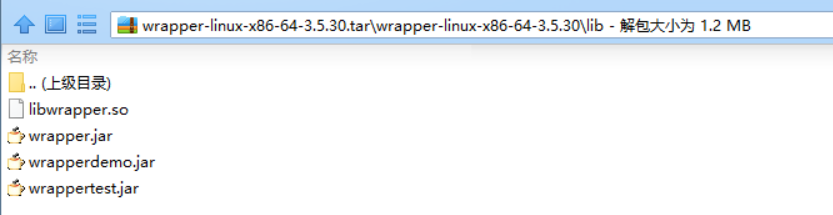
于是,笔者再看了下几个其他应用的lib,如下:
[root@iZ23nn1p4mjZ lib]# ll
total 344
-rw-r--r-- 1 root root 44664 Jan 16 13:35 libwrapper.so
-rw-r--r-- 1 root root 67882 Jan 16 13:35 wrapperdemo.jar
-rw-r--r-- 1 root root 124041 Jan 16 13:35 wrapper.jar
-rw-r--r-- 1 root root 106706 Jan 16 13:35 wrappertest.jar
[root@iZ23nn1p4mjZ lib]# cd ../../osm-all/lib
[root@iZ23nn1p4mjZ lib]# ll
total 344
-rw-r--r-- 1 root root 44664 Jan 16 13:35 libwrapper.so
-rw-r--r-- 1 root root 67882 Jan 16 13:35 wrapperdemo.jar
-rw-r--r-- 1 root root 124041 Jan 16 13:35 wrapper.jar
-rw-r--r-- 1 root root 106706 Jan 16 13:35 wrappertest.jar
[root@iZ23nn1p4mjZ lib]# cd ../../osm-route/lib
[root@iZ23nn1p4mjZ lib]# ll
total 632
-rw-r--r-- 1 root root 67882 Jan 16 13:35 wrapperdemo.jar
-rw-r--r-- 1 root root 337176 Jan 16 13:35 wrapper.dll
-rw-r--r-- 1 root root 124041 Jan 16 13:35 wrapper.jar
-rw-r--r-- 1 root root 106706 Jan 16 13:35 wrappertest.jar
[root@iZ23nn1p4mjZ lib]# cd ../../osm-trade/lib
[root@iZ23nn1p4mjZ lib]# ll
total 344
-rw-r--r-- 1 root root 44664 Jan 16 13:35 libwrapper.so
-rw-r--r-- 1 root root 67882 Jan 16 13:35 wrapperdemo.jar
-rw-r--r-- 1 root root 124041 Jan 16 13:35 wrapper.jar
-rw-r--r-- 1 root root 106706 Jan 16 13:35 wrappertest.jar
其中一个确实没有libwrapper.so,再看下这个so的作用,如下:
|
The Java component of Java Service Wrapper requires that a native library be loaded to be able to handle system signals and perform other functions which are not possible using the Java API. This property allows the name of the library to be modified to suit the needs of a particular application. In general, most users should not need to use this property. The Java language specifies some rules about how Java Native Libraries (JNI) can be named. The Wrapper's library is no exception and must follow these naming conventions. To explain this, we will use the default base name "wrapper" as an example.
If this property is given any other value, that base-name will be used to construct the actual name of the native library file using the above rules. Library Path: Regardless of the name specified, the native library must be located within a directory specified using thewrapper.java.library.path.<n> property. |
Platform specific native libraries: |
|
The Wrapper also provides a facility to make it easy to create binary distributions that run on any platform, even if the application makes use of native libraries. In detail, see the Platform specific native libraries. |
所以,其实libwrapper其实是处理平台相关的一些信号的,比如kill -N的个中含义。并不影响其本身,当然最好是应该有的。万一不见了的话,可以从官网http://wrapper.tanukisoftware.com/doc/english/download.jsp下载对应版本放进去就可以了。
Unable to load the Wrapper's native library because none of the following files及解决方法的更多相关文章
- fatal error: malformed or corrupted AST file: 'Unable to load module "/Users/apple/Library/Developer
在同一时候安装使用Xcode5, Xcode6之后, 常常遇到这个问题. fatal error: malformed or corrupted AST file: 'Unable to load m ...
- eclipse:运行 Android 项目时出现 “Unable to execute dex: Multiple dex files define” 解决方法
android 项目在eclipse 出现Unable to execute dex: Multiple dex files define Conversion to Dalvik format fa ...
- Unable to execute dex: Multiple dex files define 解决方法
程序编译正常,在用Eclipse调试执行时,报错Unable to execute dex: Multiple dex files define: 方法: 原因是有重复的.jar被引用,可以 ...
- [Android开发常见问题-11] Unable to execute dex: Multiple dex files define 解决方法
最近在开发一个工程,其中用到了一个开源的库项目Android-ViewPagerIndicator. 这个项目是作为一个库出现的,如下图: 这个项目中包含了android-support-v4.jar ...
- 错误/异常:The project cannot be built until build path errors are resolved 和 Unbound classpath container: 'JRE System Library [JavaSE-1.7]' in project 'MyJavaCode';的解决方法
错误1: The project cannot be built until build path errors are resolved 解决方法: 把java的类库加载进去即可,在工程上右键 选择 ...
- PHP Warning: PHP Startup: Unable to load dynamic library '/usr/lib/php/20151012/php_mbstring.dll' 的解决方法
step 1: cd /etc/php/{$yourphpversion}/cli step 2: sudo vim php.ini step 3: 在extension=php_mbstring.d ...
- 转:Unable to execute dex: Multiple dex files define 解决方法
转自:http://blog.csdn.net/mxlxiao7/article/details/8978930 问题发生概述: 程序编译正常,在用Eclipse调试执行时,报错Unable to e ...
- XmlDocument.load 读文件报异常:文件正被其它线程使用,解决方法
string filePath = Form1.getProjectFilePath(); System.Xml.XmlDocument xmlDoc = new System.Xml.XmlDocu ...
- Unable to execute dex:Multuple dex files define 解决方法
困扰我两天的问题终于解决了,在网上查的方法无非有三种 一. Eclipse->Project->去掉Build Automatically->Clear ->Build Pro ...
随机推荐
- Java 构造函数(抽象类中的构造函数) 和 加载
博客分类: 面向对象设计的原则 与 概念 1. Java 的构造函数 与初始化块: a. 抽象类的构造函数 若果在父类中(也就是抽象类)中显示的写了有参数的构造函数,在子类是就必须写一个构造函数来 ...
- Python面向对象之方法
普通方法要执行类里面的方法是通过对象触发的 触发的时候把自己赋值给self 类方法 vim day7-7.py #!/usr/bin/python # -*- coding:utf-8 -*- cla ...
- POJ3660 Cow Contest【最短路-floyd】
N (1 ≤ N ≤ 100) cows, conveniently numbered 1..N, are participating in a programming contest. As we ...
- 微信都在用的移动敏捷测试方法和工具|视频+PPT
本文是腾讯优测总监雷彬在MPD2016 北京站上的演讲视频.他详细讲述了腾讯多年来在实践敏捷研发过程中测试的优化之路,为测试角色(包括测试工程师和开发自测)提供敏捷作业的思路.点击此处观看视频.时长5 ...
- HFTP Guide
Introduction(说明) HFTP is a Hadoop filesystem implementation that lets you read data from a remote Ha ...
- Oracle安装部署之Oracle 10g在redhat5下的安装
[root@localhost ~]# groupadd dba -g 111 [root@localhost ~]# groupadd oinstall -g 110 [root@localhost ...
- 新入职如何快速去了解一个Javaweb项目!
1.从代码结构入手,搞清楚Java源码所在目录以及jsp代码所在目录. 2.从Web.xml入手,搞清楚首页,上下文及配置情况. 3.从lib目录里初步查看系统使用的框架和工具包. 4.从页面大体浏览 ...
- java实现从服务端下载文件
这边用一个简单的servlet实现java从服务端下载文件的操作 写一个servlet: <servlet> <servlet-name>DownloadServlet< ...
- 棋盘问题---poj1321(dfs)
http://poj.org/problem?id=1321 由于搜索是原来写的,而集训的时候没来所以只能现在补补咯-_- 简单的深搜 #include<stdio.h> #include ...
- sql server 基本问题解决思路
1.数据库故障排查步骤,如何处理紧急数据库问题;首先根据报错信息找到故障原因.然后实施对应的解决方案.2.SQL调优步骤,如何来判断SQL语句存在问题,怎么定位问题,如何解决这些问题:可以建立一个Pe ...