
利用python计算windows全盘文件md5值的脚本
import hashlib

import os

import time

import configparser

import uuid

def test_file_md5(file_path):

    test = hashlib.md5()

    if os.path.isfile(file_path):

        with open(file_path, "rb") as f:

            while True:

                data = f.read(8096)

                if not data:

                    break

                else:

                    test.update(data)

            ret = test.hexdigest()

            config = configparser.ConfigParser()

            config.read("E:/python/pycharm/再开次开始/前端/test_md5.ini",encoding="utf-8")

            if config.has_section(os.path.basename(file_path)):

                new_section_name = str(os.path.basename(file_path)) + ":" + str(uuid.uuid4())

                config[new_section_name] = {"文件路径":os.path.dirname(file_path),

                                 "md5值":ret}

            else:

                config[os.path.basename(file_path)] = {"文件路径": os.path.dirname(file_path),

                                                "md5值": ret}

            config.write(open("E:/python/pycharm/再开次开始/前端/test_md5.ini","w",encoding="utf-8"))

def test_dir_md5(file_path):

    test_abs_path = os.path.abspath(file_path)

    # print(test_abs_path)

    os.chdir(test_abs_path)

    for file in os.listdir(os.getcwd()):

        if os.path.isfile(file):

            test_file_md5(os.path.abspath(file))

        elif os.path.isdir(file):

            test_dir_md5(os.path.abspath(file))

        else:

            pass

    # return True

if __name__ == '__main__':

    began_path = os.getcwd()

    test_path = os.path.dirname(os.path.dirname(os.path.dirname(os.path.dirname(began_path))))

    os.chdir(test_path)

    print(os.listdir())

    for test_file in os.listdir():

        os.chdir(test_path)

        if os.path.abspath(test_file).startswith("E:\\$"):

            continue

        else:

            if os.path.isfile(test_file):

                # print("yyyyy")

                test_file_md5(os.path.abspath(test_file))

            elif os.path.isdir(test_file):

                # print("hahah")

                test_dir_md5(os.path.abspath(test_file))

                # print(os.path.abspath(test_file))

            else:

                pass
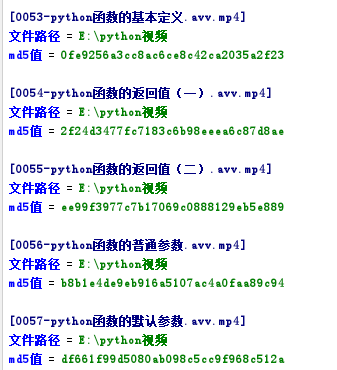
结果如下
利用python计算windows全盘文件md5值的脚本的更多相关文章
- java计算过G文件md5 值计算
package io.bigdata; import java.io.File; import java.io.FileInputStream; import java.io.IOException; ...
- windows查看文件MD5值的命令
今天需要,就记录一下. certutil -hashfile filename MD5 certutil -hashfile filename SHA1 certutil -hashfile file ...
- 利用Python计算π的值,并显示进度条
利用Python计算π的值,并显示进度条 第一步:下载tqdm 第二步;编写代码 from math import * from tqdm import tqdm from time import ...
- JAVA中获取文件MD5值的四种方法
JAVA中获取文件MD5值的四种方法其实都很类似,因为核心都是通过JAVA自带的MessageDigest类来实现.获取文件MD5值主要分为三个步骤,第一步获取文件的byte信息,第二步通过Messa ...
- 基于js-spark-md5前端js类库,快速获取文件Md5值
js-spark-md5是歪果仁开发的东西,有点多,但是我们只要一个js文件即可,具体类包我存在自己的oschina上,下载地址:https://git.oschina.net/jianqingwan ...
- C#统计目录中文件MD5值
1. [代码]统计目录中文件MD5值 using System.IO;using System.Security.Cryptography;using System.Collections;using ...
- MD5工具类,提供字符串MD5加密、文件MD5值获取(校验)功能
MD5工具类,提供字符串MD5加密(校验).文件MD5值获取(校验)功能 : package com.yzu.utils; import java.io.File; import java.io.Fi ...
- QT 获取文件MD5值
/* 方法1 */ QFile theFile(fileNamePath); theFile.open(QIODevice::ReadOnly); QByteArray ba = QCryptogra ...
- C# 获取文件MD5值的方法
可用于对比文件是否相同 /// <summary> /// 获取文件MD5值 /// </summary> /// <param name="fileName& ...
随机推荐
- API网关Kong系列(四)认证配置
目前根据业务需要先介绍2种认证插件:Key Authentication 及 HMAC-SHA1 认证 Key Authentication 向API添加密钥身份验证(也称为API密钥). 然后,消 ...
- ZooKeeper系列(2) 安装部署 (转)
原文地址:http://www.cnblogs.com/wuxl360/p/5817489.html 一.Zookeeper的搭建方式 Zookeeper安装方式有三种,单机模式和集群模式以及伪集群模 ...
- android 系统架构简介
Android系统采取的是分层的架构,根据官方文档提供的架构图,我们将android的系统架构分成5层,如图: 1.Application Framework (应用框架) application f ...
- RAID5---块,条带,校验,旋转,同步/异
冗余(奇偶校验)块:RAID5中在同一个条带中用一个块来存放冗余信息,冗余信息示其他块的"异或"值,这样在同一条带中就只有(n-1)个块是实际的数据,所以RAID5中阵列容量是(n ...
- 进行web开发时应该考虑的架构性因素
功能实现 这个自不必说. 性能与可伸缩性 根据预期的访问量,评估机器负载情况.如果在可预期的未来一台服务器可以撑得住,则没必要使用多台服务器.需要对多个环节进行性能评估:web服务器.逻辑服务器.DB ...
- Java网络编程详解
内容: 1.网络通信协议 2.UDP与TCP 3.UDP通信 4.TCP通信 5.网络编程总结 1.网络通信协议 (1)基本概念 网络:由多台计算机以及外部设备连接起来的一个系统,我们称之为网络 通信 ...
- centos7配置yum源
https://www.cnblogs.com/renpingsheng/p/7845096.html
- leetcode150
public class Solution { public int EvalRPN(string[] tokens) { Stack<int> ST_NUM = new Stack< ...
- 前端-javascript-引入
1.Javascript简介 web前端有三层: HTML:从语义的角度,描述页面的结构 CSS:从审美的角度,描述样式(美化页面) JavaScript:从交互的角度,描述行为(提升用户体验) 2. ...
- 前端-CSS-7-标准文档流&行内元素和块级元素转换
1.什么是标准文档流 <!-- 什么是标准文档流 宏观的将,我们的web页面和ps等设计软件有本质的区别 web 网页的制作 是个“流” 从上而下 ,像 “织毛衣” 而设计软件 ,想往哪里画东 ...