
利用python计算windows全盘文件md5值的脚本
import hashlib

import os

import time

import configparser

import uuid

def test_file_md5(file_path):

    test = hashlib.md5()

    if os.path.isfile(file_path):

        with open(file_path, "rb") as f:

            while True:

                data = f.read(8096)

                if not data:

                    break

                else:

                    test.update(data)

            ret = test.hexdigest()

            config = configparser.ConfigParser()

            config.read("E:/python/pycharm/再开次开始/前端/test_md5.ini",encoding="utf-8")

            if config.has_section(os.path.basename(file_path)):

                new_section_name = str(os.path.basename(file_path)) + ":" + str(uuid.uuid4())

                config[new_section_name] = {"文件路径":os.path.dirname(file_path),

                                 "md5值":ret}

            else:

                config[os.path.basename(file_path)] = {"文件路径": os.path.dirname(file_path),

                                                "md5值": ret}

            config.write(open("E:/python/pycharm/再开次开始/前端/test_md5.ini","w",encoding="utf-8"))

def test_dir_md5(file_path):

    test_abs_path = os.path.abspath(file_path)

    # print(test_abs_path)

    os.chdir(test_abs_path)

    for file in os.listdir(os.getcwd()):

        if os.path.isfile(file):

            test_file_md5(os.path.abspath(file))

        elif os.path.isdir(file):

            test_dir_md5(os.path.abspath(file))

        else:

            pass

    # return True

if __name__ == '__main__':

    began_path = os.getcwd()

    test_path = os.path.dirname(os.path.dirname(os.path.dirname(os.path.dirname(began_path))))

    os.chdir(test_path)

    print(os.listdir())

    for test_file in os.listdir():

        os.chdir(test_path)

        if os.path.abspath(test_file).startswith("E:\\$"):

            continue

        else:

            if os.path.isfile(test_file):

                # print("yyyyy")

                test_file_md5(os.path.abspath(test_file))

            elif os.path.isdir(test_file):

                # print("hahah")

                test_dir_md5(os.path.abspath(test_file))

                # print(os.path.abspath(test_file))

            else:

                pass
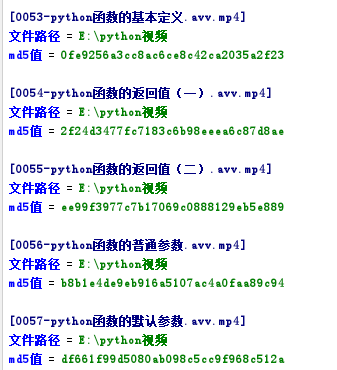
结果如下
利用python计算windows全盘文件md5值的脚本的更多相关文章
- java计算过G文件md5 值计算
package io.bigdata; import java.io.File; import java.io.FileInputStream; import java.io.IOException; ...
- windows查看文件MD5值的命令
今天需要,就记录一下. certutil -hashfile filename MD5 certutil -hashfile filename SHA1 certutil -hashfile file ...
- 利用Python计算π的值,并显示进度条
利用Python计算π的值,并显示进度条 第一步:下载tqdm 第二步;编写代码 from math import * from tqdm import tqdm from time import ...
- JAVA中获取文件MD5值的四种方法
JAVA中获取文件MD5值的四种方法其实都很类似,因为核心都是通过JAVA自带的MessageDigest类来实现.获取文件MD5值主要分为三个步骤,第一步获取文件的byte信息,第二步通过Messa ...
- 基于js-spark-md5前端js类库,快速获取文件Md5值
js-spark-md5是歪果仁开发的东西,有点多,但是我们只要一个js文件即可,具体类包我存在自己的oschina上,下载地址:https://git.oschina.net/jianqingwan ...
- C#统计目录中文件MD5值
1. [代码]统计目录中文件MD5值 using System.IO;using System.Security.Cryptography;using System.Collections;using ...
- MD5工具类,提供字符串MD5加密、文件MD5值获取(校验)功能
MD5工具类,提供字符串MD5加密(校验).文件MD5值获取(校验)功能 : package com.yzu.utils; import java.io.File; import java.io.Fi ...
- QT 获取文件MD5值
/* 方法1 */ QFile theFile(fileNamePath); theFile.open(QIODevice::ReadOnly); QByteArray ba = QCryptogra ...
- C# 获取文件MD5值的方法
可用于对比文件是否相同 /// <summary> /// 获取文件MD5值 /// </summary> /// <param name="fileName& ...
随机推荐
- BTree,B-Tree,B+Tree,B*Tree的数据结构
B树 即二叉搜索树: 1.所有非叶子结点至多拥有两个儿子(Left和Right): 2.所有结点存储一个关键字: 3.非叶子结点的左指针指向小于其关键字的子树,右指针指向大于其关键字的子树: 如: B ...
- pycharm连接虚拟机
Pycharm需要在版本2017.3.3之后才能连接 通过本地的python解释器运行虚拟机的py文件 需要先配置虚拟环境 配置Ubuntu虚拟环境 # 在VitualBox创建Ubuntu虚拟 ...
- 12.nodejs事件轮询机制
一:nodejs事件轮询机制 就是 函数的执行顺序 <script type="text/javascript"> setImmediate(function(){ ...
- Linux开机挂载windows共享文件夹
https://blog.csdn.net/zhaogang1993/article/details/79573271 (可行) 命令: mount -t cifs -o username=&quo ...
- css之单边阴影
css之单边阴影 需求:在网上找的其他博客上说单边阴影需要牺牲掉模糊,实际上牺牲掉模糊直接用border不就好了 效果: 原理: 1.在左边的外阴影就是右边的内阴影 2.将box-shadow写在be ...
- oracle 数据字典
select * from dictionary; --数据字典 数据字典是Oracle存放有关数据库信息的地方,其用途是用来描述数据的. 比如一个表的创建者信息,创建时间信息,所属表空间信息,用户访 ...
- Mysql 游标使用
BEGIN #shopsId 商家ID #accountDay 10位日期 -- 定义一个或者多个 变量来接收 游标查询的列值 DECLARE receiptContentId INT; -- 遍历数 ...
- 15 python re 模块
1.基础知识 正则表达式是用于处理字符串的强大工具,拥有自己独特的语法以及一个独立的处理引擎 正则表达式的大致匹配流程:依次拿出表达式和文本中的字符比较, 如果每一个字符都能匹配,则匹配成功:一旦有匹 ...
- 切换svn登录账户
右键-->TortoiseSVN-->设置 找到:点击已缓存数据 在认证数据一栏点击:清空
- javascript事件之鼠标滚轮(mousewheel)和DOMMouseScroll事件
javascript事件之鼠标滚轮(mousewheel)和DOMMouseScroll事件 发布时间:2015-02-07 编辑:www.jquerycn.cn 本文学习下,javascript ...