
Linux上的ftp服务器vsftpd之配置满天飞--设置匿名用户访问(不弹出用户名密码框)以及其他用户可正常上传
一、问题背景
没事谁折腾这鬼玩意哦。。。还不是因为bug。
我们的应用,用户头像是存在ftp上的。之前的ftp服务器是一台windows,我们后台服务器程序收到用户上传头像的请求时,会用一个ROOT/ROOT的账户,连接ftp服务器。
获取到连接后,即进行上传。
上传:上传文件则存放在ROOT用户的home 目录(在windows上装的是server-U来充当ftp服务器,所以就是在Server-U里面配置了ROOT用户的home目录)。
上传完成后,会得到一个ftp协议类型的url。范例如:
ftp://10.10.20.2/userphoto/user7.png。
客户端拿到该url后,即用ftp客户端的库连接该url,获取到文件流,下载下来,进行展示。
这两天,ftp服务器从windows变到了redhat上。今天下午,测试突然报了个bug过来,说是用户头像不能正常展示了。what?于是开始查找问题。
梳理了半天,发现问题在于:linux上的ftp服务器,采用的是vsftpd软件。因为配置文件没配好的原因,利用前面的“ftp://10.10.20.2/userphoto/user7.png”就访问不到图片。
为什么说没配好呢,一开始报的错是:FTP 550 Failed to change directory
于是按照下面博文里的进行修改:https://blog.csdn.net/coreyC/article/details/80866533
没想到一波三折。
二、匿名访问
关于匿名访问,如果不成功的话,那么,请首先去下载一个工具,winscp。
按照下面的方式去进行匿名访问:
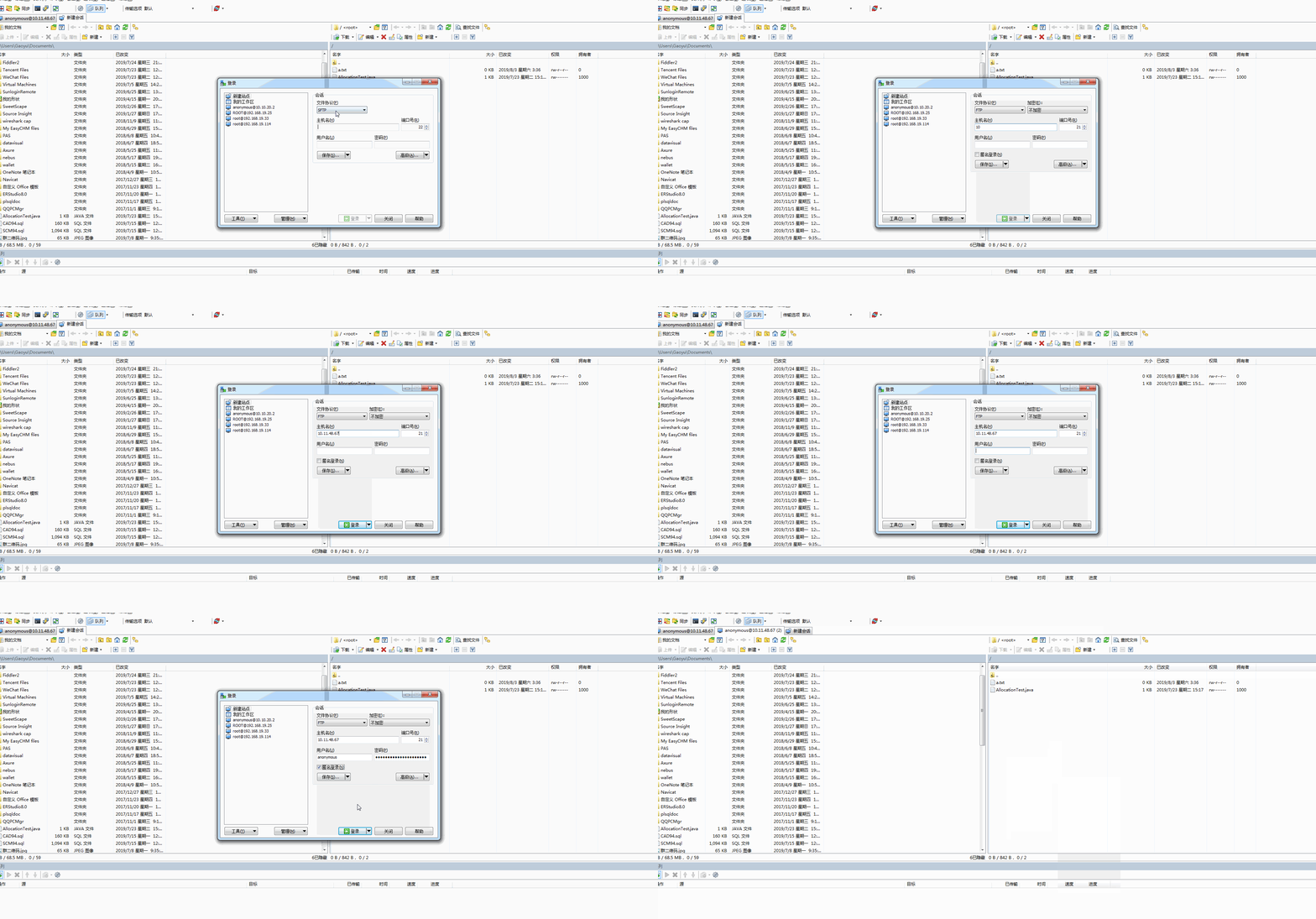
如果匿名登录失败的话,会提示具体的原因。
三、匿名上传
错误提示1:553 Could not create file
这个提示,有一个原因是,匿名用户的主目录,主目录的意思是,每个用户登录进去后所在的目录,后续的读取、上传都会在这个目录,相当于用户的base目录吧。
如果主目录的权限不够,就会提示这个问题,一般直接野蛮改为777权限。
至于主目录在哪? 在配置文件中通过以下选项进行配置:
anon_root=/data/ftp
如下图所示,需要把主目录权限改为777,即可匿名上传:

修改权限的命令:
chmod /data/ftp
下述的报错也是同样的问题:
500 OOPS: vsftpd: refusing to run with writable anonymous root
二、支持匿名访问/上传的配置文件
正确的配置贴一份,这份配置再加上,对目录进行必要的权限设置,基本可以摆平大多数情况:
# Example config file /etc/vsftpd/vsftpd.conf

#

# The default compiled in settings are fairly paranoid. This sample file

# loosens things up a bit, to make the ftp daemon more usable.

# Please see vsftpd.conf. for all compiled in defaults.

#

# READ THIS: This example file is NOT an exhaustive list of vsftpd options.

# Please read the vsftpd.conf. manual page to get a full idea of vsftpd's

# capabilities.

#

# Allow anonymous FTP? (Beware - allowed by default if you comment this out).
# 这里需要打开,允许匿名访问

anonymous_enable=YES
#https://blog.csdn.net/bluishglc/article/details/42399439
allow_writeable_chroot=YES
#

# Uncomment this to allow local users to log in.
# 之前说到我们用ROOT/ROOT来访问ftp,我们这里,ROOT/ROOT是我们的linux可以登录的用户名密码。要允许这类用户访问ftp,需要开启下面的选项

local_enable=YES

#

# Uncomment this to enable any form of FTP write command.
# 要允许写入操作。否则应该不能上传文件

write_enable=YES

#

# Default umask for local users is . You may wish to change this to ,

# if your users expect that ( is used by most other ftpd's)

local_umask=

#

# Uncomment this to allow the anonymous FTP user to upload files. This only

# has an effect if the above global write enable is activated. Also, you will

# obviously need to create a directory writable by the FTP user.
# 匿名上传,需要配合write_enable=yes

anon_upload_enable=YES

#

# Uncomment this if you want the anonymous FTP user to be able to create

# new directories.
# 允许匿名用户创建目录;

anon_mkdir_write_enable=YES
#控制匿名用户对文件和文件夹的删除和重命名

anon_other_write_enable=YES

#

# Activate directory messages - messages given to remote users when they

# go into a certain directory.

dirmessage_enable=YES

#

# The target log file can be vsftpd_log_file or xferlog_file.

# This depends on setting xferlog_std_format parameter

xferlog_enable=YES

#

# Make sure PORT transfer connections originate from port  (ftp-data).

connect_from_port_20=YES

#

# If you want, you can arrange for uploaded anonymous files to be owned by

# a different user. Note! Using "root" for uploaded files is not

# recommended!

#chown_uploads=YES

#chown_username=whoever

#

# The name of log file when xferlog_enable=YES and xferlog_std_format=YES

# WARNING - changing this filename affects /etc/logrotate.d/vsftpd.log

#xferlog_file=/var/log/xferlog

#

# Switches between logging into vsftpd_log_file and xferlog_file files.

# NO writes to vsftpd_log_file, YES to xferlog_file

xferlog_std_format=YES

#

# You may change the default value for timing out an idle session.

#idle_session_timeout=

#

# You may change the default value for timing out a data connection.

#data_connection_timeout=

#

# It is recommended that you define on your system a unique user which the

# ftp server can use as a totally isolated and unprivileged user.

#nopriv_user=ftpsecure

#

# Enable this and the server will recognise asynchronous ABOR requests. Not

# recommended for security (the code is non-trivial). Not enabling it,

# however, may confuse older FTP clients.

#async_abor_enable=YES

#

# By default the server will pretend to allow ASCII mode but in fact ignore

# the request. Turn on the below options to have the server actually do ASCII

# mangling on files when in ASCII mode.

# Beware that on some FTP servers, ASCII support allows a denial of service

# attack (DoS) via the command "SIZE /big/file" in ASCII mode. vsftpd

# predicted this attack and has always been safe, reporting the size of the

# raw file.

# ASCII mangling is a horrible feature of the protocol.

#ascii_upload_enable=YES

#ascii_download_enable=YES

#

# You may fully customise the login banner string:

#ftpd_banner=Welcome to blah FTP service.

#

# You may specify a file of disallowed anonymous e-mail addresses. Apparently

# useful for combatting certain DoS attacks.

#deny_email_enable=YES

# (default follows)

#banned_email_file=/etc/vsftpd/banned_emails

#

# You may specify an explicit list of local users to chroot() to their home

# directory. If chroot_local_user is YES, then this list becomes a list of

# users to NOT chroot().

#chroot_local_user=YES

#chroot_list_enable=YES

# (default follows)

#chroot_list_file=/etc/vsftpd/chroot_list

#

# You may activate the "-R" option to the builtin ls. This is disabled by

# default to avoid remote users being able to cause excessive I/O on large

# sites. However, some broken FTP clients such as "ncftp" and "mirror" assume

# the presence of the "-R" option, so there is a strong case for enabling it.

#ls_recurse_enable=YES

#

# When "listen" directive is enabled, vsftpd runs in standalone mode and

# listens on IPv4 sockets. This directive cannot be used in conjunction

# with the listen_ipv6 directive.

listen=YES

#

# This directive enables listening on IPv6 sockets. To listen on IPv4 and IPv6

# sockets, you must run two copies of vsftpd with two configuration files.

# Make sure, that one of the listen options is commented !!

#listen_ipv6=YES

pam_service_name=vsftpd

userlist_enable=YES

tcp_wrappers=YES
#匿名用户的根目录。这个非常重要

anon_root=/home/ROOT
#匿名用户不要密码就靠这个

no_anon_password=YES
#本地用户,如我们上传用的用户(ROOT/ROOT)的根目录。当然,我们给匿名配了那么多,估计匿名也能上传了。

local_root=/home/ROOT
#该选项暂时不太清楚

ftp_username=ROOT
参考资料:
https://blog.csdn.net/haoge921026/article/details/51956983
Linux上的ftp服务器vsftpd之配置满天飞--设置匿名用户访问(不弹出用户名密码框)以及其他用户可正常上传的更多相关文章
- linux centos6.5 ftp网页vsftpd配置
安装命令centos下 yum install vsftpd 出现“Complete!”时意味着安装完成.Linux中,系统对于大小写严格区分,比如abc和ABC是完全不相同的字符,要特别注意.配置V ...
- 腾讯云服务器linux centOS7.4 搭建ftp服务器 vsftpd
腾讯云服务器linux centos 7.4 搭建ftp服务器 vsftpd 在centos 7.3测试也是OK的,其它版本没有实验 # 安装 vsftpd $ yum install vsftpd ...
- 腾讯云服务器linux Ubuntu操作系统搭建ftp服务器vsftpd
腾讯云服务器linux Ubuntu操作系统安装ftp服务器vsftpd 操作系统: Ubuntu Server 16.04.1 LTS 64位 下面我将系统重装, 一步一步从头开始,安装FTP服务器 ...
- linux上构建ftp服务器
linux上构建ftp服务器 服务器搭建 https://help.aliyun.com/knowledge_detail/60152.html,可以参考这篇博文. 配置文件详解 进入/etc/vsf ...
- 在windwo server2008服务器上配置ftp服务器、及配置phpstrom工具、实现项目同步。
在windwo server2008服务器上配置ftp服务器.及配置phpstrom工具.实现项目同步. 在windwo server2008服务器上配置ftp服务器 参考该篇文章:http://bl ...
- centos 6.5 搭建ftp 服务器(vsftpd的配置文件说明)
0x00 如何快速的搭建简易的资源发布站 开启简易的python http服务器 1 2 cd /home/your_path python -m SimpleHTTPServer 8000 开启防火 ...
- Linux安装部署FTP服务器
Linux安装部署FTP服务器 本文章会将安装FTP服务器的步骤以及一些遇到的问题来记录下 因为项目中要与第三方对接数据,需要用到FTP服务器以提供他们每天上传数据,因为之前在本地的VMware虚 ...
- 在CentOS7上安装ftp服务器用于保存服务端上传的图片。
1.CentOS卸载vsftpd的方法 如果服务器上已经安装了vsftpd服务,配置出错需要卸载vsftpd服务. 1.1 查找vsftpd服务 [root@localhost /]# rpm -aq ...
- 【转】Linux环境搭建FTP服务器与Python实现FTP客户端的交互介绍
Linux环境搭建FTP服务器与Python实现FTP客户端的交互介绍 FTP 是File Transfer Protocol(文件传输协议)的英文简称,它基于传输层协议TCP建立,用于Interne ...
随机推荐
- Java-Tomcat for Mac配置
1.eclipse version: Eclipse Java EE IDE for Web Developers. Version: Oxygen.1 Release (4.7.1) Build i ...
- IOS_多线程
苹果的Cocoa框架支持的多线程机制有三中NSThread.GCD.NSOperation. NSThread:是官方推荐的也是最主要的线程创建方式,可是须要开发这自己去管理线程的生命周期比如线程同步 ...
- gtest运行小析
Gtest是google推出的C++测试框架,本篇文档,从整体上对Gtest的运行过程中的关键路径进行分析和梳理. 分析入口 新建一个最简单的测试工程,取名为source_analyse_proj,建 ...
- Android 布局学习之——LinearLayout的layout_weight属性
一直对layout_weight属性感到比较困惑,今天学习一下,来深入了解layout_weight属性和它的用法. 定义 首先,看看Android官方文档是怎么说的,毕竟人家才是权威 ...
- 【机翻】Deep Plug-and-Play Super-Resolution for Arbitrary
论文 (PDF) Deep Plug-and-Play Super-Resolution for Arbitrary Blur Kernels https://www.researchgate.net ...
- Linux 查看磁盘分区、文件系统、磁盘的使用情况相关的命令和工具介绍
https://www.cnblogs.com/alexyuyu/articles/3454907.html
- linux 最大文件查找
sudo du -s * | sort -nr | head 显示前10个占用空间最大的文件或目录 sudo du --max-depth=1 linux查找占空间最大的文件与目录 ...
- Tree Recovery(前序中序求后序)
Tree Recovery Time Limit: 1000MS Memory Limit: 65536K Total Submissions: 14640 Accepted: 9091 De ...
- MySQL Study之--MySQL普通用户无法本地登陆
MySQL Study之--MySQL普通用户无法本地登陆 在安装完毕MySQL后,我们通常加入拥有对应权限的普通用户用来訪问数据库.在使用用户本地登录数据库的时候,常常会出现怎么登录也无 ...
- WSGI简介
当我们实现一个Web应用(application)的时候,通常不会考虑如何接受HTTP请求.解析HTTP请求.发送HTTP响应等等,我们只关心处理逻辑,而不用去关心HTTP规范的细节. 之所以有这层透 ...