
spring aop实现日志收集
概述
详细
使用spring aop 来实现日志的统一收集功能。
spring aop 配置
首先,我们定义2种注解,一种是给service用的,一种是给Controller用的。
给service使用的aop扫描
<aop:aspectj-autoproxy />

<context:annotation-config />

<context:component-scan base-package="com.demodashi">

	<context:exclude-filter type="annotation" expression="org.springframework.stereotype.Controller" />

</context:component-scan>

<tx:annotation-driven />
给Controller使用的aop扫描
<aop:aspectj-autoproxy />

<aop:aspectj-autoproxy proxy-target-class="true" />

<!-- 扫描web包,应用Spring的注解 -->

<context:component-scan	base-package="com.demodashi">

	<context:include-filter type="annotation" expression="org.springframework.stereotype.Controller" />

	<context:exclude-filter type="annotation" expression="javax.inject.Named" />

	<context:exclude-filter type="annotation" expression="javax.inject.Inject" />

</context:component-scan>
java实现
实现思路,先定义两个注解类,一个给service类用的,一个给从controller类用的,然后使用切面类,对这两个注解进行绑定监控。结果就是,当使用注解绑定某个service类或者controller类的某个方法时,这个切面类就能监控到,并且能获取到这个service方法的相关输入,输出参数等。这样,就能实现了aop日志了。
给controller使用的注解类
package com.demodashi.aop.annotation;

import java.lang.annotation.*;

/**

 *自定义注解 拦截Controller

 */

@Target({ElementType.PARAMETER, ElementType.METHOD})

@Retention(RetentionPolicy.RUNTIME)

@Documented

public  @interface ControllerLogAnnotation {

    String description()  default "";

}
给service使用的注解类
package com.demodashi.aop.annotation;

import java.lang.annotation.*;

/**

 *自定义注解 拦截service

 */

@Target({ElementType.PARAMETER, ElementType.METHOD})

@Retention(RetentionPolicy.RUNTIME)

@Documented

public  @interface ServiceLogAnnotation {

    String description()  default "";

}
日志切面类
package com.demodashi.aop;

import java.lang.reflect.Method;

import javax.servlet.http.HttpServletRequest;

import javax.servlet.http.HttpSession;

import org.aspectj.lang.JoinPoint;

import org.aspectj.lang.annotation.AfterReturning;

import org.aspectj.lang.annotation.AfterThrowing;

import org.aspectj.lang.annotation.Aspect;

import org.aspectj.lang.annotation.Before;

import org.aspectj.lang.annotation.Pointcut;

import org.slf4j.Logger;

import org.slf4j.LoggerFactory;

import org.springframework.stereotype.Component;

import org.springframework.web.context.request.RequestContextHolder;

import org.springframework.web.context.request.ServletRequestAttributes;

import com.alibaba.fastjson.JSONObject;

import com.demodashi.aop.annotation.ControllerLogAnnotation;

import com.demodashi.aop.annotation.ServiceLogAnnotation;

import com.demodashi.base.UserVO;

/**

 * 切点类

 * @author xgchen

 *

 */

@Aspect

@Component

public  class SystemLogAspect {

	public SystemLogAspect(){

	}

    //本地异常日志记录对象

    private  static  final Logger logger = LoggerFactory.getLogger(SystemLogAspect.class);

    //Service层切点

    @Pointcut("@annotation(com.demodashi.aop.annotation.ServiceLogAnnotation)")

    public  void serviceAspect() {

    }

    //Controller层切点

    @Pointcut("@annotation(com.demodashi.aop.annotation.ControllerLogAnnotation)")

    public  void controllerAspect() {

    }

    /**

     * 前置通知 用于拦截Controller层记录用户的操作

     *

     * @param joinPoint 切点

     */

    @Before("controllerAspect()")

	public  void doBefore4control(JoinPoint joinPoint) {

        HttpServletRequest request = ((ServletRequestAttributes) RequestContextHolder.getRequestAttributes()).getRequest();

        HttpSession session = request.getSession();

        //读取session中的用户

        UserVO user = (UserVO) session.getAttribute("USER");

        //请求的IP

        String ip = request.getRemoteAddr();

         try {

            //*========控制台输出=========*//

            System.out.println("=====control 前置通知开始=====");

            System.out.println("请求方法:" + (joinPoint.getTarget().getClass().getName() + "." + joinPoint.getSignature().getName() + "()"));

            System.out.println("方法描述:" + getControllerMethodDescription(joinPoint));

            System.out.println("请求人ID:" + user.getId());

            System.out.println("请求人NAME:" + user.getName());

            System.out.println("请求IP:" + ip);

            System.out.println("=====前置通知结束=====");

        }  catch (Exception e) {

            //记录本地异常日志

            logger.error("==前置通知异常==");

            logger.error("异常信息:{}", e.getMessage());

        }

    }

    @Before("serviceAspect()")

    public  void doBefore4service(JoinPoint joinPoint) {

    	HttpServletRequest request = ((ServletRequestAttributes) RequestContextHolder.getRequestAttributes()).getRequest();

        HttpSession session = request.getSession();

        //读取session中的用户

        UserVO user = (UserVO) session.getAttribute("USER");

        //获取请求ip

        String ip = request.getRemoteAddr();

        //获取用户请求方法的参数并序列化为JSON格式字符串

        String params = "";

         if (joinPoint.getArgs() !=  null && joinPoint.getArgs().length > 0) {

             for ( int i = 0; i < joinPoint.getArgs().length; i++) {

                params += JSONObject.toJSON(joinPoint.getArgs()[i]).toString() + ";";

            }

        }

        try {

            /*========控制台输出=========*/

        	System.out.println("=====service 前置通知开始=====");

            System.out.println("异常方法:" + (joinPoint.getTarget().getClass().getName() + "." + joinPoint.getSignature().getName() + "()"));

            System.out.println("方法描述:" + getServiceMthodDescription(joinPoint));

            System.out.println("请求人ID:" + user.getId());

            System.out.println("请求人NAME:" + user.getName());

            System.out.println("请求IP:" + ip);

            System.out.println("请求参数:" + params);

        }  catch (Exception ex) {

            //记录本地异常日志

            logger.error("==异常通知异常==");

            logger.error("异常信息:{}", ex.getMessage());

        }

    }

    @AfterReturning(pointcut="serviceAspect()", returning="returnValue")

    public  void after4service(JoinPoint joinPoint, Object returnValue) {

    	HttpServletRequest request = ((ServletRequestAttributes) RequestContextHolder.getRequestAttributes()).getRequest();

        HttpSession session = request.getSession();

        //读取session中的用户

        UserVO user = (UserVO) session.getAttribute("USER");

        //获取请求ip

        String ip = request.getRemoteAddr();

        //获取用户请求方法的参数并序列化为JSON格式字符串

        String params = "";

         if (joinPoint.getArgs() !=  null && joinPoint.getArgs().length > 0) {

             for ( int i = 0; i < joinPoint.getArgs().length; i++) {

                params += JSONObject.toJSON(joinPoint.getArgs()[i]).toString() + ";";

            }

        }

        try {

            /*========控制台输出=========*/

        	System.out.println("=====service 后置通知开始=====");

            System.out.println("异常方法:" + (joinPoint.getTarget().getClass().getName() + "." + joinPoint.getSignature().getName() + "()"));

            System.out.println("方法描述:" + getServiceMthodDescription(joinPoint));

            System.out.println("请求人ID:" + user.getId());

            System.out.println("请求人NAME:" + user.getName());

            System.out.println("请求IP:" + ip);

            System.out.println("请求参数:" + params);

            System.out.println("返回值为:" + JSONObject.toJSON(returnValue).toString());

        }  catch (Exception ex) {

            //记录本地异常日志

            logger.error("==异常通知异常==");

            logger.error("异常信息:{}", ex.getMessage());

        }

    }

    /**

     * 异常通知 用于拦截service层记录异常日志

     *

     * @param joinPoint

     * @param e

     */

    @AfterThrowing(pointcut = "serviceAspect()", throwing = "e")

	public  void doAfterThrowing(JoinPoint joinPoint, Throwable e) {

    	HttpServletRequest request = ((ServletRequestAttributes) RequestContextHolder.getRequestAttributes()).getRequest();

        HttpSession session = request.getSession();

        //读取session中的用户

        UserVO user = (UserVO) session.getAttribute("USER");

        //获取请求ip

        String ip = request.getRemoteAddr();

        //获取用户请求方法的参数并序列化为JSON格式字符串

        String params = "";

         if (joinPoint.getArgs() !=  null && joinPoint.getArgs().length > 0) {

             for ( int i = 0; i < joinPoint.getArgs().length; i++) {

            	 params += JSONObject.toJSON(joinPoint.getArgs()[i]).toString() + ";";

            }

        }

        try {

            /*========控制台输出=========*/

            System.out.println("=====异常通知开始=====");

            System.out.println("异常代码:" + e.getClass().getName());

            System.out.println("异常信息:" + e.getMessage());

            System.out.println("异常方法:" + (joinPoint.getTarget().getClass().getName() + "." + joinPoint.getSignature().getName() + "()"));

            System.out.println("方法描述:" + getServiceMthodDescription(joinPoint));

            System.out.println("请求人ID:" + user.getId());

            System.out.println("请求人NAME:" + user.getName());

            System.out.println("请求IP:" + ip);

            System.out.println("请求参数:" + params);

            System.out.println("=====异常通知结束=====");

        }  catch (Exception ex) {

            //记录本地异常日志

            logger.error("==异常通知异常==");

            logger.error("异常信息:{}", ex.getMessage());

        }

         /*==========记录本地异常日志==========*/

        logger.error("异常方法:{}异常代码:{}异常信息:{}参数:{}", joinPoint.getTarget().getClass().getName() + joinPoint.getSignature().getName(), e.getClass().getName(), e.getMessage(), params);

    }

    /**

     * 获取注解中对方法的描述信息 用于service层注解

     *

     * @param joinPoint 切点

     * @return 方法描述

     * @throws Exception

     */

     public  static String getServiceMthodDescription(JoinPoint joinPoint)

             throws Exception {

        String targetName = joinPoint.getTarget().getClass().getName();

        String methodName = joinPoint.getSignature().getName();

        Object[] arguments = joinPoint.getArgs();

        Class targetClass = Class.forName(targetName);

        Method[] methods = targetClass.getMethods();

        String description = "";

         for (Method method : methods) {

             if (method.getName().equals(methodName)) {

                Class[] clazzs = method.getParameterTypes();

                 if (clazzs.length == arguments.length) {

                    description = method.getAnnotation(ServiceLogAnnotation. class).description();

                     break;

                }

            }

        }

         return description;

    }

    /**

     * 获取注解中对方法的描述信息 用于Controller层注解

     *

     * @param joinPoint 切点

     * @return 方法描述

     * @throws Exception

     */

     public  static String getControllerMethodDescription(JoinPoint joinPoint)  throws Exception {

        String targetName = joinPoint.getTarget().getClass().getName();

        String methodName = joinPoint.getSignature().getName();

        Object[] arguments = joinPoint.getArgs();

        Class targetClass = Class.forName(targetName);

        Method[] methods = targetClass.getMethods();

        String description = "";

         for (Method method : methods) {

             if (method.getName().equals(methodName)) {

                Class[] clazzs = method.getParameterTypes();

                 if (clazzs.length == arguments.length) {

                    description = method.getAnnotation(ControllerLogAnnotation. class).description();

                     break;

                }

            }

        }

         return description;

    }

}
aop使用
就是将注解绑定到具体的service方法上面,或者control方法,如下所示:
@ServiceLogAnnotation(description = "修改密码")

@Override

public UserVO changePassword(UserVO vo, String newPassword) {

	vo.setPassword(newPassword);

	return vo;

}
@ResponseBody

@RequestMapping("/editPassword.do")

@ControllerLogAnnotation(description = "接受修改密码的请求")

public Map changePassword(ModelMap modelMap, HttpServletRequest request,

		HttpServletResponse response) throws IOException {

	String message = null;

	String result = null;

	Object vo = request.getSession().getAttribute("USER");

	if (vo == null) {

		message = "操作失败:对象不能为空!";

	} else if (StringUtils.isBlank(request.getParameter("newPassword"))) {

		message = "新登陆密码不能为空!";

	}

	if (message == null) {

		try {

			userApplication.changePassword((UserVO)vo, request.getParameter("newPassword"));

			message = "修改成功!";

			result = ConstantBean.SUCCESS;

		} catch (Exception e) {

			message = e.getMessage();

			result = ConstantBean.SYSERR;

		}

	} else {

		result = ConstantBean.SYSERR;

	}

	return toMap("data", message, "result", result);

}
运行起来
首把demo导入到eclipse后,运行的界面如下:
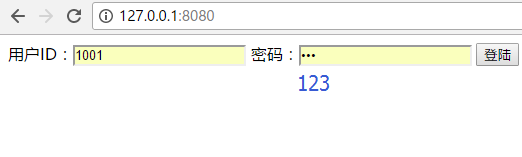
用户名 1001 密码 123
登陆后,修改密码,则看到eclipse控制台打印如下信息:
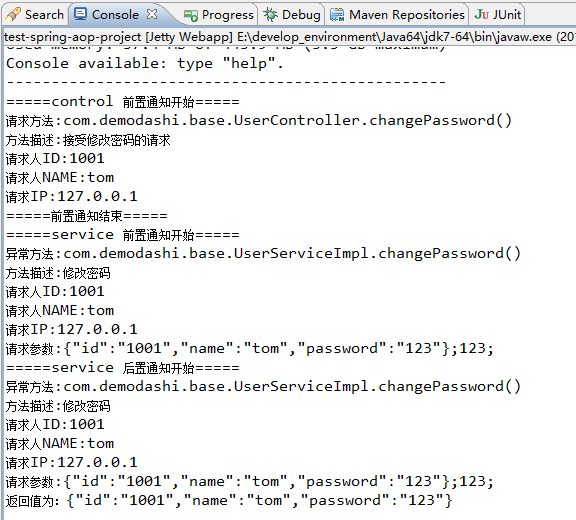
这样一个aop收集日志的功能了,这样的方式比直接把log写在具体的方法上要强多了,收集起来的log,可以直接写在本地,也可以接入elk方案。
接入elk方案可以参考本网站中的:《ELK + kafka 日志方案》
注:本文著作权归作者,由demo大师发表,拒绝转载,转载需要作者授权
spring aop实现日志收集的更多相关文章
- Spring AOP 完成日志记录
Spring AOP 完成日志记录 http://hotstrong.iteye.com/blog/1330046
- Spring AOP进行日志记录
在java开发中日志的管理有很多种.我一般会使用过滤器,或者是Spring的拦截器进行日志的处理.如果是用过滤器比较简单,只要对所有的.do提交进行拦截,然后获取action的提交路径就可以获取对每个 ...
- Spring AOP进行日志记录,管理
在java开发中日志的管理有很多种.我一般会使用过滤器,或者是Spring的拦截器进行日志的处理.如果是用过滤器比较简单,只要对所有的.do提交进行拦截,然后获取action的提交路径就可以获取对每个 ...
- TinyFrame再续篇:整合Spring AOP实现日志拦截
上一篇中主要讲解了如何使用Spring IOC实现依赖注入的.但是操作的时候,有个很明显的问题没有解决,就是日志记录问题.如果手动添加,上百个上千个操作,每个操作都要写一遍WriteLog方法,工作量 ...
- 使用Spring AOP 实现日志管理(简单教程)
有时候,我们在做项目时会遇到这样的需求: 给XXX.java中的所有方法加上指定格式的日志输出. 针对这种指定类.或者指定方法进行共性操作的功能,我们完全可以使用Spring AOP来实现. 本文使用 ...
- Spring AOP统一日志 全量日志
Spring AOP 切面@Around注解的具体使用 lichuangcsdn 2019-02-19 23:21:36 63936 收藏 61分类专栏: Spring 文章标签: Spring AO ...
- spring aop简单日志实例
转载自:http://www.blogjava.net/laoding/articles/242611.html 一直就用spring的IOC,遗憾spring的另一重要组成部分AOP却没用过,所以近 ...
- Spring AOP的日志记录
现在的项目是Spring+MyBatis,前段时间项目经理让我干了一个活,就是给所有的controller里的所有方法加上日志记录的代码,其实没有多少,也就300来个方法,也没有抱怨什么,一边打着瞌睡 ...
- spring:利用Spring AOP 使日志输入与方法分离
对方法进行日志输出是一种很常见的功能.传统的做法是把输出语句写在方法体的内部,在调用该方法时,用输入语句输出信息来记录方法的执行! 1.先写一个普通类: package com.importnew; ...
随机推荐
- IIS(互联网信息服务)
ylbtech-Miscellaneos:IIS(互联网信息服务) IIS是Internet Information Services的缩写,意为互联网信息服务,是由微软公司提供的基于运行Micros ...
- GROUP BY中ROLLUP/CUBE/GROUPING/GROUPING SETS使用示例
oracle group by中rollup和cube的区别: Oracle的GROUP BY语句除了最基本的语法外,还支持ROLLUP和CUBE语句.CUBE ROLLUP 是用于统计数据的. 实验 ...
- LeakCanary 内存泄漏 监测 性能优化 简介 原理 MD
Markdown版本笔记 我的GitHub首页 我的博客 我的微信 我的邮箱 MyAndroidBlogs baiqiantao baiqiantao bqt20094 baiqiantao@sina ...
- IT知识大扫盲
做了这么多软件开发,下列一些知识不一定都懂. 首先,说一些电子商务扫盲的名词: 常见的电子商务类型有:C2C.B2B.B2C.C2B.O2O等等,下面来简要说明下这几种类型. C2C(Customer ...
- uva 10712 - Count the Numbers(数位dp)
题目链接:uva 10712 - Count the Numbers 题目大意:给出n,a.b.问说在a到b之间有多少个n. 解题思路:数位dp.dp[i][j][x][y]表示第i位为j的时候.x是 ...
- 一次Spark应用程序参数优化案例
并行度 对于*ByKey等需要shuffle而生成的RDD,其Partition数量依如下顺序确定:1. 方法的第二个参数 > 2. spark.default.parallelism参数 &g ...
- 中文分词器ICTCLAS使用方法(Java)
http://www.cnblogs.com/CheeseZH/archive/2012/11/27/2791037.html 吃水不忘挖井人,这篇文章给了我很大帮助:http://blog.csdn ...
- NumPy与ndarray简介(转)
http://blog.csdn.net/u014374284/article/details/45420645 一.NumPy简介 NumPy的全名为Numeric Python,是一个开源的Pyt ...
- centos:时间同步
转自:https://blog.csdn.net/u011391839/article/details/62892020 Linux的时间分为System Clock(系统时间)和Real Time ...
- Java归去来第1集:手动给Eclipse配置Maven环境
一.Eclipse配置Maven 1.1.下载Maven http://maven.apache.org/download.cgi,选择对应的版本,window下载apache-maven-3.5.3 ...