
Python操作Rabbit MQ的5种模式
python版本: 2.7.14
一 消息生产者代码:
 # -*- coding: utf-8 -*-

 import json

 import pika

 import urllib

 import urllib2

 import chardet

 import sys

 import json

 from common import CommonMethod

 import pika

 import time

 HOST_NAME = "172.21.204.14"

 USER_NAME = "xxx"

 PASSWORD = "xxx"

 # 1."Hello World!"

 def hello_world():

     credentials = pika.PlainCredentials(USER_NAME, PASSWORD)

     connection = pika.BlockingConnection(pika.ConnectionParameters(HOST_NAME, 5672,'/', credentials))

     channel = connection.channel()

     channel.queue_declare(queue='hello')

     channel.basic_publish(exchange='',

                             routing_key='hello',      # specify queue  name

                             body='Hello World!')

     print(" [x] Sent 'Hello World!'")

     connection.close()

 # 2."Work queues"

 def new_task():

     credentials = pika.PlainCredentials(USER_NAME, PASSWORD)

     connection = pika.BlockingConnection(pika.ConnectionParameters(HOST_NAME, 5672,'/', credentials))

     channel = connection.channel()

     channel.queue_declare(queue='task_queue', durable=True)   # 设置队列持久化

     message = ' '.join(sys.argv[1:]) or "Hello World!"

     channel.basic_publish(exchange='',

                         routing_key='task_queue',

                         body=message,

                         properties=pika.BasicProperties(

                             delivery_mode = 2,                # 设置消息持久化

                         ))

     print(" [x] Sent %r" % message)

     connection.close()

 # 3."Publish/Subscribe"

 def emit_log(message):

     credentials = pika.PlainCredentials(USER_NAME, PASSWORD)

     connection = pika.BlockingConnection(pika.ConnectionParameters(HOST_NAME, 5672,'/', credentials))

     channel = connection.channel()

     channel.exchange_declare(exchange='logs',        # 申明logs交换机

                          exchange_type='fanout')     # 交换机类型: 发布/订阅

     channel.basic_publish(exchange='logs',

                         routing_key='',

                         body=message)

     print(" [x] Sent %r" % message)

     connection.close()

 # 4."Routing"

 def emit_log_direct(log_level,message):

     credentials = pika.PlainCredentials(USER_NAME, PASSWORD)

     connection = pika.BlockingConnection(pika.ConnectionParameters(HOST_NAME, 5672,'/', credentials))

     channel = connection.channel()

     channel.exchange_declare(exchange='direct_logs', # 申明logs交换机

                          exchange_type='direct')     # 交换机类型: 路由(Routing)

     channel.basic_publish(exchange='direct_logs',

                         routing_key=log_level,

                         body=message)

     print(" [x] Sent %r:%r" % (log_level, message))

     connection.close()

 emit_log_direct("info", "info log message:...")

 emit_log_direct("error", "error log message:...")

 # 5."Topic"

 # 与Routing模式类似,比Routing模式多了routing_key可以使用通配符"*","#"等,使用更加灵活
二 消息消费者代码:
 # -*- coding: utf-8 -*-

 import json

 import pika

 import urllib

 import urllib2

 import chardet

 import sys

 import json

 from common import CommonMethod

 import pika

 import time

 HOST_NAME = "172.21.204.14"

 USER_NAME = "xxx"

 PASSWORD = "xxx"

 # 1."Hello World!"

 def hello_world():

     credentials = pika.PlainCredentials(USER_NAME, PASSWORD)

     connection = pika.BlockingConnection(pika.ConnectionParameters(HOST_NAME, 5672,'/', credentials))

     channel = connection.channel()

     channel.queue_declare(queue='hello')

     channel.basic_publish(exchange='',

                             routing_key='hello',      # specify queue  name

                             body='Hello World!')

     print(" [x] Sent 'Hello World!'")

     connection.close()

 # 2."Work queues"

 def new_task():

     credentials = pika.PlainCredentials(USER_NAME, PASSWORD)

     connection = pika.BlockingConnection(pika.ConnectionParameters(HOST_NAME, 5672,'/', credentials))

     channel = connection.channel()

     channel.queue_declare(queue='task_queue', durable=True)   # 设置队列持久化

     message = ' '.join(sys.argv[1:]) or "Hello World!"

     channel.basic_publish(exchange='',

                         routing_key='task_queue',

                         body=message,

                         properties=pika.BasicProperties(

                             delivery_mode = 2,                # 设置消息持久化

                         ))

     print(" [x] Sent %r" % message)

     connection.close()

 # 3."Publish/Subscribe"

 def emit_log(message):

     credentials = pika.PlainCredentials(USER_NAME, PASSWORD)

     connection = pika.BlockingConnection(pika.ConnectionParameters(HOST_NAME, 5672,'/', credentials))

     channel = connection.channel()

     channel.exchange_declare(exchange='logs',        # 申明logs交换机

                          exchange_type='fanout')     # 交换机类型: 发布/订阅

     channel.basic_publish(exchange='logs',

                         routing_key='',

                         body=message)

     print(" [x] Sent %r" % message)

     connection.close()

 # 4."Routing"

 def emit_log_direct(log_level,message):

     credentials = pika.PlainCredentials(USER_NAME, PASSWORD)

     connection = pika.BlockingConnection(pika.ConnectionParameters(HOST_NAME, 5672,'/', credentials))

     channel = connection.channel()

     channel.exchange_declare(exchange='direct_logs', # 申明logs交换机

                          exchange_type='direct')     # 交换机类型: 路由(Routing)

     channel.basic_publish(exchange='direct_logs',

                         routing_key=log_level,

                         body=message)

     print(" [x] Sent %r:%r" % (log_level, message))

     connection.close()

 emit_log_direct("info", "info log message:...")

 emit_log_direct("error", "error log message:...")

 # 5."Topic"

 # 与Routing模式类似,比Routing模式多了routing_key可以使用通配符"*","#"等,使用更加灵活
三 图片
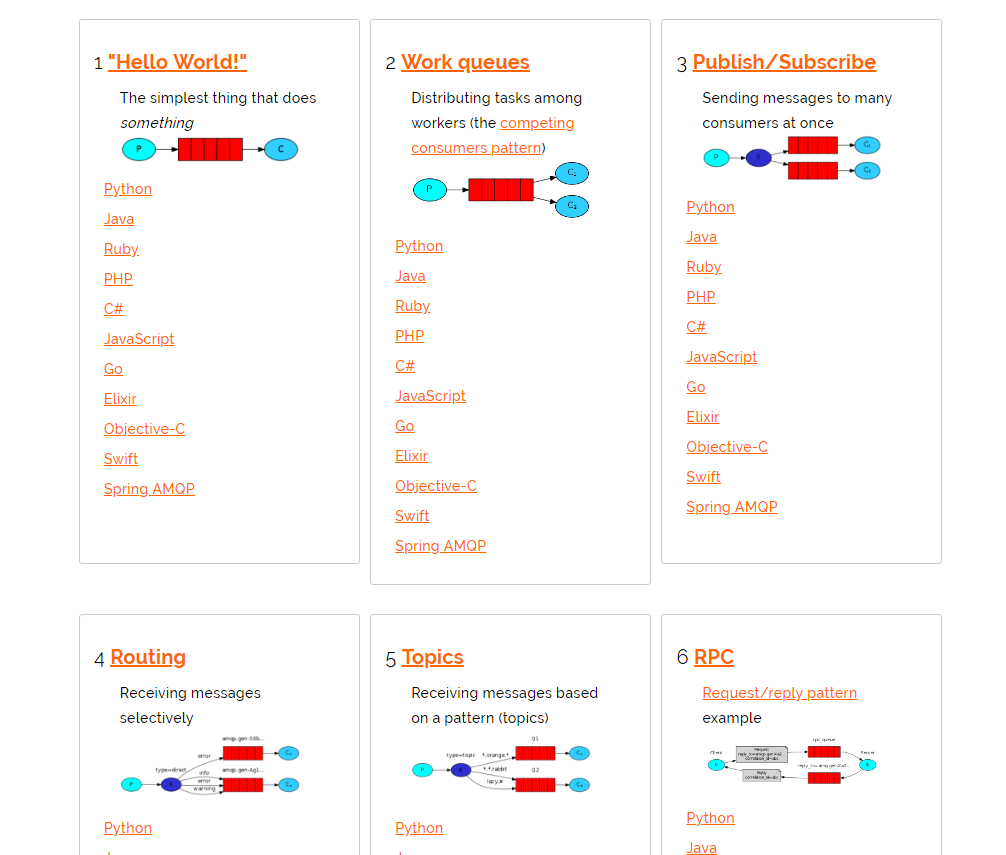
官网参考文档: http://www.rabbitmq.com/getstarted.html
Python操作Rabbit MQ的5种模式的更多相关文章
- Python操作MySQL数据库的三种方法
https://blog.csdn.net/Oscer2016/article/details/70257024 1. MySQLdb 的使用 (1) 什么是MySQLdb? MySQLdb 是用 ...
- Python操作MySQL
本篇对于Python操作MySQL主要使用两种方式: 原生模块 pymsql ORM框架 SQLAchemy pymsql pymsql是Python中操作MySQL的模块,其使用方法和MySQLdb ...
- python成长之路【第十三篇】:Python操作MySQL之pymysql
对于Python操作MySQL主要使用两种方式: 原生模块 pymsql ORM框架 SQLAchemy pymsql pymsql是Python中操作MySQL的模块,其使用方法和MySQLdb几乎 ...
- Python开发【第十九篇】:Python操作MySQL
本篇对于Python操作MySQL主要使用两种方式: 原生模块 pymsql ORM框架 SQLAchemy pymsql pymsql是Python中操作MySQL的模块,其使用方法和MySQLdb ...
- Day12(补充) Python操作MySQL
本篇对于Python操作MySQL主要使用两种方式: 原生模块 pymsql ORM框架 SQLAchemy pymsql pymsql是Python中操作MySQL的模块,其使用方法和MySQLdb ...
- Python操作SQLAchemy
如果对代码不懂就看这个:http://www.cnblogs.com/jixuege-1/p/6272888.html 本篇对于Python操作MySQL主要使用两种方式: 原生模块 pymsql O ...
- Python开发【第十一篇】:Python操作MySQL
本篇对于Python操作MySQL主要使用两种方式: 1.原生模块pymsql. 2.ORM框架SQLAchemy. pymsql pymsql是Python中操作MySQL的模块,其使用方法和MyS ...
- Python操作rabbitmq消息队列持久化
消息队列持久化 Python操作rabbit消息队列的持久化,如下: # 创建一个名为balance的队列,对queue进行durable持久化设为True(持久化第一步)channel.queue_ ...
- Python自动化开发 - Python操作MySQL
本篇对于Python操作MySQL主要使用两种方式: 原生模块 pymsql ORM框架 SQLAchemy 一.pymysql pymsql是Python中操作MySQL的模块,其使用方法和mysq ...
随机推荐
- [py][mx]xadmin注册切换主题功能和网站名称修改
注册主题 这里将基础的设置放到users模块 users/adminx.py from xadmin import views class BaseSetting(object): enable_th ...
- 十四、springboot全局处理异常(@ControllerAdvice + @ExceptionHandler)
1.@ControllerAdvice 1.场景一 在构建RestFul的今天,我们一般会限定好返回数据的格式比如: { "code": 0, "data": ...
- java map.entry
我希望要一个ArrayList<Entry>,类似C++中的pair, 但是Map.Entry是个接口,不能实例化,可以像下面这样写 HashMap<Integer, Integer ...
- vs2015 相关
VS2015一共有3个版本,Visual Studio Community(社区版).Visual Studio Professional(专业版).Visual Studio Enterprise( ...
- selenium webdriver testng自动化测试数据驱动
selenium webdriver testng自动化测试数据驱动 selenium webdriver testng自动化测试数据驱动 一.数据驱动测试概念 数据驱动测试是相同的测试脚本使用不同的 ...
- 基于GIT的管理
常用命令 git init : 初始化仓库git add 文件名 :把文件添加到暂存区git commit -m "操作记录" : 提交到仓库,设置相关操作的记录 git stat ...
- pyDay2
内容来自廖雪峰的官方网站 1.dict 为什么dict查找速度这么快?因为dict的实现原理和查字典是一样的.假设字典包含了1万个汉字,我们要查某一个字,一个办法是把字典从第一页往后翻,直到找到我们想 ...
- MHA集群(gtid复制)和vip漂移
在上一片博客中,讲述了怎么去配置MHA架构!这片博客不再细说,只说明其中MySQL主从搭建,这里使用的是gtid加上半同步复制! 步骤与上一片博客一样,不同之处在于MySQL主从的搭建!详细的gtid ...
- 利用脚本kill掉进程, 语法:运行脚本+进程名
下面附上脚本, 权限需要附X执行 #!/bin/sh #pid kill thread for chenglee #if fileformat=dos, update fileformat=unix ...
- 详解 HTML5 中的 WebSocket 及实例代码-做弹幕
原文链接:http://www.php.cn/html5-tutorial-363345.html