
Unicode Character Set and UTF-8, UTF-16, UTF-32 Encoding
在计算机内存中,统一使用unicode编码,当需要保存到硬盘或者需要传输的时候,就转换为utf-8编码。
用记事本编辑的时候,从文件读取的utf-8字符被转换为unicode字符到内存里,编码完成保存时再把unicode转换为utf-8保存到文件。
浏览网页时,服务器会把动态生成的unicode内容转换为utf-8再传输给浏览器,所以会看到许多网页的源码上会有类似<meta charset="UTF-8" />的信息,表示该网页正是用的utf-8编码。
转自:https://naveenr.net/unicode-character-set-and-utf-8-utf-16-utf-32-encoding/
ASCII
In the older days of computing, ASCII code was used to represent characters. The English language has only 26 alphabets and a few other special characters and symbols.
The table below provides the ASCII characters and their corresponding Decimal and Hex values.
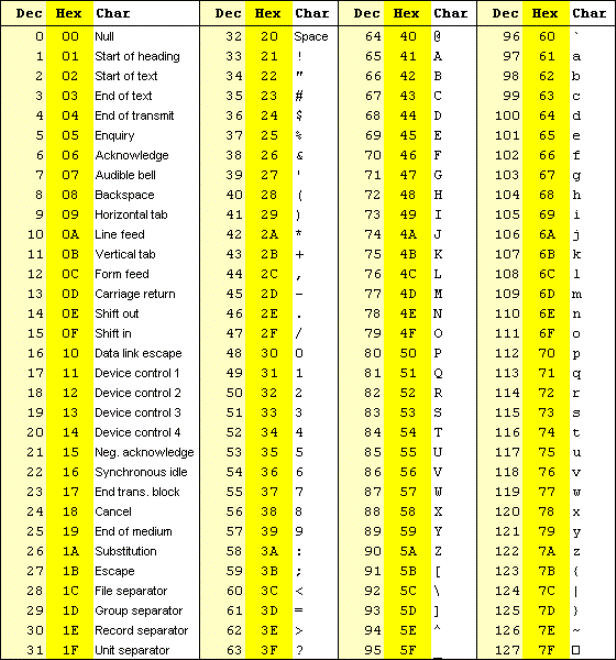
As you can infer from the above table, the ASCII values can be represented from 0 to 127 in the decimal number system. Lets look at the binary representation of 0 and 127 in 8 bit bytes.
0 is represented as
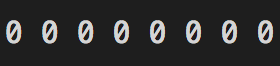
127 is represented as
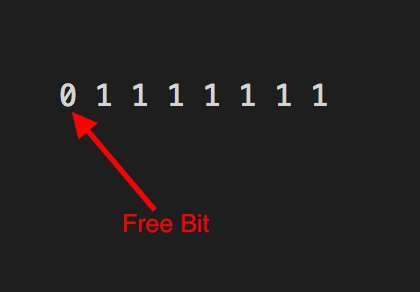
It can be inferred from the above binary representation that decimal values 0 to 127 can be represented using 7 bits leaving the 8th bit free.
This is where things started getting messy.
People came up with different ways of using the remaining eight bit which represented decimal values from 128 to 255 and collisions started to happen. For instance the decimal value 182 was used by the Vietnamese to represent the Vietnamese alphabet ờ whereas the same value 182 was used by the Indians to represent the Hindi alphabet घ. So if an email written by an Indian contains the alphabet घ and if it is read by a person in Vietnam it would appear as ờ. Cleary not the intended way to appear.
This is where Unicode character set came to save the day.
Unicode and Code Points
Unicode character set mapped each character in the world to a unique number. This ensured that there are no collisions between alphabets of different languages. These numbers are platform independent.
These unique numbers are called as code points in the unicode terminology.
Lets see how they are referred.
The latin character ṍ is referred using the code point
U+1E4D
U+ denotes unicode and 1E4D is the hexadecimal value assigned to the character ṍ
The English alphabet A is represented as U+0041
Please visit http://www.unicode.org/charts/ to know the code points for all languages and alphabets of the world
UTF-8 Encoding
Now that we know what is unicode and how each alphabet in the world is assigned to a unique code point, we need a way to represent these code points in the computer's memory. This is where character encodings come into the picture. One such encoding scheme is UTF-8.
UTF-8 encoding is a variable sized encoding scheme to represent unicode code points in memory. Variable sized encoding means the code points are represented using 1, 2, 3 or 4 bytes depending on their size.
UTF-8 1 byte encoding
A 1 byte encoding is identified by the presence of 0 in the first bit.
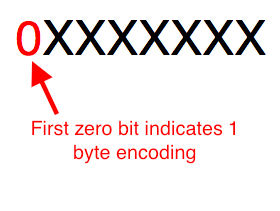
The English alphabet A has unicode code point U+0041. It's binary representation is 1000001.
A is represented in UTF-8 encoding as
01000001
The red 0 bit indicates that 1 byte encoding is used and the remaining bits represent the code point
UTF-8 2 byte encoding
The latin alphabet ñ with code point U+00F1 has binary value 11110001. This value is larger than the maximum value that can be represented using 1 byte encoding format and hence this alphabet will be represented using UTF-8 2 byte encoding.
2 byte encoding is identified by the presence of the bit sequence 110 in the first bit and 10 in the second bit.
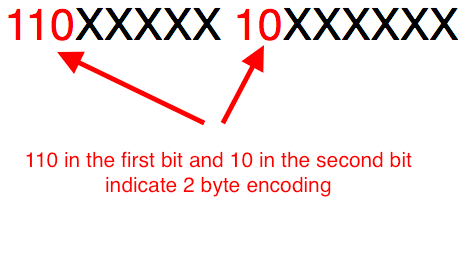
The binary value of the unicode code point U+00F1 is 1111 0001. Filling these bits in the 2 byte encoding format, we get the UTF-8 2 byte encoding representation of ñ shown below. The filling is done starting with the least significant bit of the code point being mapped to the least significant bit of the second byte.
11000011 10110001
The binary digits in blue 11110001 represent the code point U+00F1's binary value and the ones in red are the 2 byte encoding identifiers. The black coloured zeros are used to fill up the empty bits in the byte.
UTF-8 3 byte encoding
The latin character ṍ with code point U+1E4D is be represented using 3 byte encoding as it is larger than the maximum value that can be represented using 2 byte encoding.
A 3 byte encoding is identified by the presence of the bit sequence 1110 in the first byte and 10 in the second and third bytes.
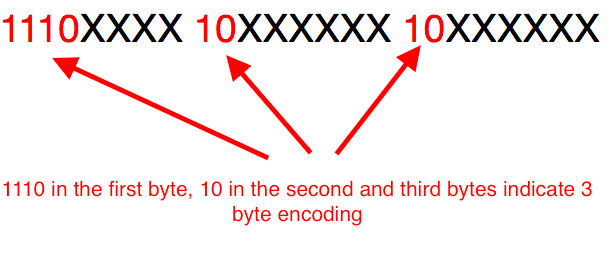
The binary value for the hex code point 0x1E4D is 1111001001101. Filling these bits in the above encoding format gives us the UTF-8 3 byte encoding representation of ṍ show below. The filling is done starting with the least significant bit of the code point mapped to the least significant of the third byte.
11100001 10111001 10001101
The red bits indicate 3 byte encoding, the black ones are filler bits and the blues represent the code point.
UTF-8 4 byte encoding
The Emoji
Unicode Character Set and UTF-8, UTF-16, UTF-32 Encoding的更多相关文章
- Unicode Character Table – Unicode 字符大全
Unicode(统一码.万国码.单一码)是一种在计算机上使用的字符编码.它为每种语言中的每个字符设定了统一并且唯一的二进制编码,以满足跨语言.跨平台进行文本转换.处理的要求.Unicode Chara ...
- nginx启动报错(1113: No mapping for the Unicode character exists in the target multi-byte code page)
使用windows版本的nginx启动时遇到(1113: No mapping for the Unicode character exists in the target multi-byte co ...
- failed (1113: No mapping for the Unicode character exists in the target multi-byte code page), client: 127.0.0.1...
nginx部署网站后,访问域名,网页显示 500 Internal Server Error ,经查看发现nginx的error.log中有报错: failed (1113: No mapping ...
- nginx 启动报错 1113: No mapping for the Unicode character exists in the target multi-byte code
failed (1113: No mapping for the Unicode character exists in the target multi-byte code page) 因为路径有中 ...
- Windows版Nginx启动失败之1113: No mapping for the Unicode character exists in the target multi-byte code page
Windows版Nginx启动一闪,进程中未发现nginx进程,查看nginx日志,提示错误为1113: No mapping for the Unicode character exists in ...
- Ansi、GB2312、GBK、Unicode(utf8、16、32)
关于ansi,一般默认为本地编码方式,中文应该是gb编码 他们之间的关系在这边文章里描写的很清楚:http://blog.csdn.net/ldanduo/article/details/820353 ...
- IIS7的FTP出错: 451 No mapping for the unicode character exists in the target multi-byte code page
提示:IIS7的FTP出错: 451 No mapping for the unicode character exists in the target multi-byte code page 今天 ...
- Multi-Byte Character Set & Unicode Character Set
本系列文章由 @YhL_Leo 出品,转载请注明出处. 文章链接: http://blog.csdn.net/yhl_leo/article/details/49592361 编程时遇到BUG:err ...
- 外设位宽为8、16、32时,CPU与外设之间地址线的连接方法
有不少人问到:flash连接CPU时,根据不同的数据宽度,比如16位的NOR FLASH (A0-A19),处理器的地址线要(A1-A20)左移偏1位.为什么要偏1位? (全文有点晦涩,建议收藏本文对 ...
随机推荐
- FreeSWITCH协议参数之自定义sip header
一.主动发送 1. 加入sip_h_前缀 这样FreeSWITCH就能自动加上后面的扩展头. 2. 示例 <action application="set" data=&qu ...
- C++中的#和##运算符
#和##运算符 #:构串操作符 构串操作符#只能修饰带参数的宏的形参,它将实参的字符序列(而不是实参代表的值)转换成字符串常量 #define STRING(x) #x#x#x #define TEX ...
- Scipy:高端科学计算
转 :https://blog.csdn.net/lwfcgz/article/details/23290623 Scipy scipy包包含致力于科学计算中常见问题的各个工具箱.它的不同子模块相应于 ...
- Koa 框架 的错误处理
默认情况下Koa会将所有错误信息输出到 stderr,除非 NODE_ENV 是 "test".为了实现自定义错误处理逻辑(比如 centralized logging),您可以添 ...
- vs 2017打包安装包(印象深刻)
Visual Studio Install 打包安装项目2017 以下是具体步骤 一.安装环境 1.下载:链接地址 2.安装vs2017的时候需要安装依赖 .NET framework 4.6 .下载 ...
- msf web_delivery模块攻击
目标机:win7 ip:192.168.31.136 攻击机:kai liunx ip:192.168.31.54 一. ...
- Mongo如何导出 CSV文件
mongoexport /h localhost /port 37189 /u aa /p aa /authenticationDatabase admin /d testdb /c usertag ...
- php分享十五:php的数据库操作
一:术语解释: What is an Extension? API和扩展不能理解为一个东西,因为扩展不一定暴露一个api给用户 The PDO MySQL driver extension, for ...
- 用“网建”平台发手机短信的C#代码
一直都用这个平台发手机短信的,今天做新项目的时候用到了,但是上来博客搜索不到,只好翻以前的源代码翻了好久才找到了,先记下来,以作备用: using System; using System.Colle ...
- Android Lock Pattern 图案解锁
参考链接:http://www.cnblogs.com/dyingbleed/archive/2012/12/03/2800007.html http://blog.csdn.net/way_ping ...