
iview,用render函数渲染
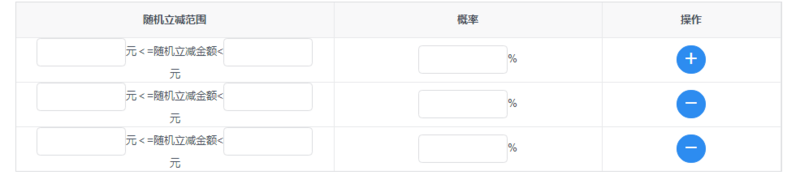
<Table border :columns="discountColumns" :data="discountData.rows"></Table>

     discountData: {

                    total: 1, rows: [

                        {

                            randomDiscountRangeMax: '',

                            randomDiscountRangeMin: '',

                            population: ''

                        },

                    ],

                    defaultRows:

                        {

                            randomDiscountRangeMax: '',

                            randomDiscountRangeMin: '',

                            population: ''

                        },

                }

    discountColumns: [

                    {

                        key: 'randomDiscountRange',

                        align: 'center',

                        title: '随机立减范围',

                        render: (h, params) => {

                            var me = this

                            return h('div', [h('Input', {

                                props: {

                                    type: 'text',

                                    value: me.discountData.rows[params.index].randomDiscountRangeMin,

                                    disabled: this.getIsDetail(),

                                },

                                style: {

                                    width: '100px'

                                },

                                on: {

                                    'on-blur': (event) => {

                                        me.discountData.rows[params.index].randomDiscountRangeMin = event.target.value

                                    }

                                }

                            }),

                                h('span', '元<=随机立减金额<'),

                                h('Input', {

                                    props: {

                                        type: 'text',

                                        value: me.discountData.rows[params.index].randomDiscountRangeMax,

                                        disabled: this.getIsDetail(),

                                    },

                                    style: {

                                        width: '100px'

                                    },

                                    on: {

                                        'on-blur': (event) => {

                                            this.discountData.rows[params.index].randomDiscountRangeMax = event.target.value

                                        }

                                    }

                                }),

                                h('span', '元')])

                        }

                    },

                    {

                        key: 'population',

                        align: 'center',

                        title: '概率',

                        width: 300,

                        render: (h, params) => {

                            var me = this

                            return h('div', [h('Input', {

                                props: {

                                    type: 'text',

                                    value: me.discountData.rows[params.index].population,

                                    disabled: this.getIsDetail(),

                                },

                                style: {

                                    width: '100px'

                                },

                                on: {

                                    'on-blur': (event) => {

                                        this.discountData.rows[params.index].population = event.target.value

                                    }

                                }

                            }), h('span', '%')])

                        }

                    }, {

                        key: 'operation',

                        align: 'center',

                        title: '操作',

                        width: 200,

                        render: (h, params) => {

                            return h('div', [

                                h('Button', {

                                    props: {

                                        type: 'primary',

                                        shape: 'circle',

                                        icon: 'plus',

                                        disabled: this.getIsDetail(),

                                    },

                                    style: {

                                        display: params.index !== 0 ? 'none' : 'inline'

                                    },

                                    on: {

                                        click: () => {

                                            this.add('discountData')

                                        }

                                    }

                                }), h('Button', {

                                    props: {

                                        type: 'primary',

                                        shape: 'circle',

                                        icon: 'minus',

                                        disabled: this.getIsDetail(),

                                    },

                                    style: {

                                        display: params.index === 0 ? 'none' : 'inline'

                                    },

                                    on: {

                                        click: () => {

                                            this.remove(params.index, 'discountData')

                                        }

                                    }

                                })

                            ])

                        }

                    }

                ]

 add (dataName) {

                var obj = JSON.parse(JSON.stringify(this[dataName].defaultRows))

                this[dataName].rows.push(obj)

            }

 remove (index, value) {

                this[value].rows.splice(index, 1)

           }
iview,用render函数渲染的更多相关文章
- render 函数渲染表格的当前数据列使用
columns7: [ { title: '编号', align: 'center', width: 90, key: 'No', render: (h, params) => { return ...
- 使用render函数渲染组件
使用render函数渲染组件:https://www.jianshu.com/p/27ec4467a66b
- iview的render函数使用
render渲染函数详解 https://www.cnblogs.com/weichen913/p/9676210.html iview表格的render函数作用是自定义渲染当前列,权限高于key,所 ...
- iview中render函数监听事件
iview的table中添加datepicker在组件中嵌套组件,如果需要监听子组件的自定义事件,应该使用render中的on:{ 'on-change' () => { console.log ...
- 在vue中结合render函数渲染指定的组件到容器中
1.demo 项目结构: index.html <!DOCTYPE html> <html> <head> <title>标题</title> ...
- [转]iview的render函数用法
原文地址:https://www.jianshu.com/p/f593cbc56e1d 一.使用html的标签(例如div.p) 原生标签用法 二.使用iview的标签(例如Button) iview ...
- [转]iview render函数常用总结(vue render函数)
原文地址:https://blog.csdn.net/weixin_43206949/article/details/89385550 iview 的render函数就是vue的render函数ivi ...
- iview table表中使用render函数props传值出现问题
使用iview中的table表格时避免不了使用render函数渲染自定义内容,或者渲染组件.但是在正常使用时出现了props传值无法识别, 按照官网介绍使用props如下: render: (h, p ...
- iview使用之怎样通过render函数在table组件表头添加图标及判断多个状态
在实际项目开发中,我们经常会用到各种各样的表格,比如在表格中填加下拉菜单,按钮,图标及可以根据状态显示对应文字等等,因为这段时间一直在做后台管理系统,所以表格用的就比较多,当然UI组件库我用的是ivi ...
随机推荐
- 解决apache上访问 cgi脚本时总是在网页中显示出脚本的源代码而不是执行结果的问题
apache是支持cgi脚本的,但是需要保证四个条件: 1.放置cgi脚本的文件夹本身需要对apache服务器这个用户(一般默认用户名是www,linux下的用户机制请自行百度)开放x(即可执行)权限 ...
- BZOJ4042 : [Cerc2014] parades
设f[x]为x子树里能选的最多的路径数,h[x]为x子树里往上走的点的集合,且不与x子树内的最优解冲突 首先f[x]=sum(f[son]) 若h[son]与x可以直接匹配,则匹配上,f[x]++ 然 ...
- request.getRequestDispatcher("").forward()中文乱码
即使jsp页面的编码已设为“UTF-8”,有中文的地方还是会出现乱码,但是用response.sendRedirect不会出现此问题. 解决方案一: 不使用PrintWriter out=respon ...
- .yaml 文件格式简介
命名 YAML 的意思其实是:"Yet Another Markup Language"(仍是一种置标语言)的缩写. 功能 YAML的语法和其他高阶语言类似,并且可以简单表达清单. ...
- C#轻量级高性能日志组件EasyLogger
一.课程介绍 本次分享课程属于<C#高级编程实战技能开发宝典课程系列>中的第六部分,阿笨后续会计划将实际项目中的一些比较实用的关于C#高级编程的技巧分享出来给大家进行学习,不断的收集.整理 ...
- tomcat内存溢出设置JAVA_OPTS
答案1设置Tomcat启动的初始内存其初始空间(即-Xms)是物理内存的1/64,最大空间(-Xmx)是物理内存的1/4.可以利用JVM提供的-Xmn -Xms -Xmx等选项可进行设置三.实例,以 ...
- ASIHttpRequest release 包无法发出请求
ASIHttpRequest 在 Release 模式下,Optimize 后会导致发不出请求. 解决方案: 去掉这两个文件的 Optimization:ASIFormDataRequest.m AS ...
- iOS用全局宏的概念理解xcode中的设置 preprocessor macros
ios有没有全局宏,或者在工程属性里设置宏? 比如我设置了一个宏叫IOS, 在所有/整个工程的代码里这个宏都是有效的. ------解决方案-------------------- 在工程的设置属性里 ...
- 下载java生成PDF
/** * 下载打印PDF * @param request * @param response * @throws ServletException * @throws IOException * ...
- 国家code和区号计算
因为项目中要用到这个功能.实现类似微信注冊时能够选择国家并得到对应的区号.还要推断号码正确与否的正则. 找到了 libPhoneNumber-iOS 标准化电话号码库 https://github.c ...