
iview,用render函数渲染
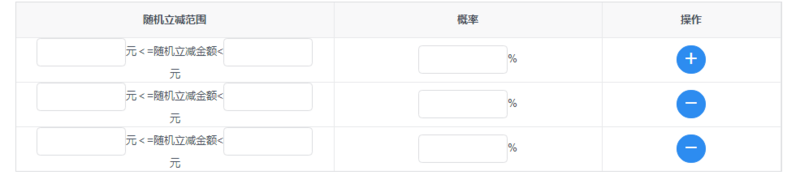
<Table border :columns="discountColumns" :data="discountData.rows"></Table>

     discountData: {

                    total: 1, rows: [

                        {

                            randomDiscountRangeMax: '',

                            randomDiscountRangeMin: '',

                            population: ''

                        },

                    ],

                    defaultRows:

                        {

                            randomDiscountRangeMax: '',

                            randomDiscountRangeMin: '',

                            population: ''

                        },

                }

    discountColumns: [

                    {

                        key: 'randomDiscountRange',

                        align: 'center',

                        title: '随机立减范围',

                        render: (h, params) => {

                            var me = this

                            return h('div', [h('Input', {

                                props: {

                                    type: 'text',

                                    value: me.discountData.rows[params.index].randomDiscountRangeMin,

                                    disabled: this.getIsDetail(),

                                },

                                style: {

                                    width: '100px'

                                },

                                on: {

                                    'on-blur': (event) => {

                                        me.discountData.rows[params.index].randomDiscountRangeMin = event.target.value

                                    }

                                }

                            }),

                                h('span', '元<=随机立减金额<'),

                                h('Input', {

                                    props: {

                                        type: 'text',

                                        value: me.discountData.rows[params.index].randomDiscountRangeMax,

                                        disabled: this.getIsDetail(),

                                    },

                                    style: {

                                        width: '100px'

                                    },

                                    on: {

                                        'on-blur': (event) => {

                                            this.discountData.rows[params.index].randomDiscountRangeMax = event.target.value

                                        }

                                    }

                                }),

                                h('span', '元')])

                        }

                    },

                    {

                        key: 'population',

                        align: 'center',

                        title: '概率',

                        width: 300,

                        render: (h, params) => {

                            var me = this

                            return h('div', [h('Input', {

                                props: {

                                    type: 'text',

                                    value: me.discountData.rows[params.index].population,

                                    disabled: this.getIsDetail(),

                                },

                                style: {

                                    width: '100px'

                                },

                                on: {

                                    'on-blur': (event) => {

                                        this.discountData.rows[params.index].population = event.target.value

                                    }

                                }

                            }), h('span', '%')])

                        }

                    }, {

                        key: 'operation',

                        align: 'center',

                        title: '操作',

                        width: 200,

                        render: (h, params) => {

                            return h('div', [

                                h('Button', {

                                    props: {

                                        type: 'primary',

                                        shape: 'circle',

                                        icon: 'plus',

                                        disabled: this.getIsDetail(),

                                    },

                                    style: {

                                        display: params.index !== 0 ? 'none' : 'inline'

                                    },

                                    on: {

                                        click: () => {

                                            this.add('discountData')

                                        }

                                    }

                                }), h('Button', {

                                    props: {

                                        type: 'primary',

                                        shape: 'circle',

                                        icon: 'minus',

                                        disabled: this.getIsDetail(),

                                    },

                                    style: {

                                        display: params.index === 0 ? 'none' : 'inline'

                                    },

                                    on: {

                                        click: () => {

                                            this.remove(params.index, 'discountData')

                                        }

                                    }

                                })

                            ])

                        }

                    }

                ]

 add (dataName) {

                var obj = JSON.parse(JSON.stringify(this[dataName].defaultRows))

                this[dataName].rows.push(obj)

            }

 remove (index, value) {

                this[value].rows.splice(index, 1)

           }
iview,用render函数渲染的更多相关文章
- render 函数渲染表格的当前数据列使用
columns7: [ { title: '编号', align: 'center', width: 90, key: 'No', render: (h, params) => { return ...
- 使用render函数渲染组件
使用render函数渲染组件:https://www.jianshu.com/p/27ec4467a66b
- iview的render函数使用
render渲染函数详解 https://www.cnblogs.com/weichen913/p/9676210.html iview表格的render函数作用是自定义渲染当前列,权限高于key,所 ...
- iview中render函数监听事件
iview的table中添加datepicker在组件中嵌套组件,如果需要监听子组件的自定义事件,应该使用render中的on:{ 'on-change' () => { console.log ...
- 在vue中结合render函数渲染指定的组件到容器中
1.demo 项目结构: index.html <!DOCTYPE html> <html> <head> <title>标题</title> ...
- [转]iview的render函数用法
原文地址:https://www.jianshu.com/p/f593cbc56e1d 一.使用html的标签(例如div.p) 原生标签用法 二.使用iview的标签(例如Button) iview ...
- [转]iview render函数常用总结(vue render函数)
原文地址:https://blog.csdn.net/weixin_43206949/article/details/89385550 iview 的render函数就是vue的render函数ivi ...
- iview table表中使用render函数props传值出现问题
使用iview中的table表格时避免不了使用render函数渲染自定义内容,或者渲染组件.但是在正常使用时出现了props传值无法识别, 按照官网介绍使用props如下: render: (h, p ...
- iview使用之怎样通过render函数在table组件表头添加图标及判断多个状态
在实际项目开发中,我们经常会用到各种各样的表格,比如在表格中填加下拉菜单,按钮,图标及可以根据状态显示对应文字等等,因为这段时间一直在做后台管理系统,所以表格用的就比较多,当然UI组件库我用的是ivi ...
随机推荐
- jquery 下拉列表选择值
选择下拉列表值样例方式 $("#updateAppName").get(0).selectedIndex = 0; $("#updateAppName").ge ...
- Codeforces Round #501 (Div. 3) F. Bracket Substring
题目链接 Codeforces Round #501 (Div. 3) F. Bracket Substring 题解 官方题解 http://codeforces.com/blog/entry/60 ...
- [CEOI2018]Global warming
[CEOI2018]Global warming 题目大意: 给定\(n(n\le2\times10^5)\),你可以将任意\(a_{l\sim r}(1\le l\le r\le n)\)每一个元素 ...
- HTML5 的新特性以及新标签的浏览器兼容问题
新特性: HTML5 现在已经不是 SGML 的子集,主要是关于图像,位置,存储,多任务等功能的增加. 1) 拖拽释放(Drag and drop) API 2) 语义化更好的内容标签(heade ...
- Codeforces Round #396 (Div. 2) C. Mahmoud and a Message dp
C. Mahmoud and a Message 题目连接: http://codeforces.com/contest/766/problem/C Description Mahmoud wrote ...
- 浅谈web缓存(转)
这是一篇知识性的文档,主要目的是为了让Web缓存相关概念更容易被开发者理解并应用于实际的应用环境中.为了简要起见,某些实现方面的细节被简化或省略了.如果你更关心细节实现则完全不必耐心看完本文,后面参考 ...
- j.u.c系列(10)---之并发工具类:Semaphore
写在前面 Semaphore是一个计数信号量,它的本质是一个"共享锁". 信号量维护了一个信号量许可集.线程可以通过调用acquire()来获取信号量的许可:当信号量中有可用的许可 ...
- logstash grok 分割匹配日志
使用logstash的时候,为了更细致的切割日志,会写一些正则表达式. 使用方法 input { file { type => "billin" path => &qu ...
- 【优化】COUNT(1)、COUNT(*)、COUNT(常量)、COUNT(主键)、COUNT(ROWID)等
http://blog.itpub.net/26736162/viewspace-2136339/
- 为在Windows Azure上的网站配置自定义域名
本篇体验给Windows Azure上的网站自定义域名,首先"CNAME"和"A记录"是必须了解的概念. 假设,在Windows Azure上的网站域名是:x. ...