
用css3和jQuery制作精美的表单
用css3和jQuery制作一个简单的精美表单
html代码如下:
<span class="title">Mask Your Input Forms and Make It Beauty</span> <br/><br/> <div id="container"> <p class="separator"><br/></p> <p class="small-title">Too Plain</p> <input class="too-plain" value="Enter your email here" /> <p class="separator"><br/></p> <p class="small-title">Fading The Label</p> <form> <label class="username-label" for="username">Username</label> <input type="text" name="username" class="username" /> <label class="password-label" for="password">Password</label> <input type="password" name="password" class="password" /> </form> <p class="separator"><br/></p> <p class="small-title">Sliding? Don't Worry</p> <form> <label class="username-label-sliding" for="username-sliding">Username</label> <input type="text" name="username" class="username-sliding" /> <label class="password-label-sliding" for="password-sliding">Password</label> <input type="password" name="password" class="password-sliding" /> </form> <p class="separator"><br/></p> </div>
css代码如下:
* { margin:0; padding:0; } body { text-align:center; font-family:Georgia, "Times New Roman", Times, serif; font-size:13px; line-height:1.5em; margin-top:8%; background:#eaeaea; } input { padding:7px; border:5px solid #e0e0e0; -webkit-border-radius:20px; border-radius:20px; -moz-border-radius:20px; } input:focus { outline:none; } #container { text-align:left; width:700px; margin-left:auto; margin-right:auto; } .separator { border-bottom:1px dashed #ccc; margin-bottom:3px; } .title { font-size:30px; margin-bottom:1.5em; font-weight:bold; font-style:italic; text-shadow:0 2px 0 #fff; } .small-title { font-size:20px; margin-bottom:0.5em; font-weight:bold; font-style:italic; text-shadow:0 2px 0 #fff; } .username-label, .password-label, .username-label-sliding, .password-label-sliding { position:absolute; margin:9px 9px 9px 12px; } .username-sliding, .password-sliding { width:150px; } a, a:visited, a:hover { text-decoration: none; color: #000; }
jQuery代码如下:
$(document).ready(function(){ $('.too-plain').focus(function(){ if($(this).val()=="Enter your email here") {$(this).val("");} }).blur(function(){ if($(this).val()=="") { $(this).val('Enter your email here'); } }); $(".username-label,.password-label").animate({ opacity: "0.4" }).click(function(){ var thisFor=$(this).attr("for"); $('.'+thisFor).focus(); }) $(".username").focus(function(){ $(".username-label").animate({opacity:"0"},"fast"); if($(this).val()=="username") { $(this).val()==""; } }).blur(function(){ if($(this).val()=="") { $(this).val()=="username"; $(".username-label").animate({opacity:"0.4"},"fast"); } }) $('.password').focus(function(){ $(".password-label").animate({opacity:"0"},"fast"); if($(this).val()=="password"){ $(this).val()==""; } }).blur(function(){ if($(this).val()=="") { $(this).val()=="password"; $('.password-label').animate({opacity:"0.4"},"fast"); } }); $('.username-label-sliding,.password-label-sliding').animate({opacity:"0.4"}).click(function(){ var thisFor=$(this).attr('for') $('.'+thisFor).focus(); }) $('.username-sliding').focus(function() { $('.username-label-sliding').animate({ marginLeft: "7em" }, "fast"); if($(this).val() == "username") $(this).val() == ""; }).blur(function() { if($(this).val() == "") { $(this).val() == "username"; $('.username-label-sliding').animate({ marginLeft: "12px" }, "fast"); } }); $('.password-sliding').focus(function() { $('.password-label-sliding').animate({ marginLeft: "7em" }, "fast"); if($(this).val() == "password") { $(this).val() == ""; } }).blur(function() { if($(this).val() == "") { $(this).val() == "password"; $('.password-label-sliding').animate({ marginLeft: "12px" }, "fast"); } }); })
在firefox3.6,ie9,chrome中预览效果下图:
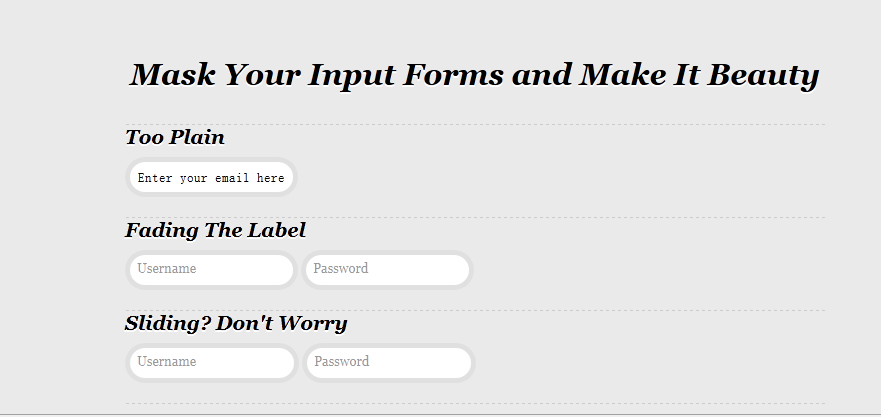
在ie7/8中预览效果如下图:

用css3和jQuery制作精美的表单的更多相关文章
- CSS3制作分步注册表单
这个DEMO是使用CSS3制作的一个分步注册表单,每个input对应的是每一步,在表单得到焦点时,对应的step也会进行对应的改变.不过这个效果是使用js代码来实现,但整个表单的外观是由CSS3来完成 ...
- jquery通过class验证表单不能为空
在开发系统时,往往都有某些表单数据为必填项,若用jQuery通过ID去验证,不仅会影响效率,还会有所遗漏,不易于后期维护. 本章将介绍如何利用jQuery,通过为表单配置class进行统一验证.(ID ...
- 运用jQuery写的验证表单
//运用jQuery写的验证表单 <!DOCTYPE html PUBLIC "-//W3C//DTD XHTML 1.0 Transitional//EN" "h ...
- jquery.form.js 让表单提交更优雅
jquery.form.js 让表单提交更优雅.可以页面不刷新提交表单,比jQuery的ajax提交要功能强大. 1.引入 <script src="/src/jquery-1.9.1 ...
- 基于jQuery商品分类选择提交表单代码
分享一款基于jQuery商品分类选择提交表单代码.这是一款基于jQuery实现的商品信息选择列表表单提交代码. 在线预览 源码下载 实现的代码: <div class="yList ...
- 一款纯css3实现的超炫3D表单
今天要给大家分享一款纯css3实现的超炫3D表单.该特效页面的加载的时候3d四十五度倾斜,当鼠标经过的时候表单动画回正.效果非常炫,一起看下效果图: 在线预览 源码下载 实现的代码. html代码 ...
- 第二百二十一节,jQuery EasyUI,Form(表单)组件
jQuery EasyUI,Form(表单)组件 学习要点: 1.加载方式 2.属性列表 3.事件列表 4.方法列表 本节课重点了解 EasyUI 中 Form(表单)组件的使用方法,这个组件不依赖于 ...
- Jquery来对form表单提交(mvc方案)
来自:http://www.cnblogs.com/lmfeng/archive/2011/06/18/2084325.html 我先说明一下,这是asp.net mvc 里面的用法, Jquery来 ...
- jquery.validate.js 验证表单时,在IE当中未验证就直接提交的原因
jquery.validate.js 验证表单时,在IE当中未验证就直接提交的原因 今天利用了jquery.validate.js来验证表单,发现在火狐.谷歌浏览器当中都可以进行验证,但是在IE系列浏 ...
随机推荐
- KVM和QEMU简介
KVM/QEMU简介 KVM虚拟机是基于linux内核虚拟化,自linux2.6.20之后就集成在linux的各个主要发行版本中.它使用linux自身的调度器进行管理,所以相对于xen,其核心源码很少 ...
- SecureCRT发送心跳机制保持SSH在线(解决阿里云ECS)
设置如下:
- Redis使用小结
Redis官方没有windows版本的,对于Windows环境的redis,有如下两个方案 微软的移植版本,但只支持到3.2 下载地址 win10及以上的版本直接通过win10的liunx子系统执行 ...
- 记录Linux启动流程的工具bootchart
/********************************************************************* * Author : Samson * Date ...
- Revit API修改链接文件房间边界
start [Transaction(TransactionMode.Manual)] [Regeneration(RegenerationOption.Manual)] );//设置房间边界 ...
- [Git]git教程
摘要 目前公司项目逐渐都要迁移到git上,使用git进行版本控制及源代码管理. git学习资料 一个小时学会Git 权威Git书籍ProGit(中文版) git官网:http://git-scm.co ...
- url提交参数类
url提交参数类 type /// <summary> /// 准备url /// </summary> TynUrl = class private FUrl, FComma ...
- firedac连接WINDOWS的ORACLE
firedac连接WINDOWS的ORACLE 首先安装OCI FOR WINDOWS.OCI分WIN32和WIN64,且OCI的版本要和ORACLE的版本相一致才行. FIREDAC指定OCI驱动程 ...
- ASIHttpRequest release 包无法发出请求
ASIHttpRequest 在 Release 模式下,Optimize 后会导致发不出请求. 解决方案: 去掉这两个文件的 Optimization:ASIFormDataRequest.m AS ...
- WordPress主题开发:WP_Query基本用法
为什么要学WP_Query? wordpress默认会根据网址调用数据,不能满足我们所有建站要求,而WP_Query可以用于查询任何你想要的内容,相当于自定义数据调用. 便于记忆,在讲用法之前我们回顾 ...