
SpringBoot2 上传文件 上传多文件
项目结构:
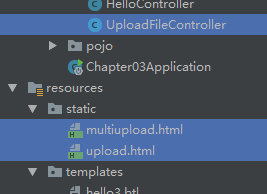
1、单文件上传
upload.html
<!DOCTYPE html>

<html lang="en">

<head>

    <meta charset="UTF-8">

    <title>upload file</title>

</head>

<body>

    <form action="/uploadfile/upload" method="post" enctype="multipart/form-data">

        <input type="file" name="file">

        <input type="submit" value="上传">

    </form>

</body>

</html>
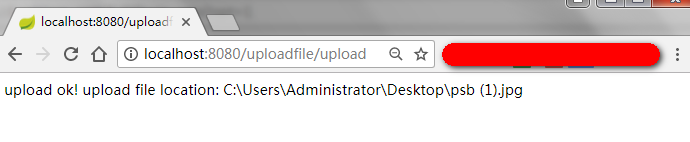
http://localhost:8080/uploadfile/upload
package com.archibladwitwicke.springboot2.chapter03.controller;

import org.springframework.stereotype.Controller;

import org.springframework.web.bind.annotation.PostMapping;

import org.springframework.web.bind.annotation.RequestMapping;

import org.springframework.web.bind.annotation.ResponseBody;

import org.springframework.web.multipart.MultipartFile;

import java.io.File;

@Controller

@RequestMapping("/uploadfile")

public class UploadFileController {

    @RequestMapping("/upload")

    public String upload() {

        return "/upload.html";

    }

    @PostMapping("/upload")

    @ResponseBody

    public String upload(MultipartFile file) {

        if (file.isEmpty()) {

            return "file is null";

        }

        String originFileName = file.getOriginalFilename();

        String destFileLocation = "C:\\Users\\Administrator\\Desktop\\" + originFileName;

        File destFile = new File(destFileLocation);

        try {

            file.transferTo(destFile);

            return "upload ok! upload file location: " + destFileLocation;

        } catch (Exception ex) {

            return "upload false! reason: " + ex.getMessage();

        }

    }

    @RequestMapping("/uploads")

    public String uploads() {

        return "/multiupload.html";

    }

}
2、多文件上传
multiupload.html
<!DOCTYPE html>

<html lang="en">

<head>

    <meta charset="UTF-8">

    <title>upload file</title>

</head>

<body>

    <form action="/uploadfile/uploads" method="post" enctype="multipart/form-data">

        <input type="file" name="files"><br/>

        <input type="file" name="files"><br/>

        <input type="file" name="files"><br/>

        <input type="submit" value="上传">

    </form>

</body>

</html>
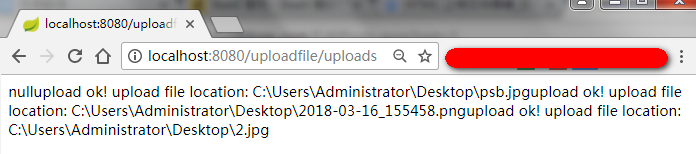
http://localhost:8080/uploadfile/uploads
package com.archibladwitwicke.springboot2.chapter03.controller;

import org.springframework.stereotype.Controller;

import org.springframework.web.bind.annotation.PostMapping;

import org.springframework.web.bind.annotation.RequestMapping;

import org.springframework.web.bind.annotation.ResponseBody;

import org.springframework.web.multipart.MultipartFile;

import java.io.File;

@Controller

@RequestMapping("/uploadfile")

public class UploadFileController {

    @RequestMapping("/uploads")

    public String uploads() {

        return "/multiupload.html";

    }

    @PostMapping("/uploads")

    @ResponseBody

    public String uploads(MultipartFile[] files) {

        String result = null;

        if (files.length == 0) {

            return "file is null";

        }

        for (MultipartFile file : files) {

            String originFileName = file.getOriginalFilename();

            String destFileLocation = "C:\\Users\\Administrator\\Desktop\\" + originFileName;

            File destFile = new File(destFileLocation);

            try {

                file.transferTo(destFile);

                result += "upload ok! upload file location: " + destFileLocation;

            } catch (Exception ex) {

                result = "upload false! reason: " + ex.getMessage();

            }

        }

        return result;

    }

}
SpringBoot2 上传文件 上传多文件的更多相关文章
- SpringBoot2.0 基础案例(14):基于Yml配置方式,实现文件上传逻辑
本文源码 GitHub地址:知了一笑 https://github.com/cicadasmile/spring-boot-base 一.文件上传 文件上传是项目开发中一个很常用的功能,常见的如头像上 ...
- SpringBoot1.x升级SpringBoot2.x踩坑之文件上传大小限制
SpringBoot1.x升级SpringBoot2.x踩坑之文件上传大小限制 前言 LZ最近升级SpringBoo框架到2.1.6,踩了一些坑,这里介绍的是文件上传大小限制. 升级前 #文件上传配置 ...
- SpringBoot2.0(三) 文件上传
SpringBoot中发起文件上传示例: /** * 文件上传 * @param multipartFile * @param path * @return */ @RequestMapping(va ...
- SpringBoot2.x设置文件上传文件的大小
The field file exceeds its maximum permitted size of 1048576 bytes spring: # 设置文件上传文件大小 servlet: mul ...
- springboot解决文件上传大小限制
(1)在配置文件(application.properties)加入如下代码 springboot2.0以下配置为: spring.http.multipart.maxFileSize = 10Mb ...
- 使用java的MultipartFile实现layui官网文件上传实现全部示例,java文件上传
layui(谐音:类UI) 是一款采用自身模块规范编写的前端 UI 框架,遵循原生 HTML/CSS/JS 的书写与组织形式,门槛极低,拿来即用. layui文件上传示例地址:https://www. ...
- SpringBoot整合WEB开发--(三)文件上传
文件上传: Java中文件上传一共涉及到两个组件,CommonsMultipartResolver和StandardServletMultipartResolver,其中CommonsMultipar ...
- 【SpringBoot】07.SpringBoot文件上传
SpringBoot文件上传 1.编写html文件在classpath下的static中 <!DOCTYPE html> <html> <head> <met ...
- 十三:SpringBoot-基于Yml配置方式,实现文件上传逻辑
SpringBoot-基于Yml配置方式,实现文件上传逻辑 1.文件上传 2.搭建文件上传界面 2.1 引入页面模板Jar包 2.2 编写简单的上传页面 2.3 配置页面入口 3.SpringBoot ...
随机推荐
- centos 6.3 64位下cpuminer +mining_proxy 挖掘莱特币(LTC)教程
1.下载软件: cpuminer: http://sourceforge.net/projects/cpuminer/files/ 找到对应的版本,我的服务器是centos64的,找了个当前最高版本: ...
- django -- 对模式进行调式(pay with the api)
在django中如果想对models进行调试.不用每次都要runserver 在web界面上点点点.django自己带了字符界面的调试功能 一.完成app的注册.与models的定义: 注册app: ...
- logstash 的 配置文件
[root@--- etc]# cat test_front_console.conf input { beats { type => beats port => } } filter { ...
- Android Studio 1.1.0 “关联源码” 或者“导入源码” ,又或者插件包
其实这博文是废话!为什么呢? 1.如果自己的SDK没有更新相应当前操作版本的source的话,相应的v4,v7等等的源码都不会自动导入的. 其实Android Studio自身就已经会去检测你当前SD ...
- android AlertDialog设置点击button不退出(转)
转载于http://blog.csdn.net/csh159/article/details/8127280 使用的是java里面的反射机制: dialog = new AlertDialog.Bui ...
- 【Android】1.2 创建Android模拟器
分类:C#.Android.VS2015: 创建日期:2016-01-20 调试手机应用程序一般先用模拟器来实现,只是因为每次都发布到手机上调试太麻烦了.当应用程序在模拟器上调试没错后,再发布到手机 ...
- 关于docker容器和镜像的区别
docker的整个生命周期有三部分组成:镜像(image)+容器(container)+仓库(repository): 如下图所示,容器是由镜像实例化而来,这和我们学习的面向对象的概念十分相似,我们可 ...
- angular学习笔记(三十)-指令(4)-transclude
本篇主要介绍指令的transclude属性: transclude的值有三个: 1.transclude:false(默认值) 不启用transclude功能. 2.transclude:true 启 ...
- VirtualBox与VMWare网络冲突
VirtualBox安装一个XP后,发现老是上不到网,怎么折腾都不行, 后来发现设备管理器中 vmware accelerated amd pcnet adapter #2显示黄色感叹号 不对呀,这是 ...
- 【转】Linux mysql停止失败的解决办法 Stopping MySQL database server mysqld [fail]
root@ubuntu:/# /etc/init.d/mysql stop * Stopping MySQL database server mysqld [fail] root@ubuntu:/# ...