
MySQL Performance Tuning: Tips, Scripts and Tools
With MySQL, common configuration mistakes can cause serious performance problems. In fact, if you mis-configure just one of the many config parameters, it can cripple performance! (see examples)
Of course, the performance of MySQL is often tied greatly to the efficiency of your MySQL queries. It’s important to ensure that your performance issues are not due to poorly written MySQL queries. You can use MySQL’s slow query log, log_queries_not_using_indexes
or APM tools which offer MySQL performance monitoring such as Appdynamics, Panopta, Sematext, Datadog, Instrumental, Oracle
(MySQL Enterprise)and other APM tools.
MySQL tuning is quite an expansive topic. I won’t try to place any recommended config lines, values or settings here. Be wary, very wary of those. This post assumes that you’ve already optimized your queries and seek guidance with selecting the
best performance config options (my.cnf) for MySQL. This can vary greatly case by case as there’s no one-size-fits-all advice. Therefore, also included below, are additional links to popular free MySQL tuning scripts and tools.
Popular
scripts and tools available for MySQL performance tuning.CLICK
TO TWEET
Stay up to date with the latest MySQL server versions
With each new version of MySQL released, there’s substantial performance and feature enhancements over previous versions. So the most important advice would be to upgrade, upgrade, upgrade. Have a look at some version performance comparisons here.
If you are seeking additional features or flexibility you may already be using MariaDB, which is an enhanced drop-in replacement for MySQL Server. Or, you may prefer Percona’s flavor of MySQL which is another improved compatible version of MySQL
to consider. If you have seen notable improvements in using MariaDB or Percona over stock MySQL please share your experience below. I view them all as great options. I’ve used mostly MySQL and MariaDB and don’t have much experience with Percona but much like
MariaDB I’ve have heard good things.
MySQL: my.cnf, avoid this common pitfall!
MySQL Performance Tuning Advice
Before continuing please have a look at the following MySQL performance tuning articles: Tuning
MySQL: my.cnf, avoid this common pitfall! and Avoid This When Tuning MySQL
Query Cache for Performance.
Other than the tuning scripts listed below, try to avoid online advice unless its via mysql.com* OR references directly Oracle’s MySQL documentation. You will notice that both blog posts linked to just above references and/or quotes MySQL’s docs.
The bottom line is, there’s a ton of conflicting advice and opinions online. I guess my advice here should be to always crosscheck your config changes with MySQL’s
official documentation. That includes everything I say here. In fact, when venturing to change MySQL’s defaults, unless you can bet your house or car on your proposed changes, its best to leave it as is. When there’s doubt… stick with defaults. As for
changes, always base your changes on benchmarks, comparisons and time-tested firsthand data.
Selecting MySQL Storage Engine
This is simple, use InnoDB and avoid MyISAM when possible. For these reasons:
- InnoDB has better crash recovery.
- InnoDB has row-level locking, MyISAM can only do full table-level locking.
- Like MyISAM, InnoDB now has FULLTEXT search indexes as of MySQL 5.6
- InnoDB supports transactions, foreign keys and relationship constraints, MyISAM does not.
DDoS attack today, beginning of a new era
MySQL Performance Tuning Scripts
You cannot replace Professional MySQL tuning with scripts. Scripts serve as basic guides, sometimes spot on, but most times loose guides which will only solve the most grievous mis-configured parameters. Use them as a starting point. Meaning, before
you contact a professional to tune MySQL use these tuning scripts so that at the very least you don’t have any so-called embarrassing config in your my.cnf file. For example, join_buffer_size set to 4GB when the total DB size is less than 1GB.
Now, lets looks at popular scripts and tools available for MySQL performance tuning: MySqlTuner, Tuning-Primer, MySQLreport, phpMyAdmin Advisor and Percona Configuration Wizard for MySQL.
MySQLTuner
A script written in Perl that will assist you with your MySQL configuration and make recommendations for increased performance and stability.
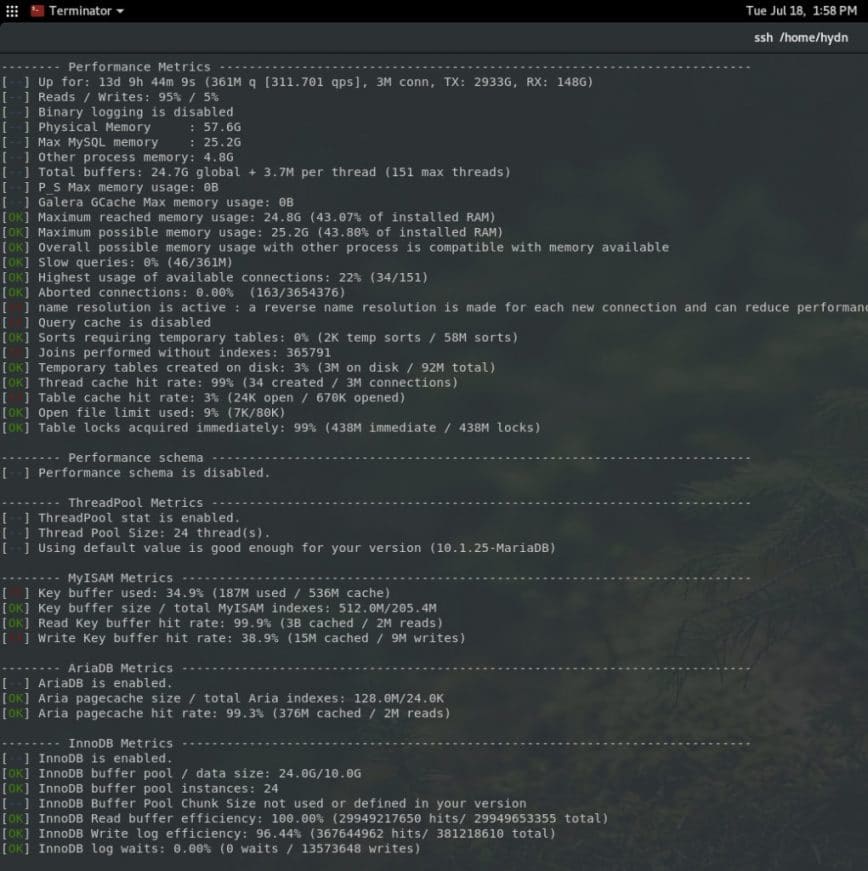
MySQLTuner is maintained and indicator collect is increasing week after week supporting a lot of configurations such as Galera Cluster, TokuDB, Performance schema, Linux OS metrics, InnoDB, MyISAM, Aria, etc. – MySQLTuner
on Github.
Tuning-Primer
This script takes information from “SHOW STATUS LIKE…” and “SHOW VARIABLES LIKE…” to produce sane recomendations for tuning server variables. It is compatable with all versions of MySQL 3.23 and higher (including 5.1).

The original script is no longer updated. I’ve been using this
Tuning-primer version on Github which fully supports MariaDB.
phpMyAdmin Advisor
The Advisor system provides recommendations on server variables by analyzing MySQL status variables.
PHP Performance and Diagnosing Bottlenecks

phpMyAdmin is a free software tool written in PHP, intended to handle the administration of MySQL over the Web. Visit: phpmyadmin.
Mysqlreport from Percona’s Toolkit
Mysqlreport transforms the values from SHOW STATUS into an easy-to-read report that provides an in-depth understanding of how well MySQL is running. mysqlreport is a better alternative (and practically the only alternative) to manually interpreting
SHOW STATUS.

The Guide To Understanding mysqlreport (PDF)
| Percona acquired Mysqlreport and you can find it as part of Percona’s
Toolkit.
Percona Configuration Wizard for MySQL
From their website: “Apply Percona best practices to achieve better MySQL database performance and avoid the time, complexity, and risk of customizing a my.cnf configuration
on your own. Simply copy and paste the results of the Percona Configuration Wizard for MySQL into your my.cnf file. Tens of thousands of MySQL users have already used this tool to improve their MySQL performance. When you complete the wizard, your configuration
files are saved for future use and you can easily share them with colleagues. Registration is required but your information will not be shared with third parties.”

Percona Configuration
Wizard for Mysql – a tool to help you generate my.cnf files based on your server’s hardware and other characteristics.
There are also a few free real-time monitoring tools such as innotop, mytop (old), mtop (older).
Fork anyone? Have a look also at Percona Monitoring and
Management (free), Monyog (not free) or the other paid tools mentioned at the top.
MySQL Performance Tuning: Tips, Scripts and Tools的更多相关文章
- mysql优化---优化工具MySQL performance tuning primer script
MySQL performance tuning primer script一个简单好用的mysql优化工具,其实一个shell脚本 下载: $ wget http://www.day32.com/M ...
- MySQL Performance tuning
1.表级锁状态 mysql> show status like 'table%'; +----------------------------+-----------+ | Variable_n ...
- 学习笔记:Analyze MySQL Performance及慢日志的开启
Table of Contents Analyze MySQL PerformanceTuningSlow queries and Slowlog Brought to you by Rick Jam ...
- PostgreSQL Hardware Performance Tuning
Bruce Momjian POSTGRESQL is an object-relational database developed on the Internet by a group of de ...
- 老李分享: Oracle Performance Tuning Overview 翻译下
1.2性能调优特性和工具 Effective data collection and analysis isessential for identifying and correcting perfo ...
- 老李分享: Oracle Performance Tuning Overview 翻译
老李分享: Oracle Performance Tuning Overview 翻译 poptest是国内唯一一家培养测试开发工程师的培训机构,以学员能胜任自动化测试,性能测试,测试工具开发等工 ...
- Performance Tuning Guidelines for Windows Server 2012
http://msdn.microsoft.com/en-us/library/windows/hardware/jj248719.aspx This guide describes importan ...
- Performance Tuning
本文译自Wikipedia的Performance tuning词条,原词条中的不少链接和扩展内容非常值得一读,翻译过程中暴露了个人工程学思想和英语水平的不足,翻译后的内容也失去很多准确性和丰富性,需 ...
- Spark SQL 之 Performance Tuning & Distributed SQL Engine
Spark SQL 之 Performance Tuning & Distributed SQL Engine 转载请注明出处:http://www.cnblogs.com/BYRans/ 缓 ...
随机推荐
- Educational Codeforces Round 53 Editorial
After I read the solution to the problem, I found that my solution was simply unsightly. Solved 4 ou ...
- testlogin
!/usr/bin/env python coding:utf-8 import requests import unittest import json,urllib class testlogin ...
- 数组类型的退化Decay
Decay即数组在某些情况下将退化为指针. 测试代码: #include <iostream> #include <typeinfo> template <typenam ...
- shell :
示例一.(用作注释,占位)#!/bin/bash : this is single line comment : 'this is a multiline comment, second line e ...
- ubuntu 14.04 server(amd64) 安装ros indigo
1.添加软件源(添加了正确的软件源,操作系统就知道去哪里下载程序,并根据命令自动安装软件) sudo sh -c 'echo "deb http://packages.ros.org/ros ...
- CentOS 6.5安装配置LAMP服务器(Apache+PHP5+MySQL)的方法
CentOS 6.5安装配置LAMP服务器(Apache+PHP5+MySQL)的方法 准备篇: 1.配置防火墙,开启80端口.3306端口vi /etc/sysconfig/iptables-A I ...
- 《Blue_Flke》团队项目软件系统设计改进
团队项目系统设计改进: 1.分析项目系统设计说明书初稿的不足,特别是软件系统结构模型建模不完善内容 在上一次的项目系统设计说明书中没有很好的完成软件系统结构模型的建模设计,只做了基本的系统项目原型模型 ...
- CentOS系统-常用组件安装
1,安装系统后,补装包组yum groupinstall "Compatibility libraries" "Base" "Development ...
- cookie session localstorage sessionStorage区别
cookie:http://www.cnblogs.com/Darren_code/archive/2011/11/24/Cookie.html 重要特点: 1.cookie 有大小设置,有过期时间设 ...
- 在linux环境下编译C++ 程序
单个源文件生成可执行程序 下面是一个保存在文件 helloworld.cpp 中一个简单的 C++ 程序的代码: 单个源文件生成可执行程序 /* helloworld.cpp */ #include ...