
OpenGL ES 3.0之顶点缓冲
所谓顶点缓冲就是直接将顶点数据存储在gpu的一段缓冲区,不需要从cpu拷贝到gpu。提高了程序的运行效率。
操作步骤
1.创建顶点缓冲对象
GLuint vertexBufferID;
2.分配空间
glGenBuffers(, &vertexBufferID);
3.绑定当前顶点缓冲对象
glBindBuffer(GL_ARRAY_BUFFER, vertexBufferID);
4.初始化缓冲区数据
glBufferData(GL_ARRAY_BUFFER, sizeof(vertices), vertices, GL_STATIC_DRAW);
5.启用顶点属性数组
glEnableVertexAttribArray(GLKVertexAttribPosition);
6.使用顶点数据进行渲染
   glVertexAttribPointer(

      GLKVertexAttribPosition,

      ,

      GL_FLOAT,

      GL_FALSE,

      sizeof(SceneVertex),

      NULL);
7.绘制
glDrawArrays(GL_TRIANGLES, ,);
下面赋全部代码
@interface OpenGLESViewController : GLKViewController

{

   GLuint vertexBufferID;

}

@property (strong, nonatomic) GLKBaseEffect *baseEffect;

@end
#import "OpenGLESViewController.h"

@implementation OpenGLESViewController

@synthesize baseEffect;

/////////////////////////////////////////////////////////////////

// This data type is used to store information for each vertex

typedef struct {

   GLKVector3  positionCoords;

}

SceneVertex;

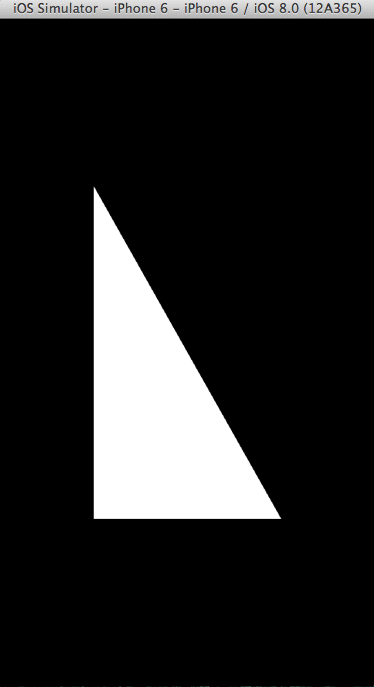
// Define vertex data for a triangle to use in example

static const SceneVertex vertices[] =

{

   {{-0.5f, -0.5f, 0.0}}, // lower left corner

   {{ 0.5f, -0.5f, 0.0}}, // lower right corner

   {{-0.5f,  0.5f, 0.0}}  // upper left corner

};

/////////////////////////////////////////////////////////////////

// Called when the view controller's view is loaded

// Perform initialization before the view is asked to draw

- (void)viewDidLoad

{

   [super viewDidLoad];

   // Verify the type of view created automatically by the

   // Interface Builder storyboard

   GLKView *view = (GLKView *)self.view;

   NSAssert([view isKindOfClass:[GLKView class]],

      @"View controller's view is not a GLKView");

   // Create an OpenGL ES 2.0 context and provide it to the

   // view

   view.context = [[EAGLContext alloc]

      initWithAPI:kEAGLRenderingAPIOpenGLES2];

   // Make the new context current

   [EAGLContext setCurrentContext:view.context];

   // Create a base effect that provides standard OpenGL ES 2.0

   // Shading Language programs and set constants to be used for

   // all subsequent rendering

   self.baseEffect = [[GLKBaseEffect alloc] init];

   self.baseEffect.useConstantColor = GL_TRUE;

   self.baseEffect.constantColor = GLKVector4Make(

      1.0f, // Red

      1.0f, // Green

      1.0f, // Blue

      1.0f);// Alpha

   // Set the background color stored in the current context

   glClearColor(0.0f, 0.0f, 0.0f, 1.0f); // background color

   // Generate, bind, and initialize contents of a buffer to be

   // stored in GPU memory

   glGenBuffers(,                // STEP 1

      &vertexBufferID);

   glBindBuffer(GL_ARRAY_BUFFER,  // STEP 2

      vertexBufferID);

   glBufferData(                  // STEP 3

      GL_ARRAY_BUFFER,  // Initialize buffer contents

      sizeof(vertices), // Number of bytes to copy

      vertices,         // Address of bytes to copy

      GL_STATIC_DRAW);  // Hint: cache in GPU memory

}

/////////////////////////////////////////////////////////////////

// GLKView delegate method: Called by the view controller's view

// whenever Cocoa Touch asks the view controller's view to

// draw itself. (In this case, render into a frame buffer that

// shares memory with a Core Animation Layer)

- (void)glkView:(GLKView *)view drawInRect:(CGRect)rect

{

   [self.baseEffect prepareToDraw];

   // Clear Frame Buffer (erase previous drawing)

   glClear(GL_COLOR_BUFFER_BIT);

   // Enable use of positions from bound vertex buffer

   glEnableVertexAttribArray(      // STEP 4

      GLKVertexAttribPosition);

   glVertexAttribPointer(          // STEP 5

      GLKVertexAttribPosition,

      ,                   // three components per vertex

      GL_FLOAT,            // data is floating point

      GL_FALSE,            // no fixed point scaling

      sizeof(SceneVertex), // no gaps in data

      NULL);               // NULL tells GPU to start at

                           // beginning of bound buffer

   // Draw triangles using the first three vertices in the

   // currently bound vertex buffer

   glDrawArrays(GL_TRIANGLES,      // STEP 6

      ,  // Start with first vertex in currently bound buffer

      ); // Use three vertices from currently bound buffer

}

/////////////////////////////////////////////////////////////////

// Called when the view controller's view has been unloaded

// Perform clean-up that is possible when you know the view

// controller's view won't be asked to draw again soon.

- (void)viewDidUnload

{

   [super viewDidUnload];

   // Make the view's context current

   GLKView *view = (GLKView *)self.view;

   [EAGLContext setCurrentContext:view.context];

   // Delete buffers that aren't needed when view is unloaded

   if ( != vertexBufferID)

   {

      glDeleteBuffers (,          // STEP 7

                       &vertexBufferID);

      vertexBufferID = ;

   }

   // Stop using the context created in -viewDidLoad

   ((GLKView *)self.view).context = nil;

   [EAGLContext setCurrentContext:nil];

}

@end
OpenGL ES 3.0之顶点缓冲的更多相关文章
- 在 OpenGL ES 2.0 上实现视差贴图(Parallax Mapping)
在 OpenGL ES 2.0 上实现视差贴图(Parallax Mapping) 视差贴图 最近一直在研究如何在我的 iPad 2(只支持 OpenGL ES 2.0, 不支持 3.0) 上实现 视 ...
- 【Android 应用开发】OpenGL ES 2.0 -- 制作 3D 彩色旋转三角形 - 顶点着色器 片元着色器 使用详解
最近开始关注OpenGL ES 2.0 这是真正意义上的理解的第一个3D程序 , 从零开始学习 . 案例下载地址 : http://download.csdn.net/detail/han120201 ...
- OpenGL ES 2.0 -- 制作 3D 彩色旋转三角形 - 顶点着色器 片元着色器 使用详解
最近开始关注OpenGL ES 2.0 这是真正意义上的理解的第一个3D程序 , 从零开始学习 . 案例下载地址 : http://download.csdn.net/detail/han120201 ...
- OpenGL ES 3.0顶点着色器(一)
OpenGL ES 3.0流程图 1.Vertex Shader(顶点着色器) 顶点着色实现了一种通用的可编程方法操作顶点. 顶点着色器的输入包括以下几个: • Shader program.程序的顶 ...
- OpenGL ES 2.0 渲染管线 学习笔记
图中展示整个OpenGL ES 2.0可编程管线 图中Vertex Shader和Fragment Shader 是可编程管线: Vertex Array/Buffer objects 顶点数据来源, ...
- OpenGL ES 3.0之VertexAttributes,Vertex Arrays,and Buffer Objects(九)
顶点数据,也称为顶点属性,指每一个顶点数据.指能被用来描述每个顶点的数据,或能被所有顶点使用的常量值.例如你想绘制一个具有颜色的立方体三角形.你指定一个恒定的值用于三角形的所有三个顶点颜色.但三角形的 ...
- 【C++ OpenGL ES 2.0编程笔记】8: 使用VBO和IBO绘制立方体 【转】
http://blog.csdn.net/kesalin/article/details/8351935 前言 本文介绍了OpenGL ES 2.0 中的顶点缓冲对象(VBO: Vertex Buff ...
- 【AR实验室】OpenGL ES绘制相机(OpenGL ES 1.0版本)
0x00 - 前言 之前做一些移动端的AR应用以及目前看到的一些AR应用,基本上都是这样一个套路:手机背景显示现实场景,然后在该背景上进行图形学绘制.至于图形学绘制时,相机外参的解算使用的是V-SLA ...
- OpenGL ES 3.0 基础知识
首先要了解OpenGL的图形管线有哪些内容,再分别去了解其中的相关的关系: 管线分别包括了顶点缓冲区/数组对象,定点着色器,纹理,片段着色器,变换反馈,图元装配,光栅化,逐片段操作,帧缓冲区.其中顶点 ...
随机推荐
- DMA/TIM capture
This is a more free standing example measuring the LSI (TIM5_CH4 internally) and demonstrating DMA/T ...
- gitblit无法安装windows服务或者启动服务失败:Failed creating java
gitblit解压后,命令行运行installService.cmd之前,需要修改里面的参数,将ARCH修改x86,默认是amd64,我的机器是windows 10 Pro 64位版本,jdk也都是6 ...
- Python 中函数的 收集参数 机制
定义函数的时候,在参数前加了一个 * 号,函数可以接收零个或多个值作为参数.返回结果是一个元组. 传递零个参数时函数并不报错,而是返回一个空元组.但以上这种方法也有局限性,它不能收集关键字参数. 对关 ...
- poll() can't detect event when socket is closed locally?
from https://stackoverflow.com/questions/5039608/poll-cant-detect-event-when-socket-is-closed-locall ...
- 在线即时展现 Html、JS、CSS 编辑工具 - JSFiddle
在线即时展现 Html.JS.CSS 编辑工具 - JSFiddle 想对它做些说明介绍.但是它确是那么的easy使用. 兴许有时间,把左側列表作以相关介绍和演示样例演示吧.
- AngularJS使用angular-formly进行表单验证
当验证表单中有很多字段时,这时候可能希望把html的生成以及验证逻辑放到controller中,在页面,也许是这样的: <some-form fiedls="vm.someFields ...
- android的logcat详细用法!
from://http://www.miui.com/article-272-1.html [技术交流]android的logcat详细用法! logcat是Android中一个命令行工具,可以用于得 ...
- ios之网络异常与正常视图的切换
1. xib中创建两个View 2. View的视图大概如下第一个:View View 第二个:View 3. 代码切换: [self.view addSubview:_redView]; // 会 ...
- 在MFC内竟然不可以解析“Mat”
调试了好久,在MFC内竟然不可以解析“Mat” 总是显示"Mat"没有定义,改动include.lib.依赖库, 不断地改动: #include "opencv2/img ...
- FrameLayout和handle实现霓虹灯效果
这个程序的主要思想就是在一个FrameLayout中定义多个TextView,分别设置不同的背景色.因为帧布局的特性,所以这些控件都是叠加起来的.然后,通过定时器循环给handler发送消息,改变控件 ...