
JPA(二):HellWord工程
使用JPA持久化对象的操作步骤:
1)创建persistence.xml,在这个文件中配置持久化单元:
--- 需要指定跟哪个数据库进行交互;
--- 需要指定JPA使用哪个持久化的框架以及配置该框架的基本属性。
2)创建实体类,使用annotation来描述实体类跟数据库表之间的映射关系。
3)使用JPA API完成数据增加、删除、修改和查询擦操作:
--- 创建EntityManagerFactory(对应hibernate中的SessionFactory)
--- 创建EntityManager(对应hibernate中的Session)
4)JPA规范要求在类路径的MATA-INF目录下放置persistence.xml,文件的名字是固定的。
演示HelloWord工程:
1)创建jpa project
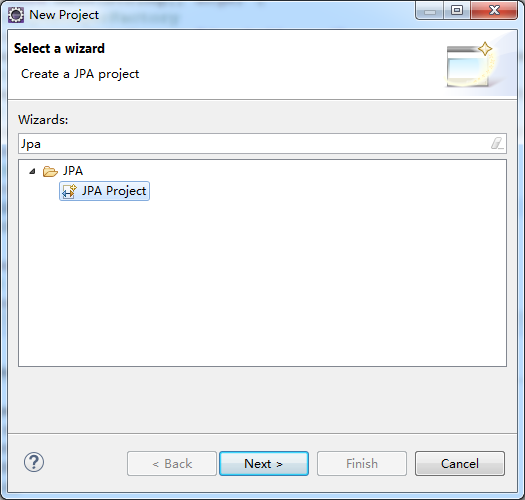
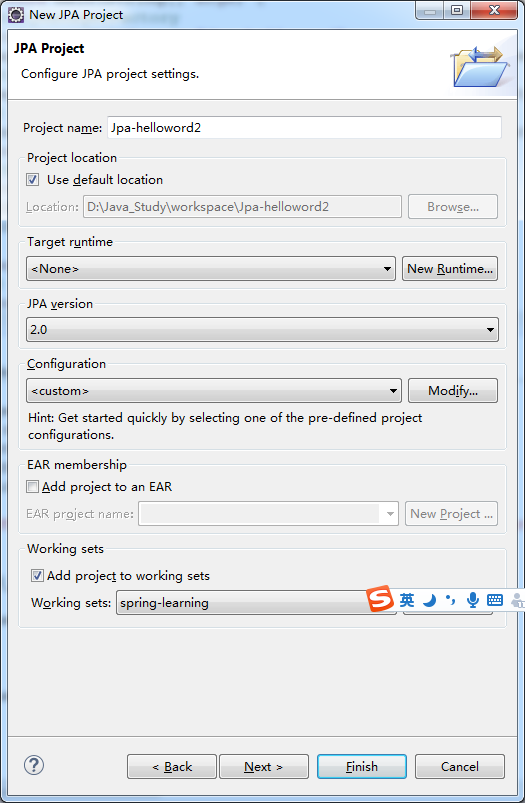
之后点击“Finish”按钮完成工程创建。
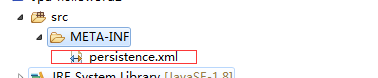
工程创建好后,会发现在src下的META-INF文件夹下包含一个persistence.xml文件,该文件是用来配置jpa相关信息的。
2)导入依赖包:
a、从hibernate官网下载hibernate开发包:hibernate-release-5.3.0.Final.zip,把解压后的文件中的数据拷贝到工程下新建的lib文件夹中:
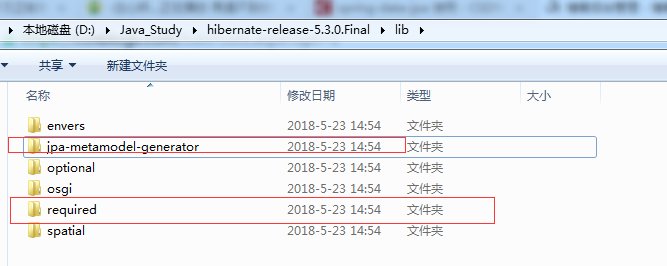
备注:把上图中选中的两个文件夹下的所有包拷贝到lib中
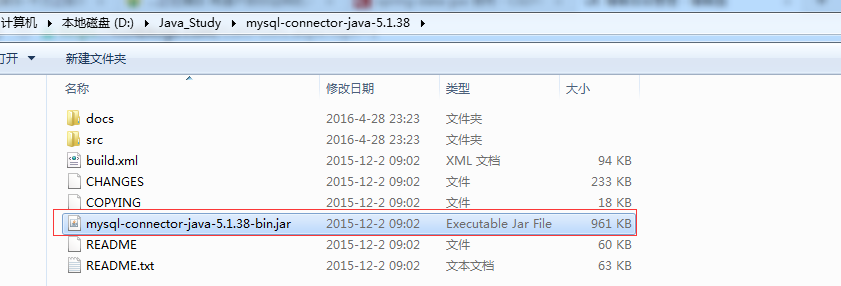
b、导入mysql驱动包:
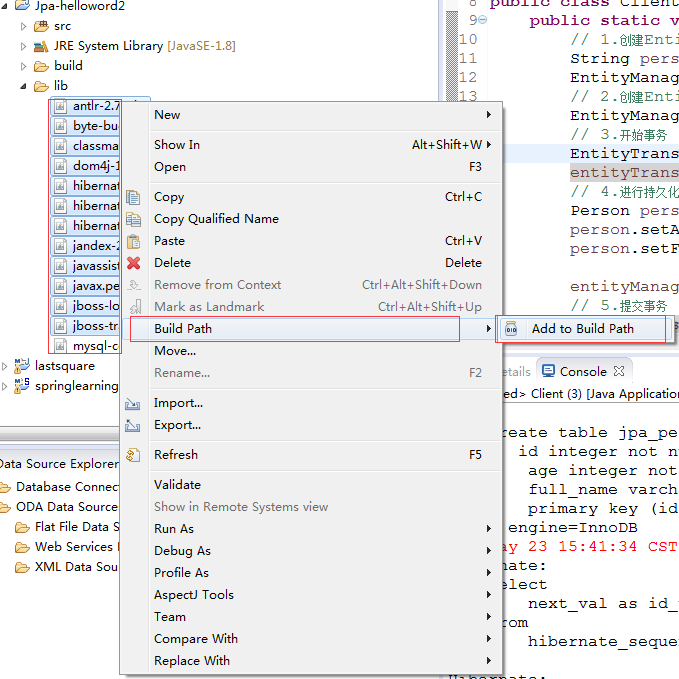
c、右键lib文件夹下所有jar文件,弹出菜单中选择Build Path-> Add to Build Path
3)在src下添加Person实体类
package com.dxsoft.jpa.helloword;

import javax.persistence.Column;

import javax.persistence.Entity;

import javax.persistence.GeneratedValue;

import javax.persistence.GenerationType;

import javax.persistence.Id;

import javax.persistence.Table;

@Entity

@Table(name = "jpa_person")

public class Person {

    private Integer id;

    private String fullName;

    private int age;

    public Person() {

    }

    @GeneratedValue(strategy = GenerationType.AUTO)

    @Id

    public Integer getId() {

        return id;

    }

    public void setId(Integer id) {

        this.id = id;

    }

    @Column(name = "full_name")

    public String getFullName() {

        return fullName;

    }

    public void setFullName(String fullName) {

        this.fullName = fullName;

    }

    public int getAge() {

        return age;

    }

    public void setAge(int age) {

        this.age = age;

    }

    @Override

    public String toString() {

        return "Person [id=" + id + ", fullName=" + fullName + ", age=" + age + "]";

    }

}
备注:
1)@Id注解为唯一主键;
2)@GeneratedValue(strategy = GenerationType.AUTO)注解自增,并制定自增方式。JPA提供了四种主键生成策略,其被定义在枚举类GenerationType中,包括GenerationType.TABLE,GenerationType.SEQUENCE,GenerationType.IDENTITY和GenerationType.AUTO;
3)@Column(name="")可以重新定义数据库对应字段的名字,如果类中定义属性字段和数据不一样时需要定义,否则可省略。
4)修改persistence.xml配置内容
<?xml version="1.0" encoding="UTF-8"?>

<persistence version="2.0"

    xmlns="http://java.sun.com/xml/ns/persistence" xmlns:xsi="http://www.w3.org/2001/XMLSchema-instance"

    xsi:schemaLocation="http://java.sun.com/xml/ns/persistence http://java.sun.com/xml/ns/persistence/persistence_2_0.xsd">

    <persistence-unit name="Jpa-helloword"

        transaction-type="RESOURCE_LOCAL">

        <!-- 配置使用什么 ORM 产品来作为 JPA 的实现 -->

        <provider>org.hibernate.jpa.HibernatePersistenceProvider</provider>

        <!-- 添加持久化类 -->

        <class>com.dxsoft.jpa.helloword.Person</class>

        <properties>

            <!-- 数据库的相关配置 -->

            <property name="javax.persistence.jdbc.driver" value="com.mysql.jdbc.Driver" />

            <property name="javax.persistence.jdbc.url" value="jdbc:mysql://127.0.0.1:3306/jpa" />

            <property name="javax.persistence.jdbc.user" value="root" />

            <property name="javax.persistence.jdbc.password" value="root" />

            <!-- 指定方言

            MySQL                org.hibernate.dialect.MySQLDialect

            MySQL with InnoDB    org.hibernate.dialect.MySQLInnoDBDialect

            MySQL with MyISAM    org.hibernate.dialect.MySQLMyISAMDialect

            MySQL5                org.hibernate.dialect.MySQL5Dialect

            MySQL5 with InnoDB    org.hibernate.dialect.MySQL5InnoDBDialect

            -->

            <property name="hibernate.dialect" value="org.hibernate.dialect.MySQL5InnoDBDialect" />

            <property name="hibernate.show_sql" value="true" />

            <property name="hibernate.format_sql" value="true" />

            <!--

            create      :每次加载hibernate时都会删除上一次的生成的表,然后根据你的model类再重新来生成新表,哪怕两次没有任何改变也要这样执行,这就是导致数据库表数据丢失的一个重要原因。<br>

            create-drop :每次加载hibernate时根据model类生成表,但是sessionFactory一关闭,表就自动删除。<br>

            update      :最常用的属性,第一次加载hibernate时根据model类会自动建立起表的结构(前提是先建立好数据库),以后加载hibernate时根据 model类自动更新表结构,即使表结构改变了但表中的行仍然存在不会删除以前的行。要注意的是当部署到服务器后,表结构是不会被马上建立起来的,是要等 应用第一次运行起来后才会。<br>

            validate    :每次加载hibernate时,验证创建数据库表结构,只会和数据库中的表进行比较,不会创建新表,但是会插入新值。 <br>

            -->

            <property name="hibernate.hbm2ddl.auto" value="update" />

        </properties>

    </persistence-unit>

</persistence>
5)添加测试类:
package com.dxsoft.jpa.helloword;

import javax.persistence.EntityManager;

import javax.persistence.EntityManagerFactory;

import javax.persistence.EntityTransaction;

import javax.persistence.Persistence;

public class Client {

    public static void main(String[] args) {

        // 1.创建EntityManagerFactory

        String persistenceUnitName = "Jpa-helloword";

        EntityManagerFactory entityManagerFactory = Persistence.createEntityManagerFactory(persistenceUnitName);

        // 2.创建EntityManager

        EntityManager entityManager = entityManagerFactory.createEntityManager();

        // 3.开始事务

        EntityTransaction entityTransaction = entityManager.getTransaction();

        entityTransaction.begin();

        // 4.进行持久化操作

        Person person = new Person();

        person.setAge(31);

        person.setFullName("tommmy duan");

        entityManager.persist(person);

        // 5.提交事务

        entityTransaction.commit();

        // 6.关闭EntityManager

        entityManager.close();

        // 7.关闭EnityManagerFactory

        entityManagerFactory.close();

        System.out.println("complete..");

    }

}
执行打印信息如下:
INFO: HHH10001501: Connection obtained from JdbcConnectionAccess [org.hibernate.engine.jdbc.env.internal.JdbcEnvironmentInitiator$ConnectionProviderJdbcConnectionAccess@1950e8a6] for (non-JTA) DDL execution was not in auto-commit mode; the Connection 'local transaction' will be committed and the Connection will be set into auto-commit mode.

Hibernate:

    create table hibernate_sequence (

       next_val bigint

    ) engine=InnoDB

Hibernate:

    insert into hibernate_sequence values ( 1 )

Hibernate:

    create table jpa_person (

       id integer not null,

        age integer not null,

        full_name varchar(255),

        primary key (id)

    ) engine=InnoDB

Wed May 23 15:41:34 CST 2018 WARN: Establishing SSL connection without server's identity verification is not recommended. According to MySQL 5.5.45+, 5.6.26+ and 5.7.6+ requirements SSL connection must be established by default if explicit option isn't set. For compliance with existing applications not using SSL the verifyServerCertificate property is set to 'false'. You need either to explicitly disable SSL by setting useSSL=false, or set useSSL=true and provide truststore for server certificate verification.

Hibernate:

    select

        next_val as id_val

    from

        hibernate_sequence for update

Hibernate:

    update

        hibernate_sequence

    set

        next_val= ?

    where

        next_val=?

Hibernate:

    insert

    into

        jpa_person

        (age, full_name, id)

    values

        (?, ?, ?)

五月 23, 2018 3:41:34 下午 org.hibernate.engine.jdbc.connections.internal.DriverManagerConnectionProviderImpl stop

INFO: HHH10001008: Cleaning up connection pool [jdbc:mysql://127.0.0.1:3306/jpa]

complete..
JPA(二):HellWord工程的更多相关文章
- 《MFC游戏开发》笔记二 建立工程、调整窗口
本系列文章由七十一雾央编写,转载请注明出处. http://blog.csdn.net/u011371356/article/details/9300383 作者:七十一雾央 新浪微博:http:/ ...
- SpringBoot +Jpa+ Hibernate+Mysql工程
1 使用工具workspace-sts 3.9.5.RELEASE (1)新建一个SpringBoot 项目,选择加载项目需要的的组件.DevTools,JPA,Web,Mysql. Finish. ...
- Orleans学习总结(二)--创建工程
通过第一篇Orleans学习总结(一)--入门认识我们大致知道知道是干嘛的了,下面我们来动手造一个传说中的神秘的高并发集群Orleans程序. 一.创建四个C#工程 1.IGrain工程,用来定义各种 ...
- spingboot集成jpa(二)
一.使用单元测试 单元测试在每个项目环境中必不可少,springboot中如何使用单元测试 在src/test/java中新建测试类DemoApplicationTest.java 项目结构: De ...
- Android应用程序开发之图片操作(二)——工程图片资源的加载及OOM的处理
(一)工程图片资源的加载方法 在Android应用程序开发之图片操作(一)中,详细说明了如何操作各种资源图片,只是有的没有附上示例代码,在此,我将针对项目工程中的图片资源的显示加载进行说明.官方说明, ...
- Android入门(二):Android工程目录结构
首先我们来看看Android工程的目录结构,如下图: 下面我们来看看每个文件夹都是用来做什么的? 1.src:这个不用多说,它就是保存Java源文件的目录: 2.gen:该文件夹用来保存自动生成的R. ...
- FM算法(二):工程实现
主要内容: 实现方法 Python实现FM算法 libFM 一.实现方法 1.FM模型函数 变换为线性复杂度的计算公式: 2.FM优化目标 根据不同的应用,FM可以采用不同的损失函数loss fu ...
- <Spring Data JPA>二 Spring Data Jpa
1.pom依赖 <?xml version="1.0" encoding="UTF-8"?> <project xmlns="htt ...
- Spring Data Jpa (二)JPA基础查询
介绍Spring Data Common里面的公用基本方法 (1)Spring Data Common的Repository Repository位于Spring Data Common的lib里面, ...
随机推荐
- bitnami下webmin安装
下载 我在官方网站下载最新的安装包(webmin_1.670_all.deb):http://sourceforge.net/projects/webadmin/files/webmin 安装 单独 ...
- 【优化】COUNT(1)、COUNT(*)、COUNT(常量)、COUNT(主键)、COUNT(ROWID)等
http://blog.itpub.net/26736162/viewspace-2136339/
- win8、server 2012 清除winsxs文件夹
使用系统自带的文件清理工具 1.组合键win+x ,选择“命令提示符(管理员)” 复制“dism /online /Cleanup-Image /StartComponentCleanup” 到dos ...
- Android的学习之路(三)项目的启动过程和安装过程具体解释
应用的安装和启动过程: 安装:第一步:java的编译器会把这个.java文件编译成.class文件 第二部:Android的SDK提供了一个dx工具,这个工具把.class文件转义 ...
- 利用/proc/pid/pagemap将虚拟地址转换为物理地址
内核文档: Documentation/vm/pagemap.txt pagemap is a new (as of 2.6.25) set of interfaces in the kernel t ...
- ASP.NET Identity系列01,揭开神秘面纱
早在2005年的时候,微软随着ASP.NET 推出了membership机制,十年磨一剑,如今的ASP.NET Identity是否足够强大,一起来体会. 在VS2013下新建项目,选择"A ...
- C#把数组中的某个元素取出来放到第一个位置
如何取出数组中符合某种条件的元素,然后放在数组最前面,即索引为0的位置? 思路大致如下:→找到符合条件的数组元素,把之赋值给一个临时变量temp,并记下该数组元素的索引位置,假设是index→在源数组 ...
- excel 批注
Excel VBA之Name对象.Comment对象及字体设置等,点滴学习积累 存在的方式 百家号11-1518:46 ======================================== ...
- HTML5之SVG
1.背景 SVG是Scalable Vector Graphics的缩写,意为可缩放矢量图形.1998年,万维网联盟成立了一个工作组,研发一种通过 XML来表现矢量图形的技术——SVG!由于SVG也是 ...
- 安装GCC-4.6.1详细教程
一.什么是Gcc Linux系统下的Gcc(GNU C Compiler)是GNU推出的功能强大.性能优越的多平台编译器,是GNU的代表作品之一.gcc是可以在多种硬体平台上编译出可执行程序的超级编译 ...