
C# 验证过滤代理IP是否有效
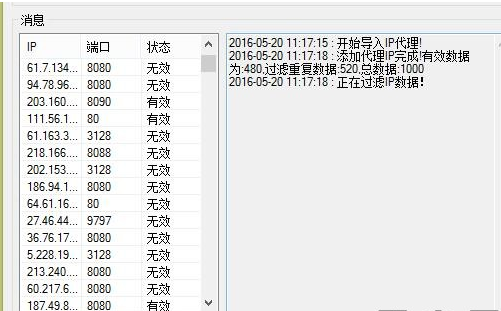
private void 导入IPToolStripMenuItem_Click(object sender, EventArgs e)

        {

            using (OpenFileDialog Openfile = new OpenFileDialog())

            {

                Openfile.Filter = "文本文件|*.txt";

                Openfile.Multiselect = false;

                if (Openfile.ShowDialog() == DialogResult.OK)

                {

                    Thread threadfile = new Thread(() => ReadFileIP(Openfile.FileName)) { IsBackground = true };

                    threadfile.Start();

                }

            }

        }

        /// <summary>

        /// 读取txt代理ip

        /// </summary>

        /// <param name="filename"></param>

        private void ReadFileIP(string filename)

        {

            txtmsg.BeginInvoke(new Action(() =>

            {

                txtmsg.AppendText("开始导入IP代理!".SetLog());

            }));

            var file = File.Open(filename, FileMode.Open);

            int num = ;

            int goods = ;

            int repeat = ;

            using (var stream = new StreamReader(file))

            {

                while (!stream.EndOfStream)

                {

                    num++;

                    string linetemp = stream.ReadLine().Trim().ToLower();

                    string[] iptxt = linetemp.Split(':');

                    if (iptxt.Count() == )

                    {

                        lock (Config.lock_prxoy)

                        {

                            var data = Config._prxoyList.Where(m => m.ip == iptxt[]).FirstOrDefault();

                            if (data != null)

                            {

                                repeat++;

                                continue;

                            }

                        }

                        goods++;

                        Model.ProxyIP _proxyip = new Model.ProxyIP();

                        _proxyip.ip = iptxt[];

                        _proxyip.prot = int.Parse(iptxt[]);

                        ListViewItem item = new ListViewItem(_proxyip.ip);

                        item.SubItems.Add(_proxyip.prot.ToString());

                        item.SubItems.Add("");

                        listViewIP.Invoke(new Action(() =>

                        {

                            ListViewItem itemresult = listViewIP.Items.Add(item);

                            _dic.Add(_proxyip.ip, itemresult);

                            //dic.Add(_send.Tel, backitem);

                        }));

                        lock (Config.lock_prxoy)

                        {

                            Config._prxoyList.Add(_proxyip);

                        }

                    }

                }

            }

            txtmsg.Invoke(new Action(() =>

            {

                string log = string.Format("添加代理IP完成!有效数据为:{0},过滤重复数据:{1},总数据:{2}", goods.ToString(), repeat.ToString(), num.ToString());

                txtmsg.AppendText(log.SetLog());

            }));

            Thread filter = new Thread(new ThreadStart(filterIP)) { IsBackground = true };

            filter.Start();

        }

        private void filterIP()

        {

            txtmsg.Invoke(new Action(() =>

            {

                txtmsg.AppendText("正在过滤IP数据!".SetLog());

            }));

            List<System.Threading.Tasks.Task> TaskList = new List<System.Threading.Tasks.Task>();

            lock (Config.lock_prxoy)

            {

                foreach (Model.ProxyIP _model in Config._prxoyList)

                {

                    var task = System.Threading.Tasks.Task.Factory.StartNew(() =>

                    {

                        bool reslut = VerIP(_model.ip, _model.prot);

                        if (reslut)

                        {

                            _model.filter = Model.filterIP.有效;

                            this.Invoke(new Action(() =>

                            {

                                _dic[_model.ip].SubItems[].Text = "有效";

                            }));

                        }

                        else

                        {

                            _model.filter = Model.filterIP.无效;

                            this.Invoke(new Action(() =>

                            {

                                _dic[_model.ip].SubItems[].Text = "无效";

                            }));

                        }

                    });

                    TaskList.Add(task);

                }

            }

            System.Threading.Tasks.Task.WaitAll(TaskList.ToArray());

            txtmsg.Invoke(new Action(() =>

            {

                txtmsg.AppendText(Config._prxoyList[].filter.ToString() + "过滤IP数据完成!".SetLog());

            }));

        }

        private bool VerIP(string ip,int port)

        {

            try

            {

                HttpWebRequest Req;

                HttpWebResponse Resp;

                WebProxy proxyObject = new WebProxy(ip, port);// port为端口号 整数型

                Req = WebRequest.Create("https://www.baidu.com") as HttpWebRequest;

                Req.Proxy = proxyObject; //设置代理

                Req.Timeout = ;   //超时

                Resp = (HttpWebResponse)Req.GetResponse();

                Encoding bin = Encoding.GetEncoding("UTF-8");

                using (StreamReader sr = new StreamReader(Resp.GetResponseStream(), bin))

                {

                    string str = sr.ReadToEnd();

                    if (str.Contains("百度"))

                    {

                        Resp.Close();

                        return true;

                    }

                    else

                    {

                        return false;

                    }

                }

            }

            catch (Exception ex)

            {

                return false;

            }

        }

    }
主要的代码 ,我就贴上来了,那些model实体的,你们估计也用不到,这个过滤速度很快,哈哈。
C# 验证过滤代理IP是否有效的更多相关文章
- python爬虫成长之路(二):抓取代理IP并多线程验证
上回说到,突破反爬虫限制的方法之一就是多用几个代理IP,但前提是我们得拥有有效的代理IP,下面我们来介绍抓取代理IP并多线程快速验证其有效性的过程. 一.抓取代理IP 提供免费代理IP的网站还挺多的, ...
- 维护爬虫代理IP池--采集并验证
任务分析 我们爬的免费代理来自于https://www.kuaidaili.com这个网站.用`requests`将ip地址与端口采集过来,将`IP`与`PORT`组合成`requests`需要的代理 ...
- Python3.x:免费代理ip的批量获取并入库
Python3.x:免费代理ip的批量获取并入库 一.简介 网络爬虫的世界,向来都是一场精彩的攻防战.现在许多网站的反爬虫机制在不断的完善,其中最令人头疼的,莫过于直接封锁你的ip.但是道高一尺魔高一 ...
- 【原创】验证代理IP是否有用
/// <summary> /// 验证代理IP是否有用 /// </summary> /// <param name="ip">IP地址< ...
- 爬虫爬取代理IP池及代理IP的验证
最近项目内容需要引入代理IP去爬取内容. 为了项目持续运行,需要不断构造.维护.验证代理IP. 为了绕过服务端对IP 和 频率的限制,为了阻止服务端获取真正的主机IP. 一.服务器如何获取客户端IP ...
- 代理IP爬取和验证(快代理&西刺代理)
前言 仅仅伪装网页agent是不够的,你还需要一点新东西 今天主要讲解两个比较知名的国内免费IP代理网站:西刺代理&快代理,我们主要的目标是爬取其免费的高匿代理,这些IP有两大特点:免费,不稳 ...
- Python 快速验证代理IP是否有效
有时候,我们需要用到代理IP,比如在爬虫的时候,但是得到了IP之后,可能不知道怎么验证这些IP是不是有效的,这时候我们可以使用Python携带该IP来模拟访问某一个网站,如果多次未成功访问,则说明这个 ...
- 验证代理IP
##author:wuhao#import urllib.requestfrom http import cookiejar import xlrd import threading #有效的代理,可 ...
- Java 验证代理ip
原文地址:http://www.cnblogs.com/junrong624/p/5416503.html 1 import java.io.IOException; import java.io.I ...
随机推荐
- Openfire注册流程代码分析
Openfire注册流程代码分析 一.客户端/服务端注册用户流程 经过主机连接消息确认后,客户端共发送俩条XML完成注册过程.服务器返回两条XML. 注:IQ消息节点用于处理用户的注册.好友.分组.获 ...
- LeetCode: Gas Station 解题报告
Gas Station There are N gas stations along a circular route, where the amount of gas at station i is ...
- Fiddler filter 过滤隐藏css、js、图片等
REGEX:(?insx)/[^\?/]*\.(css|ico|jpg|png|gif|bmp|wav|js|jpeg)(\?.*)?$ Fiddler教程 http://www.jianshu.co ...
- C语言引用连接脚本lds中的符号——清除bss段,c实现方式
之前我们的启动文件清除bss和拷贝都是通过汇编的方式的实现,但是,我们能够使用C语言,就不使用汇编: 先看连接脚本: SECTIONS { . = 0x30000000; __code_start = ...
- python 字符串格式化转换类型
- PHP 图片处理类 错误处理方法:
call an undefined function exif_imagetype() 打开扩展php.ini 将 ; 去掉: extension=php_exif.dll 并将extension=p ...
- Android NFC近场通信2——NFC标签调度
上面一篇文章简单介绍了NFC的背景和技术应用,今天主要是讲解一下NFC如何发起通信和标签通信(主要是翻译android官网的资料,中间加入个人心得). NFC总是在一个发起者和一个被动目标之间发生.发 ...
- [转]httpclient编码
这几天都在纠结Java Web开发中的中文编码问题.其实,很多Java Web开发者都被中文编码“折磨”过,网络上有大量的讨论.以前我也读过这方面的博文,读完后感觉似乎懂了,好像知道了编码问题的原因和 ...
- .net 循环引用是否会造成内存泄漏
一直想做这么一个测试,人和手的测试.类型"人"有一个属性"手",需要"手"也可以读取"人"的数据.则"手&qu ...
- hbase源码系列(四)数据模型-表定义和列族定义的具体含义
hbase是一个KeyValue型的数据库,在<hbase实战>描述它的逻辑模型[行键,列族,列限定符,时间版本],物理模型是基于列族的.但实际情况是啥?还是上点代码吧. HTableDe ...