
SData:优雅的数据交换方案
SData的网址是https://github.com/knat/SData。
数据交换方案可以分为两类:有纲要(schema)的和无纲要的。有纲要的数据交换方案有Google的Protocol Buffers,Microsoft的Bond以及SData,纲要编译器在编译时刻把纲要与编程语言进行映射,也就是通过纲要生成编程语言代码,此类方案是静态类型化的。无纲要的数据交换方案有JSON(我知道存在JSON schema,但它并不在编译阶段起作用),序列化器(serializer)在运行时刻把数据与编程语言进行映射,此类方案是动态类型化的。静态类型化的数据交换方案的优点是类型安全和高性能,缺点是不够灵活,这和静态类型化的编程语言与动态类型化的编程语言的差异类似。
SData的纲要语言优雅强大,面向对象,类型丰富,代码生成机制优美灵活。下面是通过示例来介绍SData。
1)你需要Visual Studio 2015。
2)下载并安装最新的SData VSIX package(SData-*.vsix)。
3)打开VS 2015,新建一个Console Application,卸载项目并编辑csproj文件,将下面的代码插入到文件末尾:
<!--Begin SData-->

<Import Project="$([System.IO.Directory]::GetFiles($([System.IO.Path]::Combine($([System.Environment]::GetFolderPath(SpecialFolder.LocalApplicationData)), `Microsoft\VisualStudio\14.0\Extensions`)), `SData.targets`, System.IO.SearchOption.AllDirectories))" />

<!--End SData-->
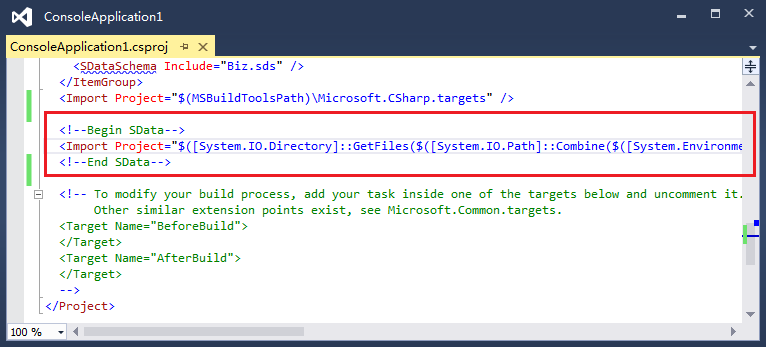
4)加载项目,打开"Add New Item"对话框 -> Visual C# Items -> SData, 新建一个SData纲要文件,将下面的代码拷贝到该文件中:
//Biz.sds。SData纲要文件的扩展名是sds

namespace "http://example.com/business"//名称空间由URI标识

{

    class Person abstract/*抽象类不能拥有实例*/ key Id//指定某属性为类的键,该属性值必须唯一

    {

        Id/*属性名*/ as Int32//属性类型

        Name as String

        Phones as list<String>//list是个有序集合

        RegDate as nullable<DateTimeOffset>//可空类型可以接受null值

    }

    class Customer extends Person//继承

    {

        //每个属性在类中必须拥有唯一的名字

        Reputation as Reputation

        Orders as nullable<set<Order>>//set是个无序集合,每个条目必须唯一,即Order.Id必须唯一

    }

    enum Reputation as Int32//枚举的underlying类型

    {

        None = 0

        Bronze = 1

        Silver = 2

        Gold = 3

        Bad = -1

    }

    class Order key Id

    {

        Id as Int64

        Amount as Decimal

        IsUrgent as Boolean

    }

    class Supplier extends Person

    {

        BankAccount as String

        Products as map<Int32/*key*/, String/*value*/>//map是个无序的key-value集合,每个key必须唯一

    }

}

namespace "http://example.com/business/api"

{

    //要引用另一个名称空间的成员,需使用import指令

    import "http://example.com/business"/*名称空间URI*/ as biz/*为URI取个别名,可选*/

    class DataSet

    {

        People as set<Person>

        ETag as Binary

    }

}
编译项目时,SData纲要编译器会检查纲要文件的正确性:
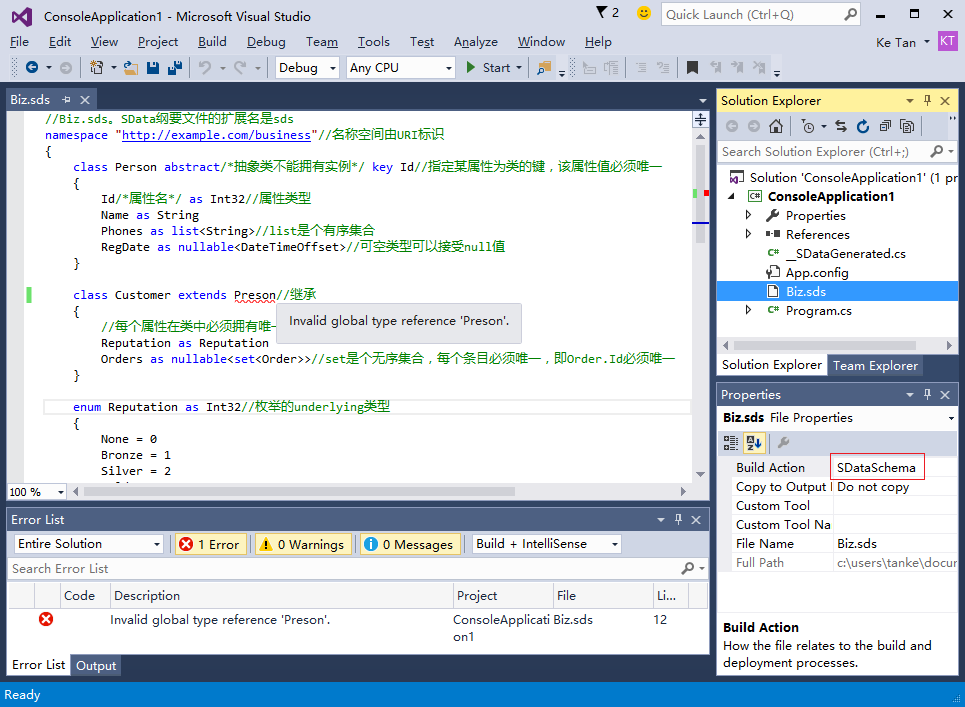
5)将SData runtime library NuGet package添加到项目中:
PM> Install-Package SData -Pre
6)在C#文件中,使用SData.SchemaNamespaceAttribute特性指定纲要名称空间到C#名称空间的映射:
//Program.cs

using SData;

[assembly: SchemaNamespace("http://example.com/business"/*纲要名称空间URI*/,

                            "Example.Business"/*C#名称空间名字*/)]

//所有的纲要名称空间必须被映射

[assembly: SchemaNamespace("http://example.com/business/api", "Example.Business.API")]
编译项目时,SData纲要编译器在检查了纲要文件的正确性后,会解析C#文件,并在__SDataGenerated.cs文件中生成代码,打开并查看该文件。
7)使用生成的代码非常简单,将下面的代码拷贝到Program.cs中:
//Program.cs

using System;

using System.Collections.Generic;

using System.Diagnostics;

using System.IO;

using SData;

using Example.Business;

using Example.Business.API;

[assembly: SchemaNamespace("http://example.com/business", "Example.Business")]

[assembly: SchemaNamespace("http://example.com/business/api", "Example.Business.API")]

class Program

{

    static void Main()

    {

        //重要:在程序初始化时调用SData_Assembly_Name.Initialize()以初始化元数据

        SData_ConsoleApplication1.Initialize();

        var ds = new DataSet

        {

            People = new HashSet<Person>

            {

                new Customer

                {

                    Id = 1, Name = "Tank", RegDate = DateTimeOffset.Now,

                    Phones = new List<string> { "1234567", "2345678"},

                    Reputation = Reputation.Bronze,

                    Orders = new HashSet<Order>

                    {

                        new Order { Id = 1, Amount = 436.99M, IsUrgent = true},

                        new Order { Id = 2, Amount = 98.77M, IsUrgent = false},

                    }

                },

                new Customer

                {

                    Id = 2, Name = "Mike",

                    Phones = new List<string>(),

                    Reputation = Reputation.Gold,

                },

                new Supplier

                {

                    Id = 3, Name = "Eric", RegDate = DateTimeOffset.UtcNow,

                    Phones = new List<string> {"7654321" },

                    BankAccount="11223344", Products = new Dictionary<int, string>

                    {

                        { 1, "Mountain Bike" },

                        { 2, "Road Bike" },

                    }

                }

            },

            ETag = new byte[] { 1, 2, 3, 4, 5, 6, 7, 8 },

        };

        using (var writer = new StreamWriter("DataSet.txt"))

        {

            ds.Save(writer, "    ", "\r\n");

        }

        DataSet result;

        var context = new LoadingContext();

        using (var reader = new StreamReader("DataSet.txt"))

        {

            if (!DataSet.TryLoad("**DataSet.txt**", //filePath只是个标识符

                reader, context, out result))

            {

                foreach (var diag in context.DiagnosticList)

                {

                    Console.WriteLine(diag.ToString());

                }

                Debug.Assert(false);

            }

        }

    }

}
8)打开并查看DataSet.txt(注释是我添加的):
//SData数据格式示例

//一个数据文件必须包含且仅包含一个类数据

<a0/*alias*/ = @"http://example.com/business"/*URI*/> {//类DataSet的数据

    People = [//list或set类型的数据

        //因为类Person是抽象的,类型指示器'(alias::className)'用来指定数据的类类型

        (a0::Customer) {

            Id = 1,

            Name = @"Tank",

            Phones = [

                @"1234567",

                @"2345678",

            ],

            RegDate = "2015-07-31T11:19:26.7854059+08:00",

            Reputation = a0::Reputation.Bronze,

            Orders = [

                {

                    Id = 1,

                    Amount = 436.99,

                    IsUrgent = true,

                },

                {

                    Id = 2,

                    Amount = 98.77,

                    IsUrgent = false,

                },

            ],

        },

        (a0::Customer) {

            Id = 2,

            Name = @"Mike",

            Phones = [

            ],

            Reputation = a0::Reputation.Gold,

            //如果某属性的类型是nullable,则该属性可以缺失,否则必须出现

            //允许未知的属性

        },

        (a0::Supplier) {

            Id = 3,

            Name = @"Eric",

            Phones = [

                @"7654321",

            ],

            RegDate = "2015-07-31T03:19:26.8010317+00:00",

            BankAccount = @"11223344",

            Products = #[//map类型的数据

                1 = @"Mountain Bike",

                2 = @"Road Bike",

            ],

        },

    ],

    ETag = "AQIDBAUGBwg=",

}
9)在行var context = new LoadingContext();设置一个断点,当程序运行到断点时,打开修改保存DataSet.txt文件,比如删除行Name = @"Tank",,因为属性Name的类型不是nullable,即该属性是必须的,TryLoad()将会失败,下面的诊断信息将打印在控制台:
Error -293: Property 'Name' missing.

    **DataSet.txt**: (23,9)-(23,9)
10)因为每个生成的C#类都标注了partial修饰符,自定义代码可以添加到C#类中:
//my.cs

namespace Example.Business

{

    partial class Person : SomeClass, ISomeInterface

    {

        public int MyProperty { get; set; }

        public abstract void MyMethod();

    }

    partial class Customer

    {

        //注意:非抽象类必须有无参构造方法

        public override void MyMethod() { }

    }

}
11)可以添加自定义验证:
//my.cs

using System;

using SData;

public class MyLoadingContext : LoadingContext

{

    public bool CheckCustomerReputation { get; set; }

    public override void Reset()

    {

        base.Reset();

        //...

    }

}

public enum MyDiagnosticCode

{

    PhonesIsEmpty = 1,

    BadReputationCustomer,

}

namespace Example.Business

{

    partial class Person

    {

        //OnLoading() is called by the serializer just after the object is created

        private bool OnLoading(LoadingContext context, TextSpan textSpan)

        {

            Console.WriteLine("Person.OnLoading()");

            return true;

        }

        //OnLoaded() is called just after all properties are set

        private bool OnLoaded(LoadingContext context, TextSpan textSpan)

        {

            Console.WriteLine("Person.OnLoaded()");

            if (Phones.Count == 0)

            {

                context.AddDiagnostic(DiagnosticSeverity.Error,

                    (int)MyDiagnosticCode.PhonesIsEmpty, "Phones is empty.", textSpan);

                return false;

            }

            return true;

//if error diagnostics are added to the context, the method must return false.

//if any OnLoading() or OnLoaded() returns false, TryLoad() will return false immediately

        }

    }

    partial class Customer

    {

        //the serializer will call base method(Person.OnLoading()) first

        private bool OnLoading(LoadingContext context, TextSpan textSpan)

        {

            Console.WriteLine("Customer.OnLoading()");

            return true;

        }

        //the serializer will call base method(Person.OnLoaded()) first

        private bool OnLoaded(LoadingContext context, TextSpan textSpan)

        {

            Console.WriteLine("Customer.OnLoaded()");

            var myContext = (MyLoadingContext)context;

            if (myContext.CheckCustomerReputation && Reputation == Business.Reputation.Bad)

            {

                context.AddDiagnostic(DiagnosticSeverity.Warning,

                    (int)MyDiagnosticCode.BadReputationCustomer, "Bad reputation customer.",

                    textSpan);

//if non-error diagnostics are added to the context, the method should return true.

            }

            return true;

        }

    }

}
//Program.cs

        //...

        var context = new MyLoadingContext() { CheckCustomerReputation = true };

        using (var reader = new StreamReader("DataSet.txt"))

        {

            if (!DataSet.TryLoad("**DataSet.txt**", reader, context, out result))

            //...
12)使用SData.SchemaClassAttribute特性将纲要类显式映射到C#类,使用SData.SchemaPropertyAttribute特性将纲要属性显式映射到C#属性/域,SData纲要编译器会解析这些特性:
//my.cs

using System;

using System.Collections.Generic;

using System.Collections.ObjectModel;

using SData;

namespace Example.Business

{

    [SchemaClass("Person"/*schema class name*/)]

    partial class Contact

    {

        [SchemaProperty("RegDate"/*schema property name*/)]

        public DateTimeOffset? RegistrationDate { get; internal set; }

        //same-named schema property and C# property/field are mapped implicitly

        public string Name { get; internal set; }

        [SchemaProperty("Phones")]

        private Collection<string> _phones;

        public Collection<string> Phones

        {

            get { return _phones ?? (_phones = new Collection<string>()); }

        }

//list<T> can be mapped to System.Collections.Generic.ICollection<T> or implementing class

//set<T> can be mapped to System.Collections.Generic.ISet<T> or implementing class

//map<TKey, TValue> can be mapped to System.Collections.Generic.IDictionary<TKey, TValue>

//  or implementing class

    }

    //same-named schema class and C# class are mapped implicitly

    partial class Supplier

    {

        public IDictionary<int, string> Products { get; internal set; }

    }

}

namespace Example.Business.API

{

    partial class DataSet

    {

        [SchemaProperty("People")]

        public ISet<Contact> Contacts { get; set; }

    }

}
SData.SchemaNamespaceAttribute,SData.SchemaClassAttribute和SData.SchemaPropertyAttribute是编译时特性,它们与运行时无关,这算是元编程。
更多信息请访问https://github.com/knat/SData。
SData:优雅的数据交换方案的更多相关文章
- jQuery数据缓存方案详解:$.data()的使用
我们经常使用隐藏控件或者是js全局变量来临时存储数据,全局变量容易导致命名污染,隐藏控件导致经常读写dom浪费性能.jQuery提供了自己的数据缓存方案,能够达到和隐藏控件.全局变量相同的效果,但是j ...
- Android Learning:数据存储方案归纳与总结
前言 最近在学习<第一行android代码>和<疯狂android讲义>,我的感触是Android应用的本质其实就是数据的处理,包括数据的接收,存储,处理以及显示,我想针对这几 ...
- 常用两种数据交换格式之XML和JSON的比较
目前,在web开发领域,主要的数据交换格式有XML和JSON,对于XML相信每一个web developer都不会感到陌生: 相比之下,JSON可能对于一些新步入开发领域的新手会感到有些陌生,也可能你 ...
- XML和JSON两种数据交换格式的比较
在web开发领域,主要的数据交换格式有XML和JSON,对于在 Ajax开发中,是选择XML还是JSON,一直存在着争议,个人还是比较倾向于JSON的.一般都输出Json不输出xml,原因就是因为 x ...
- Disruptor——一种可替代有界队列完成并发线程间数据交换的高性能解决方案
本文翻译自LMAX关于Disruptor的论文,同时加上一些自己的理解和标注.Disruptor是一个高效的线程间交换数据的基础组件,它使用栅栏(barrier)+序号(Sequencing)机制协调 ...
- 从Exchager数据交换到基于trade-off的系统设计
可以使用JDK提供的Exchager类进行同步交换:进行数据交换的双方将互相等待对方,直到双方的数据都准备完毕,才进行交换.Exchager类很少用到,但理解数据交换的时机却十分重要,这是一个基于tr ...
- DataStage 九、数据交换到MySQL以及乱码问题
DataStage序列文章 DataStage 一.安装 DataStage 二.InfoSphere Information Server进程的启动和停止 DataStage 三.配置ODBC Da ...
- 数据交换格式XML和JSON对比
1.简介: XML:extensible markup language,一种类似于HTML的语言,他没有预先定义的标签,使用DTD(document type definition)文档类型定义来组 ...
- MES系统与喷涂设备软件基于文本文件的数据对接方案
产品在生产过程中除了记录产品本身的一些数据信息,往往还需要记录下生产设备的一些参数和状态,这也是MES系统的一个重要功能.客户的药物支架产品,需要用到微量药物喷涂设备,客户需要MES系统能完整记录下每 ...
随机推荐
- WPF 应用完全模拟 UWP 的标题栏按钮
WPF 自定义窗口样式有多种方式,不过基本核心实现都是在修改 Win32 窗口样式.然而,Windows 上的应用就应该有 Windows 应用的样子嘛,在保证自定义的同时也能与其他窗口样式保持一致当 ...
- VS 编译太慢了吗?新建解决方案配置关闭一部分项目的编译
手头的解决方案真大!里面的项目个数达到了 30 个或是 50 个?然而接近一半是单元测试项目和辅助工具.再加上一些不尽如人意的项目优化,编译速度真的是无力吐槽.幸好 Visual Studio 提供了 ...
- 《DSP using MATLAB》示例Example 8.7
%% ------------------------------------------------------------------------ %% Output Info about thi ...
- 《DSP using MATLAB》示例Example 6.26
代码: % r = 0.9; theta = (pi/180)*[-55:5:-35, 35:5:55]'; p = r*exp(j*theta); a = poly(p); b = 1; % Dir ...
- Sprint第一个冲刺(第七天)
今天休息. 燃尽图:
- 以gevent(协程) 方式跑uwsgi服务
当你的系统存在一些IO或网络请求较久的操作时, 如果以默认的方式启动uwsgi服务, 那么如果这类请求过多的时候, 所以进程被卡死. uwsgi就无法再对后续请求做处理了. 这时可以用gevent的方 ...
- OpenSSL生成公钥私钥***
证书标准 X.509 - 这是一种证书标准,主要定义了证书中应该包含哪些内容.其详情可以参考RFC5280,SSL使用的就是这种证书标准. 编码格式 同样的X.509证书,可能有不同的编码格式,目前有 ...
- maven中项目发布jar包不同步
昨天的项目今天运行的时候突然发现今天就不能运行了 严重: Error configuring application listener of class org.springframework.web ...
- DS04--树
一.学习总结 1.树结构思维导图 2.树结构学习体会 树这一节遇到最大的困难就是递归不能灵活的运用,总是想用链表那里的知识解决,做了一大堆,程序崩溃也找不到问题出在哪里. 二.PTA实验作业 题目1: ...
- rtmp直播推流(一)--flv格式解析与封装
flv文件格式分析,可参看RTMP中FLV流到标准h264.aac的转换,该文章写的很清晰. flv封装格式解析,可参看视音频数据处理入门:FLV封装格式解析,文章图文并貌,很直观. flv文件封装, ...