
.NET Versioning and Multi-Targeting - .NET 4.5 is an in-place upgrade to .NET 4.0
Say what you will about the past ridiculousness of .NET Framework versioning, since the confusion of .NET 3.5SP1 they've been trying to get it right. It's not the magic of Java Version 6 Update 31 (build 1.6.0_31-b05) but it's a start. O_o
Back in July of 2011 I wrote a post on Issues with .NET and Microsoft Product Versioning that got the attention of some folks. I was most concerned about some "platform updates" to .NET 4 and the way they were named. Meetings were had and those small updates now have simpler names versions like NET 4.0.1, etc.
I'm not going to tell you it's not confusing today. I do think that things are getting better and becoming less confusing. .NET 4.5 is a step in the right direction of transparency in versioning.
The .NET Framework can version in two ways. There are "side by side installs" and there are "in place upgrades." A major version means side-by-side and a minor version means in-place.
Side-by-side means that different versions of .NET can live together on the same machine.
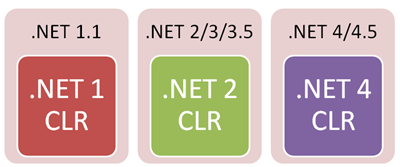
In-place upgrade means that the CLR is the same but new libraries are added as well as bug fixes and performance improvements:
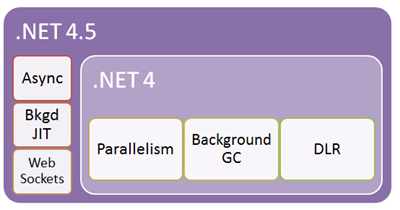
There's been some concern about how .NET 4.5 is an "in-place upgrade" of .NET 4. That means .NET 4.5 is still the v4CLR and adds new libraries as well as improvements to the core CLR itself.
Rick Strahl said on his blog:
Note that this in-place replacement is very different from the side by side installs of .NET 2.0 and 3.0/3.5 which all ran on the 2.0 version of the CLR. The two 3.x versions were basically library enhancements on top of the core .NET 2.0 runtime. Both versions ran under the .NET 2.0 runtime which wasn’t changed (other than for security patches and bug fixes) for the whole 3.x cycle. The 4.5 update instead completely replaces the .NET 4.0 runtime and leaves the actual version number set at v4.0.30319.
Rick has a great post with a lot of detail and information. However, respectfully, I don't think .NET 4.5 vs. .NET 4 is as different as Rick implies. In fact .NET 3 and .NET 3.5 both upgraded the system (and CLR) in place as well.
Perhaps if 3 and 3.5 were called .NET 2.5 and .NET 2.8 it would have made more sense. The community is always concerned about breaking changes, much like we are here with .NET 4 and .NET 4.5. Unfortunately reality and marketing names haven't always matched, but going forward I think we all agree that:
- Major Version = New CLR
- Minor Version = Bug fixes, new libraries
- Revision = Bug fixes, no breaking changes, small improvements
.NET 4.5 is not a radically different side-by-side CLR. A new CLR would be a theoretical .NET 5 In my opinion.
Could something break with .NET 4.5? This is why it's in beta now, so now is the time to speak up. It's possible something could break but unlikely according the .NET Blog. Here are the known .NET 4.5 breaking changes - most are pretty obscure. The kinds of breaking changes I've seen myself in the wild have been primarily when folks are relying on reflection or internal data structures. These internals aren't public contracts so they may have changed. I realize that when a change breaks YOU it feels like a situation when "100% of applications will break....mine did!" situation. It sucks, but in fact there are minimal breaking changes in .NET 4.5.
Can I get .NET 2.0, 3.5, 4 and 4.5 apps all running together on my system? Yes.
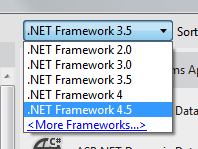
Can I develop apps with different versions with Visual Studio 11 Beta? Sure, you can multi-target all these versions and even plugin more targeting packs. I'll do a blog post later this week on Portable Libraries, a new version in .NET 4.5 that makes creating libraries for any CLR (including Xbox, Phone, Mono and others).
Developing Safely for both .NET 4 and .NET 4.5
It's been implied on blogs that if you install .NET 4.5 on your machine that you can't safely develop for .NET 4. In Rick's post, he compares two DLLs on a .NET 4 machine and again after the .NET 4.5 in place upgrade. How can you target safely against .NET 4 if you've installed .NET 4.5? You don't have those .NET 4 DLLs anymore, right?
Actually you do. They are in C:\Program Files (x86)\Reference Assemblies\Microsoft\Framework\.NETFramework.
_585203cb-b169-4c82-9dce-8f3ad4ce268a.png)
Let's prove it on a machine with Visual Studio 11 Beta. I'll make a DLL and reference System.Web and make use of one of the added types in that assembly. Yes, it's a screenshot of code, but hang in there.
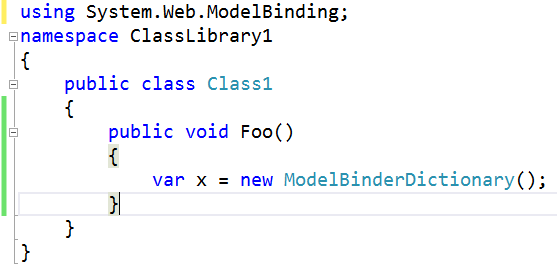
Now I'll change the properties of my project from .NET 4.5 to .NET 4. I won't change anything else. I'll build. Note that the type isn't there, I get a build error and I can't reference the namespace. You will know if you're using new .NET 4.5 functionality. The multi-targeting build system was designed for this and existed as far back as .NET 3.5. Those reference assemblies are there to catch this kind of thing.
_c1029450-be1e-4fd2-8844-d86f3694fcc2.png)
So while .NET 4 and .NET 4.5 don't live side by side on your system at runtime, Visual Studio knows about all the different versions of .NET and the compiler will reference different versions when you build.
If you are making a client app, like WinForms, Console, WPF, etc, this is all automatic. Your app.config contains that fact that you need .NET 4.5 and you'll even get a prompt to install it.
<?xml version="1.0" encoding="utf-8" ?><configuration> <startup> <supportedRuntime version="v4.0" sku=".NETFramework,Version=v4.5" /> </startup></configuration> |
So if I run my .NET 4.5 Console App on a .NET 4.0 machine now I get a nice dialog.
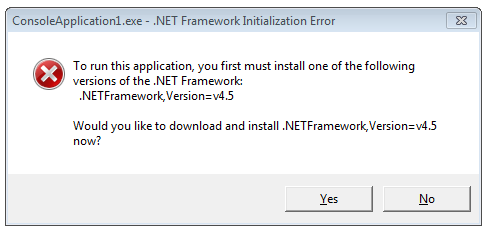
Looks like this technique doesn't work on ASP.NET (I would expect a Yellow Screen of Death)...I will talk to the team about that. I think this is a good thing and ASP.NET should respect it also.
UPDATE #2: The system will throw an error when an ASP.NET 4.5 application is deployed to an ASP.NET 4 system. The default templates on for ASP.NET 4.5 applications include the targetFramework attribute set to 4.5 like this:
|
1
2
3
4
5
|
<configuration> <system.web> <compilation debug="true" strict="false" explicit="true" targetFramework="4.5" /> </system.web></configuration> |
This will throw a YSOD if you deploy a 4.5 to a 4 machine like this: "The 'targetFramework' attribute currently references a version that is later than the installed version of the .NET Framework."
UPDATE: If you really, really want to detect .NET 4.5 at runtime, don't check versions or build numbers. Check for the existence of the feature you want to use. For example, from this Stackoverflow question by Christian K, here's how to detect .NET 4.5 programmatically.
However, David from the CLR team (in the comments) says that this is not a good idea. He says to check if an important feature is there and use it. Don't cheat and infer .NET versions.
"The IsNet45OrHigher example is not what we'd recommend. By feature detection, we mean 'detecting the presence of a feature before you use that feature', <i>not</i> 'using the presence of a feature to determine what version of .NET you are runnning on."
public static bool IsNet45OrNewer(){ // Class "ReflectionContext" exists from .NET 4.5 onwards. return Type.GetType("System.Reflection.ReflectionContext", false) != null;} |
Microsoft has said the same thing about Operating System features:
Identifying the current operating system is usually not the best way to determine whether a particular operating system feature is present. This is because the operating system may have had new features added in a redistributable DLL. Rather than using GetVersionEx to determine the operating system platform or version number, test for the presence of the feature itself.
Related Posts
- How to set an IIS Application or AppPool to use ASP.NET 3.5 rather than 2.0
- .NET Framework Versions and Dependencies - A very helpful MSDN article with a nice diagram showing what operating systems include what .NET framework automatically.
.NET Versioning and Multi-Targeting - .NET 4.5 is an in-place upgrade to .NET 4.0的更多相关文章
- 我(webabcd)的文章索引
[最后更新:2014.08.28] 重新想象 Windows Store Apps 系列文章 重新想象 Windows 8 Store Apps 系列文章 重新想象 Windows 8 Store A ...
- Multi-Targeting and Porting a .NET Library to .NET Core 2.0
Creating a new .NET Standard Project The first step for moving this library is to create a new .NET ...
- elasticsearch 口水篇(6) Mapping 定义索引
前面我们感觉ES就想是一个nosql数据库,支持Free Schema. 接触过Lucene.solr的同学这时可能会思考一个问题——怎么定义document中的field?store.index.a ...
- Prism 4 文档 ---第10章 Silverlight和WPF之间共享代码
本主题帮助你理解来自Prism的多目标和它的优缺点.多目标的代码针对两个不同的平台有大致相同的代码库.这允许同时保持代码尽可能多一样能够产生针对两种不同技术的二进制文件.在这种情况下,本节介绍 ...
- MySQL、HBase、ES的特点和区别
MySQL:关系型数据库,主要面向OLTP,支持事务,支持二级索引,支持sql,支持主从.Group Replication架构模型(本文全部以Innodb为例,不涉及别的存储引擎). HBase:基 ...
- elasticsearch Mapping 定义索引
Mapping is the process of defining how a document should be mapped to the Search Engine, including i ...
- CLR 这些年有啥变化吗?
引言 首先想给初学者推荐下<CLR via C#>这本好书,做.Net开发的开发者应该都读一下.为避免广告之嫌,所以这里只提供豆瓣书评的链接. CLR 作为.Net 程序跨平台运行的载体, ...
- 那些年黑了你的微软BUG
本文为 Dennis Gao 原创技术文章,发表于博客园博客,未经作者本人允许禁止任何形式的转载. 前言 炎炎夏日,朗朗乾坤,30℃ 的北京,你还在 Coding 吗? 整个 7 月都在忙项目,还加了 ...
- ionic + cordova+angularJs 搭建的H5 App完整版总结
为期半个月的项目实践开发,已完整告一段落,团队小组获得第一名,辛苦总算没有白费,想起有一天晚上,整个小组的人,联调到12点才从公司回去,真是心酸.这里总结一下,项目过程中遇到的问题 和感悟.哈哈, ...
随机推荐
- Floyd_Warshall(任意两点之间的最短路)
/* O(V^3) 案例: 1 2 2 1 3 5 2 3 1 */ #include <cstdio>#include <iostream>using namespace s ...
- @PathVariable @RequestParam @RequestBody 的区别
转载自:@RequestParam @RequestBody @PathVariable 等参数绑定注解详解 简介: handler method 参数绑定常用的注解,我们根据他们处理的Request ...
- 20165301 2017-2018-2 《Java程序设计》第九周学习总结
20165301 2017-2018-2 <Java程序设计>第九周学习总结 教材学习内容总结 第十三章:Java网络编程 URL类 通常包含三部分信息:协议.地址.资源 协议必须是URL ...
- asyncio的简单了解
asyncio是Python 3.4版本引入的标准库,直接内置了对异步IO的支持. asyncio的编程模型就是一个消息循环.我们从asyncio模块中直接获取一个EventLoop的引用,然后把需要 ...
- Linux 基础——文件搜索命令find
一.find命令的好处 有时会经常在目录下找文件或目录的具体存放在哪,但是该目录下的文件又很多不好找出.这时并不需要手动查看所有的文件,用find命令来帮助查找就行了.所以文件或目录一定归好类,存放有 ...
- appium--【Mac】提示报错“could not launch WebDriverAgentRunner..........."
运行appium WebDriverAgentLib和WebDriverAgentRunner都编译到真机运行成功,未在桌面生成一个没图标的WebDriverAgentRunner 连接并选择自己 ...
- html5.2新特性【长期更新】
先来说几个新定义: 1.p标签里只能是文字内容,不能在里面使用浮动,定位这些特性了.语义化加强,p标签就是文字标签. 2.legend以前只能是纯文本,新版可以加标签了,很爽吧. <fields ...
- 在Hboxlayout中组件的显示比例
有两种方法: 在插入布局的时候设置 mainLayout->addWidget(list,1,Qt::AlignCenter); mainLayout->addWidget(stack,3 ...
- 洛谷P3950 部落冲突 [LCT]
题目传送门 部落冲突 格式难调,体面就不放了. 分析: julao们应该都看得出来就是个$LCT$板子,战争就$cut$,结束就$link$,询问就$find$.没了... 太久没打$LCT$,然后发 ...
- 洛谷P4768 [NOI2018]归程 [可持久化并查集,Dijkstra]
题目传送门 归程 格式难调,题面就不放了. 分析: 之前同步赛的时候反正就一脸懵逼,然后场场暴力大战,现在呢,还是不会$Kruskal$重构树,于是就拿可持久化并查集做. 但是之前做可持久化并查集的时 ...