
windows10 vs2015编译 带nginx-rtmp-module 模块的32位nginx
1 下载必要软件
从 http://xhmikosr.1f0.de/tools/msys/下载msys:http://xhmikosr.1f0.de/tools/msys/MSYS_MinGW-w64_GCC_610_x86-x64_Full.7z。
把MSYS_MinGW-w64_GCC_610_x86-x64_Full.7z压缩包里面的MSYS解压到C盘根目录。
安装windwos版本git。https://git-for-windows.github.io/
https://github.com/git-for-windows/git/releases/download/v2.9.3.windows.1/Git-2.9.3-64-bit.exe
vc2015下载地址:https://www.visualstudio.com/downloads/download-visual-studio-vs
安装perl
http://www.activestate.com/activeperl/downloads
http://www.activestate.com/activeperl/downloads/thank-you?dl=http://downloads.activestate.com/ActivePerl/releases/5.24.0.2400/ActivePerl-5.24.0.2400-MSWin32-x86-64int-300560.exe
安装hg代码管理工具,下载nginx源码。需要设置环境变量PATH 加入 C:\Program Files\Mercurial。
https://www.mercurial-scm.org/release/windows/Mercurial-3.9-x64.exe
2 下载编译nginx必须的源码包
cmd.exe
d:
cd d:\git\
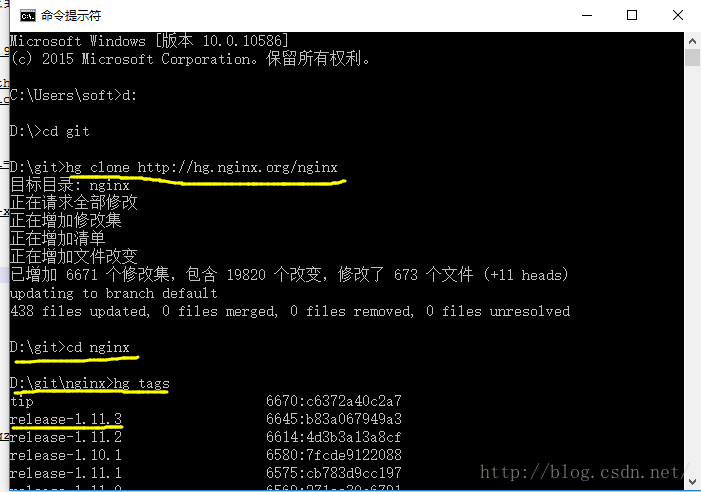
hg clone http://hg.nginx.org/nginx
cd nginx
hg tags 找到最新tag是release-1.11.3
迁出最新稳定版本代码
hg co release-1.11.3
# 修改错误级别为3级,d:\git\nginx\auto\cc\msvc的83行,把 -W4 修改为 -W3
# 否则,编译时(nmake -f build/Makefile),会出现如下错误:
# build/lib/nginx-rtmp-module/ngx_rtmp_core_module.c(611): error C2220: 警告被视为错误 - 没有生成“object”文件
# build/lib/nginx-rtmp-module/ngx_rtmp_core_module.c(611): warning C4456: “sa”的声明隐藏了上一个本地声明
# build/lib/nginx-rtmp-module/ngx_rtmp_core_module.c(611): note: 要简化迁移,请考虑暂时对用于生成且不引发警告的编译器版本 使用 /Wv:18 标记
# build/lib/nginx-rtmp-module/ngx_rtmp_core_module.c(506): note: 参见“sa”的声明
# NMAKE : fatal error U1077: “"C:\Program Files (x86)\Microsoft Visual Studio 14.0\VC\BIN\cl.EXE"”: 返回代码“0x2”
# Stop.
d:\git\nginx\auto\cc\msvc
CFLAGS="$CFLAGS -W4" ==> CFLAGS="$CFLAGS -W3"
mkdir build
mkdir build\lib
# 下载 nginx-rtmp-module 代码,checkout稳定版本
git clone https://github.com/arut/nginx-rtmp-module.git
cd nginx-rtmp-module
git tag
git checkout -b b1.1.9 v1.1.9
# 打开 msys 环境,下载必要的源码包。
c:\msys\msys.bat
在msys窗口输入:
cd d:/git/nginx/build/lib/
# 下载 opensll、pcre、zlib到lib目录,并解压
wget ftp://ftp.openssl.org/source/old/1.0.1/openssl-1.0.1s.tar.gz
wget http://downloads.sourceforge.net/pcre/pcre-8.39.tar.bz2
wget http://zlib.net/zlib-1.2.8.tar.gz
tar -xzf openssl-1.0.1s.tar.gz
tar -jxvf pcre-8.39.tar.bz2
tar -xzf zlib-1.2.8.tar.gz
3 编译
cd d:/git/nginx
# 在msys的/d/git/nginx目录下执行 auto/configure如下:
auto/configure --with-cc=cl --builddir=build --prefix= \
--conf-path=conf/nginx.conf --pid-path=logs/nginx.pid \
--http-log-path=logs/access.log --error-log-path=logs/error.log \
--sbin-path=nginx.exe --http-client-body-temp-path=temp/client_body_temp \
--http-proxy-temp-path=temp/proxy_temp \
--http-fastcgi-temp-path=temp/fastcgi_temp \
--with-cc-opt=-DFD_SETSIZE=1024 --with-pcre=build/lib/pcre-8.39 \
--with-zlib=build/lib/zlib-1.2.8 --with-openssl=build/lib/openssl-1.0.1s \
--with-select_module --with-http_ssl_module --with-ipv6 \
--with-http_sub_module \
--add-module=build/lib/nginx-rtmp-module
在cmd窗口运行:
d:
cd d:/git/nginx
"C:\Program Files (x86)\Microsoft Visual Studio 14.0\VC\bin\vcvars32.bat"
nmake -f build/Makefile
运行完成后,cmd 命令行窗口显示:
已完成库搜索
sed -e "s|%PREFIX%||" -e "s|%PID_PATH%|/logs/nginx.pid|" -e "s|%CONF_PATH%|/conf/nginx.conf|" -e "s|%ERROR_LOG_PATH%|/logs/error.log|" < docs/man/nginx.8 > build/nginx.8
'sed' 不是内部或外部命令,也不是可运行的程序
或批处理文件。
NMAKE : fatal error U1077: “sed”: 返回代码“0x1”
Stop
这个是因为我们没有正确配置msys 和 mingw32 在windows 上面的路径产生的,不用理会。
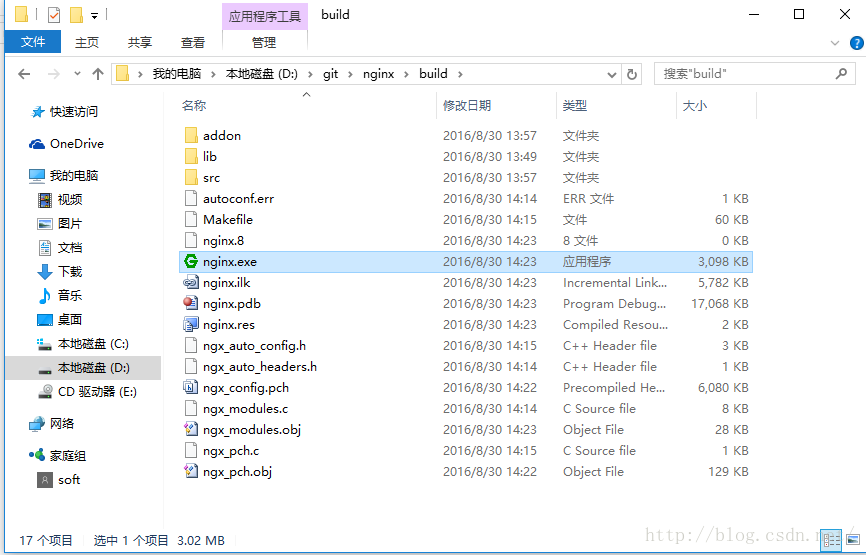
在d:\git\nginx\build\下面,已经成功生成nginx.exe
4 配置
cd d:\git\nginx\build
mkdir logs
mkdir temp
# 修改 lib\nginx-rtmp-module\test\nginx.conf 的配置内容,指定 /path/to 为 lib
# 注意系统不要占用tcp 8080端口,和 1935 端口。nginx.conf 中默认使用了8080 作为http端口,1935 作为推流端口。
# root /path/to/nginx-rtmp-module/test;
root lib/nginx-rtmp-module/test;
# root /path/to/nginx-rtmp-module/test/www;
root lib/nginx-rtmp-module/test/www;
5 测试
# 启动nginx.exe
nginx.exe -c lib\nginx-rtmp-module\test\nginx.conf
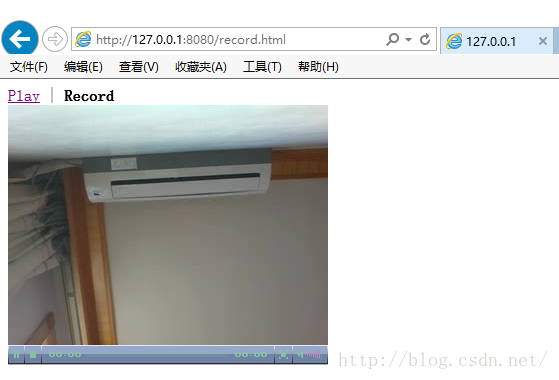
在浏览器地址栏输入一下内容,如果pc上带有可用摄像头,就可以看到录制、观看视频流:
http://127.0.0.1:8080/index.html
http://127.0.0.1:8080/rtmp-publisher/player.html
http://127.0.0.1:8080/rtmp-publisher/publisher.html
http://127.0.0.1:8080/stat/
windows10 vs2015编译 带nginx-rtmp-module 模块的32位nginx的更多相关文章
- Aliyun OSS Nginx proxy module(阿里云OSS Nginx 签名代理模块)
1.此文章主要介绍内容 本文主要介绍如何利用Nginx lua 实现将阿里云OSS存储空间做到同本地磁盘一样使用.核心是利用Nginx lua 对OSS请求进行签名并利用内部跳转将所有访问本地Ngin ...
- ffmpeg,rtmpdump和nginx rtmp实现录屏,直播和录制
公司最近在做视频直播的项目,我这里分配到对直播的视频进行录制,录制的方式是通过rtmpdump对rtmp的视频流进行录制 前置的知识 ffmpeg: 用于实现把录屏工具发出的视频和音频流,转换成我们需 ...
- nginx upload module的使用
现在的网站,总会有一点与用户交互的功能,例如允许用户上传头像,上传照片,上传附件这类的.PHP写的程序,对于上传文件效率不是很高.幸好,nginx有一个名为upload的module可以解决这个问题. ...
- 开始Nginx的SSL模块
nginx: [emerg] the "ssl" parameter requires ngx_http_ssl_module in /usr/local/nginx/conf/n ...
- nginx健康检查模块源码分析
nginx健康检查模块 本文所说的nginx健康检查模块是指nginx_upstream_check_module模块.nginx_upstream_check_module模块是Taobao定制的用 ...
- nginx的ngx_http_geoip2模块以精准禁止特定地区IP访问
要求:对网站的信息,比如某个访问节点不想国内或者国外的用户使用,禁止国内或者国外或者精确到某个城市的那种情况. 解决方式:1.Cloudfalre来实现禁止特定国家的ip访问,比较简单,但是需要mon ...
- 【Nginx】如何为已安装的Nginx动态添加模块?看完我懂了!!
写在前面 很多时候,我们根据当时的项目情况和业务需求安装完Nginx后,后续随着业务的发展,往往会给安装好的Nginx添加其他的功能模块.在为Nginx添加功能模块时,要求Nginx不停机.这就涉及到 ...
- Win7 下用 VS2015 编译最新 openssl(1.0.2j)包含32、64位debug和release版本的dll、lib(8个版本)
Win7 64位系统下通过VS2015编译好的最新的OpenSSL(1.0.2j)所有八个版本的链接库, 包含以下八个版本: 1.32位.debug版LIB: 2.32位.release版LIB: 3 ...
- vs2015编译zlib静态库步骤
ZLIB静态库的编译 下载ZLIB源码 ZLib官网下载或者GitHub上直接 clone 下来即可 www.zlib.net 截至目前最新版本1.2.1.1本 如下图我选择从官网下载 下载完以后解压 ...
随机推荐
- Java复习3.变量.常量.String.
Java 中的变量常量数据类型 20131004 前言: 还是国庆节,无聊的很,就没事复习点Java的知识,其实C/C++基本上是现在大型企业面试的语言,但是多学习点Java是没有坏处的,而且,将来工 ...
- URAL 1203 Scientific Conference 简单dp 难度:0
http://acm.timus.ru/problem.aspx?space=1&num=1203 按照结束时间为主,开始时间为辅排序,那么对于任意结束时间t,在此之前结束的任务都已经被处理, ...
- SQL HAVING用法详解
来自:http://blog.csdn.net/wozeze1/article/details/6031318 HAVING 子句对 GROUP BY 子句设置条件的方式与 WHERE 和 SELEC ...
- 进程与网络监控和ssh简单使用
进程的概念和管理 进程: 正在执行的程序 线程: 轻量级的进程 进程有独立的地址空间,线程没有 线程不能独立存在,它是由进程创建.Thread1.在linux中,每个执行的程序都称为一个进程.每一个进 ...
- 一台服务器的IIS绑定多个域名
等待十分钟: 在IIS上配置:
- vim+ctags用法
vim用法 在VIM编辑器的环境下用":make"就可以编译程序,如果程序中有错误,就会显示出来. 下列命令可以快速定位,并修改错误错误 ":c ...
- LINUX系统下APACHE中的CGI应用
该实验环境是在APACHE的配置内容的基础上实现的! 1.安装软件: yum install php -y ##安装完成后,可以在/etc/httpd/conf.d/目录下查看,有php ...
- python常用模块之shutil模块
python常用模块之shutil模块 shutil模块,高级的文件.文件夹.压缩包处理模块 1.shutil.copyfile(src,des[,length]):将文件内容拷贝到另一个文件 In ...
- vue-route(三)后台管理路由配置
在一个后台管理的项目中,关于路由的配置, 我们需要实现的一个布局是header,aside,main三部分,后期还可能添加footer部分,实现的需求是请求数据时,局部的刷新,这个时候我们就需 ...
- vue中父子组件值的传递
父传子 父组件: