
Ignite缓存管理初体验
Ignite缓存管理初体验:ignite服务端配置,大家可以用参考官方进行配置(或者使用默认配置也可以)。
本文中的ignite使用版本是1.7,与spring结合使用。
maven依赖配置
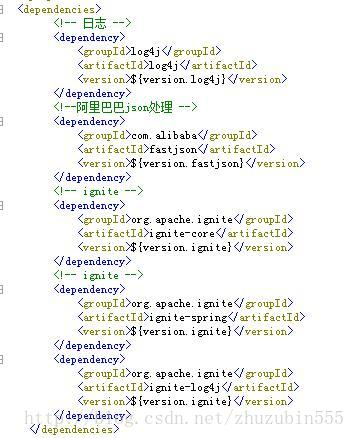
ignite 客户端配置
 <property name="clientMode" value="true"><!--声明为客户端-->

    <!-- Explicitly configure TCP discovery SPI to provide list of initial nodes. -->

    <property name="discoverySpi">

        <bean class="org.apache.ignite.spi.discovery.tcp.TcpDiscoverySpi">

            <property name="ipFinder">

                <!--

                    Ignite provides several options for automatic discovery that can be used

                    instead os static IP based discovery. For information on all options refer

                    to our documentation: https://apacheignite.readme.io/docs/cluster-config

                -->

                <!-- Uncomment static IP finder to enable static-based discovery of initial nodes. -->

                <!--<bean class="org.apache.ignite.spi.discovery.tcp.ipfinder.vm.TcpDiscoveryVmIpFinder">-->

                <bean class="org.apache.ignite.spi.discovery.tcp.ipfinder.multicast.TcpDiscoveryMulticastIpFinder">

                    <property name="addresses">

                        <list>

                            <!-- In distributed environment, replace with actual host IP address. -->

                            <value>${ignite.serverIp}</value><!--服务端IP地址-->

                        </list>

                    </property>

                </bean>

            </property>

        </bean>

    </property>

    <property name="communicationSpi">

        <bean class="org.apache.ignite.spi.communication.tcp.TcpCommunicationSpi">

            <property name="localPort" value="${ignite.communication.localport}"><!--对接服务端端口-->

            <property name="localAddress" value="192.168.1.93"><!--ignite客户端链接地址(适用多网卡情况)-->

        </property></property></bean>

    </property>

</property>
igniteService代码(interface实现缓存存储,供应用调用)
@原码

public interface IgniteCacheApplication {

/**

*设置系统对象

*/

public boolean putIgniteCache(String parentName,String name,Object value,Long expiry);

/**

*获取系统对象

*/

public Object getIgniteCache(String parentName,String name);

/**

*移除系统对象

*/

public boolean removeIgniteCache(String parentName,String name);

/**

*清空系统对象

*/

public boolean clearIgniteCacheByName(String parentName,String name);

/**

*清空系统缓存

*/

public void clearIgniteCache();

/**

*销毁缓存对象

*/

public void destroyCache(String parentName);
@实现类原码
@Service(“cacheServiceImpl”)
public class IgniteCacheServiceImpl implements CacheApplication,InitializingBean {
private static final Logger logger = Logger.getLogger(IgniteCacheServiceImpl.class);

public static Ignite ignite ;

@Autowired

private IgniteConfiguration cfg;

@SuppressWarnings({ "unchecked", "rawtypes" })

@Override

public boolean putIgniteCache(String parentName, String name, Object value, Long expiry) {

    boolean flag=true;

    try {

        CacheConfiguration cacheCfg = new CacheConfiguration();

        if(StringUtils.isEmpty(name)){

            return false;

        }

        if(!StringUtils.isEmpty(expiry)){

            cacheCfg.setExpiryPolicyFactory(CreatedExpiryPolicy.factoryOf(new Duration(TimeUnit.SECONDS, expiry)));

        }

        cacheCfg.setName(parentName);

        cacheCfg.setAtomicityMode(CacheAtomicityMode.TRANSACTIONAL);

        IgniteCache<string, object=""> cache = ignite.getOrCreateCache(cacheCfg);

        cache.put(name, value);

        CacheConstant.igniteStatus="normal";

    } catch (CacheException e) {

        if (e.getCause() instanceof IgniteClientDisconnectedException) {

            IgniteClientDisconnectedException cause =

              (IgniteClientDisconnectedException)e.getCause();

            cause.reconnectFuture().get(); // Wait for reconnect.

            logger.error("ignite Wait for reconnect",e);

            CacheConstant.igniteStatus="death";

            flag=false;

          }else{

              e.printStackTrace();

              logger.error("ignite cache Exception errorInfo:"+e.getMessage(),e);

              CacheConstant.igniteStatus="death";

              flag=false;

          }

    } catch (Exception e) {

        e.printStackTrace();

        logger.error("添加ignite对象缓存异常 param{"+parentName+","+name+"},errorInfo:"+e.getMessage(),e);

        CacheConstant.igniteStatus="death";

        flag=false;

    }

    return flag;

}

@SuppressWarnings({ "unchecked", "rawtypes" })

@Override

public Object getIgniteCache(String parentName, String name) {

    try {

        CacheConfiguration cacheCfg = new CacheConfiguration();

        if(StringUtils.isEmpty(name)){

            return false;

        }

        cacheCfg.setName(parentName);

        cacheCfg.setAtomicityMode(CacheAtomicityMode.TRANSACTIONAL);

        IgniteCache<string, object=""> cache = ignite.getOrCreateCache(cacheCfg);

        CacheConstant.igniteStatus="normal";

        return cache.get(name);

    } catch (CacheException e) {

        if (e.getCause() instanceof IgniteClientDisconnectedException) {

            IgniteClientDisconnectedException cause =

              (IgniteClientDisconnectedException)e.getCause();

            cause.reconnectFuture().get(); // Wait for reconnect.

            logger.error("ignite Wait for reconnect",e);

            CacheConstant.igniteStatus="death";

            return null;

          }else{

              e.printStackTrace();

              logger.error("ignite cache Exception errorInfo:"+e.getMessage(),e);

              CacheConstant.igniteStatus="death";

              return null;

          }

    } catch (Exception e) {

        e.printStackTrace();

        logger.error("获取ignite对象缓存异常 param{"+parentName+","+name+"},errorInfo:"+e.getMessage(),e);

        CacheConstant.igniteStatus="death";

        return null;

    }

}

@SuppressWarnings({ "unchecked", "rawtypes" })

@Override

public boolean removeIgniteCache(String parentName, String name) {

    try {

        CacheConfiguration cacheCfg = new CacheConfiguration();

        if(StringUtils.isEmpty(name)){

            return false;

        }

        cacheCfg.setName(parentName);

        cacheCfg.setAtomicityMode(CacheAtomicityMode.TRANSACTIONAL);

        IgniteCache<string, object=""> cache = ignite.getOrCreateCache(cacheCfg);

        boolean flag = cache.remove(name);

        CacheConstant.igniteStatus="normal";

        return flag;

    } catch (CacheException e) {

        if (e.getCause() instanceof IgniteClientDisconnectedException) {

            IgniteClientDisconnectedException cause =

              (IgniteClientDisconnectedException)e.getCause();

            cause.reconnectFuture().get(); // Wait for reconnect.

            logger.error("ignite Wait for reconnect",e);

            return false;

          }else{

              e.printStackTrace();

              logger.error("ignite cache Exception errorInfo:"+e.getMessage(),e);

              CacheConstant.igniteStatus="death";

              return false;

          }

    } catch (Exception e) {

        e.printStackTrace();

        logger.error("移除ignite对象缓存异常 param{"+parentName+","+name+"},errorInfo:"+e.getMessage(),e);

        CacheConstant.igniteStatus="death";

        return false;

    }

}

@SuppressWarnings({ "unchecked", "rawtypes" })

@Override

public boolean clearIgniteCacheByName(String parentName, String name) {

    boolean flag=true;

    try {

        CacheConfiguration cacheCfg = new CacheConfiguration();

        cacheCfg.setAtomicityMode(CacheAtomicityMode.TRANSACTIONAL);

        cacheCfg.setName(parentName);

        IgniteCache<string, object=""> cache = ignite.getOrCreateCache(cacheCfg);

        if(StringUtils.isEmpty(name)){

            return false;

        }

        cache.clear();

        CacheConstant.igniteStatus="normal";

    } catch (CacheException e) {

        if (e.getCause() instanceof IgniteClientDisconnectedException) {

            IgniteClientDisconnectedException cause =

              (IgniteClientDisconnectedException)e.getCause();

            cause.reconnectFuture().get(); // Wait for reconnect.

            logger.error("ignite Wait for reconnect",e);

            CacheConstant.igniteStatus="death";

            return false;

          }else{

              e.printStackTrace();

              logger.error("ignite cache Exception errorInfo:"+e.getMessage(),e);

              CacheConstant.igniteStatus="death";

              return false;

          }

    } catch (Exception e) {

        e.printStackTrace();

        logger.error("清除ignite对象中所有缓存异常 param{"+parentName+","+name+"},errorInfo:"+e.getMessage(),e);

        CacheConstant.igniteStatus="death";

        flag=false;

    }

    return flag;

}

@Override

public void clearIgniteCache() {

    try {

        @SuppressWarnings("rawtypes")

        CacheConfiguration cacheCfg = new CacheConfiguration();

        cacheCfg.setAtomicityMode(CacheAtomicityMode.TRANSACTIONAL);

        @SuppressWarnings("unchecked")

        IgniteCache<string, object=""> cache = ignite.getOrCreateCache(cacheCfg);

        cache.clear();

        CacheConstant.igniteStatus="normal";

    } catch (CacheException e) {

        if (e.getCause() instanceof IgniteClientDisconnectedException) {

            IgniteClientDisconnectedException cause =

              (IgniteClientDisconnectedException)e.getCause();

            cause.reconnectFuture().get(); // Wait for reconnect.

            logger.error("ignite Wait for reconnect",e);

            CacheConstant.igniteStatus="death";

          }else{

              e.printStackTrace();

              logger.error("ignite cache Exception errorInfo:"+e.getMessage(),e);

              CacheConstant.igniteStatus="death";

          }

    } catch (Exception e) {

        e.printStackTrace();

        logger.error("清除ignite缓存异常,errorInfo:"+e.getMessage(),e);

        CacheConstant.igniteStatus="death";

    }

}

/**

*系统启动时,扫描ignite配置,并启动

*/

@Override

public void afterPropertiesSet() throws Exception {

    startIgnite();

}

public void setCfg(IgniteConfiguration cfg) {

    this.cfg = cfg;

}

public void startIgnite(){

    logger.info("starting ignite ...");

    ignite = Ignition.start(cfg);

    logger.info("started ignite ...");

}

@Override

public void destroyCache(String parentName) {

    try {

        ignite.destroyCache(parentName);

        CacheConstant.igniteStatus="normal";

    } catch (CacheException e) {

        if (e.getCause() instanceof IgniteClientDisconnectedException) {

            IgniteClientDisconnectedException cause =

              (IgniteClientDisconnectedException)e.getCause();

            cause.reconnectFuture().get(); // Wait for reconnect.

            logger.error("ignite Wait for reconnect",e);

            CacheConstant.igniteStatus="death";

          }else{

              e.printStackTrace();

              logger.error("ignite cache Exception errorInfo:"+e.getMessage(),e);

              CacheConstant.igniteStatus="death";

          }

    } catch (Exception e) {

        e.printStackTrace();

        logger.error("清除ignite缓存异常,errorInfo:"+e.getMessage(),e);

        CacheConstant.igniteStatus="death";

    }

}

</string,></string,></string,></string,></string,>
Ignite缓存管理初体验的更多相关文章
- 图数据库HugeGraph:HugeGraph-Hubble基于Web的可视化图管理初体验
原创/朱季谦 一.HugeGraph-Hubble简介 关于HugeGraph,官方资料是这样介绍的,它是一款易用.高效.通用的开源图数据库系统(Graph Database), 实现了 Apache ...
- Spring boot缓存初体验
spring boot缓存初体验 1.项目搭建 使用MySQL作为数据库,spring boot集成mybatis来操作数据库,所以在使用springboot的cache组件时,需要先搭建一个简单的s ...
- Ignite缓存大小管理
Ignite使用计算机内存存储缓存数据,达到提升缓存读写性能的.但是计算机内存往往是有限的,我们必须合理管理Ignite对内存的使用. Ignite可以使用JVM堆外内存和堆内内存.使用堆外内存基本上 ...
- Helm Template初体验,方便管理多环境
我最新最全的文章都在南瓜慢说 www.pkslow.com,文章更新也只在官网,欢迎大家来喝茶~~ 1 简介 Helm作为一个优秀的包管理器,这部分我们之前已经做了介绍,文章如下: 用Helm部署Ku ...
- 五、MyBatis缓存初体验
缓存就是内存中的数据,常常来自对数据库查询结果的保存,使用缓存, 我们可以避免频繁的与数据库进行交互, 进而提高响应速度. 一级缓存初体验(session,默认打开) 同一查询执行两次以上:selec ...
- Bower管理依赖库初体验
比如一开始我用了jquery-1.10.2.min.js,后来要用bootstrap,但bootstrap依赖的确实2.0.3版本的jquery,那又要下载一个去替换原来的,这样的事情发生多了就会觉得 ...
- Spring之初体验
Spring之初体验 Spring是一个轻量级的Java Web开发框架,以IoC(Inverse of Control 控制反转)和 ...
- node.js 初体验
node.js 初体验 2011-10-31 22:56 by 聂微东, 174545 阅读, 118 评论, 收藏, 编辑 PS: ~ 此篇文章的进阶内容在为<Nodejs初阶之express ...
- grunt 构建工具(build tool)初体验
操作环境:win8 系统,建议使用 git bash (window下的命令行工具) 1,安装node.js 官网下载:https://nodejs.org/ 直接点击install ,会根据你的操 ...
随机推荐
- RabbitMQ之远程过程调用(RPC)【译】
在第二个教程中,我们学习了如何使用工作队列在多个worker之间分配耗时的任务. 但是如果我们需要在远程计算机上运行功能并等待结果呢?嗯,这是另外一件事情,这种模式通常被称为远程过程调用(RPC). ...
- 在.net4的环境下使用Microsoft.AspNet.SignalR.Client 2.4.0
我的环境是运行在.net 4 framework,并且使用了signalr 在重连的时候发现,运行的服务被关闭了.找不到合适的处理的办法.因为报错是 说明: 由于未经处理的异常,进程终止.异常信息: ...
- PHP多进程编程(3):多进程抓取网页的演示
我们知道,从父进程到子经常的数据传递相对比较容易一些,但是从子进程传递到父进程就比较的困难. 有很多办法实现进程交互,在php中比较方便的是 管道通信.当然,还可以通过 socket_pair 进行通 ...
- 03 java基本
输入输出流 标准输出流比较简单, 只需要使用 System.out.println 就可以了, 标准输入流步骤如下: Scanner in = new Scanner(System.in); 然后可以 ...
- 嵌入式驱动开发之采集方式bypass mode---bypass mode
http://baike.baidu.com/link?url=HifFTlNRROR24lW_gSdTiG-eXooi08O0Eeq1mU6Yy0I1LOMW4kdumv25BOQbohV_428M ...
- 开启mysql日志及若干问题
今天学习了mysql日志功能,以前也有所了解,只不过没有深入的学习,所以趁着“余热”,把我从网上找到的资料与实践 结合起来,总结一下其基本用法.学习从来都不是无趣的,就看你怎么看待学习. 1.查看查询 ...
- 基于docker部署的微服务架构(四): 配置中心
原文:http://www.jianshu.com/p/b17d65934b58%20 前言 在微服务架构中,由于服务数量众多,如果使用传统的配置文件管理方式,配置文件分散在各个项目中,不易于集中管理 ...
- hdu 1426:Sudoku Killer(DFS深搜,进阶题目,求数独的解)
Sudoku Killer Time Limit: 2000/1000 MS (Java/Others) Memory Limit: 65536/32768 K (Java/Others)Tot ...
- 如何用ChemDraw选择结构
在使用ChemDraw软件过程中,我们往往会需要对结构进行翻滚.连结.旋转.分解.组合等操作.但是对于新手用户来说不是每种操作大家都会使用的. 针对这种情况我们会有一系列的教程来为大家讲解.下面我们就 ...
- jquery如何书写一个根据下拉选择列表的选择值 控制其他标签时候显示的功能
有时候我们在一些表单搜集信息的时候,需要根据上一项的选择情况设定下面的某些输入信息是否显示,是否需要被收集等,这个时候就要对下拉列表的选择事件做一个监听. 代码如下: <!DOCTYPE HTM ...