
MyBatis学习4---使用MyBatis_Generator生成Dto、Dao、Mapping
由于MyBatis属于一种半自动的ORM框架,所以主要的工作将是书写Mapping映射文件,但是由于手写映射文件很容易出错,所以查资料发现有现成的工具可以自动生成底层模型类、Dao接口类甚至Mapping映射文件。
一、建立表结构
CREATE TABLE `user` (
`id` varchar(50) NOT NULL,
`username` varchar(18) CHARACTER SET utf8 COLLATE utf8_bin DEFAULT NULL,
`password` varchar(18) DEFAULT NULL,
`email` varchar(50) DEFAULT NULL,
`name` varchar(18) DEFAULT NULL,
`sex` varchar(2) DEFAULT NULL,
`birthday` varchar(50) DEFAULT NULL,
`address` varchar(500) DEFAULT NULL,
`tel` varchar(18) DEFAULT NULL,
`qq` varchar(18) DEFAULT NULL,
`image` varchar(50) DEFAULT NULL,
`sfjh` varchar(1) DEFAULT NULL,
`sfzx` varchar(1) DEFAULT NULL,
`sfhf` varchar(1) DEFAULT NULL,
`sfpl` varchar(1) DEFAULT NULL,
`sffx` varchar(1) DEFAULT NULL,
PRIMARY KEY (`id`)
) ENGINE=InnoDB DEFAULT CHARSET=utf-8;
二、下载mybatis-generator-core
进入:http://code.google.com/p/mybatis/
选择Downloads,再选择MyBatis Generator Tool下载即可。
三、生成配置文件
新建一个空的XML配置文件,名称可以随便取,这里以generatorConfig.xml为名。最好将这个文件放在下载后的lib目录中,如图:
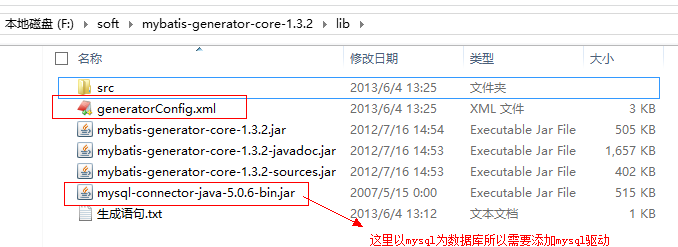
其中mysql的驱动可以随便放在非中文路径的地方,这里为了方便就放在lib目录下。
自动生成最重要的就是配置文件的书写,现在就开始介绍generatorConfig.xml这个文件的具体内容:
- <?xml version="1.0" encoding="UTF-8"?>
- <!DOCTYPE generatorConfiguration
- PUBLIC "-//mybatis.org//DTD MyBatis Generator Configuration 1.0//EN"
- "http://mybatis.org/dtd/mybatis-generator-config_1_0.dtd">
- <generatorConfiguration>
- <!-- 数据库驱动-->
- <classPathEntry location="mysql-connector-java-5.0.6-bin.jar"/>
- <context id="DB2Tables" targetRuntime="MyBatis3">
- <commentGenerator>
- <property name="suppressDate" value="true"/>
- <!-- 是否去除自动生成的注释 true:是 : false:否 -->
- <property name="suppressAllComments" value="true"/>
- </commentGenerator>
- <!--数据库链接URL,用户名、密码 -->
- <jdbcConnection driverClass="com.mysql.jdbc.Driver" connectionURL="jdbc:mysql://localhost/test" userId="test" password="test">
- </jdbcConnection>
- <javaTypeResolver>
- <property name="forceBigDecimals" value="false"/>
- </javaTypeResolver>
- <!-- 生成模型的包名和位置-->
- <javaModelGenerator targetPackage="test.model" targetProject="src">
- <property name="enableSubPackages" value="true"/>
- <property name="trimStrings" value="true"/>
- </javaModelGenerator>
- <!-- 生成映射文件的包名和位置-->
- <sqlMapGenerator targetPackage="test.mapping" targetProject="src">
- <property name="enableSubPackages" value="true"/>
- </sqlMapGenerator>
- <!-- 生成DAO的包名和位置-->
- <javaClientGenerator type="XMLMAPPER" targetPackage="test.dao" targetProject="src">
- <property name="enableSubPackages" value="true"/>
- </javaClientGenerator>
- <!-- 要生成哪些表-->
- <table tableName="about" domainObjectName="AboutDto" enableCountByExample="false" enableUpdateByExample="false" enableDeleteByExample="false" enableSelectByExample="false" selectByExampleQueryId="false"></table>
- <table tableName="user" domainObjectName="UserDto" enableCountByExample="false" enableUpdateByExample="false" enableDeleteByExample="false" enableSelectByExample="false" selectByExampleQueryId="false"></table>
- <table tableName="syslogs" domainObjectName="SyslogsDto" enableCountByExample="false" enableUpdateByExample="false" enableDeleteByExample="false" enableSelectByExample="false" selectByExampleQueryId="false"></table>
- </context>
- </generatorConfiguration>
1、其中需要注意的有数据库驱动、数据库URL、用户名、密码、生成模型的包名和位置、生成映射文件的包名和位置、生成DAO的包名和位置以及最后需要生成的表名和对应的类名。
四、运行
需要通过CMD命令行方式来运行,首先可以先准备一个运行的脚本,这里使用的脚本是:java -jar mybatis-generator-core-1.3.2.jar -configfile generatorConfig.xml -overwrite
需要注意的是:mybatis-generator-core-1.3.2.jar为下载的对应版本的jar,generatorConfig.xml 为配置文件名,如果不为这个可以在这里进行修改。
启动cmd进入到“F:\soft\mybatis-generator-core-1.3.2\lib”这个目录下,如图:
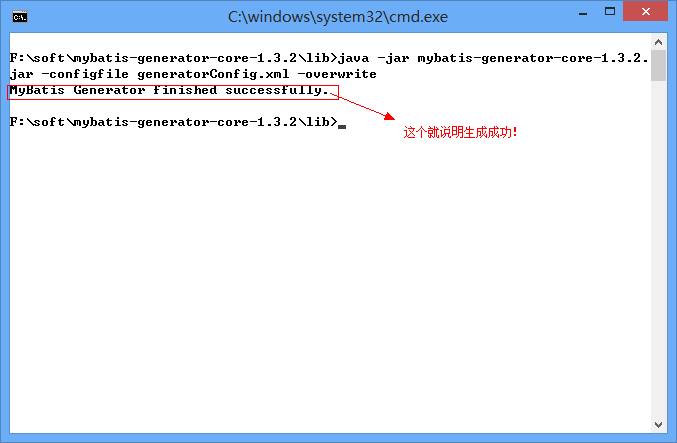
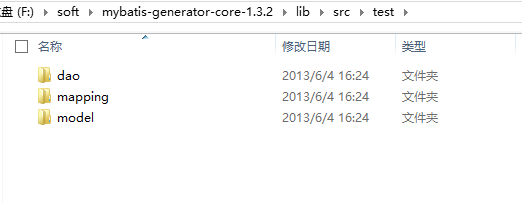
生成成功后进到src目录下,可以看到已经生成了对应的model、dao、mapping,如图:
下面可以看看生成后的UserMapper.xml
- <?xml version="1.0" encoding="UTF-8" ?>
- <!DOCTYPE mapper PUBLIC "-//mybatis.org//DTD Mapper 3.0//EN" "http://mybatis.org/dtd/mybatis-3-mapper.dtd" >
- <mapper namespace="test.dao.UserDtoMapper" >
- <resultMap id="BaseResultMap" type="test.model.UserDto" >
- <id column="id" property="id" jdbcType="VARCHAR" />
- <result column="username" property="username" jdbcType="VARCHAR" />
- <result column="password" property="password" jdbcType="VARCHAR" />
- <result column="email" property="email" jdbcType="VARCHAR" />
- <result column="name" property="name" jdbcType="VARCHAR" />
- <result column="sex" property="sex" jdbcType="VARCHAR" />
- <result column="birthday" property="birthday" jdbcType="VARCHAR" />
- <result column="address" property="address" jdbcType="VARCHAR" />
- <result column="tel" property="tel" jdbcType="VARCHAR" />
- <result column="qq" property="qq" jdbcType="VARCHAR" />
- <result column="image" property="image" jdbcType="VARCHAR" />
- <result column="sfjh" property="sfjh" jdbcType="VARCHAR" />
- <result column="sfzx" property="sfzx" jdbcType="VARCHAR" />
- <result column="sfhf" property="sfhf" jdbcType="VARCHAR" />
- <result column="sfpl" property="sfpl" jdbcType="VARCHAR" />
- <result column="sffx" property="sffx" jdbcType="VARCHAR" />
- </resultMap>
- <sql id="Base_Column_List" >
- id, username, password, email, name, sex, birthday, address, tel, qq, image, sfjh,
- sfzx, sfhf, sfpl, sffx
- </sql>
- <select id="selectByPrimaryKey" resultMap="BaseResultMap" parameterType="java.lang.String" >
- select
- <include refid="Base_Column_List" />
- from user
- where id = #{id,jdbcType=VARCHAR}
- </select>
- <delete id="deleteByPrimaryKey" parameterType="java.lang.String" >
- delete from user
- where id = #{id,jdbcType=VARCHAR}
- </delete>
- <insert id="insert" parameterType="test.model.UserDto" >
- insert into user (id, username, password,
- email, name, sex, birthday,
- address, tel, qq, image,
- sfjh, sfzx, sfhf, sfpl,
- sffx)
- values (#{id,jdbcType=VARCHAR}, #{username,jdbcType=VARCHAR}, #{password,jdbcType=VARCHAR},
- #{email,jdbcType=VARCHAR}, #{name,jdbcType=VARCHAR}, #{sex,jdbcType=VARCHAR}, #{birthday,jdbcType=VARCHAR},
- #{address,jdbcType=VARCHAR}, #{tel,jdbcType=VARCHAR}, #{qq,jdbcType=VARCHAR}, #{image,jdbcType=VARCHAR},
- #{sfjh,jdbcType=VARCHAR}, #{sfzx,jdbcType=VARCHAR}, #{sfhf,jdbcType=VARCHAR}, #{sfpl,jdbcType=VARCHAR},
- #{sffx,jdbcType=VARCHAR})
- </insert>
- <insert id="insertSelective" parameterType="test.model.UserDto" >
- insert into user
- <trim prefix="(" suffix=")" suffixOverrides="," >
- <if test="id != null" >
- id,
- </if>
- <if test="username != null" >
- username,
- </if>
- <if test="password != null" >
- password,
- </if>
- <if test="email != null" >
- email,
- </if>
- <if test="name != null" >
- name,
- </if>
- <if test="sex != null" >
- sex,
- </if>
- <if test="birthday != null" >
- birthday,
- </if>
- <if test="address != null" >
- address,
- </if>
- <if test="tel != null" >
- tel,
- </if>
- <if test="qq != null" >
- qq,
- </if>
- <if test="image != null" >
- image,
- </if>
- <if test="sfjh != null" >
- sfjh,
- </if>
- <if test="sfzx != null" >
- sfzx,
- </if>
- <if test="sfhf != null" >
- sfhf,
- </if>
- <if test="sfpl != null" >
- sfpl,
- </if>
- <if test="sffx != null" >
- sffx,
- </if>
- </trim>
- <trim prefix="values (" suffix=")" suffixOverrides="," >
- <if test="id != null" >
- #{id,jdbcType=VARCHAR},
- </if>
- <if test="username != null" >
- #{username,jdbcType=VARCHAR},
- </if>
- <if test="password != null" >
- #{password,jdbcType=VARCHAR},
- </if>
- <if test="email != null" >
- #{email,jdbcType=VARCHAR},
- </if>
- <if test="name != null" >
- #{name,jdbcType=VARCHAR},
- </if>
- <if test="sex != null" >
- #{sex,jdbcType=VARCHAR},
- </if>
- <if test="birthday != null" >
- #{birthday,jdbcType=VARCHAR},
- </if>
- <if test="address != null" >
- #{address,jdbcType=VARCHAR},
- </if>
- <if test="tel != null" >
- #{tel,jdbcType=VARCHAR},
- </if>
- <if test="qq != null" >
- #{qq,jdbcType=VARCHAR},
- </if>
- <if test="image != null" >
- #{image,jdbcType=VARCHAR},
- </if>
- <if test="sfjh != null" >
- #{sfjh,jdbcType=VARCHAR},
- </if>
- <if test="sfzx != null" >
- #{sfzx,jdbcType=VARCHAR},
- </if>
- <if test="sfhf != null" >
- #{sfhf,jdbcType=VARCHAR},
- </if>
- <if test="sfpl != null" >
- #{sfpl,jdbcType=VARCHAR},
- </if>
- <if test="sffx != null" >
- #{sffx,jdbcType=VARCHAR},
- </if>
- </trim>
- </insert>
- <update id="updateByPrimaryKeySelective" parameterType="test.model.UserDto" >
- update user
- <set >
- <if test="username != null" >
- username = #{username,jdbcType=VARCHAR},
- </if>
- <if test="password != null" >
- password = #{password,jdbcType=VARCHAR},
- </if>
- <if test="email != null" >
- email = #{email,jdbcType=VARCHAR},
- </if>
- <if test="name != null" >
- name = #{name,jdbcType=VARCHAR},
- </if>
- <if test="sex != null" >
- sex = #{sex,jdbcType=VARCHAR},
- </if>
- <if test="birthday != null" >
- birthday = #{birthday,jdbcType=VARCHAR},
- </if>
- <if test="address != null" >
- address = #{address,jdbcType=VARCHAR},
- </if>
- <if test="tel != null" >
- tel = #{tel,jdbcType=VARCHAR},
- </if>
- <if test="qq != null" >
- qq = #{qq,jdbcType=VARCHAR},
- </if>
- <if test="image != null" >
- image = #{image,jdbcType=VARCHAR},
- </if>
- <if test="sfjh != null" >
- sfjh = #{sfjh,jdbcType=VARCHAR},
- </if>
- <if test="sfzx != null" >
- sfzx = #{sfzx,jdbcType=VARCHAR},
- </if>
- <if test="sfhf != null" >
- sfhf = #{sfhf,jdbcType=VARCHAR},
- </if>
- <if test="sfpl != null" >
- sfpl = #{sfpl,jdbcType=VARCHAR},
- </if>
- <if test="sffx != null" >
- sffx = #{sffx,jdbcType=VARCHAR},
- </if>
- </set>
- where id = #{id,jdbcType=VARCHAR}
- </update>
- <update id="updateByPrimaryKey" parameterType="test.model.UserDto" >
- update user
- set username = #{username,jdbcType=VARCHAR},
- password = #{password,jdbcType=VARCHAR},
- email = #{email,jdbcType=VARCHAR},
- name = #{name,jdbcType=VARCHAR},
- sex = #{sex,jdbcType=VARCHAR},
- birthday = #{birthday,jdbcType=VARCHAR},
- address = #{address,jdbcType=VARCHAR},
- tel = #{tel,jdbcType=VARCHAR},
- qq = #{qq,jdbcType=VARCHAR},
- image = #{image,jdbcType=VARCHAR},
- sfjh = #{sfjh,jdbcType=VARCHAR},
- sfzx = #{sfzx,jdbcType=VARCHAR},
- sfhf = #{sfhf,jdbcType=VARCHAR},
- sfpl = #{sfpl,jdbcType=VARCHAR},
- sffx = #{sffx,jdbcType=VARCHAR}
- where id = #{id,jdbcType=VARCHAR}
- </update>
- </mapper>
接下来就可以将这三个目录拷贝到对应项目的目录中,如果需要新增自己的方法可以修改dao类。
MyBatis学习4---使用MyBatis_Generator生成Dto、Dao、Mapping的更多相关文章
- mybatis generator.xml 配置 自动生成model,dao,mapping
generator.xml文件: <?xml version="1.0" encoding="UTF-8"?> <!DOCTYPE gener ...
- MyBatis学习---使用MyBatis_Generator生成Dto、Dao、Mapping
由于MyBatis属于一种半自动的ORM框架,所以主要的工作将是书写Mapping映射文件,但是由于手写映射文件很容易出错,所以查资料发现有现成的工具可以自动生成底层模型类.Dao接口类甚至Mappi ...
- 使用MyBatis_Generator生成Dto、Dao、Mapping
由于MyBatis属于一种半自动的ORM框架,所以主要的工作将是书写Mapping映射文件,但是由于手写映射文件很容易出错,所以查资料发现有现成的工具可以自动生成底层模型类.Dao接口类甚至Mappi ...
- Mybatis学习笔记(三) 之Dao开发
使用Mybatis开发Dao,通常有两个方法,即原始Dao开发方法和Mapper接口开发方法,常用还是Mapper接口开发. SqlSession的使用范围 public class test1 { ...
- 使用mybatis generator插件,自动生成dao、dto、mapper等文件
mybatis generator 介绍 mybatis generator中文文档http://mbg.cndocs.tk/ MyBatis Generator (MBG) 是一个Mybatis的代 ...
- mybatis 学习笔记(三):mapper 代理开发 dao 层
mybatis 学习笔记(三):mapper 代理开发 dao 层 优势 通过使用mapper 代理,我们可以不需要去编写具体的实现类(使用 getMapper() 方法自动生成),只需编写接口即可, ...
- springboot学习随笔(四):Springboot整合mybatis(含generator自动生成代码)
这章我们将通过springboot整合mybatis来操作数据库 以下内容分为两部分,一部分主要介绍generator自动生成代码,生成model.dao层接口.dao接口对应的sql配置文件 第一部 ...
- 【MyBatis学习04】mapper代理方法开发dao
上一篇博文总结了mybatis使用 原始dao的方法存在的一些弊端,我们肯定不会去用它,那么mybatis中该如何开发dao呢?如题所述,这篇博文主要来总结一下使用mapper代理的方法来开发dao的 ...
- mybatis generator cmd 终端命令 生成dao model mapper
mybatis generator cmd 终端命令 生成dao model mapper 文件包下载 mybatis-generator-core-1.3.2.jar 下载地址:https://gi ...
随机推荐
- UNIX网络编程读书笔记:poll函数
poll函数提供的功能与select类似,不过在处理流设备时,它能够提供额外的信息. poll函数原型 #include <poll.h> int poll(struct pollfd * ...
- BMFONT 字体制作
原地址:http://blog.csdn.net/luyuncsd123/article/details/18351057 网上搜BMFont做字体,很多都是从一个字体文件读取,然后选择需要的字,然后 ...
- ASP.Net中后台控制页面提示信息的显示方式
ASP.Net中后台控制页面提示信息的显示方式 用于删除或修改成功后的显示:(背景No空白) ScriptManager.RegisterStartupScript(this, typeof(Pa ...
- JavaScript 中的所有数据都是以 64 位浮点型数据(float) 来存储。浮点型数据使用注意事项。全局变量特殊之处
JavaScript 中的所有数据都是以 64 位浮点型数据(float) 来存储. 所有的编程语言,包括 JavaScript,对浮点型数据的精确度都很难确定: <!DOCTYPE html& ...
- storyboard,xib
1. 从xib的viewcontroll中启动storyboard 或者 从一个storyboard切换到另一个storyboard: – (IBAction)openStoryboard:(id)s ...
- SQL server 存储过程 C#调用Windows CMD命令并返回输出结果 Mysql删除重复数据保留最小的id C# 取字符串中间文本 取字符串左边 取字符串右边 C# JSON格式数据高级用法
create proc insertLog@Title nvarchar(50),@Contents nvarchar(max),@UserId int,@CreateTime datetimeasi ...
- 使用rman备份异机恢复数据库
一.RMAN备份源库注意点: 最好保留rman备份日志 $rman target / log=backup.log RMAN>run { allocate channel t1 type dis ...
- Spring Cloud 模块简介2
前面一篇文章谈到微服务基础框架,而Netflix的多个开源组件一起正好可以提供完整的分布式微服务基础架构环境,而对于Spring Cloud正是对Netflix的多个开源组件进一步的封装而成,同时又实 ...
- mysql numberic types ---- mysql 数值类型详解
编程语言中大多都有数据类型一说.虽然mysql 的sql 语句与标准sql 有别.但是宏观上看还是差不多的:下面我们说一下mysql数据库中的数值类型 一.在mysql里有那些类型可以表示数值: 1. ...
- laravel 数据库查询的一些函数意义(未完)
->all() 查询数据库中的全部信息,一对象形式返回 $rows=UserModel::all(); ->get() 查询的执行函数,->toArray()将查询的是数据集转换成数 ...