
一款基于的jQuery仿苹果样式焦点图插件
这次我们要分享的这款jQuery焦点图非常特别,它的外观特别简单,但是又相当大气。焦点图的整体样式是仿苹果样式的,由于jQuery的运用,我们只要点击图片下方的缩略图即可达到图片切换的焦点图特效,这款jQuery焦点图插件非常适合在产片展示的网页上使用。
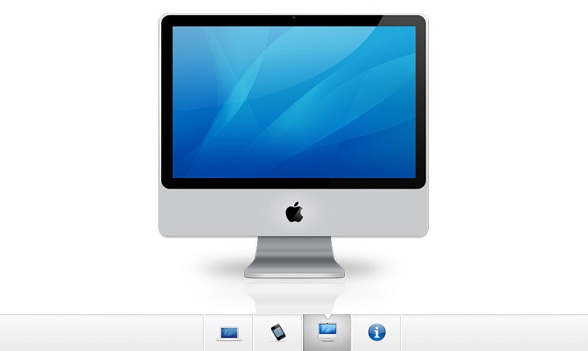
接下来我们一起分享一下实现这款苹果焦点图的过程及源码。
HTML代码:
<div id="gallery">

    <div id="slides" style="width: 3680px; margin-left: 0px;">

    <div class="slide"><img width="920" height="400" alt="side" src="img/sample_slides/macbook.jpg"></div>

    <div class="slide"><img width="920" height="400" alt="side" src="img/sample_slides/iphone.jpg"></div>

    <div class="slide"><img width="920" height="400" alt="side" src="img/sample_slides/imac.jpg"></div>

    <div class="slide"><a target="_blank" href="http://tutorialzine.com/2009/10/beautiful-apple-gallery-slideshow/"><img width="920" height="400" alt="side" src="img/sample_slides/info.jpg"></a></div>

    </div>

    <div id="menu">

    <ul>

        <li class="fbar inact"> </li><li class="menuItem inact act"><a href=""><img alt="thumbnail" src="img/sample_slides/thumb_macbook.png"></a></li><li class="menuItem inact"><a href=""><img alt="thumbnail" src="img/sample_slides/thumb_iphone.png"></a></li><li class="menuItem inact"><a href=""><img alt="thumbnail" src="img/sample_slides/thumb_imac.png"></a></li><li class="menuItem inact"><a href=""><img alt="thumbnail" src="img/sample_slides/thumb_about.png"></a></li>

    </ul>

    </div>

  </div>
从以上HTML代码可以看出,整个焦点图由一些div构成图片容器,用ul li列表构成下面的缩略图。
CSS代码:
#gallery{

    /* CSS3 Box Shadow */

    -moz-box-shadow:0 0 3px #AAAAAA;

    -webkit-box-shadow:0 0 3px #AAAAAA;

    box-shadow:0 0 3px #AAAAAA;

    /* CSS3 Rounded Corners */

    -moz-border-radius-bottomleft:4px;

    -webkit-border-bottom-left-radius:4px;

    border-bottom-left-radius:4px;

    -moz-border-radius-bottomright:4px;

    -webkit-border-bottom-right-radius:4px;

    border-bottom-right-radius:4px;

    border:1px solid white;

    background:url(img/panel.jpg) repeat-x bottom center #ffffff;

    /* The width of the gallery */

    width:920px;

    overflow:hidden;

}

#slides{

    /* This is the slide area */

    height:400px;

    /* jQuery changes the width later on to the sum of the widths of all the slides. */

    width:920px;

    overflow:hidden;

}

.slide{

    float:left;

}

#menu{

    /* This is the container for the thumbnails */

    height:45px;

}

ul{

    margin:0px;

    padding:0px;

}

li{

    /* Every thumbnail is a li element */

    width:60px;

    display:inline-block;

    list-style:none;

    height:45px;

    overflow:hidden;

}

li.inact:hover{

    /* The inactive state, highlighted on mouse over */

    background:url(img/pic_bg.png) repeat;

}

li.act,li.act:hover{

    /* The active state of the thumb */

    background:url(img/active_bg.png) no-repeat;

}

li.act a{

    cursor:default;

}

.fbar{

    /* The left-most vertical bar, next to the first thumbnail */

    width:2px;

    background:url(img/divider.png) no-repeat right;

}

li a{

    display:block;

    background:url(img/divider.png) no-repeat right;

    height:35px;

    padding-top:10px;

}

a img{

    border:none;

}
CSS代码也非常简单,都是一些简单设置而已。
jQuery代码:
$(document).ready(function(){

    /* This code is executed after the DOM has been completely loaded */

    var totWidth=0;

    var positions = new Array();

    $('#slides .slide').each(function(i){

        /* Traverse through all the slides and store their accumulative widths in totWidth */

        positions[i]= totWidth;

        totWidth += $(this).width();

        /* The positions array contains each slide's commulutative offset from the left part of the container */

        if(!$(this).width())

        {

            alert("Please, fill in width & height for all your images!");

            return false;

        }

    });

    $('#slides').width(totWidth);

    /* Change the cotnainer div's width to the exact width of all the slides combined */

    $('#menu ul li a').click(function(e,keepScroll){

            /* On a thumbnail click */

            $('li.menuItem').removeClass('act').addClass('inact');

            $(this).parent().addClass('act');

            var pos = $(this).parent().prevAll('.menuItem').length;

            $('#slides').stop().animate({marginLeft:-positions[pos]+'px'},450);

            /* Start the sliding animation */

            e.preventDefault();

            /* Prevent the default action of the link */

            // Stopping the auto-advance if an icon has been clicked:

            if(!keepScroll) clearInterval(itvl);

    });

    $('#menu ul li.menuItem:first').addClass('act').siblings().addClass('inact');

    /* On page load, mark the first thumbnail as active */

    /*****

     *

     *    Enabling auto-advance.

     *

     ****/

    var current=1;

    function autoAdvance()

    {

        if(current==-1) return false;

        $('#menu ul li a').eq(current%$('#menu ul li a').length).trigger('click',[true]);    // [true] will be passed as the keepScroll parameter of the click function on line 28

        current++;

    }

    // The number of seconds that the slider will auto-advance in:

    var changeEvery = 10;

    var itvl = setInterval(function(){autoAdvance()},changeEvery*1000);

    /* End of customizations */

});
这是焦点图的重点,完成了图片滑块的动画逻辑,点击缩略图即可切换图片。
一款基于的jQuery仿苹果样式焦点图插件的更多相关文章
- jQuery仿苹果样式焦点图插件
在线演示 本地下载
- 分享8个常用的jQuery焦点图插件
现在web网页jquery应用越来越广泛,目前几乎每一个WEB项目都在使用jQuery,因为jQuery插件实在太丰富,尤其是一些图片滑块插件和jQuery焦点图插件,更是多如牛毛,很多初学者只需稍微 ...
- 一款基于jQuery的图片分组切换焦点图插件
这是一款基于jQuery的图片切换焦点图插件,这款jQuery焦点图插件的特点是图片可以分组切换,也就是说一次可以切换多张图片,相比其他焦点图插件,它能节省更多的空间,可以向用户展示更多的图片,非常实 ...
- jQuery 3D圆盘旋转焦点图 支持鼠标滚轮
之前我们分享过很多炫酷实用的jQuery焦点图插件了,今天介绍的这款jQuery焦点图非常特别,所有图片围成一个圆圈,组成一个立体视觉的圆盘,并且可以旋转选择圆盘中的图片.另外,这款jQuery 3D ...
- 一款基于jQuery的图片下滑切换焦点图插件
之前为大家分享了好多款jquery插件,今天我们要分享的一款jQuery插件也比较实用,是一款jQuery焦点图插件.焦点图相当普通,一共可以循环播放4张图片,并且每一张图片在切换的时候都是向下滑动的 ...
- 一款基于jQuery多图切换焦点图插件
这次要给大家分享的也是一款jQuery图片滑块插件,之前有介绍过不少实用的jQuery焦点图插件和jQuery图片滑块插件,比如jQuery左侧Tab切换的图片滑块插件.它的特点是可以同时切换多张图片 ...
- 分享10款常用的jQuery焦点图插件
爱编程一直在收集整理编程相关的知识和解决方案,今天小编为大家带来10款非常常用的jquery焦点图插件. 1.jQuery可自动播放动画的焦点图插件 之前我们已经分享过很多非常实用的jQuery焦点图 ...
- 基于jQuery上下切换的焦点图—带缩略图悬浮
分享一款基于jQuery上下切换的焦点图,这款焦点图带有缩略图悬浮,它的切换效果比较简单,仅仅是作图片的上下切换,但是效果还是比较流畅的.这款jQuery焦点图插件的另外一个特点是在播放器上面可以悬浮 ...
- 基于jQuery的美食时间轴焦点图插件
这是一款非常炫酷的jQuery焦点图插件,这款jQuery焦点图的特点是有一个时间轴,点击切换按钮时,时间轴会逐渐移动,时间轴上的图片也会逐渐切换.另外,在图片上方也可以放置自定义样式的文字. 在线预 ...
随机推荐
- Fragment 生命周期 事务 MD
Markdown版本笔记 我的GitHub首页 我的博客 我的微信 我的邮箱 MyAndroidBlogs baiqiantao baiqiantao bqt20094 baiqiantao@sina ...
- Servlet学习笔记(一):生命周期
一.Servlet 生命周期: Servlet 生命周期可被定义为从创建直到毁灭的整个过程.以下是 Servlet 遵循的过程:初始化——响应请求——终止——回收 Servlet 通过调用 init ...
- 2014Esri全球用户大会——亮点系列之产品技术
2014年Esri全球用户大会已于7月14日~18日隆重召开,让我们一起来回味下面精彩内容: 序:大会主题"Creating Our Future" [解读]: 传达两个核 ...
- HTTPS服务器配置
一.SSL证书申请 1.确认需要申请证书的域名 2.生成私钥和csr文件 在linux机器上执行以下命令生成私钥 #openssl genrsa -out server.key 2048 在linux ...
- Android倒计时案例展示
1. Handler 与Message方法实现倒计时功能 关于Handler与Message消息机制的原理可查看:Android--Handler使用应运及消息机制处理原理分析 这个设计思路也是最经常 ...
- Android之横屏竖屏显示问题
1.採用不同的布局文件 在res下创建目录layout-land 在该目录下写入的layout(xml文件)横屏的时候系统自己主动选择显示的layout 同理: 在res下创建目录layout-por ...
- Error: Cannot find module 'express' 之 解决方案
出现如题错误,是因为执行了#npm install -g express的缘故,express没有被写到package.json里面去. 解决也好办,在程序目录下执行#npm install expr ...
- ShareSDK for Android 2.3.10已经公布
ShareSDK for Android 2.3.10已经公布,本次更新内容包含: 1.加入自己定义分享标签功能 新版本号SDK下载页面地址: http://share.sharesdk.cn/Dow ...
- C#应用视频教程3.2 Halcon软件测试
Halcon是图像处理比较牛逼的一个软件(德国人的东西,做的非常强大,里面集成的算法很多,可能你一辈子研究这个也做不过他),然而牛逼归牛逼,康耐视,基恩士也很牛逼,但是日本人的东西一般太过封闭,屌丝用 ...
- 001-Cocos2dx-2.1.3环境搭建-windows
图片丢失,转到:http://blog.csdn.net/whyhowwhat/article/details/51908229