
0122——UITabBarController
UITabBarController是IOS中很常用的一个viewController。UITabBarController通常作为整个程序的rootViewController,而且不能添加到别的container viewController中.
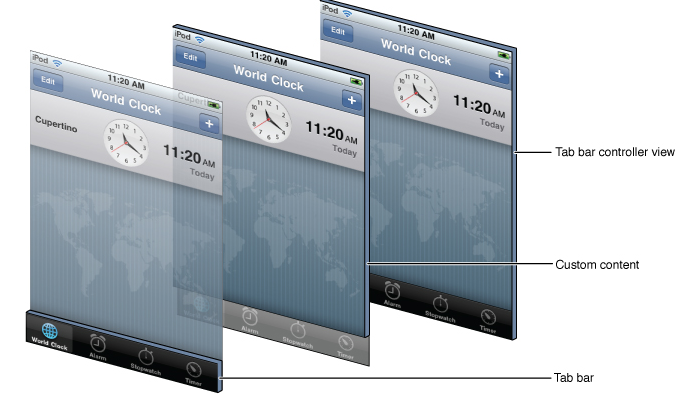
一.创建
最常见的创建UITabBarController的地方就是在application delegate中的 applicationDidFinishLaunching:方法,因为UITabBarController通常是作为整个程序的rootViewController的,我们需要在程序的window显示之前就创建好它,具体步骤如下:
1、创建一个UITabBarController对象
2、创建tabbarcontroller中每一个tab对应的要显示的对象子控制器
3、通过设置UITabBarController对象为window.rootViewController,然后显示window
- (BOOL)application:(UIApplication *)application didFinishLaunchingWithOptions:(NSDictionary *)launchOptions {
//创建窗口
self.window = [[UIWindow alloc]initWithFrame:[UIScreen mainScreen].bounds];
//创建tabbarcontroller
UITabBarController * tabbarController = [[UITabBarController alloc]init];
tabbarController.tabBar.tintColor = [UIColor orangeColor]; //显示的字体颜色
//创建每个界面
HomeViewController * homeVC =[[HomeViewController alloc]init];
homeVC.view.backgroundColor =[UIColor whiteColor];
homeVC.tabBarItem = [[UITabBarItem alloc]initWithTitle: @"主页"image:[UIImage imageNamed:@"tabbar_home"] selectedImage:[[UIImage imageNamed:@"tabbar_home_selected"]imageWithRenderingMode:UIImageRenderingModeAlwaysOriginal]];//使用自身的颜色,而不是默认颜色
//将创建的添加到tabbarController
tabbarController.viewControllers = @[homeVC,messVC,discVC,myVC];//加的顺序就是现实的顺序
self.window.rootViewController = tabbarController;
//显示窗口
[self.window makeKeyAndVisible];
return YES;
}

二.tabbar
屏幕下方的工具条称为UITabBar ,如果UITabBarController有N个子控制器,那么UITabBar内部就会有N 个UITabBarButton作为子控件与之对应。
注意:UITabBarButton在UITabBar中得位置是均分的,UITabBar的高度为49。
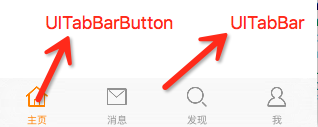
三.UITabBarButton
UITabBarButton⾥面显⽰什么内容,由对应子控制器的tabBarItem属性来决定
homeVC.tabBarItem.title=@"消息";
四.在tabbar中间加入一个按钮

第一步:自己定义一个CustomTabBarController,一个CustomUITabBar
第二步:CustomUITabBar中重新布局(给button让出一个位置)
- (void)layoutSubviews{
[super layoutSubviews];
//计算每个item的平均宽度
CGFloat avgWith = self.frame.size.width/5;
NSInteger index = 0;
for (UIView *item in self.subviews) {
if ([item isKindOfClass:NSClassFromString(@"UITabBarButton")]) {
item.frame = CGRectMake(index * avgWith, item.frame.origin.y, avgWith, item.frame.size.height);
index ++;
if (index == 2) {
_addButton.frame = CGRectMake(index * avgWith, 3, avgWith, 44);
[self addSubview:_addButton];//加入button
index++;
}
}
}
}
CustomTabBarController和CustomUITabBar之间是代理关系,而tabbar是只读属性,用下面的话来设置
@implementation CustomTabBarController
- (void)viewDidLoad {
[super viewDidLoad];
CustomUITabBar *tb = [[CustomUITabBar alloc]init];
tb.delegate = self;
[self setValue:tb forKey:@"tabBar"];//只读,属性设置不了的时候
}
第三步:实现代理
代理实现点击button打开页面
– presentViewController:animated:completion: 弹出一个新视图 可以带动画效果,完成后可以做相应的执行函数经常为nil
– dismissViewControllerAnimated:completion:退出一个新视图 可以带动画效果,完成后可以做相应的执行函数经常为nil
-(void)addButtonDidClicked:(UIButton *)sender{
addViewController * addVC = [[addViewController alloc]init];
addVC.view.backgroundColor = [UIColor whiteColor];
[self presentViewController:addVC animated:YES completion:nil];
}
0122——UITabBarController的更多相关文章
- UITabBarController 升级定制
UITabBarController 定制 特点 用法 1.准备工作: 加入你的相关图片,放入了Assets.xcassets; 导入Categroy文件夹(这个里面的文件,在这里不详细说明了,有疑问 ...
- UITabBarController 基本定制
UITabBarController 定制 特点 用法 1.准备好你的tabBar图片及其他图片(哈哈哈!!!!),我的图片都放在了Assets.xcassets中. 2.导入本工程中的Categro ...
- 自定义UITabBarController标签视图控制器
首先创建一个类,继承自UItabBarController 然后在.m文件中: 这里我有两个宏定义: #define WIDTH (myView.frame.size.width / 4) //我在写 ...
- 混合使用UITabBarController和UINavigationController
混合使用这两个控件的好处是我们可以在NavigationBar添加更多的东西,如标题,按钮等.让用户能够获得更多的信息. UITabBarController的属性ViewControllers接受以 ...
- 基本组件的使用——UITabBarController
和UINavigationController的作用差不多,UITabBarController也可以在多个UIViewController中切换 这个控件的使用相对简单,只需要为该控件的viewCo ...
- Swift - 重写UIKit框架类的init初始化方法(以UITabBarController为例)
原来写了篇文章讲UITabBarController的用法,当时是从UIViewController跳转到UITabBarController页面,代码如下: 1 self.presentViewCo ...
- iOS 怎么设置 UITabBarController 的第n个item为第一响应者?
iOS 怎么设置 UITabBarController 的第n个item为第一响应者? UITabBarController 里面有个属性:selectedIndex @property(nonato ...
- iOS UITabBarController的使用
UITabBarController 和 UINavigationController 几乎是iOS APP的标配. UITabBarController分栏(标签栏)控制器, 和UINavigati ...
- iOS开发UI篇—UITabBarController简单介绍
iOS开发UI篇—UITabBarController简单介绍 一.简单介绍 UITabBarController和UINavigationController类似,UITabBarControlle ...
随机推荐
- ZJOI 最小割 CQOI 不同的最小割 (最小割分治)
题目1 ZJOI 最小割 题目大意: 求一个无向带权图两点间的最小割,询问小于等于c的点对有多少. 算法讨论: 最小割 分治 代码: #include <cstdlib> #include ...
- hdu1372 BFS求最短路径长度
C - 广搜 基础 Crawling in process... Crawling failed Time Limit:1000MS Memory Limit:65536KB 64bi ...
- Longest Palindromic Substring -LeetCode
题目 Given a string s,find the longest palindromic substring in S.You may assume that the maximum len ...
- 16-js-缓冲运动
<!DOCTYPE html> <html lang="en"> <head> <meta charset="UTF-8&quo ...
- Service Lane
Link https://www.hackerrank.com/challenges/service-lane def main(): n, t = map(int, raw_input().spli ...
- 根据文字计算Label的尺寸
CGSize size = [self.username.text boundingRectWithSize:(CGSize){130,20} options:NSStringDrawingUsesL ...
- 这样就算会了PHP么?-11
PHP中关于类的基本内容练习: <?php class SportObject{ public $name; public $height; public $avirdupois; public ...
- delphi 打开文件夹并定位到一个文件(关键是/select参数)
strFileName := FcxLV[nIndex].Items.Item[FcxLV[nIndex].ItemIndex].SubItems.Strings[0]; //路径 ShellExe ...
- PowerShell常用的属性
get-location | get-member -membertype property -------获取对象的属性---------- 获取对象特定的成员, 湖区.Net Framwork ...
- 单路CPU性能排名 更新于2015.10.6
http://itianti.sinaapp.com/index.php/cpu 排名 处理器 图例 分数 1 Intel Xeon E5-2699 v3 @ 2.30GHz 22892 2 Inte ...