
C#基于UDP实现的P2P语音聊天工具(1)
这篇文章主要是一个应用,使用udp传送语音和文本等信息。在这个系统中没有服务端和客户端,相互通讯都是直接相互联系的。能够很好的实现效果。
语音获取
要想发送语音信息,首先得获取语音,这里有几种方法,一种是使用DirectX的DirectXsound来录音,我为了简便使用一个开源的插件NAudio来实现语音录取。 在项目中引用NAudio.dll
- //------------------录音相关-----------------------------
- private IWaveIn waveIn;
- private WaveFileWriter writer;
- private void LoadWasapiDevicesCombo()
- {
- var deviceEnum = new MMDeviceEnumerator();
- var devices = deviceEnum.EnumerateAudioEndPoints(DataFlow.Capture, DeviceState.Active).ToList();
- comboBox1.DataSource = devices;
- comboBox1.DisplayMember = "FriendlyName";
- }
- private void CreateWaveInDevice()
- {
- waveIn = new WaveIn();
- waveIn.WaveFormat = new WaveFormat(8000, 1);
- waveIn.DataAvailable += OnDataAvailable;
- waveIn.RecordingStopped += OnRecordingStopped;
- }
- void OnDataAvailable(object sender, WaveInEventArgs e)
- {
- if (this.InvokeRequired)
- {
- this.BeginInvoke(new EventHandler<WaveInEventArgs>(OnDataAvailable), sender, e);
- }
- else
- {
- writer.Write(e.Buffer, 0, e.BytesRecorded);
- int secondsRecorded = (int)(writer.Length / writer.WaveFormat.AverageBytesPerSecond);
- if (secondsRecorded >= 10)//最大10s
- {
- StopRecord();
- }
- else
- {
- l_sound.Text = secondsRecorded + " s";
- }
- }
- }
- void OnRecordingStopped(object sender, StoppedEventArgs e)
- {
- if (InvokeRequired)
- {
- BeginInvoke(new EventHandler<StoppedEventArgs>(OnRecordingStopped), sender, e);
- }
- else
- {
- FinalizeWaveFile();
- }
- }
- void StopRecord()
- {
- AllChangeBtn(btn_luyin, true);
- AllChangeBtn(btn_stop, false);
- AllChangeBtn(btn_sendsound, true);
- AllChangeBtn(btn_play, true);
- //btn_luyin.Enabled = true;
- //btn_stop.Enabled = false;
- //btn_sendsound.Enabled = true;
- //btn_play.Enabled = true;
- if (waveIn != null)
- waveIn.StopRecording();
- //Cleanup();
- }
- private void Cleanup()
- {
- if (waveIn != null)
- {
- waveIn.Dispose();
- waveIn = null;
- }
- FinalizeWaveFile();
- }
- private void FinalizeWaveFile()
- {
- if (writer != null)
- {
- writer.Dispose();
- writer = null;
- }
- }
- //开始录音
- private void btn_luyin_Click(object sender, EventArgs e)
- {
- btn_stop.Enabled = true;
- btn_luyin.Enabled = false;
- if (waveIn == null)
- {
- CreateWaveInDevice();
- }
- if (File.Exists(soundfile))
- {
- File.Delete(soundfile);
- }
- writer = new WaveFileWriter(soundfile, waveIn.WaveFormat);
- waveIn.StartRecording();
- }
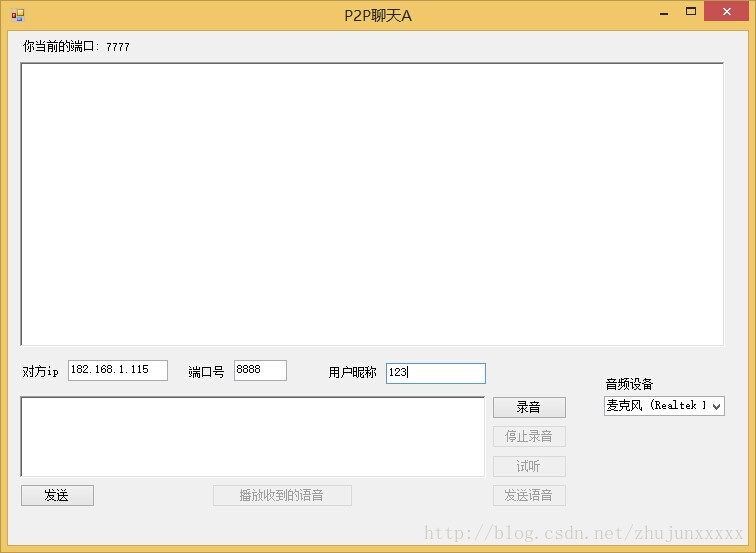
上面的代码实现了录音,并且写入文件p2psound_A.wav
语音发送
获取到语音后我们要把语音发送出去
当我们录好音后点击发送,这部分相关代码是
- MsgTranslator tran = null;
- ublic Form1()
- {
- InitializeComponent();
- LoadWasapiDevicesCombo();//显示音频设备
- Config cfg = SeiClient.GetDefaultConfig();
- cfg.Port = 7777;
- UDPThread udp = new UDPThread(cfg);
- tran = new MsgTranslator(udp, cfg);
- tran.MessageReceived += tran_MessageReceived;
- tran.Debuged += new EventHandler<DebugEventArgs>(tran_Debuged);
- }
- private void btn_sendsound_Click(object sender, EventArgs e)
- {
- if (t_ip.Text == "")
- {
- MessageBox.Show("请输入ip");
- return;
- }
- if (t_port.Text == "")
- {
- MessageBox.Show("请输入端口号");
- return;
- }
- string ip = t_ip.Text;
- int port = int.Parse(t_port.Text);
- string nick = t_nick.Text;
- string msg = "语音消息";
- IPEndPoint remote = new IPEndPoint(IPAddress.Parse(ip), port);
- Msg m = new Msg(remote, "zz", nick, Commands.SendMsg, msg, "Come From A");
- m.IsRequireReceive = true;
- m.ExtendMessageBytes = FileContent(soundfile);
- m.PackageNo = Msg.GetRandomNumber();
- m.Type = Consts.MESSAGE_BINARY;
- tran.Send(m);
- }
- private byte[] FileContent(string fileName)
- {
- FileStream fs = new FileStream(fileName, FileMode.Open, FileAccess.Read);
- try
- {
- byte[] buffur = new byte[fs.Length];
- fs.Read(buffur, 0, (int)fs.Length);
- return buffur;
- }
- catch (Exception ex)
- {
- return null;
- }
- finally
- {
- if (fs != null)
- {
- //关闭资源
- fs.Close();
- }
- }
- }
如此一来我们就把产生的语音文件发送出去了
语音的接收与播放
其实语音的接收和文本消息的接收没有什么不同,只不过语音发送的时候是以二进制发送的,因此我们在收到语音后 就应该写入到一个文件里面去,接收完成后,播放这段语音就行了。
下面这段代码主要是把收到的数据保存到文件中去,这个函数式我的NetFrame里收到消息时所触发的事件,在文章前面提过的那篇文章里
- void tran_MessageReceived(object sender, MessageEventArgs e)
- {
- Msg msg = e.msg;
- if (msg.Type == Consts.MESSAGE_BINARY)
- {
- string m = msg.Type + "->" + msg.UserName + "发来二进制消息!";
- AddServerMessage(m);
- if (File.Exists(recive_soundfile))
- {
- File.Delete(recive_soundfile);
- }
- FileStream fs = new FileStream(recive_soundfile, FileMode.Create, FileAccess.Write);
- fs.Write(msg.ExtendMessageBytes, 0, msg.ExtendMessageBytes.Length);
- fs.Close();
- //play_sound(recive_soundfile);
- ChangeBtn(true);
- }
- else
- {
- string m = msg.Type + "->" + msg.UserName + "说:" + msg.NormalMsg;
- AddServerMessage(m);
- }
- }
收到语音消息后,我们要进行播放,播放时仍然用刚才那个插件播放
- //--------播放部分----------
- private IWavePlayer wavePlayer;
- private WaveStream reader;
- public void play_sound(string filename)
- {
- if (wavePlayer != null)
- {
- wavePlayer.Dispose();
- wavePlayer = null;
- }
- if (reader != null)
- {
- reader.Dispose();
- }
- reader = new MediaFoundationReader(filename, new MediaFoundationReader.MediaFoundationReaderSettings() { SingleReaderObject = true });
- if (wavePlayer == null)
- {
- wavePlayer = new WaveOut();
- wavePlayer.PlaybackStopped += WavePlayerOnPlaybackStopped;
- wavePlayer.Init(reader);
- }
- wavePlayer.Play();
- }
- private void WavePlayerOnPlaybackStopped(object sender, StoppedEventArgs stoppedEventArgs)
- {
- if (stoppedEventArgs.Exception != null)
- {
- MessageBox.Show(stoppedEventArgs.Exception.Message);
- }
- if (wavePlayer != null)
- {
- wavePlayer.Stop();
- }
- btn_luyin.Enabled = true;
- }private void btn_play_Click(object sender, EventArgs e)
- {
- btn_luyin.Enabled = false;
- play_sound(soundfile);
- }
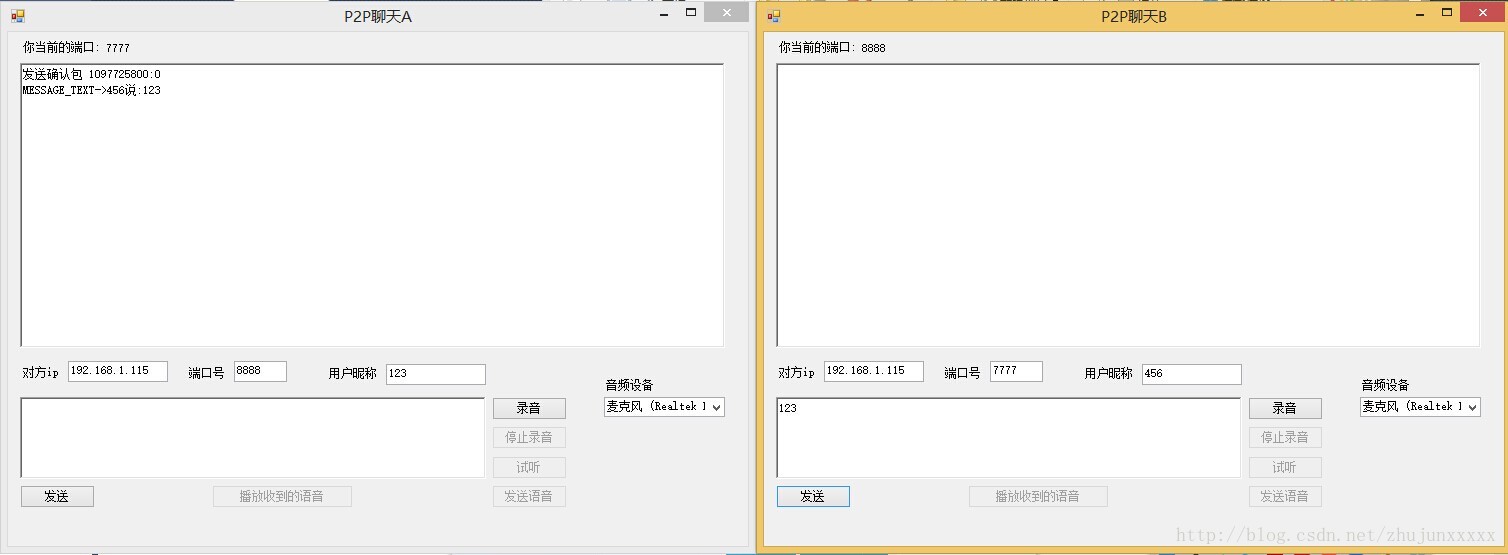
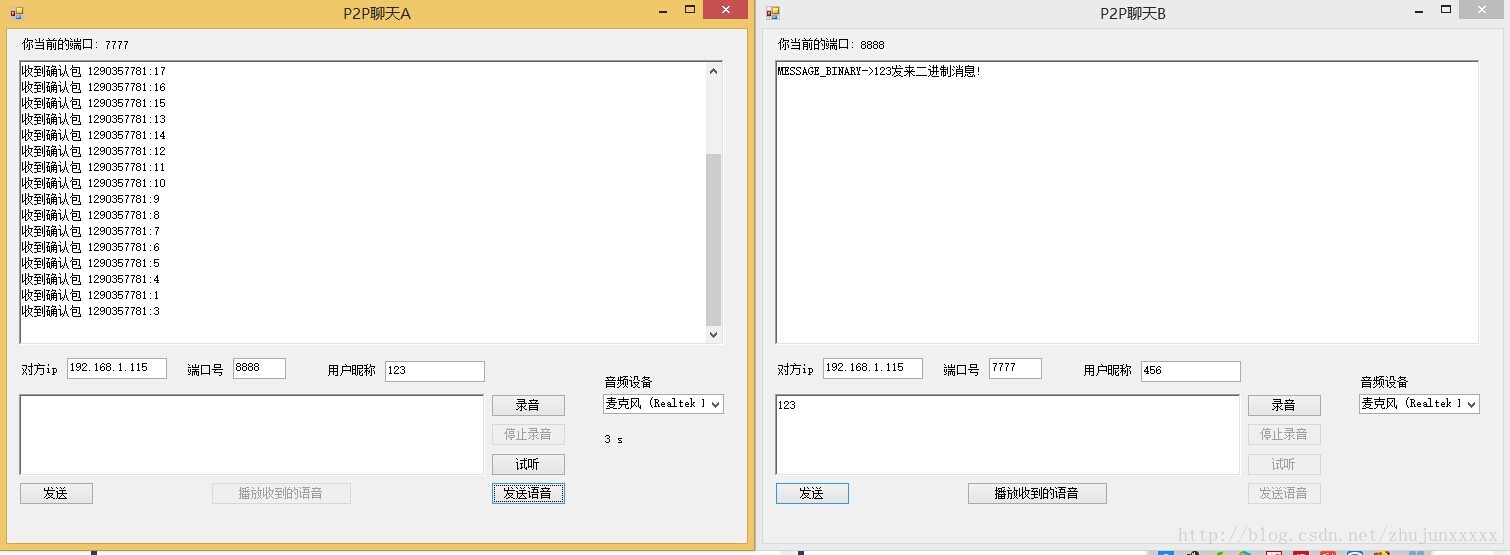
在上面演示了接收和发送一段语音消息的界面
技术总结
主要用到的技术就是UDP和NAudio的录音和播放功能
其中用到的UDP传输类我放在了github上面 地址在我的博客左边的个人介绍里有地址 项目地址 https://github.com/zhujunxxxxx/ZZNetFrame
希望这篇文章能够提供一个思路。
C#基于UDP实现的P2P语音聊天工具(1)的更多相关文章
- c#基于udp实现的p2p语音聊天工具
原创性申明 此博文的出处 为 http://blog.csdn.net/zhujunxxxxx/article/details/40124773假设进行转载请注明出处.本文作者原创,邮箱zhujunx ...
- Android 即时语音聊天工具 开发
使用融云SDK 1. 功能需求分析 1.1 核心功能需求: * 即时通讯 * 文字聊天 * 语音聊天 1.2 辅助功能需求: * 注册.登录 * 好友添加功能 * 好友关系管理 2. 融云即时通讯平台 ...
- 基于Nodejs开发的web即时聊天工具
由于公司需要开发web即时聊天的功能,开始时我们主要的实施方法是用jquery的ajax定时(10秒)轮询向服务器请求,由于是轮询请求,对 服务器的压力比较大.我们网站上线的时间不长,访问量不是很大, ...
- C 基于UDP实现一个简易的聊天室
引言 本文是围绕Linux udp api 构建一个简易的多人聊天室.重点看思路,帮助我们加深 对udp开发中一些api了解.相对而言udp socket开发相比tcp socket开发注意的细节要少 ...
- C++开发的基于TCP协议的内网聊天工具
项目相关地址 源码:https://github.com/easonjim/TCPChat bug提交:https://github.com/easonjim/TCPChat/issues
- Pilin —— 一个基于Xmpp openfire smack的即时聊天工具
https://github.com/whfcomm/Pilin
- 基于Qt的P2P局域网聊天及文件传送软件设计
基于Qt的P2P局域网聊天及文件传送软件设计 zouxy09@qq.com http://blog.csdn.net/zouxy09 这是我的<通信网络>的课程设计作业,之 ...
- 基于UDP协议的控制台聊天
这几天学了java的网络编程弄出一个基于UDP协议的聊天工具 功能 添加并且备注好友(输入对方的ip) 删除好友 查看好友列表 用java写的控制台程序导出可执行程序后不能双击打开 还需要些一个脚本文 ...
- 与众不同 windows phone (31) - Communication(通信)之基于 Socket UDP 开发一个多人聊天室
原文:与众不同 windows phone (31) - Communication(通信)之基于 Socket UDP 开发一个多人聊天室 [索引页][源码下载] 与众不同 windows phon ...
随机推荐
- hdu 2818 Building Block (带权并查集,很优美的题目)
Problem Description John are playing with blocks. There are N blocks ( <= N <= ) numbered ...N ...
- MVVM架构~knockoutjs系列之表单添加(验证)与列表操作源码开放
返回目录 本文章应该是knockoutjs系列的最后一篇了,前几篇中主要讲一些基础知识,这一讲主要是一个实际的例子,对于一个对象的添加与编辑功能的实现,并将项目源代码公开了,共大家一起学习! knoc ...
- [原创作品]html css改变浏览器选择文字的背景和颜色
又很久没有'剥壳'了,最近在为一家公司做一个生产管理解决方案.所以都很忙.今天的话题很简单,就做一个很简单的网页特效.今天偶然浏览到一个网站,他们在选择文字时,样子不是蓝背景和白色字体那么单调,感觉这 ...
- IEquatable(T) interface in .Net
原文:http://weblogs.asp.net/pawanmishra/iequatable-t-interface-in-net 泛型方法: public static bool AreEqua ...
- SQL SERVER数据库服务操作
using System; using System.Collections.Generic; using System.ComponentModel; using System.Data; usin ...
- (转) 值不能为空。参数名viewinfo(microsoft.sqlserver.management.sqlstudio.explorer)
打开MSSQL 2008 R2的时候,展开数据库都显示以下的错误提示: 值不能为空.参数名viewinfo(microsoft.sqlserver.management.sqlstudio.explo ...
- C#图像处理(4):图像的剪裁
图像的剪裁方法,从中间剪裁返回剪裁后的左右两页,方法实现如下: /// <summary> /// 图片裁剪,返回左右两页 /// </summary> /// <par ...
- linux shell脚本连接oracle查询数据插入文件和日志文件中
#!/bin/sh sqlplus "用户名/密码@数据库"<<EOF 或者只有一个库的 :sqlplus "用户名/密码"<<EOF ...
- PAT 65. A+B and C (64bit) (20)
题目链接:http://pat.zju.edu.cn/contests/pat-a-practise/1065 思路分析: 1)对a+b造成的long long 类型的数据溢出进行特殊处理: a> ...
- 【干货】.NET开发通用组件发布(二) 邮件发送组件
组件介绍和合作开发 http://www.cnblogs.com/MrHuo/p/MrHuoControls.html 邮件发送组件 邮件发送组件采用常用的SMTP发送方式,需要添加以下格式的配置文件 ...