
[AngularJS] Angular 1.5 multiple transclude
If you know ui-router, multi-transclude should be easy for you also. In previou Angular version <1.4, one diretive can only have one transclude element. But now in Angular 1.5, you can give each transclude element a name, then you can have multi-transcluded elements.
<!DOCTYPE html>

<html lang="en">

<head>

    <meta charset="UTF-8">

    <title>Title</title>

    <script src="node_modules/angular/angular.min.js"></script>

    <script src="app.js"></script>

</head>

<body ng-app="app">

<ng-details>

    <detail-title>Details</detail-title>

    <detail-content-text >This is text content</detail-content-text>

</ng-details>

</body>

</html>
var app = angular.module('app', []);
app.directive('ngDetails', function () {
return {
restrict: 'E',
scope: {},
transclude: {
'title': 'detailTitle', // title: used in directive template, detailTitle: used in app html
'textContent': 'detailContentText'
},
controller: function(){
this.toggle = true;
this.toggleIt = function(){
this.toggle = !this.toggle;
}
},
controllerAs: 'vm',
template: [
'<div class="details">',
'<div class="summary" ng-click="open = !open">',
'{{ open ? \'▾\' : \'▸\' }}',
'<span ng-transclude="title">default title</span>',
'</div>',
'<div class="content" ng-if="vm.toggle" ng-show="open" ng-transclude="textContent">default text</div>',
'</div>'
].join('')
};
});
This can make html code lot more easy to follow.
Another benefit is we can choose which element to be transcluded into our template:
<ng-details>

    <detail-title>Details</detail-title>

    <detail-content-text >This is text content</detail-content-text>

    <detail-content-image >Sorry there is no image</detail-content-image>

</ng-details>
In app html, we add one more transclude element: detail-content-image, but it is not yet showing on the page.
var app = angular.module('app', []);
app.directive('ngDetails', function () {
return {
restrict: 'E',
scope: {},
transclude: {
'title': 'detailTitle',
'textContent': 'detailContentText',
'imageContent': 'detailContentImage',
},
controller: function(){
this.toggle = true;
this.toggleIt = function(){
this.toggle = !this.toggle;
}
},
controllerAs: 'vm',
template: [
'<div class="details">',
'<div class="summary" ng-click="open = !open">',
'{{ open ? \'▾\' : \'▸\' }}',
'<span ng-transclude="title">default title</span>',
'</div>',
'<div class="content" ng-if="vm.toggle" ng-show="open" ng-transclude="textContent">default text</div>',
'<div class="content" ng-if="!vm.toggle" ng-show="open" ng-transclude="imageContent">default image</div>',
'</div>',
'<button ng-click="vm.toggleIt()">Toggle it: {{vm.toggle}}</button>'
].join('')
};
});
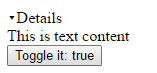
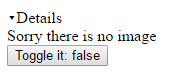
So, based on the toggle button, the template can choose which element to transclude into the template.
---------------------------------
Component refactor:
[AngularJS] Angular 1.5 multiple transclude的更多相关文章
- [AngularJS] Angular 1.5 $transclude with named slot
In Angular 1.5, there is no link and compile. So use if you transclude, you cannot access the fifth ...
- angular 自定义指令 directive transclude 理解
项目中断断续续的用了下angular,也没狠下心 认真的学习.angular 特别是自定义指令这块 空白. transclude 定义是否将当前元素的内容转移到模板中.看解释有点抽象. 看解释有点抽象 ...
- 浅析AngularJS自定义指令之嵌入(transclude)
AngularJS自定义指令的嵌入功能与vue的插槽十分类似,都可以实现一些自定义内容展现.在开始之前先简单介绍下自定义指令的transclude属性和AngularJS的内置指令ng-transcl ...
- [AngularJS] Angular 1.3 Anuglar hint
Read More: http://www.linkplugapp.com/a/953215 https://docs.google.com/document/d/1XXMvReO8-Awi1EZXA ...
- AngularJS学习---Routing(路由) & Multiple Views(多个视图) step 7
1.切换分支到step7,并启动项目 git checkout step- npm start 2.需求: 在步骤7之前,应用只给我们的用户提供了一个简单的界面(一张所有手机的列表),并且所有的模板代 ...
- [Angularjs]angular ng-repeat与js特效加载先后导致的问题
写在前面 最近在项目中遇到这样的一个前端的bug,在ng-repeat中绑定的图片,有一个晃动的特效,在手机端浏览的时候,图片有时候会正常展示,有时就展示不出来.当时猜测是因为angularjs与特效 ...
- angular高级篇之transclude使用详解
angular指令的transclude属性是一个让初学者比较难以理解的地方,transclude可以设置为false(默认),true或者对象三种值,如果不设该属性就默认为false,也就是说你不需 ...
- [AngularJS] Angular 1.3 ngMessages with ngAnimate
Note: Can use $dirty to check whether user has intracted with the form: https://docs.angularjs.org/a ...
- [AngularJS] Angular 1.3 $submitted for Form in Angular
AngularJS 1.3 add $submitted for form, so you can use $submitted to track whether the submit event ...
随机推荐
- android SlidingTabLayout实现ViewPager页卡滑动效果
先来张效果图(能够滑动切换页卡) watermark/2/text/aHR0cDovL2Jsb2cuY3Nkbi5uZXQvcGVuZ2t2/font/5a6L5L2T/fontsize/400/fi ...
- Java基础知识强化64:基本类型包装类的引入
1. 基本类型包装类概述 (1)将基本数据类型封装成对象的好处在于可以在对象中定义更多的功能方法操作该数据. (2)常用的操作的之一:用于基本数据类型与字符串之间的转换. (3)基本类型和包装类的对应 ...
- C# List 泛型用法
List 类是 ArrayList 类的泛型等效类,某些情况下,用它比用数组和 ArrayList 都方便. 我们假设有一组数据,其中每一项数据都是一个结构. public struct Item{ ...
- 新手们的GDI+绘制方格
//绘制panel控件触发的事件 //不可在窗体加载时绘制方格 private void panel1_Paint(object sender, PaintEventArgs e) ...
- FileGeodatabase和PersonalGeodatabase与ArcSDEGeodatabase三种数据库比较.
- 捷易拍与springMVC系统结合
1. 捷易拍高拍仪在jsp页面的调用 使用ActiveX插件的方式处理解决此问题,捷易拍公司提供了支持IE8以上的32位浏览器的插件,安装插件后,我们可以使用Object标签,使用高拍仪 注意: 1. ...
- 数学函数类方法的使用.java
public class Test { public static void main(String[] args) { double a=2,b=3; double z1=Math.pow(a,b) ...
- php DOMDocument 递归 格式化缩进HTML文档
function format(\DOMNode $node, $treeIndex = 0) { //不格式化的标签 if (in_array($node->nodeName, array(& ...
- HTML&CSS基础学习笔记1.27-input提交数据
提交数据 我们在表单上填的信息很多情况下需要提交到后台. <input>的[type]属性值为“submit”时,表示提交表单数据.它在页面的表现形式也是个按钮,点击该按钮,表单数据将会提 ...
- fiddler使用之坑
今天一上午都在搞fiddler,之前可以抓到浏览器的请求,今天突然不行了,弄得我花一上午时间去设置浏览器代理的事情,遇到各种各样的问题,现将解决办法记录如下: 1.原来fiddler安装在E盘中,安装 ...