
03-03_启动weblogic domain
本文重点:
- 直接启动weblogic
- 控制台访问
- weblogic概念及手工启动脚本分析
- 启动weblogic
- 启动admin Server做了哪些事情
一、直接启动weblogic
|
[root@wls1 ~]# cd /opt/wldomains/base_domains/ [root@wls1 base_domains]# ./startWebLogic.sh . JAVA Memory arguments: -Xms256m -Xmx512m -XX:CompileThreshold=8000 -XX:PermSize=128m -XX:MaxPermSize=256m . WLS Start Mode=Development . CLASSPATH=/opt/weblogic/patch_wls1036/profiles/default/sys_manifest_classpath/weblogic_patch.jar:/opt/weblogic/patch_ocp371/profiles/default/sys_manifest_classpath/weblogic_patch.jar:/opt/java/lib/tools.jar:/opt/weblogic/wlserver_10.3/server/lib/weblogic_sp.jar:/opt/weblogic/wlserver_10.3/server/lib/weblogic.jar:/opt/weblogic/modules/features/weblogic.server.modules_10.3.6.0.jar:/opt/weblogic/wlserver_10.3/server/lib/webservices.jar:/opt/weblogic/modules/org.apache.ant_1.7.1/lib/ant-all.jar:/opt/weblogic/modules/net.sf.antcontrib_1.1.0.0_1-0b2/lib/ant-contrib.jar:/opt/weblogic/wlserver_10.3/common/derby/lib/derbyclient.jar:/opt/weblogic/wlserver_10.3/server/lib/xqrl.jar . PATH=/opt/weblogic/wlserver_10.3/server/bin:/opt/weblogic/modules/org.apache.ant_1.7.1/bin:/opt/java/jre/bin:/opt/java/bin:/opt/java:/bin:/opt/java/jre/bin:/usr/local/sbin:/usr/local/bin:/usr/sbin:/usr/bin:/root/bin . *************************************************** * To start WebLogic Server, use a username and * * password assigned to an admin-level user. For * * server administration, use the WebLogic Server * * console at http://hostname:port/console * *************************************************** starting weblogic with Java version: java version "1.8.0_144" Java(TM) SE Runtime Environment (build 1.8.0_144-b01) Java HotSpot(TM) 64-Bit Server VM (build 25.144-b01, mixed mode) Starting WLS with line: /opt/java/bin/java -client -Xms256m -Xmx512m -XX:CompileThreshold=8000 -XX:PermSize=128m -XX:MaxPermSize=256m -Dweblogic.Name=AdminServer -Djava.security.policy=/opt/weblogic/wlserver_10.3/server/lib/weblogic.policy -Xverify:none -da -Dplatform.home=/opt/weblogic/wlserver_10.3 -Dwls.home=/opt/weblogic/wlserver_10.3/server -Dweblogic.home=/opt/weblogic/wlserver_10.3/server -Dweblogic.management.discover=true -Dwlw.iterativeDev= -Dwlw.testConsole= -Dwlw.logErrorsToConsole= -Dweblogic.ext.dirs=/opt/weblogic/patch_wls1036/profiles/default/sysext_manifest_classpath:/opt/weblogic/patch_ocp371/profiles/default/sysext_manifest_classpath weblogic.Server Java HotSpot(TM) 64-Bit Server VM warning: ignoring option PermSize=128m; support was removed in 8.0 Java HotSpot(TM) 64-Bit Server VM warning: ignoring option MaxPermSize=256m; support was removed in 8.0 <Jan 17, 2018 12:18:11 AM CST> <Info> <Security> <BEA-090905> <Disabling CryptoJ JCE Provider self-integrity check for better startup performance. To enable this check, specify -Dweblogic.security.allowCryptoJDefaultJCEVerification=true> <Jan 17, 2018 12:18:12 AM CST> <Info> <Security> <BEA-090906> <Changing the default Random Number Generator in RSA CryptoJ from ECDRBG to FIPS186PRNG. To disable this change, specify -Dweblogic.security.allowCryptoJDefaultPRNG=true> <Jan 17, 2018 12:18:12 AM CST> <Info> <WebLogicServer> <BEA-000377> <Starting WebLogic Server with Java HotSpot(TM) 64-Bit Server VM Version 25.144-b01 from Oracle Corporation> <Jan 17, 2018 12:18:12 AM CST> <Info> <Management> <BEA-141107> <Version: WebLogic Server 10.3.6.0 Tue Nov 15 08:52:36 PST 2011 1441050 > <Jan 17, 2018 12:18:13 AM CST> <Notice> <WebLogicServer> <BEA-000365> <Server state changed to STARTING> <Jan 17, 2018 12:18:13 AM CST> <Info> <WorkManager> <BEA-002900> <Initializing self-tuning thread pool> <Jan 17, 2018 12:18:13 AM CST> <Notice> <Log Management> <BEA-170019> <The server log file /opt/wldomains/base_domains/servers/AdminServer/logs/AdminServer.log is opened. All server side log events will be written to this file.> <Jan 17, 2018 12:18:16 AM CST> <Notice> <Security> <BEA-090082> <Security initializing using security realm myrealm.> <Jan 17, 2018 12:18:20 AM CST> <Notice> <WebLogicServer> <BEA-000365> <Server state changed to STANDBY> <Jan 17, 2018 12:18:20 AM CST> <Notice> <WebLogicServer> <BEA-000365> <Server state changed to STARTING> <Jan 17, 2018 12:18:21 AM CST> <Notice> <Log Management> <BEA-170027> <The Server has established connection with the Domain level Diagnostic Service successfully.> <Jan 17, 2018 12:18:21 AM CST> <Notice> <WebLogicServer> <BEA-000365> <Server state changed to ADMIN> <Jan 17, 2018 12:18:21 AM CST> <Notice> <WebLogicServer> <BEA-000365> <Server state changed to RESUMING> <Jan 17, 2018 12:18:21 AM CST> <Warning> <Server> <BEA-002611> <Hostname "localhost", maps to multiple IP addresses: 127.0.0.1, 0:0:0:0:0:0:0:1> <Jan 17, 2018 12:18:21 AM CST> <Notice> <Server> <BEA-002613> <Channel "Default[1]" is now listening on fe80:0:0:0:16a8:b4c:e936:926e:7001 for protocols iiop, t3, ldap, snmp, http.> <Jan 17, 2018 12:18:21 AM CST> <Notice> <Server> <BEA-002613> <Channel "Default[2]" is now listening on 127.0.0.1:7001 for protocols iiop, t3, ldap, snmp, http.> <Jan 17, 2018 12:18:21 AM CST> <Notice> <Server> <BEA-002613> <Channel "Default" is now listening on 192.168.188.61:7001 for protocols iiop, t3, ldap, snmp, http.> <Jan 17, 2018 12:18:21 AM CST> <Notice> <Server> <BEA-002613> <Channel "Default[3]" is now listening on 0:0:0:0:0:0:0:1:7001 for protocols iiop, t3, ldap, snmp, http.> <Jan 17, 2018 12:18:21 AM CST> <Notice> <WebLogicServer> <BEA-000331> <Started WebLogic Admin Server "AdminServer" for domain "base_domains" running in Development Mode> <Jan 17, 2018 12:18:21 AM CST> <Warning> <Server> <BEA-002611> <Hostname "wls1", maps to multiple IP addresses: 192.168.188.61, fe80:0:0:0:16a8:b4c:e936:926e%2> <Jan 17, 2018 12:18:21 AM CST> <Notice> <WebLogicServer> <BEA-000365> <Server state changed to RUNNING> <Jan 17, 2018 12:18:21 AM CST> <Notice> <WebLogicServer> <BEA-000360> <Server started in RUNNING mode> |
此时weblogic已经运行,默认会监听在7001端口上。
上述示例是运行在
开发模式下面,如果生产模式需要输入weblogic帐号密码才能启动。
二、控制台访问
weblogic方式URL有三种:
- http://192.168.188.61:7001/console
- http://adminDNSName:7001/console
- https://192.168.188.61:7002/console # 此方式需要开启SSL
浏览器访问如下:

登录页面如下:

weblogic启动完成。
三、weblogic概念及手工启动weblogic
Weblogic server可以运行在大多数的java虚拟机上,比如openjdk,oracle jdk,以及bea公司出的Jrockit JDK
java运行时参数
|
java options ProgramOptions FullyQualifiedJavaClass options:选项,例如: -Xms:动态堆的最小大小 -Xmx:动态堆的最大大小 -Dprop=val:程序可访问的环境变量 -classpath CLASSPATH:包含从属类的文件或目录列表
|
启动weblogic需要依赖:
- PATH:环境变量,要包含一系列依赖的可执行文件的路径。
- CLASSPATH:包含所依赖的包。
配置PATH:
直接PATH=$JAVA_HOME/bin:$PATH
配置CLASSPATH:
- CLASSPATH必须包含的jar包:
|
${WL_HOME}/server/lib/weblogic.jar |
- CLASSPATH可选的包含的jar包:
|
${WL_HOME}/common/eval/pointbase/lib/pbclient51.jar ${WL_HOME}/common/eval/pointbase/lib/pbtools51.jar ${WL_HOME}/common/eval/pointbase/lib/pbembedded51.jar JDBC Startup classes, shutdown classes Other common classes |
:不通过脚本,最小化参数启动weblogic并访问
|
[root@wls1 base_domains]# /opt/java/bin/java -classpath /opt/weblogic/wlserver_10.3/server/lib/weblogic.jar weblogic.Server <Jan 17, 2018 9:19:08 PM CST> <Info> <Security> <BEA-090905> <Disabling CryptoJ JCE Provider self-integrity check for better startup performance. To enable this check, specify -Dweblogic.security.allowCryptoJDefaultJCEVerification=true> <Jan 17, 2018 9:19:09 PM CST> <Info> <Security> <BEA-090906> <Changing the default Random Number Generator in RSA CryptoJ from ECDRBG to FIPS186PRNG. To disable this change, specify -Dweblogic.security.allowCryptoJDefaultPRNG=true> <Jan 17, 2018 9:19:10 PM CST> <Info> <WebLogicServer> <BEA-000377> <Starting WebLogic Server with Java HotSpot(TM) 64-Bit Server VM Version 25.144-b01 from Oracle Corporation> <Jan 17, 2018 9:19:10 PM CST> <Info> <Management> <BEA-141107> <Version: WebLogic Server 10.3.6.0 Tue Nov 15 08:52:36 PST 2011 1441050 > <Jan 17, 2018 9:19:11 PM CST> <Notice> <WebLogicServer> <BEA-000365> <Server state changed to STARTING> <Jan 17, 2018 9:19:11 PM CST> <Info> <WorkManager> <BEA-002900> <Initializing self-tuning thread pool> <Jan 17, 2018 9:19:11 PM CST> <Notice> <LoggingService> <BEA-320400> <The log file /opt/wldomains/base_domains/servers/AdminServer/logs/AdminServer.log will be rotated. Reopen the log file if tailing has stopped. This can happen on some platforms like Windows.> <Jan 17, 2018 9:19:11 PM CST> <Notice> <LoggingService> <BEA-320401> <The log file has been rotated to /opt/wldomains/base_domains/servers/AdminServer/logs/AdminServer.log00003. Log messages will continue to be logged in /opt/wldomains/base_domains/servers/AdminServer/logs/AdminServer.log.> <Jan 17, 2018 9:19:11 PM CST> <Notice> <Log Management> <BEA-170019> <The server log file /opt/wldomains/base_domains/servers/AdminServer/logs/AdminServer.log is opened. All server side log events will be written to this file.> <Jan 17, 2018 9:19:11 PM CST> <Error> <Socket> <BEA-000438> <Unable to load performance pack. Using Java I/O instead. Please ensure that libmuxer library is in :'/usr/java/packages/lib/amd64:/usr/lib64:/lib64:/lib:/usr/lib' > <Jan 17, 2018 9:19:13 PM CST> <Notice> <Security> <BEA-090082> <Security initializing using security realm myrealm.> <Jan 17, 2018 9:19:13 PM CST> <Warning> <Store> <BEA-280109> <Unable to load the native wlfileio library for the persistent file store "_WLS_AdminServer". The store will use buffered I/O. The store is still operating in a transactionally safe synchronous mode. See store open log messages for the requested and final write policies.> <Jan 17, 2018 9:19:15 PM CST> <Warning> <HTTP> <BEA-101296> <Unable to load the default compiler class "com.sun.tools.javac.Main". Using the default javac compiler to compile JSPs.> <Jan 17, 2018 9:19:15 PM CST> <Notice> <WebLogicServer> <BEA-000365> <Server state changed to STANDBY> <Jan 17, 2018 9:19:15 PM CST> <Notice> <WebLogicServer> <BEA-000365> <Server state changed to STARTING> <Jan 17, 2018 9:19:16 PM CST> <Notice> <LoggingService> <BEA-320400> <The log file /opt/wldomains/base_domains/servers/AdminServer/logs/base_domains.log will be rotated. Reopen the log file if tailing has stopped. This can happen on some platforms like Windows.> <Jan 17, 2018 9:19:16 PM CST> <Notice> <LoggingService> <BEA-320401> <The log file has been rotated to /opt/wldomains/base_domains/servers/AdminServer/logs/base_domains.log00003. Log messages will continue to be logged in /opt/wldomains/base_domains/servers/AdminServer/logs/base_domains.log.> <Jan 17, 2018 9:19:16 PM CST> <Notice> <Log Management> <BEA-170027> <The Server has established connection with the Domain level Diagnostic Service successfully.> <Jan 17, 2018 9:19:16 PM CST> <Notice> <WebLogicServer> <BEA-000365> <Server state changed to ADMIN> <Jan 17, 2018 9:19:16 PM CST> <Notice> <WebLogicServer> <BEA-000365> <Server state changed to RESUMING> <Jan 17, 2018 9:19:16 PM CST> <Warning> <Server> <BEA-002611> <Hostname "localhost", maps to multiple IP addresses: 127.0.0.1, 0:0:0:0:0:0:0:1> <Jan 17, 2018 9:19:16 PM CST> <Notice> <Server> <BEA-002613> <Channel "Default[1]" is now listening on fe80:0:0:0:16a8:b4c:e936:926e:7001 for protocols iiop, t3, ldap, snmp, http.> <Jan 17, 2018 9:19:16 PM CST> <Notice> <Server> <BEA-002613> <Channel "Default[2]" is now listening on 127.0.0.1:7001 for protocols iiop, t3, ldap, snmp, http.> <Jan 17, 2018 9:19:16 PM CST> <Notice> <Server> <BEA-002613> <Channel "Default" is now listening on 192.168.188.61:7001 for protocols iiop, t3, ldap, snmp, http.> <Jan 17, 2018 9:19:16 PM CST> <Notice> <Server> <BEA-002613> <Channel "Default[3]" is now listening on 0:0:0:0:0:0:0:1:7001 for protocols iiop, t3, ldap, snmp, http.> <Jan 17, 2018 9:19:16 PM CST> <Notice> <WebLogicServer> <BEA-000331> <Started WebLogic Admin Server "AdminServer" for domain "base_domains" running in Development Mode> <Jan 17, 2018 9:19:16 PM CST> <Warning> <Server> <BEA-002611> <Hostname "wls1", maps to multiple IP addresses: 192.168.188.61, fe80:0:0:0:16a8:b4c:e936:926e%2> <Jan 17, 2018 9:19:16 PM CST> <Notice> <WebLogicServer> <BEA-000365> <Server state changed to RUNNING> <Jan 17, 2018 9:19:16 PM CST> <Notice> <WebLogicServer> <BEA-000360> <Server started in RUNNING mode> [root@wls1 ~]# ps aux | grep java root 5470 161 9.2 3563872 356064 pts/0 Sl+ 21:46 0:09 /opt/java/bin/java -classpath /opt/weblogic/wlserver_10.3/server/lib/weblogic.jar weblogic.Server root 5497 0.0 0.0 112660 972 pts/2 R+ 21:46 0:00 grep --color=auto java
|
在/opt/wldomains/base_domains启动,会读该域下的配置文件配置并启动。但是启动的参数非常少,如ps aux | grep java 所示。
正常访问:
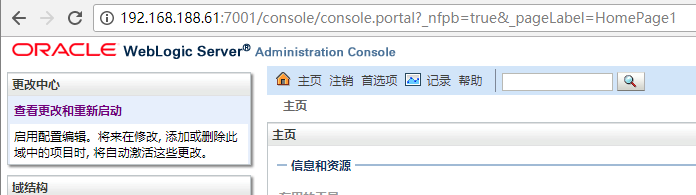
:在一个临时路径下直接启动weblogic server
|
[root@wls1 temp]# /opt/java/bin/java -classpath /opt/weblogic/wlserver_10.3/server/lib/weblogic.jar weblogic.Server <Jan 17, 2018 9:24:03 PM CST> <Info> <Security> <BEA-090905> <Disabling CryptoJ JCE Provider self-integrity check for better startup performance. To enable this check, specify -Dweblogic.security.allowCryptoJDefaultJCEVerification=true> <Jan 17, 2018 9:24:05 PM CST> <Info> <Security> <BEA-090906> <Changing the default Random Number Generator in RSA CryptoJ from ECDRBG to FIPS186PRNG. To disable this change, specify -Dweblogic.security.allowCryptoJDefaultPRNG=true> <Jan 17, 2018 9:24:06 PM CST> <Info> <WebLogicServer> <BEA-000377> <Starting WebLogic Server with Java HotSpot(TM) 64-Bit Server VM Version 25.144-b01 from Oracle Corporation> /root/temp/config/config.xml not found No config.xml was found. Would you like the server to create a default configuration and boot? (y/n): |
我创建一个临时路径temp,然后在该路径下启动,如上示例,没多大意义就终止了。
:一个正常的weblogic手工启动的命令行
|
[root@wls1 base_domains]# /opt/java/bin/java -server -Xms512m -Xmx1024m -classpath /opt/weblogic/wlserver_10.3/server/lib/weblogic.jar -Dweblogic.Name=AdminServer -Dplatform.home=/opt/weblogic/wlserver_10.3 -Dweblogic.management.username=weblogic -Dweblogic.management.password='!QAZ2wsx' -Djava.security.policy=/opt/weblogic/wlserver_10.3/server/lib/weblogic.policy weblogic.Server <Jan 17, 2018 9:49:59 PM CST> <Info> <Security> <BEA-090905> <Disabling CryptoJ JCE Provider self-integrity check for better startup performance. To enable this check, specify -Dweblogic.security.allowCryptoJDefaultJCEVerification=true> <Jan 17, 2018 9:50:00 PM CST> <Info> <Security> <BEA-090906> <Changing the default Random Number Generator in RSA CryptoJ from ECDRBG to FIPS186PRNG. To disable this change, specify -Dweblogic.security.allowCryptoJDefaultPRNG=true> <Jan 17, 2018 9:50:00 PM CST> <Info> <WebLogicServer> <BEA-000377> <Starting WebLogic Server with Java HotSpot(TM) 64-Bit Server VM Version 25.144-b01 from Oracle Corporation> <Jan 17, 2018 9:50:01 PM CST> <Info> <Management> <BEA-141107> <Version: WebLogic Server 10.3.6.0 Tue Nov 15 08:52:36 PST 2011 1441050 > <Jan 17, 2018 9:50:01 PM CST> <Notice> <WebLogicServer> <BEA-000365> <Server state changed to STARTING> <Jan 17, 2018 9:50:01 PM CST> <Info> <WorkManager> <BEA-002900> <Initializing self-tuning thread pool> <Jan 17, 2018 9:50:01 PM CST> <Notice> <LoggingService> <BEA-320400> <The log file /opt/wldomains/base_domains/servers/AdminServer/logs/AdminServer.log will be rotated. Reopen the log file if tailing has stopped. This can happen on some platforms like Windows.> <Jan 17, 2018 9:50:01 PM CST> <Notice> <LoggingService> <BEA-320401> <The log file has been rotated to /opt/wldomains/base_domains/servers/AdminServer/logs/AdminServer.log00006. Log messages will continue to be logged in /opt/wldomains/base_domains/servers/AdminServer/logs/AdminServer.log.> <Jan 17, 2018 9:50:01 PM CST> <Notice> <Log Management> <BEA-170019> <The server log file /opt/wldomains/base_domains/servers/AdminServer/logs/AdminServer.log is opened. All server side log events will be written to this file.> <Jan 17, 2018 9:50:02 PM CST> <Error> <Socket> <BEA-000438> <Unable to load performance pack. Using Java I/O instead. Please ensure that libmuxer library is in :'/usr/java/packages/lib/amd64:/usr/lib64:/lib64:/lib:/usr/lib' > <Jan 17, 2018 9:50:03 PM CST> <Notice> <Security> <BEA-090082> <Security initializing using security realm myrealm.> <Jan 17, 2018 9:50:04 PM CST> <Warning> <Store> <BEA-280109> <Unable to load the native wlfileio library for the persistent file store "_WLS_AdminServer". The store will use buffered I/O. The store is still operating in a transactionally safe synchronous mode. See store open log messages for the requested and final write policies.> <Jan 17, 2018 9:50:05 PM CST> <Warning> <HTTP> <BEA-101296> <Unable to load the default compiler class "com.sun.tools.javac.Main". Using the default javac compiler to compile JSPs.> <Jan 17, 2018 9:50:06 PM CST> <Notice> <WebLogicServer> <BEA-000365> <Server state changed to STANDBY> <Jan 17, 2018 9:50:06 PM CST> <Notice> <WebLogicServer> <BEA-000365> <Server state changed to STARTING> <Jan 17, 2018 9:50:06 PM CST> <Notice> <LoggingService> <BEA-320400> <The log file /opt/wldomains/base_domains/servers/AdminServer/logs/base_domains.log will be rotated. Reopen the log file if tailing has stopped. This can happen on some platforms like Windows.> <Jan 17, 2018 9:50:06 PM CST> <Notice> <LoggingService> <BEA-320401> <The log file has been rotated to /opt/wldomains/base_domains/servers/AdminServer/logs/base_domains.log00006. Log messages will continue to be logged in /opt/wldomains/base_domains/servers/AdminServer/logs/base_domains.log.> <Jan 17, 2018 9:50:06 PM CST> <Notice> <Log Management> <BEA-170027> <The Server has established connection with the Domain level Diagnostic Service successfully.> <Jan 17, 2018 9:50:07 PM CST> <Notice> <WebLogicServer> <BEA-000365> <Server state changed to ADMIN> <Jan 17, 2018 9:50:07 PM CST> <Notice> <WebLogicServer> <BEA-000365> <Server state changed to RESUMING> <Jan 17, 2018 9:50:07 PM CST> <Warning> <Server> <BEA-002611> <Hostname "localhost", maps to multiple IP addresses: 127.0.0.1, 0:0:0:0:0:0:0:1> <Jan 17, 2018 9:50:07 PM CST> <Notice> <Server> <BEA-002613> <Channel "Default[1]" is now listening on fe80:0:0:0:16a8:b4c:e936:926e:7001 for protocols iiop, t3, ldap, snmp, http.> <Jan 17, 2018 9:50:07 PM CST> <Notice> <Server> <BEA-002613> <Channel "Default[2]" is now listening on 127.0.0.1:7001 for protocols iiop, t3, ldap, snmp, http.> <Jan 17, 2018 9:50:07 PM CST> <Notice> <Server> <BEA-002613> <Channel "Default" is now listening on 192.168.188.61:7001 for protocols iiop, t3, ldap, snmp, http.> <Jan 17, 2018 9:50:07 PM CST> <Notice> <Server> <BEA-002613> <Channel "Default[3]" is now listening on 0:0:0:0:0:0:0:1:7001 for protocols iiop, t3, ldap, snmp, http.> <Jan 17, 2018 9:50:07 PM CST> <Notice> <WebLogicServer> <BEA-000331> <Started WebLogic Admin Server "AdminServer" for domain "base_domains" running in Development Mode> <Jan 17, 2018 9:50:07 PM CST> <Warning> <Server> <BEA-002611> <Hostname "wls1", maps to multiple IP addresses: 192.168.188.61, fe80:0:0:0:16a8:b4c:e936:926e%2> <Jan 17, 2018 9:50:07 PM CST> <Notice> <WebLogicServer> <BEA-000365> <Server state changed to RUNNING> <Jan 17, 2018 9:50:07 PM CST> <Notice> <WebLogicServer> <BEA-000360> <Server started in RUNNING mode> [root@wls1 ~]# ps aux | grep java root 5548 44.1 12.7 3678524 491664 pts/0 Sl+ 21:49 0:13 /opt/java/bin/java -server -Xms512m -Xmx1024m -classpath /opt/weblogic/wlserver_10.3/server/lib/weblogic.jar -Dweblogic.Name=AdminServer -Dplatform.home=/opt/weblogic/wlserver_10.3 -Dweblogic.management.username=weblogic -Dweblogic.management.password=!QAZ2wsx -Djava.security.policy=/opt/weblogic/wlserver_10.3/server/lib/weblogic.policy weblogic.Server root 5588 0.0 0.0 112660 972 pts/2 S+ 21:50 0:00 grep --color=auto java |
weblogic server自带的server脚本就是这样用选项堆积起来的。
四、启动脚本分析
weblogic server自带的存放路径:
|
/opt/wldomains/base_domains/startWebLogic.sh [root@wls1 base_domains]# cat startWebLogic.sh #!/bin/sh # WARNING: This file is created by the Configuration Wizard. # Any changes to this script may be lost when adding extensions to this configuration. DOMAIN_HOME="/opt/wldomains/base_domains" ${DOMAIN_HOME}/bin/startWebLogic.sh $* |
会启动bin/startWebLogic.sh脚本
该脚本会去读setDomainEnv.sh这是变量,最终执行效果如:第一步:直接启动weblogic,所示
五、启动admin Server做了哪些事情
- 读取config/config.xml的配置信息,并加载至内存中,如有修改会写入该配置文件。
03-03_启动weblogic domain的更多相关文章
- weblogica domain目录 环境变量 如何启动weblogic server
手工启动weblogic server
- 转:配置nodemanager启动weblogic服务器
下面仅供参考,里面表格还有文件目录我是写的linux,刚刚看到原作者是windows, 后面我会把自己配置nodemanager的经过记录上来,我搞得是linux. (一)通过nodemanager本 ...
- 启动weblogic的错误:Could not obtain an exclusive lock to the embedded LDAP data files directory
http://hi.baidu.com/kaisep/item/0e4bf6ee5da001d1ea34c986 源地址 启动weblogic的错误:Could not obtain an exclu ...
- 03-02_配置weblogic domain
配置Domain 图形化界面: [Windows] Windows菜单 [windows] config.cmd [Unix/Linux] config.sh 命令行界面: [windows] con ...
- 解决启动WebLogic输入用户名密码问题
转自:http://wenku.baidu.com/link?url=M6wJDVwm_Us6NsYi5u-PDTTbTHpO_ncsv5yClXSxhDIhA70IRga5ZdvotT4bW__MG ...
- 解决安装Weblogic domain卡住问题(Primeton BPS)
这两天一直有一个问题困扰我,在suse10+weblogic(920,923,100,103)上安装bpm产品失败.有些版本是创建domain的时候卡在create security informat ...
- 后台启动weblogic成功后,在web浏览器上无法访问
后台启动weblogic成功后,在web浏览器上无法访问,可尝试重启服务器.
- weblogic domain creation
管理服务器 URL: http://CICI-ThinkPad:7001 Domain Path: D:\Program Files\DEV\Oracle\Middleware\user_projec ...
- 启动weblogic服务时,还需要输入用户名和密码的解决方法
当启动weblogic服务时,还需要输入用户名和密码,相当繁琐,如下: 而在生产环境中,一般会要求不要在每次启动时都输入用户名密码, 因此可以通过一些简单的配置达到此目的,通常的做法有两种: 1.修改 ...
随机推荐
- 漫画:什么是CAS机制
这篇文章说到重点了:https://www.cnblogs.com/myopensource/p/8177074.html
- postgresql逻辑结构--视图(五)
定义 一.创建视图 1.语法 create [or replace ] [ temp | temporary ] view name [(column_name [,...])] as que ...
- Maven 打包遇到的问题
[ERROR] No compiler is provided in this environment. Perhaps you are running on a JRE rather than a ...
- 大佬带你深入浅出Lua虚拟机
欢迎大家前往腾讯云+社区,获取更多腾讯海量技术实践干货哦~ 本文由鹅厂优文发表于云+社区专栏 作者:郑小辉 | 腾讯 游戏客户端开发高级工程师 写在前面:本文所有的文字都是我手工一个一个敲的,以及本文 ...
- mongodb操作技巧
1.添加字段或更新值 db.getCollection('test').updateMany( {}, { $set:{ 'createTime':'2017-06-29 08:08', 'updat ...
- SpringMvc @JsonView 使用方式
准确来说,@JsonView注解不是Spring的,它位于jackson-annotation包中: 作用:SpringMvc使用@ResponseBody将结果以json返回客户端, 有些实体类的 ...
- Cglib invoke以及invokeSuper的一点区别
简单记录下,解决的一个问题,Cglib的invoke和invokeSuper的区别: 简而言之,invoke方法调用的对象没有增强过,invokeSuper方法调用的对象已经是增强了的,所以会再走一遍 ...
- 基于asp.net mvc的近乎产品开发培训课程(第四讲)
演示产品源码下载地址:http://www.jinhusns.com/Products/Download 演示产品源码下载地址:http://www.jinhusns.com/Products/Do ...
- RabbitMQ远程不能访问问题的解决
刚刚安装的RabbitMQ-Server-3.3.5,并且也已经开启了Web管理功能,但是现在存在一个问题: 出于安全的考虑,guest这个默认的用户只能通过http://localhost:1567 ...
- ImageButton设置src图片大小
需求&起因 有时候没有找到合适大小的资源,需要修改图片大小而且不改变ImageButton的大小.可以通过缩放图片大小的方式改变外观. ImageView的属性android:scaleTyp ...