
Node.js ORM框架Sequlize之表间关系
Sequelize模型之间存在关联关系,这些关系代表了数据库中对应表之间的主/外键关系。基于模型关系可以实现关联表之间的连接查询、更新、删除等操作。本文将通过一个示例,介绍模型的定义,创建模型关联关系,模型与关联关系同步数据库,及关系模型的增、删、改、查操作。数据库中的表之间存在一定的关联关系,表之间的关系基于
主/外键进行关联、创建约束等。关系表中的数据分为1对1(1:1)、1对多(1:M)、多对多(N:M)三种关联关系。在
Sequelize中建立关联关系,通过调用模型(源模型)的belongsTo、hasOne、hasMany、belongsToMany方法,再将要建立关系的模型(目标模型)做为参数传入即可。这些方法会按以下规则创建关联关系:
hasOne- 与目标模型建立1:1关联关系,关联关系(外键)存在于目标模型中。belongsTo- 与目标模型建立1:1关联关系,关联关系(外键)存在于源模型中。hasMany- 与目标模型建立1:N关联关系,关联关系(外键)存在于目标模型中。belongsToMany- 与目标模型建立N:M关联关系,会通过sourceId和targetId创建交叉表。
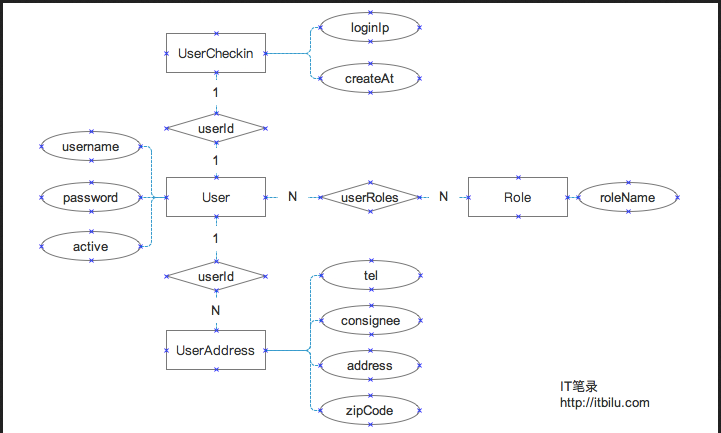
为了能够清楚说明模型关系的定义及关系模型的使用,我们定义如下4个模型对象:
用户(User)-与其它模型存在1:1、1:N、N:M用户登录信息(UserCheckin)-与User存在1:1关系用户地址(UserAddress)-与User存在N:1关系角色(Role)-与User存在N:M关系这几个模型的
E-R结构如下:
接下来上代码,代码和瓷土不符,请注意!
代码写的有点low,没办法,!
 /**

  * 大家就按照我的步骤来,一点一点,要有耐心哦

  * 我相信,最后肯定有你想要的!加油

  */

 //引入框架

 const Sequelize = require('sequelize');

 //创建ORM实例

 const sequelize = new Sequelize('sequlizedb', 'root', 'guoguo',

     {

         'dialect': 'mysql',  // 数据库使用mysql

     }

 );

 //验证连接

 sequelize

     .authenticate()

     .then(() => {

         console.log('链接成功');

     })

     .catch((error) => {

         console.log('链接失败' + error);

     })

 //模型的创建

 const User = sequelize.define('user', {

     name: Sequelize.STRING,

     age: Sequelize.INTEGER,

 }, {

         freezeTableName: true,

     });

 // User.create({

 //     name: 'guo',

 //     age: 25

 // })

 //     .then((result) => {

 //         console.log('=======添加成功===================');

 //         console.log(result);

 //         console.log('==========================');

 //     })

 //     .catch((error) => {

 //         console.log('==========================');

 //         console.log('添加失败' + error);

 //         console.log('==========================');

 //     });

 // const Role=sequelize.define('role',{

 //     name:{

 //         type:sequelize.STRING,

 //     }

 // },

 // {freezeTableName:true});

 const Message = sequelize.define('message', {

     text: Sequelize.STRING,

 }, {

         freezeTableName: true,

     });

 const Image = sequelize.define('image', {

     url: Sequelize.STRING,

 }, {

         freezeTableName: true,

     });

 //删除表

 // sequelize.drop()

 // .then((logging)=>{

 //     console.log('==========================');

 //     console.log('删除成功!'+logging);

 //     console.log('==========================');

 // })

 // .catch((error)=>{

 //     console.log('==========================');

 //     console.log('删除失败'+error);

 //     console.log('==========================');

 // });

 //建立关系

 // Message.belongsTo(User);

 // Message.hasMany(Image);

 //同步到数据库

 // sequelize.sync({

 //     force: true,

 // }).then(() => {

 //     console.log('==========================');

 //     console.log('同步成功');

 //     console.log('==========================');

 // }).catch(() => {

 //     console.log('==========================');

 //     console.log('同步失败');

 //     console.log('==========================');

 // });

 //cudr

 function addUers(name, age) {

     User.create({

         name: name,

         age: age,

     }).then((log) => {

         log = JSON.stringify(log);

         console.log('==========================');

         console.log('增加用户成功' + log);

         console.log('==========================');

     }).catch((error) => {

         console.log('==========================');

         console.log('增加用户失败' + error);

         console.log('==========================');

     });

 }

 function addMessage(userId, text) {

     Message.create({

         text: text,

         userId: userId,

     }).then((log) => {

         log = JSON.stringify(log);

         console.log('==========================');

         console.log('增加成功!' + log);

         console.log('==========================');

     }).catch((error) => {

         console.log('==========================');

         console.log('增加失败!' + error);

         console.log('==========================');

     });

 }

 function addImage(messageId, imageUrl) {

     Image.create({

         url: imageUrl,

         messageId: messageId,

     }).then((log) => {

         log = JSON.stringify(log);

         console.log('==========================');

         console.log('添加图片成功' + log);

         console.log('==========================');

     }).catch((error) => {

         console.log('==========================');

         console.log('添加图片失败' + error);

         console.log('==========================');

     });

 }

 //测试

 //addUers('杨雪娇',22);

 //addMessage(2, '杨雪娇发来的消息3');

 // addImage(5,'http://3.png');

 // addImage(6,'http://4.png');

 // addImage(2,'http://2.png');

 // //

 function getAllMessage() {

     Message.findAll({

         where: {

             userId: 2

         },

         include: [

             {

                 model: User,

                 attributes: [

                     'id',

                     'name',

                 ],

             },

             {

                 model: Image,

                 attributes: [

                     'id',

                     'url'

                 ]

             }

         ],

     }).then((result) => {

         result = JSON.stringify(result);

         console.log('==========================');

         console.log(result);

         console.log('==========================');

     }).catch((error) => {

         console.log('==========================');

         console.log('查询失败' + error);

         console.log('==========================');

     });

 }

 //测试

 //getAllMessage();

 //删除消息

 function delMessage(userId, messageId) {

     Message.destroy({

         where: {

             userId: userId,

             id: messageId,

         },

     }).then((log) => {

         log = JSON.stringify(log);

         console.log('==========================');

         console.log('删除消息成功!' + log);

         console.log('==========================');

     }).catch((error) => {

         console.log('==========================');

         console.log('删除消息失败!' + error);

         console.log('==========================');

     });

 }

 //测试

 //测试发现问题 如果不设置级联 则,从属message表的image表记录不会删除,而只是出现对应messageId 为NULL的现象

 //delMessage(2,4);

 const Role = sequelize.define('role', {

     name: {

         type: Sequelize.STRING, allowNull: true,

     }

 }, {

         freezeTableName: true,

     });

 //对于单个模型的同步

 // Role.sync().then((log) => {

 //     log = JSON.stringify(log);

 //     console.log('==========================');

 //     console.log('Role表数据同步成功' + log);

 //     console.log('==========================');

 //     Role.create({

 //         name: '管理员'

 //     }).then((log) => {

 //         log = JSON.stringify(log);

 //         console.log('==========================');

 //         console.log('添加的数据为' + log);

 //         console.log('==========================');

 //     }).catch((error) => {

 //         console.log('==========================');

 //         console.log('添加数据失败' + error);

 //         console.log('==========================');

 //     });

 // }).catch((error) => {

 //     console.log('==========================');

 //     console.log('Role模型与表数据同步失败' + error);

 //     console.log('==========================');

 // });

 //定义User1模型

 const User1 = sequelize.define('user1', {

     name: {

         type: Sequelize.STRING,

         validate: {

             notEmpty: true,

             len: [2, 30],

         }

     },

     age: {

         type: Sequelize.STRING,

         defaultValue: 21,

         validate: {

             isInt: {

                 msg: '年龄必须是整数!',

             }

         }

     },

     email: {

         type: Sequelize.STRING,

         validate: {

             isEmail: true,

         }

     },

     userpicture: Sequelize.STRING,

 }, {

         freezeTableName: true,

     });

 //

 //同步User1模型

 // User1.sync().then((log) => {

 //     log = JSON.stringify(log);

 //     console.log('==========================');

 //     console.log('User1表数据同步成功' + log);

 //     console.log('==========================');

 // }).catch((error) => {

 //     console.log('==========================');

 //     console.log('User1模型与表数据同步失败' + error);

 //     console.log('==========================');

 // });

 function addUser1(userInfo) {

     User1.create({

         name: userInfo.name,

         age:userInfo.age,

         email:userInfo.email,

     }).then((log) => {

         log = JSON.stringify(log);

         console.log('==========================');

         console.log('添加的数据为' + log);

         console.log('==========================');

     }).catch((error) => {

         console.log('==========================');

         console.log('添加数据失败' + error);

         console.log('==========================');

     });

 }

 const userInfo={

     name:'郭东生',

     //age:0.1,//Validation error: 年龄必须是整数!

     age:22,

     email:'7758@qq.com',

     //email:'7758',//Validation error: Validation isEmail on email failed

 }

 addUser1(userInfo);
Node.js ORM框架Sequlize之表间关系的更多相关文章
- Node.js ORM 框架 sequelize 实践
最近在做团队的一个内部系统,这次使用的nodejs web框架是团队统一的hapi.js,而数据库依然是mysql,ORM 框架选用有着6000+ stars 的 sequelize.js,hapi- ...
- Node.js ORM框架Sequelize使用示例
示例代码: const Sequelize = require('sequelize'); const sequelize = new Sequelize('database', 'username' ...
- Node.js Express 框架
Node.js Express 框架 Express 简介 Express 是一个简洁而灵活的 node.js Web应用框架, 提供了一系列强大特性帮助你创建各种 Web 应用,和丰富的 HTTP ...
- Node.js Express框架
Express 介绍 Express是一个最小的,灵活的Node.js Web应用程序框架,它提供了一套强大的功能来开发Web和移动应用程序. 它有助于基于Node Web应用程序的快速开发.下面是一 ...
- 全端开发必备!10个最好的 Node.js MVC 框架
Node.js 是最流行的 JavaScript 服务端平台,它允许建立可扩展的 Web 应用程序.Node.js 包含不同类型的框架,如 MVC 框架.全栈框架.REST API 以及大量的服 ...
- Koa – 更加强大的下一代 Node.js Web 框架
Koa 是 Express 的开发团队设计的下一代 Web 框架,其目的是为 Web 应用程序提供更小,更具表现力,更坚实的基础.Koa 没有核捆绑任何中间件,并提供了一套优雅的方法,使服务器端开 ...
- 【360开源】thinkjs:基于Promise的Node.js MVC框架 (转)
thinkjs是360奇舞团开源的一款Node.js MVC框架,该框架底层基于Promise来实现,很好的解决了Node.js里异步回调的问题.360奇舞团(奇虎75Team),是奇虎360公司We ...
- Node.js日志框架选型比較:Winston
日志对于问题定位.调试,系统性能调优至关重要,尤其是系统复杂以及在线执行的情况下. 好的开发框架都会有一个可开启关闭/可配置记录级别的日志系统.我们从下面几个方面来做选型: 1. 每行日志都须要有准确 ...
- 十款最佳Node.js MVC框架
十款最佳Node.js MVC框架摘要:Node.js是JavaScript中最为流行的框架之一,易于创建可扩展的Web应用.本文分享十款最佳的JavaScript框架. Node.js是JavaSc ...
随机推荐
- netty客户端源码
随笔记录. //创建一个ChannelFactory(客户端代码) ChannelFactory factory = new NioClientSocketChannelFactory( Execut ...
- 关于Python数据分析与机器学习的一些资源
https://github.com/search?l=Python&o=desc&q=python&s=stars&type=Repositories&utf ...
- 垃圾回收(GC)相关算法笔记
GC需要完成的3件事情: 哪些内存需要回收? 什么时候回收? 如何回收? 引用计数算法 给对象中添维护一个计数器,每当引用这个对象时,计数器加1:当引用失效时,计数器值减1:当计数器值为0时,表示这个 ...
- CentOS 6.5 网络服务器功能的实现①:运用bind搭建基本的DNS服务器
何谓DNS服务?简而言之,DNS服务在互联网中可以实现域名解析(把域名转换成网络可以识别的IP地址). 名词解释①:正向解析:域名解析IP地址:反向解析:IP地址解析域名. DNS服务的正/反向区域解 ...
- docker namespaces
https://docs.docker.com/engine/security/userns-remap/#prerequisites 注:以下验证环境为centos7.5 docker 18.09. ...
- 利用docker hub做中转拉取google的k8s镜像
1.背景 部署kubernetes,需要FQ.但是在初始化的时候,即是FQ了有的镜像pull依然会超时,导致初始化失败.而你又不想使用国内的一些镜像源,因为更新不及时.很多新功能和插件都不会包括,只想 ...
- JDK并发包中ExecutorCompletionService使用
相信大家都知道,jdk中ExecutorService是并发编程时使用很频繁的接口,并且使用很方便,那么想在有这么一个场景: 一批任务使用线程池处理,并且需要获得结果,但是不关心任务执行结束后输出结果 ...
- UML类图示例
- Window下JDK、Tomcat、eclipse安装与配置
今天项目组开会,由于.Net平台的限制无法满足现有业务需求,项目计划从.Net平台转Java平台,采用Java+Spark+Hadoop,之前关于Java和Hadoop的书也买的有只是平时看的少,最近 ...
- .16-浅析webpack源码之编译后流程梳理
这节把编译打包后的流程梳理一下,然后集中处理compile. 之前忽略了一个点,如下: new NodeEnvironmentPlugin().apply(compiler); // 引入插件加载 i ...