
Node.js ORM框架Sequlize之表间关系
Sequelize模型之间存在关联关系,这些关系代表了数据库中对应表之间的主/外键关系。基于模型关系可以实现关联表之间的连接查询、更新、删除等操作。本文将通过一个示例,介绍模型的定义,创建模型关联关系,模型与关联关系同步数据库,及关系模型的增、删、改、查操作。数据库中的表之间存在一定的关联关系,表之间的关系基于
主/外键进行关联、创建约束等。关系表中的数据分为1对1(1:1)、1对多(1:M)、多对多(N:M)三种关联关系。在
Sequelize中建立关联关系,通过调用模型(源模型)的belongsTo、hasOne、hasMany、belongsToMany方法,再将要建立关系的模型(目标模型)做为参数传入即可。这些方法会按以下规则创建关联关系:
hasOne- 与目标模型建立1:1关联关系,关联关系(外键)存在于目标模型中。belongsTo- 与目标模型建立1:1关联关系,关联关系(外键)存在于源模型中。hasMany- 与目标模型建立1:N关联关系,关联关系(外键)存在于目标模型中。belongsToMany- 与目标模型建立N:M关联关系,会通过sourceId和targetId创建交叉表。
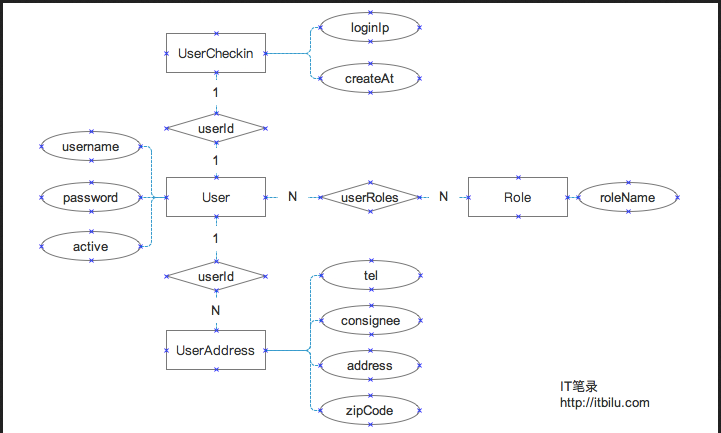
为了能够清楚说明模型关系的定义及关系模型的使用,我们定义如下4个模型对象:
用户(User)-与其它模型存在1:1、1:N、N:M用户登录信息(UserCheckin)-与User存在1:1关系用户地址(UserAddress)-与User存在N:1关系角色(Role)-与User存在N:M关系这几个模型的
E-R结构如下:
接下来上代码,代码和瓷土不符,请注意!
代码写的有点low,没办法,!
 /**

  * 大家就按照我的步骤来,一点一点,要有耐心哦

  * 我相信,最后肯定有你想要的!加油

  */

 //引入框架

 const Sequelize = require('sequelize');

 //创建ORM实例

 const sequelize = new Sequelize('sequlizedb', 'root', 'guoguo',

     {

         'dialect': 'mysql',  // 数据库使用mysql

     }

 );

 //验证连接

 sequelize

     .authenticate()

     .then(() => {

         console.log('链接成功');

     })

     .catch((error) => {

         console.log('链接失败' + error);

     })

 //模型的创建

 const User = sequelize.define('user', {

     name: Sequelize.STRING,

     age: Sequelize.INTEGER,

 }, {

         freezeTableName: true,

     });

 // User.create({

 //     name: 'guo',

 //     age: 25

 // })

 //     .then((result) => {

 //         console.log('=======添加成功===================');

 //         console.log(result);

 //         console.log('==========================');

 //     })

 //     .catch((error) => {

 //         console.log('==========================');

 //         console.log('添加失败' + error);

 //         console.log('==========================');

 //     });

 // const Role=sequelize.define('role',{

 //     name:{

 //         type:sequelize.STRING,

 //     }

 // },

 // {freezeTableName:true});

 const Message = sequelize.define('message', {

     text: Sequelize.STRING,

 }, {

         freezeTableName: true,

     });

 const Image = sequelize.define('image', {

     url: Sequelize.STRING,

 }, {

         freezeTableName: true,

     });

 //删除表

 // sequelize.drop()

 // .then((logging)=>{

 //     console.log('==========================');

 //     console.log('删除成功!'+logging);

 //     console.log('==========================');

 // })

 // .catch((error)=>{

 //     console.log('==========================');

 //     console.log('删除失败'+error);

 //     console.log('==========================');

 // });

 //建立关系

 // Message.belongsTo(User);

 // Message.hasMany(Image);

 //同步到数据库

 // sequelize.sync({

 //     force: true,

 // }).then(() => {

 //     console.log('==========================');

 //     console.log('同步成功');

 //     console.log('==========================');

 // }).catch(() => {

 //     console.log('==========================');

 //     console.log('同步失败');

 //     console.log('==========================');

 // });

 //cudr

 function addUers(name, age) {

     User.create({

         name: name,

         age: age,

     }).then((log) => {

         log = JSON.stringify(log);

         console.log('==========================');

         console.log('增加用户成功' + log);

         console.log('==========================');

     }).catch((error) => {

         console.log('==========================');

         console.log('增加用户失败' + error);

         console.log('==========================');

     });

 }

 function addMessage(userId, text) {

     Message.create({

         text: text,

         userId: userId,

     }).then((log) => {

         log = JSON.stringify(log);

         console.log('==========================');

         console.log('增加成功!' + log);

         console.log('==========================');

     }).catch((error) => {

         console.log('==========================');

         console.log('增加失败!' + error);

         console.log('==========================');

     });

 }

 function addImage(messageId, imageUrl) {

     Image.create({

         url: imageUrl,

         messageId: messageId,

     }).then((log) => {

         log = JSON.stringify(log);

         console.log('==========================');

         console.log('添加图片成功' + log);

         console.log('==========================');

     }).catch((error) => {

         console.log('==========================');

         console.log('添加图片失败' + error);

         console.log('==========================');

     });

 }

 //测试

 //addUers('杨雪娇',22);

 //addMessage(2, '杨雪娇发来的消息3');

 // addImage(5,'http://3.png');

 // addImage(6,'http://4.png');

 // addImage(2,'http://2.png');

 // //

 function getAllMessage() {

     Message.findAll({

         where: {

             userId: 2

         },

         include: [

             {

                 model: User,

                 attributes: [

                     'id',

                     'name',

                 ],

             },

             {

                 model: Image,

                 attributes: [

                     'id',

                     'url'

                 ]

             }

         ],

     }).then((result) => {

         result = JSON.stringify(result);

         console.log('==========================');

         console.log(result);

         console.log('==========================');

     }).catch((error) => {

         console.log('==========================');

         console.log('查询失败' + error);

         console.log('==========================');

     });

 }

 //测试

 //getAllMessage();

 //删除消息

 function delMessage(userId, messageId) {

     Message.destroy({

         where: {

             userId: userId,

             id: messageId,

         },

     }).then((log) => {

         log = JSON.stringify(log);

         console.log('==========================');

         console.log('删除消息成功!' + log);

         console.log('==========================');

     }).catch((error) => {

         console.log('==========================');

         console.log('删除消息失败!' + error);

         console.log('==========================');

     });

 }

 //测试

 //测试发现问题 如果不设置级联 则,从属message表的image表记录不会删除,而只是出现对应messageId 为NULL的现象

 //delMessage(2,4);

 const Role = sequelize.define('role', {

     name: {

         type: Sequelize.STRING, allowNull: true,

     }

 }, {

         freezeTableName: true,

     });

 //对于单个模型的同步

 // Role.sync().then((log) => {

 //     log = JSON.stringify(log);

 //     console.log('==========================');

 //     console.log('Role表数据同步成功' + log);

 //     console.log('==========================');

 //     Role.create({

 //         name: '管理员'

 //     }).then((log) => {

 //         log = JSON.stringify(log);

 //         console.log('==========================');

 //         console.log('添加的数据为' + log);

 //         console.log('==========================');

 //     }).catch((error) => {

 //         console.log('==========================');

 //         console.log('添加数据失败' + error);

 //         console.log('==========================');

 //     });

 // }).catch((error) => {

 //     console.log('==========================');

 //     console.log('Role模型与表数据同步失败' + error);

 //     console.log('==========================');

 // });

 //定义User1模型

 const User1 = sequelize.define('user1', {

     name: {

         type: Sequelize.STRING,

         validate: {

             notEmpty: true,

             len: [2, 30],

         }

     },

     age: {

         type: Sequelize.STRING,

         defaultValue: 21,

         validate: {

             isInt: {

                 msg: '年龄必须是整数!',

             }

         }

     },

     email: {

         type: Sequelize.STRING,

         validate: {

             isEmail: true,

         }

     },

     userpicture: Sequelize.STRING,

 }, {

         freezeTableName: true,

     });

 //

 //同步User1模型

 // User1.sync().then((log) => {

 //     log = JSON.stringify(log);

 //     console.log('==========================');

 //     console.log('User1表数据同步成功' + log);

 //     console.log('==========================');

 // }).catch((error) => {

 //     console.log('==========================');

 //     console.log('User1模型与表数据同步失败' + error);

 //     console.log('==========================');

 // });

 function addUser1(userInfo) {

     User1.create({

         name: userInfo.name,

         age:userInfo.age,

         email:userInfo.email,

     }).then((log) => {

         log = JSON.stringify(log);

         console.log('==========================');

         console.log('添加的数据为' + log);

         console.log('==========================');

     }).catch((error) => {

         console.log('==========================');

         console.log('添加数据失败' + error);

         console.log('==========================');

     });

 }

 const userInfo={

     name:'郭东生',

     //age:0.1,//Validation error: 年龄必须是整数!

     age:22,

     email:'7758@qq.com',

     //email:'7758',//Validation error: Validation isEmail on email failed

 }

 addUser1(userInfo);
Node.js ORM框架Sequlize之表间关系的更多相关文章
- Node.js ORM 框架 sequelize 实践
最近在做团队的一个内部系统,这次使用的nodejs web框架是团队统一的hapi.js,而数据库依然是mysql,ORM 框架选用有着6000+ stars 的 sequelize.js,hapi- ...
- Node.js ORM框架Sequelize使用示例
示例代码: const Sequelize = require('sequelize'); const sequelize = new Sequelize('database', 'username' ...
- Node.js Express 框架
Node.js Express 框架 Express 简介 Express 是一个简洁而灵活的 node.js Web应用框架, 提供了一系列强大特性帮助你创建各种 Web 应用,和丰富的 HTTP ...
- Node.js Express框架
Express 介绍 Express是一个最小的,灵活的Node.js Web应用程序框架,它提供了一套强大的功能来开发Web和移动应用程序. 它有助于基于Node Web应用程序的快速开发.下面是一 ...
- 全端开发必备!10个最好的 Node.js MVC 框架
Node.js 是最流行的 JavaScript 服务端平台,它允许建立可扩展的 Web 应用程序.Node.js 包含不同类型的框架,如 MVC 框架.全栈框架.REST API 以及大量的服 ...
- Koa – 更加强大的下一代 Node.js Web 框架
Koa 是 Express 的开发团队设计的下一代 Web 框架,其目的是为 Web 应用程序提供更小,更具表现力,更坚实的基础.Koa 没有核捆绑任何中间件,并提供了一套优雅的方法,使服务器端开 ...
- 【360开源】thinkjs:基于Promise的Node.js MVC框架 (转)
thinkjs是360奇舞团开源的一款Node.js MVC框架,该框架底层基于Promise来实现,很好的解决了Node.js里异步回调的问题.360奇舞团(奇虎75Team),是奇虎360公司We ...
- Node.js日志框架选型比較:Winston
日志对于问题定位.调试,系统性能调优至关重要,尤其是系统复杂以及在线执行的情况下. 好的开发框架都会有一个可开启关闭/可配置记录级别的日志系统.我们从下面几个方面来做选型: 1. 每行日志都须要有准确 ...
- 十款最佳Node.js MVC框架
十款最佳Node.js MVC框架摘要:Node.js是JavaScript中最为流行的框架之一,易于创建可扩展的Web应用.本文分享十款最佳的JavaScript框架. Node.js是JavaSc ...
随机推荐
- vtk文件编写
在paraview中加载vtk文件,可以很好的显示三维空间图像,如下cpp代码: #include <iostream> #include <fstream> #include ...
- Redmine 删除 project 中的 public 选项
缘由:由于manager的错误设置,导致本不该public的项目设置成public 诉求:去除项目新建及设置时的public勾选 1.查找日志 由于redmine是拿ruby编写的,且主页等都是由ht ...
- Vue图片懒加载插件 - vue lazyload的简单使用
Vue module for lazyloading images in your applications. Some of goals of this project worth noting i ...
- 全网最全的Windows下Anaconda2 / Anaconda3里Python语言实现定时发送微信消息给好友或群里(图文详解)
不多说,直接上干货! 缘由: (1)最近看到情侣零点送祝福,感觉还是很浪漫的事情,相信有很多人熬夜为了给爱的人送上零点祝福,但是有时等着等着就睡着了或者时间并不是卡的那么准就有点强迫症了,这是也许程序 ...
- 全网最详细的Sublime Text 3的安装Package Control插件管理包(图文详解)
不多说,直接上干货! 全网最详细的Windows里下载与安装Sublime Text *(图文详解) 全网最详细的Sublime Text 3的激活(图文详解) 全网最详细的Sublime Text ...
- 《垃圾回收的算法与实现》——Python垃圾回收
Python垃圾回收 python采用引用计数法进行垃圾回收 Python内存分配 python在分配内存空间时,在malloc之上堆放了3个独立的分层. python内存分配时主要由arena.po ...
- markdown简单入门
1.斜体和加粗: 使用下划线"_"或"*"括起来 _内容_ or *内容* 1个_ 或 * 都是斜体,2个则是加粗: 3个既斜体 又加粗,4个以上则没什么变化 ...
- IDA动态调试so文件出现SIGILL
用ida6.6 调试android的so文件时经常会报SIGILL的错误,意思是指令非法.而且这种错误基本都是发生在系统函数内部,像我遇到过的mmap,fopen,fgets等等.在这些函数内部如果用 ...
- JVM 综述
概览 从 JVM 的总体上看,它解决了3个问题: Java 程序的内存管理(GC & 运行时数据区). Java Class 二进制字节流的加载(ClassLoader). Java 程序的执 ...
- 【Tomcat】部署Web到tomcat的四种方式
一.静态部署 1.直接将web项目文件件拷贝到webapps 目录中 Tomcat的Webapps目录是Tomcat默认的应用目录,当服务器启动时,会加载所有这个目录下的应用.所以可以将JSP ...