
7.3 netty3基本使用
由于dubbo默认使用的是netty3进行通信的,这里简单的列出一个netty3通信的例子。
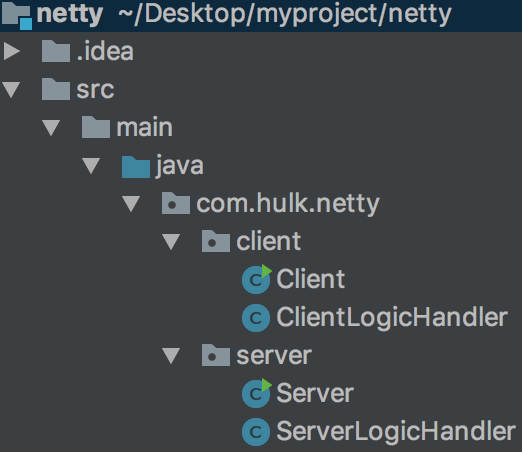
一 server端
1 Server
 package com.hulk.netty.server;

 import org.jboss.netty.bootstrap.ServerBootstrap;

 import org.jboss.netty.channel.*;

 import org.jboss.netty.channel.socket.nio.NioServerSocketChannelFactory;

 import org.jboss.netty.handler.codec.string.StringDecoder;

 import org.jboss.netty.handler.codec.string.StringEncoder;

 import java.net.InetSocketAddress;

 import java.util.concurrent.Executors;

 public class Server {

     public void start(){

         ChannelFactory factory = new NioServerSocketChannelFactory(

                 Executors.newCachedThreadPool(),//boss线程池

                 Executors.newCachedThreadPool(),//worker线程池

                 8//worker线程数

         );

         ServerBootstrap bootstrap = new ServerBootstrap(factory);

         /**

          * 对于每一个连接channel, server都会调用PipelineFactory为该连接创建一个ChannelPipline

          */

         bootstrap.setPipelineFactory(new ChannelPipelineFactory() {

             public ChannelPipeline getPipeline() throws Exception {

                 ChannelPipeline pipeline = Channels.pipeline();

                 pipeline.addLast("decoder", new StringDecoder());

                 pipeline.addLast("encoder", new StringEncoder());

                 pipeline.addLast("handler", new ServerLogicHandler());

                 return pipeline;

             }

         });

         Channel channel = bootstrap.bind(new InetSocketAddress("127.0.0.1", 8080));

         System.out.println("server start success!");

     }

     public static void main(String[] args) throws InterruptedException {

         Server server = new Server();

         server.start();

         Thread.sleep(Integer.MAX_VALUE);

     }

 }
步骤:
- 首先创建了NioServerSocketChannelFactory:创建boss线程池,创建worker线程池以及worker线程数。(boss线程数默认为1个)
- 创建ServerBootstrap server端启动辅助类
- 为ServerBootstrap设置ChannelPipelineFactory工厂,并为ChannelPipelineFactory将来创建出的ChannelPipeline设置编码器/解码器/事件处理器
- 使用ServerBootstrap绑定监听地址和端口
2 事件处理器ServerLogicHandler
 package com.hulk.netty.server;

 import org.jboss.netty.channel.Channel;

 import org.jboss.netty.channel.ChannelHandlerContext;

 import org.jboss.netty.channel.ChannelStateEvent;

 import org.jboss.netty.channel.ExceptionEvent;

 import org.jboss.netty.channel.MessageEvent;

 import org.jboss.netty.channel.SimpleChannelHandler;

 public class ServerLogicHandler extends SimpleChannelHandler {

     @Override

     public void channelConnected(ChannelHandlerContext ctx, ChannelStateEvent e) throws Exception {

         System.out.println("连接成功, channel: " + e.getChannel().toString());

     }

     @Override

     public void messageReceived(ChannelHandlerContext ctx, MessageEvent e) throws Exception {

         String msg = (String) e.getMessage();

         System.out.println("接收到了client的消息, msg: " + msg);

         Channel channel = e.getChannel();

         String str = "hi, client";

         channel.write(str);//写消息发给client端

         System.out.println("服务端发送数据: " + str + "完成");

     }

     @Override

     public void exceptionCaught(ChannelHandlerContext ctx, ExceptionEvent e) throws Exception {

         e.getCause().printStackTrace();

         e.getChannel().close();

     }

 }
说明:
- 监听与客户端连接成功事件
- 监听接收到来自客户端的消息,之后写回给客户端消息
- 捕捉异常事件
二 client端
1 Client
 package com.hulk.netty.client;

 import org.jboss.netty.bootstrap.ClientBootstrap;

 import org.jboss.netty.channel.ChannelFactory;

 import org.jboss.netty.channel.ChannelPipeline;

 import org.jboss.netty.channel.ChannelPipelineFactory;

 import org.jboss.netty.channel.Channels;

 import org.jboss.netty.channel.socket.nio.NioClientSocketChannelFactory;

 import org.jboss.netty.handler.codec.string.StringDecoder;

 import org.jboss.netty.handler.codec.string.StringEncoder;

 import java.net.InetSocketAddress;

 import java.util.concurrent.Executors;

 public class Client {

     public static void main(String[] args) {

         ChannelFactory factory = new NioClientSocketChannelFactory(

                 Executors.newCachedThreadPool(),

                 Executors.newCachedThreadPool(),

                 8

         );

         ClientBootstrap bootstrap = new ClientBootstrap(factory);

         bootstrap.setPipelineFactory(new ChannelPipelineFactory() {

             public ChannelPipeline getPipeline() throws Exception {

                 ChannelPipeline pipeline = Channels.pipeline();

                 pipeline.addLast("decoder", new StringDecoder());

                 pipeline.addLast("encoder", new StringEncoder());

                 pipeline.addLast("handler", new ClientLogicHandler());

                 return pipeline;

             }

         });

         bootstrap.connect(new InetSocketAddress("127.0.0.1", 8080));

         System.out.println("client start success!");

     }

 }
步骤:(与Server几乎相同)
- 首先创建了NioClientSocketChannelFactory:创建boss线程池,创建worker线程池以及worker线程数。(boss线程数默认为1个)
- 创建ClientBootstrap client端启动辅助类
- 为ClientBootstrap设置ChannelPipelineFactory工厂,并为ChannelPipelineFactory将来创建出的ChannelPipeline设置编码器/解码器/事件处理器
- 使用ClientBootstrap连接Server端监听的地址和端口
2 ClientLogicHandler
 package com.hulk.netty.client;

 import org.jboss.netty.channel.ChannelHandlerContext;

 import org.jboss.netty.channel.ChannelStateEvent;

 import org.jboss.netty.channel.ExceptionEvent;

 import org.jboss.netty.channel.MessageEvent;

 import org.jboss.netty.channel.SimpleChannelHandler;

 import org.jboss.netty.channel.WriteCompletionEvent;

 public class ClientLogicHandler extends SimpleChannelHandler {

     @Override

     public void channelConnected(ChannelHandlerContext ctx, ChannelStateEvent e) throws Exception {

         System.out.println("客户端连接成功!");

         String str = "hi server!";

         e.getChannel().write(str);//异步

     }

     @Override

     public void writeComplete(ChannelHandlerContext ctx, WriteCompletionEvent e) throws Exception {

         System.out.println("客户端写消息完成");

     }

     @Override

     public void messageReceived(ChannelHandlerContext ctx, MessageEvent e) throws Exception {

         String msg = (String) e.getMessage();

         System.out.println("客户端接收到消息, msg: " + msg);

     }

     @Override

     public void exceptionCaught(ChannelHandlerContext ctx, ExceptionEvent e) throws Exception {

         e.getCause().printStackTrace();

         e.getChannel().close();

     }

 }
说明:
- 监听与服务端连接成功事件,连接成功后,写消息给服务端
- 监听向服务端写消息完成的事件
- 监听接收到来自服务端的消息
- 捕捉异常事件
这就是一个简单的netty3通信的例子,关于netty,后续会读源码。
7.3 netty3基本使用的更多相关文章
- netty3升netty4一失眼成千古恨
老项目是netty3的,本来想直接改到netty5,但是netty5居然是只支持jdk1.7,很奇怪jdk1.6和jdk1.8都不行..为了兼容jdk1.6加上netty4本来和netty5就差别不大 ...
- 使用Netty3或Netty4发布Http协议服务
现在是2018年1月11日18:12分,已经是下班时间了,小Alan今天给大家简单的介绍一下Netty,让大家以后在使用到Netty的时候能够有一定的了解和基础,这样深入学习Netty以及以后灵活应用 ...
- nio之netty3的应用
1.netty3是nio的封装版本.在使用上面比nio的直接使用更好.nio简单使用都是单线程的方式(比如:一个服务员服务很多客户),但是netty3的方式不一样的是,引入线程池的方式来实现服务的通信 ...
- 蓝萝卜blu netty3升netty4
老项目是netty3的,本来想直接改到netty5,但是netty5居然是只支持jdk1.7,很奇怪jdk1.6和jdk1.8都不行..为了兼容jdk1.6加上netty4本来和netty5就差别不大 ...
- 以http server为例简要分析netty3实现
概要 最近看了点netty3实现.从webbit项目作为口子.webbit项目是一个基于netty3做的http与websocket server.后面还会继续看下netty4,netty4有很多改进 ...
- Netty3 源代码分析 - NIO server绑定过程分析
Netty3 源代码分析 - NIO server绑定过程分析 一个框架封装的越好,越利于我们高速的coding.可是却掩盖了非常多的细节和原理.可是源代码可以揭示一切. 服务器端代码在指定 ...
- Netty3:分隔符和定长解码器
回顾TCP粘包/拆包问题解决方案 上文详细说了TCP粘包/拆包问题产生的原因及解决方式,并以LineBasedFrameDecoder为例演示了粘包/拆包问题的实际解决方案,本文再介绍两种粘包/拆包问 ...
- 在netty3.x中存在两种线程:boss线程和worker线程。
在netty 3.x 中存在两种线程:boss线程和worker线程.
- netty-3.客户端与服务端通信
(原) 第三篇,客户端与服务端通信 以下例子逻辑: 如果客户端连上服务端,服务端控制台就显示,XXX个客户端地址连接上线. 第一个客户端连接成功后,客户端控制台不显示信息,再有其它客户端再连接上线,则 ...
随机推荐
- Python异常处理回顾与总结
1 引言 在我们调试程序时,经常不可避免地出现意料之外的情况,导致程序不得不停止运行,然后提示大堆提示信息,大多是这种情况都是由异常引起的.异常的出现一方面是因为写代码时粗心导致的语法错误,这种错误在 ...
- 正睿OI 提高 Day1T3 ZYB玩字符串(DP)
题目链接 设可能的答案串为p,长为len.p一定是s的一个子串且len|n. 虽然一些p在s中可能被断成若干段,但删掉其中的若干段后,这段区间一定会被全部消掉. 于是枚举p后,可以用f[i][j]表示 ...
- CentOS 7 下编译安装lnmp之PHP篇详解
一.安装环境 宿主机=> win7,虚拟机 centos => 系统版本:centos-release-7-5.1804.el7.centos.x86_64 二.PHP下载 官网 http ...
- Python生成requirements.txt包依赖管理文件
requirements.txt是Python的依赖管理软件,和Java的POM一样. requirements.txt会生成使用了pip安装后的依赖包,在正常环境下会生成这个目录下的包/usr/lo ...
- HDU 4759 Poker Shuffle(2013长春网络赛1001题)
Poker Shuffle Time Limit: 2000/1000 MS (Java/Others) Memory Limit: 32768/32768 K (Java/Others)Tot ...
- 使用git pull文件时和本地文件冲突怎么办
在使用git pull代码时,经常会碰到有冲突的情况,提示如下信息:error: Your local changes to 'c/environ.c' would be overwritten by ...
- linux socket编程示例
#include <sys/socket.h> #include <netinet/in.h> #include <arpa/inet.h> #include &l ...
- WebLogic使用总结(四)——WebLogic部署Web应用
一.打包Web应用 首先将要部署到WebLogic的Web应用打包成war包,具体操作步骤如下图所示: 选中要打包的[oams]项目→[Export...]
- How do I debug a published XBAP file in VS2010?
I need to debug a full-trust application either by specifying a URL or, ideally, from within the web ...
- 快速将wax配置到项目中进行lua开发
通过Finder浏览到你保存该项目的文件夹.创建三个新的文件夹:wax.scripts和Classes. 第一:首先,下载源代码的压缩包.Wax放在GitHub上(https://github.com ...