
Orchard 前台权限与自定义权限
一:关于前台权限
1:只允许自己看到
首先,我们需要确定在 Role 设置页面,用户所对应的 View Page by others 和 View all content 未被选中。备注,我们首先和得设置 Anonymous 和 Authenticated 的这两个的权限,这两项也未被选中。
这样一来,我们可以达到整个站点,我们只能看到自己的东西,如下:
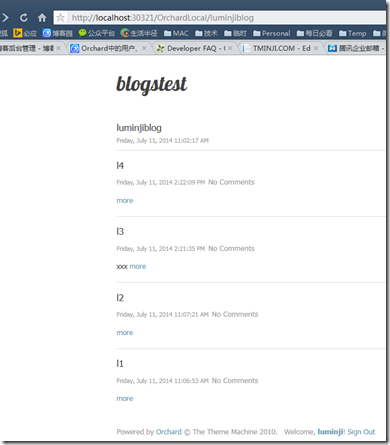
而如果是 Admin 等全权限登录的,应该是这样的:
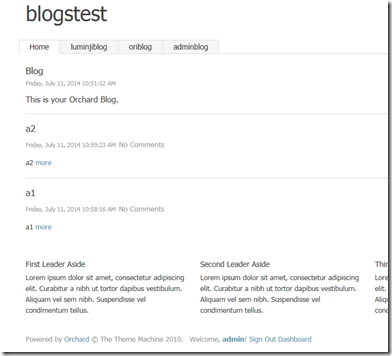
2:只允许某个角色看到
同理1。
二:关于自定义权限
首先,我们需要在模块的根目录下创建文件 Permissions:
public class Permissions : IPermissionProvider {
public static readonly Permission ManageBlogs = new Permission { Description = "Manage blogs for others", Name = "ManageBlogs" };
public static readonly Permission ManageOwnBlogs = new Permission { Description = "Manage own blogs", Name = "ManageOwnBlogs", ImpliedBy = new[] { ManageBlogs } };public static readonly Permission PublishBlogPost = new Permission { Description = "Publish or unpublish blog post for others", Name = "PublishBlogPost", ImpliedBy = new[] { ManageBlogs } };
public static readonly Permission PublishOwnBlogPost = new Permission { Description = "Publish or unpublish own blog post", Name = "PublishOwnBlogPost", ImpliedBy = new[] { PublishBlogPost, ManageOwnBlogs } };
public static readonly Permission EditBlogPost = new Permission { Description = "Edit blog posts for others", Name = "EditBlogPost", ImpliedBy = new[] { PublishBlogPost } };
public static readonly Permission EditOwnBlogPost = new Permission { Description = "Edit own blog posts", Name = "EditOwnBlogPost", ImpliedBy = new[] { EditBlogPost, PublishOwnBlogPost } };
public static readonly Permission DeleteBlogPost = new Permission { Description = "Delete blog post for others", Name = "DeleteBlogPost", ImpliedBy = new[] { ManageBlogs } };
public static readonly Permission DeleteOwnBlogPost = new Permission { Description = "Delete own blog post", Name = "DeleteOwnBlogPost", ImpliedBy = new[] { DeleteBlogPost, ManageOwnBlogs } };public static readonly Permission MetaListBlogs = new Permission { ImpliedBy = new[] { EditBlogPost, PublishBlogPost, DeleteBlogPost }, Name = "MetaListBlogs"};
public static readonly Permission MetaListOwnBlogs = new Permission { ImpliedBy = new[] { EditOwnBlogPost, PublishOwnBlogPost, DeleteOwnBlogPost }, Name = "MetaListOwnBlogs" };public virtual Feature Feature { get; set; }
public IEnumerable<Permission> GetPermissions() {
return new[] {
ManageOwnBlogs,
ManageBlogs,
EditOwnBlogPost,
EditBlogPost,
PublishOwnBlogPost,
PublishBlogPost,
DeleteOwnBlogPost,
DeleteBlogPost,
};
}public IEnumerable<PermissionStereotype> GetDefaultStereotypes() {
return new[] {
new PermissionStereotype {
Name = "Administrator",
Permissions = new[] {ManageBlogs}
},
new PermissionStereotype {
Name = "Editor",
Permissions = new[] {PublishBlogPost,EditBlogPost,DeleteBlogPost}
},
new PermissionStereotype {
Name = "Moderator",
},
new PermissionStereotype {
Name = "Author",
Permissions = new[] {ManageOwnBlogs}
},
new PermissionStereotype {
Name = "Contributor",
Permissions = new[] {EditOwnBlogPost}
},
};
}}
其次,我们需要在控制器中,为服务设定权限,如:
public AdminController(IMyService myService, IOrchardServices orchardServices) { _myService = myService; Services = orchardServices; }。。。
Services.Authorizer.Authorize(Permissions.SomeModulePermission, T("Some operation failed"));
三:获取当前登录用户的角色信息
四:对 PART 设定权限
至此,ORCHARD 已经完全控制了所以的显式和功能权限,包括页面上的 PART部分。
参考:
http://docs.orchardproject.net/Documentation/Developer-FAQ
http://orchard.codeplex.com/discussions/547703
http://orchard.codeplex.com/discussions/390754
Orchard 前台权限与自定义权限的更多相关文章
- DRF认证、自定义认证和权限、自定义权限
源码分析 """ 1)APIView的dispath(self, request, *args, **kwargs) 2)dispath方法内 self.initial( ...
- 【转】 Pro Android学习笔记(六五):安全和权限(2):权限和自定义权限
目录(?)[-] 进程边界 声明和使用权限 AndroidManifestxml的许可设置 自定义权限 运行安全通过两个层面进行保护.进程层面:不同应用运行在不同的进程,每个应用有独自的user ID ...
- Salesforce自定义权限简介
自定义权限(Custom Permission) Salesforce默认提供了多种方式设定用户的权限,比如简档.权限集等.在这些设定中,已经包括了系统中的对象.应用.字段.页面布局等组件,管理员或开 ...
- Orchard Core 自定义权限配置
在我们为Orchard Core配置了一个新的Module之后,我们要考虑的是谁可以访问这个Module,那么这里就涉及到了一个权限的配置.如下图,添加了自定义的权限: Orchard Core源码: ...
- Android自定义权限和使用权限
本文来自http://blog.csdn.net/liuxian13183/ ,引用必须注明出处! 自定义权限,主要用于保护被赋予权限的组件.如无权限与有权限,正如public与private的对类保 ...
- Android权限安全(3)权限的分级和自定义权限
Android的不同权限分级 Normal 一般apk都可以用, Dangerous 一般apk都可以用,但有提示 SignatureOrSystem 特定的private key签名的或系统的apk ...
- android - 解决“应用自定义权限重名”
背景 现场的开发今天跟我说,测试包装不上!报错"应用自定义权限重名"!!! 网上百度下关键字,发现魅族手机有这个毛病,顺藤摸瓜:"http://bbs.flyme.cn/ ...
- 关于 DotNetCore 的自定义权限管理
1.自定义权限需要扩展 Microsoft.AspNetCore.Authentication 实现一套接口 IAuthenticationHandler, IAuthenticationSignIn ...
- SharePoint REST API - 使用REST接口对列表设置自定义权限
博客地址:http://blog.csdn.net/FoxDave SharePoint网站.列表和列表项都属于SecurableObject类型.默认情况下,一个安全对象继承父级的权限.对一个对 ...
随机推荐
- 【AtCoder】ARC100 题解
C - Linear Approximation 找出\(A_i - i\)的中位数作为\(b\)即可 题解 #include <iostream> #include <cstrin ...
- MongoDB CPU使用较高,如何排查?
前言 首先,我们简单梳理一下,CPU 在什么情况下才算负载较高?负载查看是通过"uptime"命令查看.大家都知道,命令显示的结果分别表示1分钟.5分钟.15分钟的负载情况,这点就 ...
- Liunx 部署环境常用命令
在Linux环境中部署web项目中常用到一些命令,在此记录已做备用: 1. 查看当前工作目录: pwd [选项] 常用参数: pwd -P 显示出实际路径,而非使用连接(link)路径. 2. 列出目 ...
- 8.9 正睿暑期集训营 Day6
目录 2018.8.9 正睿暑期集训营 Day6 A 萌新拆塔(状压DP) B 奇迹暖暖 C 风花雪月(DP) 考试代码 A B C 2018.8.9 正睿暑期集训营 Day6 时间:2.5h(实际) ...
- Codeforces Beta Round #14 (Div. 2) C. Four Segments 水题
C. Four Segments 题目连接: http://codeforces.com/contest/14/problem/C Description Several months later A ...
- activiti流程
package cn.demo.service.impl; import java.io.File; import java.io.FileInputStream; import java.io.Fi ...
- Android深入浅出之Binder机制(转)
Android深入浅出之Binder机制 一 说明 Android系统最常见也是初学者最难搞明白的就是Binder了,很多很多的Service就是通过Binder机制来和客户端通讯交互的.所以搞明白B ...
- Java 与 .NET 的平台发展之争
Java 8即将正式发布,从早期版本中,我们已经可以领略到一些令人兴奋的特性.但是开发者Andrew C. Oliver表示,尽管如此,Java语言在某些特性上还是落后于.Net.比如,Java 8中 ...
- A brief CRC tutorial
https://www.kernel.org/doc/Documentation/crc32.txt A brief CRC tutorial. A CRC is a long-division re ...
- lodoop打印控件详解
注意:使用此打印控件需要引入(在我上传的Demo中都有): install_lodop32.exe install_lodop64.exe LodopFuncs.js jquery-1.10.0.mi ...