
Android学习笔记--通过wifi向服务器端发送数据
(转自http://www.cnblogs.com/zhxiang/archive/2011/07/21/2112825.html)
客户端程序:
|
1
2
3
4
5
6
7
8
9
10
11
12
13
14
15
16
17
18
19
20
21
22
23
24
25
26
27
28
29
30
31
32
33
34
35
36
37
38
39
40
41
42
43
44
45
46
47
48
49
50
51
52
53
54
55
56
57
58
59
60
61
62
63
64
65
66
67
68
69
70
71
72
73
74
75
76
77
78
79
80
81
82
83
84
85
86
87
88
89
90
91
92
93
94
95
96
97
98
99
100
101
102
103
104
105
106
107
108
109
110
111
112
113
114
115
|
package com.zx.android; import android.app.Activity; import android.os.Bundle; import android.util.Log; import android.view.View; import android.view.View.OnClickListener; import android.widget.Button; import android.widget.EditText; import android.widget.TextView; import android.content.Context; import android.widget.Toast; import java.io.BufferedReader; import java.io.BufferedWriter; import java.io.InputStreamReader; import java.io.OutputStreamWriter; import java.io.PrintWriter; import android.net.wifi.WifiManager; import java.net.Socket; import com.zx.android.ClientActivity; public class ClientActivity extends Activity { /** Called when the activity is first created. */ private Button startButton = null; private Button stopButton = null; private Button checkButton = null; private WifiManager wifiManager = null; private final String DEBUG_TAG= "Activity01"; private TextView mTextView=null; private EditText mEditText=null; private Button mButton=null; @Override public void onCreate(Bundle savedInstanceState) { super.onCreate(savedInstanceState); setContentView(R.layout.main); mButton = (Button)findViewById(R.id.Button01); mTextView=(TextView)findViewById(R.id.TextView01); mEditText=(EditText)findViewById(R.id.EditText01); startButton = (Button)findViewById(R.id.startWifi); stopButton = (Button)findViewById(R.id.stopWifi); checkButton = (Button)findViewById(R.id.checkWifi); startButton.setOnClickListener(new StartWifiListener()); stopButton.setOnClickListener(new StopWifiListener()); checkButton.setOnClickListener(new CheckWifiListener()); //登陆 mButton.setOnClickListener(new OnClickListener() { public void onClick(View v) { Socket socket = null; String message = mEditText.getText().toString() + "/r/n"; try { //创建Socket socket = new Socket("192.168.1.102",54321); //向服务器端发送消息 PrintWriter out = new PrintWriter( new BufferedWriter( new OutputStreamWriter(socket.getOutputStream())),true); out.println(message); //接收来自服务器端的消息 BufferedReader br = new BufferedReader(new InputStreamReader(socket.getInputStream())); String msg = br.readLine(); if ( msg != null ) { mTextView.setText(msg); } else { mTextView.setText("数据错误!"); } //关闭流 out.close(); br.close(); //关闭Socket socket.close(); } catch (Exception e) { // TODO: handle exception Log.e(DEBUG_TAG, e.toString()); } } }); } class StartWifiListener implements OnClickListener{ public void onClick(View v) { wifiManager = (WifiManager)ClientActivity.this.getSystemService(Context.WIFI_SERVICE); wifiManager.setWifiEnabled(true); System.out.println("wifi state --->" + wifiManager.getWifiState()); Toast.makeText(ClientActivity.this, "当前Wifi网卡状态为" + wifiManager.getWifiState(), Toast.LENGTH_SHORT).show(); } } class StopWifiListener implements OnClickListener{ public void onClick(View arg0) { wifiManager = (WifiManager)ClientActivity.this.getSystemService(Context.WIFI_SERVICE); wifiManager.setWifiEnabled(false); System.out.println("wifi state --->" + wifiManager.getWifiState()); Toast.makeText(ClientActivity.this, "当前Wifi网卡状态为" + wifiManager.getWifiState(), Toast.LENGTH_SHORT).show(); } } class CheckWifiListener implements OnClickListener{ public void onClick(View v) { wifiManager = (WifiManager)ClientActivity.this.getSystemService(Context.WIFI_SERVICE); System.out.println("wifi state --->" + wifiManager.getWifiState()); Toast.makeText(ClientActivity.this, "当前Wifi网卡状态为" + wifiManager.getWifiState(), Toast.LENGTH_SHORT).show(); } } } |
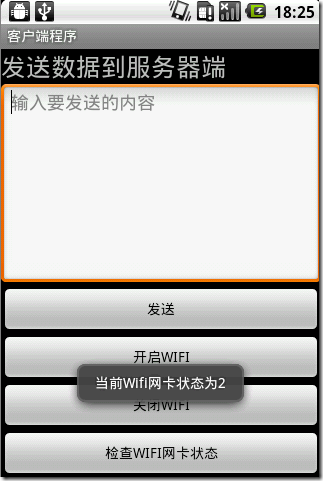
这个是我在手机上运行时截的图,下面三个按钮是操作wifi网关的按钮,下面的那个提示框是按下这个按钮出现的,数字为0表示正在关闭wifi,数字2表示正在开启wifi,数字1表示wifi处于关闭状态,数字3表示 wifi处于开启状态。
上面的的发送按钮可以发送数据到服务器,实验室的是局域网,没有无线网络,我利用一个无线路由与电脑相连,在利用手机wifi搜索到该网络,手机与电脑构 成局域网,便可发送数据。至于服务器端,可以采用网络调试助手接收数据,协议选择TCP服务器,ip地址和端口视自己情况定。
当然也可以自己写个服务器端程序,再在命令行窗口中显示接收到的数据。
服务器端程序:
|
1
2
3
4
5
6
7
8
9
10
11
12
13
14
15
16
17
18
19
20
21
22
23
24
25
26
27
28
29
30
31
32
33
34
35
36
37
38
39
40
41
42
43
44
45
46
47
48
49
50
51
52
53
54
55
56
57
58
59
|
package com.zx.android; import java.io.BufferedReader; import java.io.BufferedWriter; import java.io.InputStreamReader; import java.io.OutputStreamWriter; import java.io.PrintWriter; import java.net.ServerSocket; import java.net.Socket; public class Server implements Runnable { public void run() { try { //创建ServerSocket ServerSocket serverSocket = new ServerSocket(54321); while (true) { //接受客户端请求 Socket client = serverSocket.accept(); System.out.println("accept"); try { //接收客户端消息 BufferedReader in = new BufferedReader(new InputStreamReader(client.getInputStream())); String str = in.readLine(); System.out.println("read:" + str); //向服务器发送消息 PrintWriter out = new PrintWriter( new BufferedWriter( new OutputStreamWriter(client.getOutputStream())),true); out.println("server message"); //关闭流 out.close(); in.close(); } catch (Exception e) { System.out.println(e.getMessage()); e.printStackTrace(); } finally { //关闭 client.close(); System.out.println("close"); } } } catch (Exception e) { System.out.println(e.getMessage()); } } //main函数,开启服务器 public static void main(String[] args) { Thread desktopServerThread = new Thread(new Server()); desktopServerThread.start(); } } |
Android学习笔记--通过wifi向服务器端发送数据的更多相关文章
- Android 学习笔记之Volley(七)实现Json数据加载和解析...
学习内容: 1.使用Volley实现异步加载Json数据... Volley的第二大请求就是通过发送请求异步实现Json数据信息的加载,加载Json数据有两种方式,一种是通过获取Json对象,然后 ...
- Android(java)学习笔记80:UDP协议发送数据
UDP协议发送数据:我们总是先运行接收端,再运行发送端发送端: 1 package cn.itcast_02; import java.io.IOException; import java.net. ...
- Android(java)学习笔记20:UDP协议发送数据
1. UDP协议发送数据:我们总是先运行接收端,再运行发送端发送端: package cn.itcast_02; import java.io.IOException; import java.net ...
- Android学习笔记36:使用SQLite方式存储数据
在Android中一共提供了5种数据存储方式,分别为: (1)Files:通过FileInputStream和FileOutputStream对文件进行操作.具体使用方法可以参阅博文<Andro ...
- Android学习笔记之JSON数据解析
转载:Android学习笔记44:JSON数据解析 JSON(JavaScript Object Notation)是一种轻量级的数据交换格式,采用完全独立于语言的文本格式,为Web应用开发提供了一种 ...
- 【转】Pro Android学习笔记(九八):BroadcastReceiver(2):接收器触发通知
文章转载只能用于非商业性质,且不能带有虚拟货币.积分.注册等附加条件.转载须注明出处:http://blog.sina.com.cn/flowingflying或作者@恺风Wei-傻瓜与非傻瓜 广播接 ...
- 【转】 Pro Android学习笔记(七七):服务(2):Local Service
目录(?)[-] Local service代码 调用Local ServiceLocal Service client代码 AndroidManifestxml定义Serviceacitivty的l ...
- 【转】 Pro Android学习笔记(七五):HTTP服务(9):DownloadManager
目录(?)[-] 小例子 保存在哪里下载文件信息设置和读取 查看下载状态和取消下载 文章转载只能用于非商业性质,且不能带有虚拟货币.积分.注册等附加条件,转载须注明出处:http://blog.csd ...
- 【转】 Pro Android学习笔记(六九):HTTP服务(3):HTTP POST MultiPart
目录(?)[-] 建立测试环境 开发环境导入第三方JAR HTTP Post Multipart小例子 HTTP POST不仅可以通过键值对传递参数,还可以携带更为复杂的参数,例如文件.HTTP Po ...
随机推荐
- PhpStorm快捷方式
转载源:http://www.cr173.com/html/66775_1.html PhpStorm 是 JetBrains 公司开发的一款商业的 PHP 集成开发工具,PhpStorm可随时帮助用 ...
- IntelliJ IDEA 2016.2 注册破解激活教程
下载了IntelliJ IDEA 尽然需要激活,整了终于找到解决的办法了,记录下来. IntelliJ IDEA 2016.2下载地址:http://www.jetbrains.com/idea/do ...
- Jave Web阿里云短信服务发送验证码
首先得在阿里云根据流程开通短信服务,申请签名和模版,具体看文档 因为这是个web项目,用到了thymeleaf模板,所以在pom.xml中加入如下依赖 <dependency> <g ...
- Android - AssetManager
http://blog.csdn.net/luoshengyang/article/details/8791064
- springboot学习-springboot使用spring-data-jpa操作MySQL数据库
我们在上一篇搭建了一个简单的springboot应用,这一篇将介绍使用spring-data-jpa操作数据库. 新建一个MySQL数据库,这里数据库名为springboot,建立user_info数 ...
- 回调地狱以及用promise怎么解决回调地狱
哈哈哈,我又又又回来了,不好意思,最近枸杞喝的比较到位,精力比较旺盛. 现在我们来聊一聊啥是回调地狱,注意是回调地狱啊 不是RB人民最爱拍的那啥地狱啊,来吧,上车吧少年,这是去幼儿园的车 都让开, ...
- 【代码笔记】iOS-SDWebImage的使用
一,工程图. 二,代码. RootViewController.m #import "RootViewController.h" //加入头文件 #import "UII ...
- 高性能JavaScript(高性能Ajax)
ajax是一种与服务器通信而无需重载页面的方法(即局部刷新.) 高性能的Ajax应该考虑数据传输技术和数据格式,以及其他的如数据缓存等优化技术. 请求数据 请求数据的常用技术有XMLHttpReque ...
- js之面向对象
本文的面向对象分为ES6和ES6之前的,重点学习ES6的===============================一.面向对象 1.什么是面向对象 a)什么是对象:万物都可以抽象成对象 时间对象 ...
- Android 常见adb命令
Android 常见adb命令 by:授客 QQ:1033553122 1. 查看所有已链接的设备 命令: adb devices 例: C:\Users\laiyu>adb device ...