
Javascript - Vue - 请求
本地增删查的一个例子
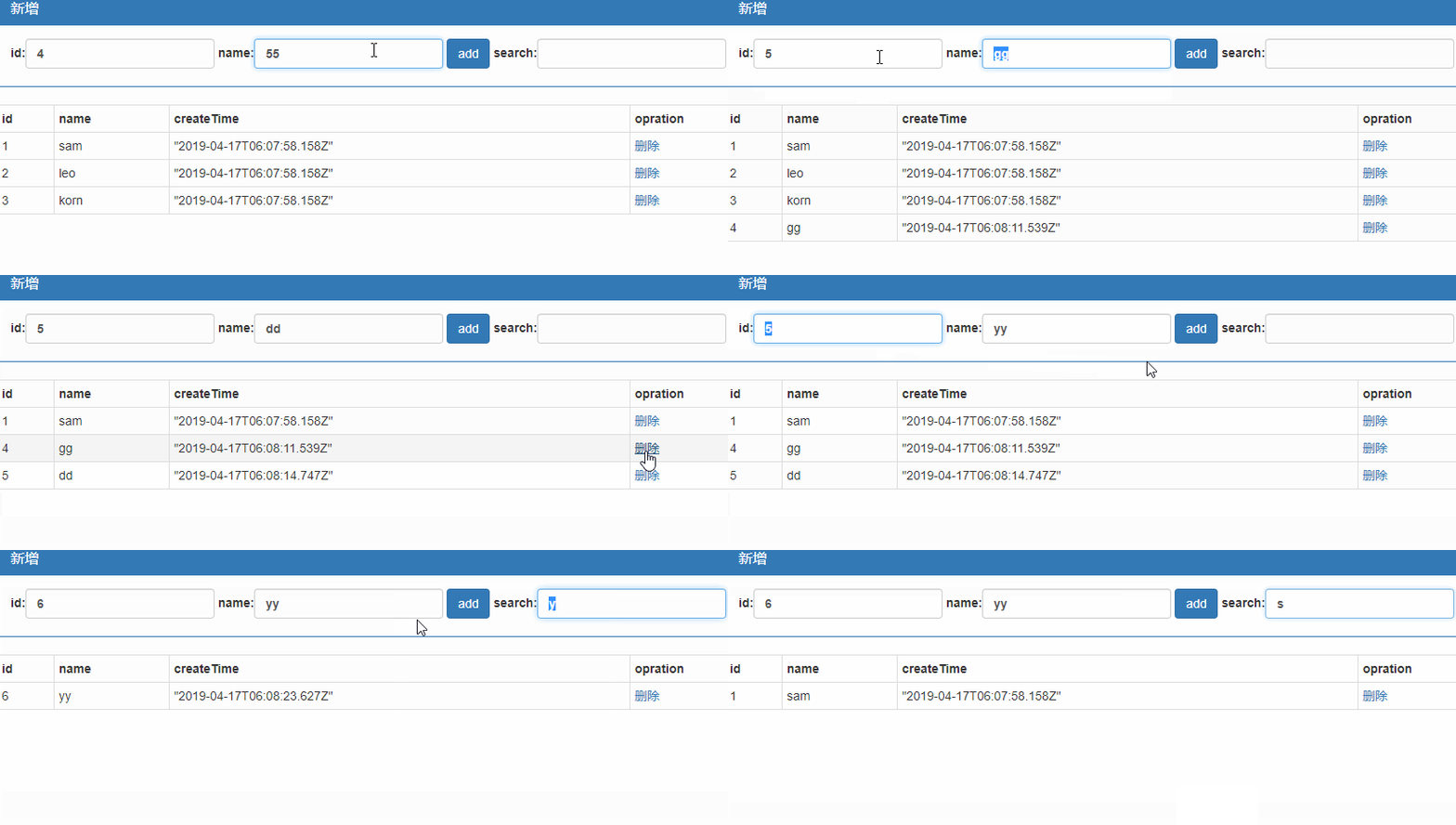
<div class="panel panel-primary">
<div class="panel-heading">
<h3 class="panel-title">新增</h3>
</div>
<div class="panel-body form-inline">
<label>
id:<input type="text" class="form-control" v-model="obj.id" />
</label>
<label>
name:<input type="text" class="form-control" v-model="obj.name" />
</label>
<input type="button" value="add" class="btn btn-primary" @click="add" />
<label>
search:<input type="text" class="form-control" v-model="keyWords"/>
</label>
</div>
</div>
<table class="table table-striped table-bordered table-hover table-condensed">
<tr><th>id</th><th>name</th><th>createTime</th><th>opration</th></tr>
<!--//呈现的数据由vue对象内部维护的search函数提供,当在搜索框输入数据后,vue对象内部数据keyWords发生变化,则会自动调用search进行数据过滤-->
<tr v-for="obj in search(keyWords)" :key="obj.id"><td>{{obj.id}}</td><td>{{obj.name}}</td><td>{{obj.time}}</td><td><a href="#" @click.prevent="del(obj.id)">删除</a></td></tr>
</table>
</div>
el: "#box",
data: {
keyWords: "",
obj: { id: null, name: "", time: null },
list: [
{ id: 1, name: "sam",time:new Date() },
{ id: 2, name: "leo", time: new Date() },
{ id: 3, name: "korn", time: new Date() }
]
},
methods: {
add: function () {
var id = this.obj.id;
var name = this.obj.name;
this.list.push({ id: id, name: name,time:new Date() });
},
del: function (id) {
var index=this.list.findIndex((item) => {
if (item.id == id) return true;
});
this.list.splice(index, 1);
},
search: function (keyWords) {
return this.list.filter((item,index) => {
if (item.name.includes(keyWords)) {
return item;
}
});
}
}
});
向服务端发起请求
axios
这是官方推荐的新的插件,用于客户端向服务端发送请求。可在axios下载。
{{msg}}
<button @click="sendGet">GetInfo</button>
}
},
methods: {
sendGet: function () {
var self=this;
var getObj=axios.get("http://localhost:53385/Handler.ashx", {
params: self.sendData
});
var endObj= getObj.then(function (response) {
self.msg = response.data;
});
endObj.catch(function (error) {
self.msg = error.status + error.statusText;
});
},
sendPost: function () {
var self = this;
var postObj = axios.post("http://localhost:53385/Handler.ashx", self.sendData);
var endObj=postObj.then(function (response) {
self.msg = response.data;
});
endObj.catch(function (error) {
self.msg = error.status + error.statusText;
});
}
}
});
</script>
服务端
{
public void ProcessRequest(HttpContext context)
{
context.Response.ContentType = "text/plain";
context.Response.Write("OK");
context.Response.End();
}
}

增删改查实例
<div class="panel panel-primary">
<div class="panel-heading">
<h3 class="panel-title">添加</h3>
</div>
<div class="panel-body form-inline">
<label>
name:<input type="text" class="form-control" v-model="name" />
</label>
<input type="button" value="新增" class="btn btn-primary" @click="add" />
</div>
</div>
<table class="table table-bordered table-hover table-striped">
<tr>
<th>ID</th>
<th>Name</th>
<th>Date</th>
<th>Operation</th>
</tr>
<tr v-for="obj in list" :key="obj.ID">
<td>
{{obj.ID}}
</td>
<td>
{{obj.Name}}
</td>
<td>
{{obj.Date}}
</td>
<td>
<a href="#" :id="obj.ID">编辑</a>
</td>
</tr>
</table>
</div>
服务端需要创建一个模拟数据库存储数据的在内存中可以保持全局唯一的数据对象以便可以在这个对象列表里持续添加数据
{
public int ID { get; set; }
public string Name { get; set; }
public DateTime Date { get; set; }
public static List<Employee> GlobalList { get; set; } //全局唯一的员工列表
static Employee()
{
GlobalList= new List<Employee>
{
new Employee
{
ID = 1,
Date = new DateTime(),
Name = "寒食"
},
new Employee
{
ID = 2,
Date = new DateTime(),
Name = "山魈"
},
new Employee
{
ID = 3,
Date = new DateTime(),
Name = "李隼"
}
};
}
}
查询
客户端代码
el: "#box",
data: {
name:null,
list: [
{ ID: 1, Name: "sam", Date: new Date() }
]
},
methods: {
getServerData: function () {
var self = this;
axios.get("http://localhost:53385/getAllList.ashx").then(function (response) {
self.list = response.data;
});
}
},
created: function () { //vue对象创建完成后开启查询
this.getServerData();
}
});
服务端代码
{
context.Response.ContentType = "text/plain";
string listStr = JsonConvert.SerializeObject(Employee.GlobalList);
context.Response.Write( listStr);
context.Response.End();
}
新增
客户端代码
el: "#box",
data: {
name:null,
list: [
{ ID: 1, Name: "sam", Date: new Date() }
]
},
methods: {
add: function () {
var self = this;
axios.post("http://localhost:53385/addData.ashx", { name: this.name }).then(function (response) {
self.list = response.data;
});
}
}
});
服务端代码
{
context.Response.ContentType = "text/plain";
//客户端axios对象的post方法模拟了post提交方式,但它提交的是json格式的数据,不能用request.form[]来获取数据
//以下通过读取流数据来获取客户端提交的json数据
context.Response.Cache.SetCacheability(HttpCacheability.NoCache);
using (var reader = new System.IO.StreamReader(context.Request.InputStream))
{
String jsonData = reader.ReadToEnd();
var em = new Employee { Date = new DateTime(), Name = JsonConvert.DeserializeObject<Employee>(jsonData).Name };
var list = Employee.GlobalList;
list.Add(em);
var message = string.IsNullOrEmpty(jsonData) ? "error" : JsonConvert.SerializeObject(list);
context.Response.Write(message);
context.Response.End();
}
}
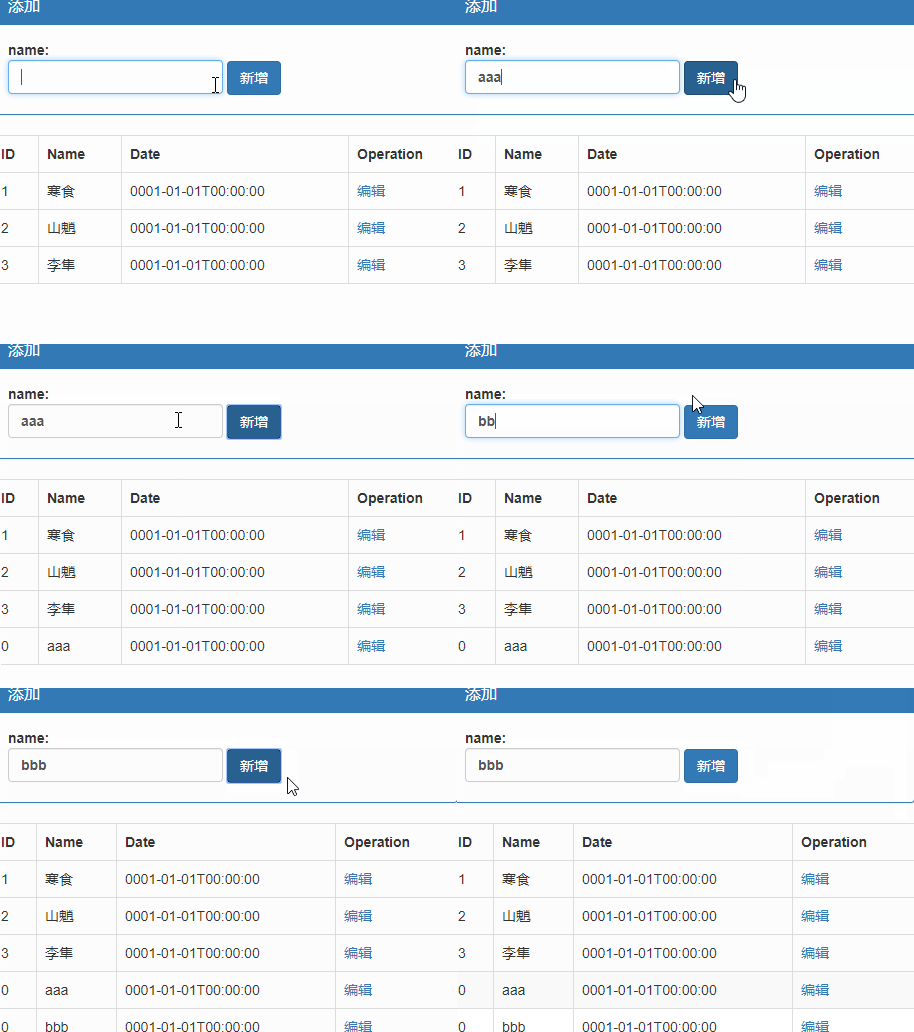
删改略……
Javascript - Vue - 请求的更多相关文章
- Javascript异步请求你能捕获到异常吗?
Javascript异步请求你能捕获到异常吗? 异常处理是程序发布之前必须要解决的问题,不经过异常处理的应用会让用户对产品失去信心.在异常处理中,我们一贯的做法是按照函数调用的次序,将异常从数据访问层 ...
- 一个vue请求接口渲染页面的例子
new Vue({ el:'#bodylist', data: { list: [ { "type_id": "1", "type_name" ...
- JavaScript获取请求参数
<script type="text/javascript"> //获取请求参数 function paramsMap() { var url = window.loc ...
- Javascript - Vue - vue对象
vue提供了一整套前端解决方案,可以提升企业开发效率 vue的处理过程 app.js 项目入口,所有请求最先进入此模块进行处理 route.js 由app.js调用,处理路由的分发 controlle ...
- Javascript - Vue - 在vscode里使用webpack
cnpm(node package manager)和webpack模块 npm是运行在node.js环境下的包管理工具,使用npm可以很快速的安装前端文件里需要依赖的那些项目文件,比如js.css文 ...
- Javascript - Vue - 路由
vue router.js 下载:vue-router.js, 该文件依赖于vue.js <script src="Scripts/vue-2.4.0.js">< ...
- Javascript - Vue - webpack + vue-cil
cnpm(node package manager)和webpack模块 npm是运行在node.js环境下的包管理工具(先安装node.js,再通过命令 npm install npm -g 安装n ...
- Javascript - Vue - webpack中的组件、路由和动画
引入vue.js 1.cnpm i vue -S 2.在mian.js中引入vue文件 import Vue from "vue"//在main.js中使用这种方式引用vue文件时 ...
- VUE请求本地数据的配置json-server
VUE开发请求本地数据的配置,早期的vue-lic下面有dev-server.js和dev-client.js两文件,请求本地数据在dev-server.js里配置,最新的vue-webpack-te ...
随机推荐
- LeetCode-----算法448.找到所有数组中消失的数字
题目: 给定一个范围在 1 ≤ a[i] ≤ n ( n = 数组大小 ) 的 整型数组,数组中的元素一些出现了两次,另一些只出现一次. 找到所有在 [1, n] 范围之间没有出现在数组中的数字. ...
- WPF使用路径(URI)引用资源文件
Uri uri = new Uri("pack://application:,,,/程序集名称;component/Resources/bj.png", UriKind.Absol ...
- Beta阶段敏捷冲刺②
1.提供当天站立式会议照片一张. 每个人的工作 (有work item 的ID),并将其记录在码云项目管理中: 1.1昨天已完成的工作. 姓名 昨天已完成的工作 徐璐琳 完成设置界面的排版 祁泽文 实 ...
- c语言和c++有什么区别
差不多是win98跟winXP的关系.C++是在C的基础上增加了新的理论,玩出了新的花样.所以叫C加加. C是一个结构化语言,它的重点在于算法和数据结构.C程序的设计首要考虑的是如何通过一个过程,对输 ...
- 后Hadoop时代的大数据技术思考:数据即服务
1. Hadoop 的神话正在破灭 IBM leads BigInsights for Hadoop out behind barn. Shots heard IBM has announced th ...
- HGOI20180815 (NOIP 提高组模拟赛 day2)
Day 2 rank 11 100+35+30=165 本题是一道数论题,求ax+by=c的正整数对(x,y) x>=0并且y>=0 先说下gcd: 求a,b公约数gcd(a,b) 如gc ...
- php session 登录退出验证
login.html 负责收集用户填写的登录信息 <html><head><title></title></head><body> ...
- SQL优化:索引的重要性
开篇小测验 下面这样一个小SQL 你该怎么样添加最优索引 两个表上现在只有聚集索引 bigproduct 表上已经有聚集索引 ProductID bigtransactionhistory 表上已经有 ...
- java基础-多线程应用案例展示
java基础-多线程应用案例展示 作者:尹正杰 版权声明:原创作品,谢绝转载!否则将追究法律责任. 一.两只熊,100只蜜蜂,蜜蜂每次生产的蜂蜜量是1,罐子的容量是30,熊在罐子的蜂蜜量达到20的时候 ...
- Java基础-赋值运算符Assignment Operators与条件运算符Condition Operators
Java基础-赋值运算符Assignment Operators与条件运算符Condition Operators 作者:尹正杰 版权声明:原创作品,谢绝转载!否则将追究法律责任. 一.赋值运算符 表 ...