
Javascript - Vue - 请求
本地增删查的一个例子
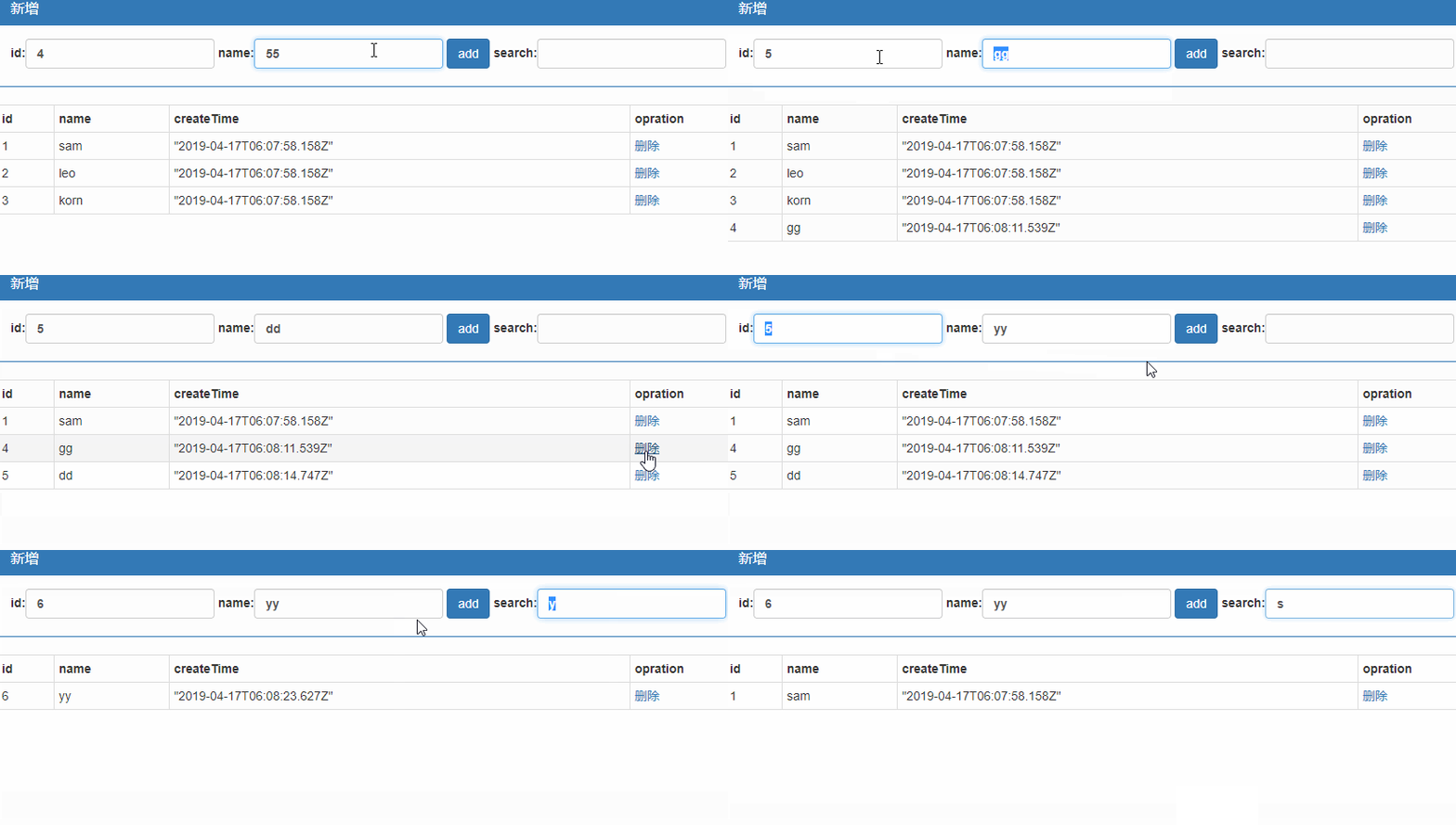
<div class="panel panel-primary">
<div class="panel-heading">
<h3 class="panel-title">新增</h3>
</div>
<div class="panel-body form-inline">
<label>
id:<input type="text" class="form-control" v-model="obj.id" />
</label>
<label>
name:<input type="text" class="form-control" v-model="obj.name" />
</label>
<input type="button" value="add" class="btn btn-primary" @click="add" />
<label>
search:<input type="text" class="form-control" v-model="keyWords"/>
</label>
</div>
</div>
<table class="table table-striped table-bordered table-hover table-condensed">
<tr><th>id</th><th>name</th><th>createTime</th><th>opration</th></tr>
<!--//呈现的数据由vue对象内部维护的search函数提供,当在搜索框输入数据后,vue对象内部数据keyWords发生变化,则会自动调用search进行数据过滤-->
<tr v-for="obj in search(keyWords)" :key="obj.id"><td>{{obj.id}}</td><td>{{obj.name}}</td><td>{{obj.time}}</td><td><a href="#" @click.prevent="del(obj.id)">删除</a></td></tr>
</table>
</div>
el: "#box",
data: {
keyWords: "",
obj: { id: null, name: "", time: null },
list: [
{ id: 1, name: "sam",time:new Date() },
{ id: 2, name: "leo", time: new Date() },
{ id: 3, name: "korn", time: new Date() }
]
},
methods: {
add: function () {
var id = this.obj.id;
var name = this.obj.name;
this.list.push({ id: id, name: name,time:new Date() });
},
del: function (id) {
var index=this.list.findIndex((item) => {
if (item.id == id) return true;
});
this.list.splice(index, 1);
},
search: function (keyWords) {
return this.list.filter((item,index) => {
if (item.name.includes(keyWords)) {
return item;
}
});
}
}
});
向服务端发起请求
axios
这是官方推荐的新的插件,用于客户端向服务端发送请求。可在axios下载。
{{msg}}
<button @click="sendGet">GetInfo</button>
}
},
methods: {
sendGet: function () {
var self=this;
var getObj=axios.get("http://localhost:53385/Handler.ashx", {
params: self.sendData
});
var endObj= getObj.then(function (response) {
self.msg = response.data;
});
endObj.catch(function (error) {
self.msg = error.status + error.statusText;
});
},
sendPost: function () {
var self = this;
var postObj = axios.post("http://localhost:53385/Handler.ashx", self.sendData);
var endObj=postObj.then(function (response) {
self.msg = response.data;
});
endObj.catch(function (error) {
self.msg = error.status + error.statusText;
});
}
}
});
</script>
服务端
{
public void ProcessRequest(HttpContext context)
{
context.Response.ContentType = "text/plain";
context.Response.Write("OK");
context.Response.End();
}
}

增删改查实例
<div class="panel panel-primary">
<div class="panel-heading">
<h3 class="panel-title">添加</h3>
</div>
<div class="panel-body form-inline">
<label>
name:<input type="text" class="form-control" v-model="name" />
</label>
<input type="button" value="新增" class="btn btn-primary" @click="add" />
</div>
</div>
<table class="table table-bordered table-hover table-striped">
<tr>
<th>ID</th>
<th>Name</th>
<th>Date</th>
<th>Operation</th>
</tr>
<tr v-for="obj in list" :key="obj.ID">
<td>
{{obj.ID}}
</td>
<td>
{{obj.Name}}
</td>
<td>
{{obj.Date}}
</td>
<td>
<a href="#" :id="obj.ID">编辑</a>
</td>
</tr>
</table>
</div>
服务端需要创建一个模拟数据库存储数据的在内存中可以保持全局唯一的数据对象以便可以在这个对象列表里持续添加数据
{
public int ID { get; set; }
public string Name { get; set; }
public DateTime Date { get; set; }
public static List<Employee> GlobalList { get; set; } //全局唯一的员工列表
static Employee()
{
GlobalList= new List<Employee>
{
new Employee
{
ID = 1,
Date = new DateTime(),
Name = "寒食"
},
new Employee
{
ID = 2,
Date = new DateTime(),
Name = "山魈"
},
new Employee
{
ID = 3,
Date = new DateTime(),
Name = "李隼"
}
};
}
}
查询
客户端代码
el: "#box",
data: {
name:null,
list: [
{ ID: 1, Name: "sam", Date: new Date() }
]
},
methods: {
getServerData: function () {
var self = this;
axios.get("http://localhost:53385/getAllList.ashx").then(function (response) {
self.list = response.data;
});
}
},
created: function () { //vue对象创建完成后开启查询
this.getServerData();
}
});
服务端代码
{
context.Response.ContentType = "text/plain";
string listStr = JsonConvert.SerializeObject(Employee.GlobalList);
context.Response.Write( listStr);
context.Response.End();
}
新增
客户端代码
el: "#box",
data: {
name:null,
list: [
{ ID: 1, Name: "sam", Date: new Date() }
]
},
methods: {
add: function () {
var self = this;
axios.post("http://localhost:53385/addData.ashx", { name: this.name }).then(function (response) {
self.list = response.data;
});
}
}
});
服务端代码
{
context.Response.ContentType = "text/plain";
//客户端axios对象的post方法模拟了post提交方式,但它提交的是json格式的数据,不能用request.form[]来获取数据
//以下通过读取流数据来获取客户端提交的json数据
context.Response.Cache.SetCacheability(HttpCacheability.NoCache);
using (var reader = new System.IO.StreamReader(context.Request.InputStream))
{
String jsonData = reader.ReadToEnd();
var em = new Employee { Date = new DateTime(), Name = JsonConvert.DeserializeObject<Employee>(jsonData).Name };
var list = Employee.GlobalList;
list.Add(em);
var message = string.IsNullOrEmpty(jsonData) ? "error" : JsonConvert.SerializeObject(list);
context.Response.Write(message);
context.Response.End();
}
}
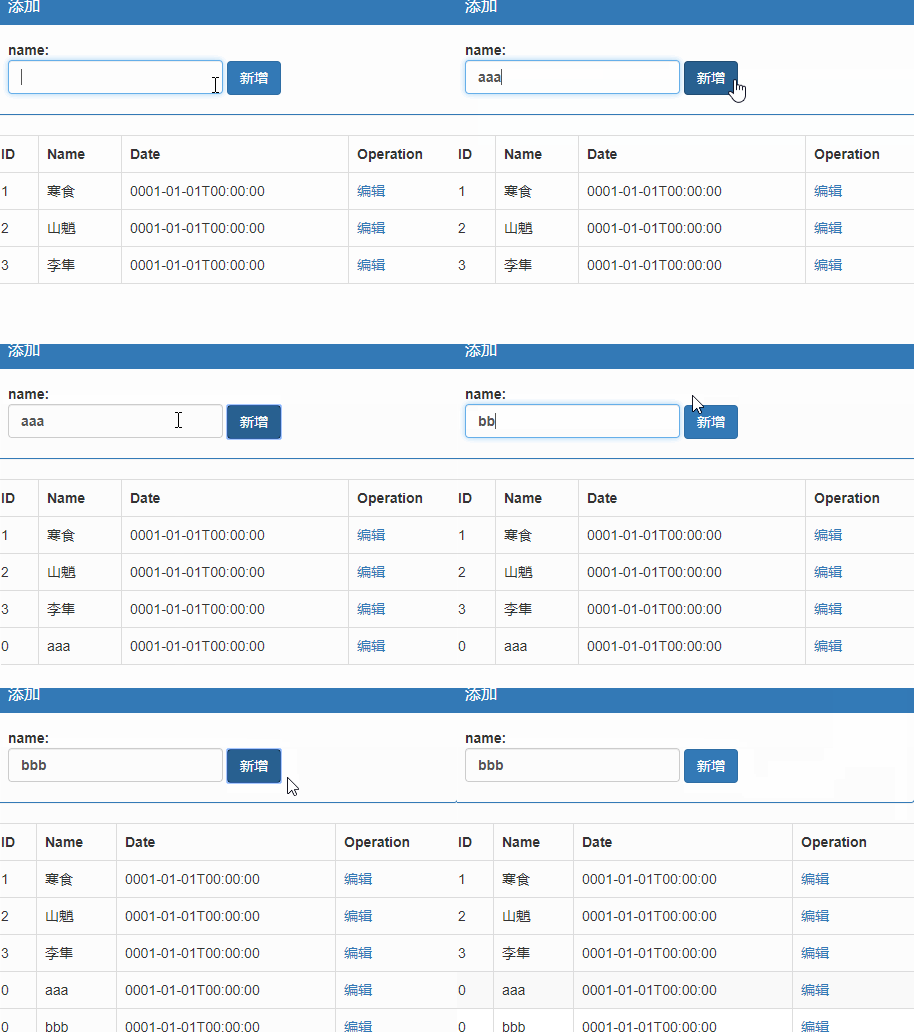
删改略……
Javascript - Vue - 请求的更多相关文章
- Javascript异步请求你能捕获到异常吗?
Javascript异步请求你能捕获到异常吗? 异常处理是程序发布之前必须要解决的问题,不经过异常处理的应用会让用户对产品失去信心.在异常处理中,我们一贯的做法是按照函数调用的次序,将异常从数据访问层 ...
- 一个vue请求接口渲染页面的例子
new Vue({ el:'#bodylist', data: { list: [ { "type_id": "1", "type_name" ...
- JavaScript获取请求参数
<script type="text/javascript"> //获取请求参数 function paramsMap() { var url = window.loc ...
- Javascript - Vue - vue对象
vue提供了一整套前端解决方案,可以提升企业开发效率 vue的处理过程 app.js 项目入口,所有请求最先进入此模块进行处理 route.js 由app.js调用,处理路由的分发 controlle ...
- Javascript - Vue - 在vscode里使用webpack
cnpm(node package manager)和webpack模块 npm是运行在node.js环境下的包管理工具,使用npm可以很快速的安装前端文件里需要依赖的那些项目文件,比如js.css文 ...
- Javascript - Vue - 路由
vue router.js 下载:vue-router.js, 该文件依赖于vue.js <script src="Scripts/vue-2.4.0.js">< ...
- Javascript - Vue - webpack + vue-cil
cnpm(node package manager)和webpack模块 npm是运行在node.js环境下的包管理工具(先安装node.js,再通过命令 npm install npm -g 安装n ...
- Javascript - Vue - webpack中的组件、路由和动画
引入vue.js 1.cnpm i vue -S 2.在mian.js中引入vue文件 import Vue from "vue"//在main.js中使用这种方式引用vue文件时 ...
- VUE请求本地数据的配置json-server
VUE开发请求本地数据的配置,早期的vue-lic下面有dev-server.js和dev-client.js两文件,请求本地数据在dev-server.js里配置,最新的vue-webpack-te ...
随机推荐
- PAT甲题题解-1105. Spiral Matrix (25)-(模拟顺时针矩阵)
题意:给定N,以及N个数.找出满足m*n=N且m>=n且m-n最小的m.n值,建立大小为m*n矩阵,将N个数从大到下顺时针填入矩阵中. #include <iostream> #in ...
- 团队作业week9
1. Bug bash ▪ How many bugs is found in your bug bash? 2. Write a blog to talk about your scenario t ...
- 软件工程团队项目第一次Sprint评审
第一组:9-652 作品:炸弹人 评价:已经完成了界面的设计和基本功能,游戏已初具雏形.这款游戏可玩性很强,是个很不错的项目.但是对游戏并没有进行深入开发,不能持续的吸引玩家的兴趣,容易引起玩家的厌倦 ...
- SpringMVC(三)-- springmvc的系统学习之数据的处理,乱码及restful
资源:尚学堂 邹波 springmvc框架视频 一.提交数据的处理 1.提交的域名称和处理方法的参数一致 (1)提交的数据:http://localhost:8080/data/hello.do?na ...
- Spark 实践——基于 Spark Streaming 的实时日志分析系统
本文基于<Spark 最佳实践>第6章 Spark 流式计算. 我们知道网站用户访问流量是不间断的,基于网站的访问日志,即 Web log 分析是典型的流式实时计算应用场景.比如百度统计, ...
- 异构数据库之间完全可以用SQL语句导数据
告诉你一个最快的方法,用SQLServer连接DBF 在SQLServer中执行 SELECT * into bmk FROM OpenDataSource( ‘Microsoft.Jet.OLEDB ...
- 【bzoj1088】扫雷
见过水的,没见过这么水的 Description 相信大家都玩过扫雷的游戏.那是在一个n*m的矩阵里面有一些雷,要你根据一些信息找出雷来.万圣节到了,“余”人国流行起了一种简单的扫雷游戏,这个游戏规则 ...
- 五、spring boot 1.5.4 集成 jpa+hibernate+jdbcTemplate
1.pom添加依赖 <!-- spring data jpa,会注入tomcat jdbc pool/hibernate等 --> <dependency> <group ...
- POJ 1087 A Plug for UNIX / HDU 1526 A Plug for UNIX / ZOJ 1157 A Plug for UNIX / UVA 753 A Plug for UNIX / UVAlive 5418 A Plug for UNIX / SCU 1671 A Plug for UNIX (网络流)
POJ 1087 A Plug for UNIX / HDU 1526 A Plug for UNIX / ZOJ 1157 A Plug for UNIX / UVA 753 A Plug for ...
- 置换群和Burnside引理,Polya定理
定义简化版: 置换,就是一个1~n的排列,是一个1~n排列对1~n的映射 置换群,所有的置换的集合. 经常会遇到求本质不同的构造,如旋转不同构,翻转交换不同构等. 不动点:一个置换中,置换后和置换前没 ...