
elasticSearch6源码分析(6)http和transport模块
1.http模块概述
The http module allows to expose Elasticsearch APIs over HTTP.

The http mechanism is completely asynchronous in nature, meaning that there is no blocking thread waiting for a response. The benefit of using asynchronous communication for HTTP is solving the C10k problem.

When possible, consider using HTTP keep alive when connecting for better performance and try to get your favorite client not to do HTTP chunking.
2.http配置类HttpTransportSettings
public final class HttpTransportSettings {

    public static final Setting<Boolean> SETTING_CORS_ENABLED =

        Setting.boolSetting("http.cors.enabled", false, Property.NodeScope);

    public static final Setting<String> SETTING_CORS_ALLOW_ORIGIN =

        new Setting<>("http.cors.allow-origin", "", (value) -> value, Property.NodeScope);

    public static final Setting<Integer> SETTING_CORS_MAX_AGE =

        Setting.intSetting("http.cors.max-age", 1728000, Property.NodeScope);

    public static final Setting<String> SETTING_CORS_ALLOW_METHODS =

        new Setting<>("http.cors.allow-methods", "OPTIONS,HEAD,GET,POST,PUT,DELETE", (value) -> value, Property.NodeScope);

    public static final Setting<String> SETTING_CORS_ALLOW_HEADERS =

        new Setting<>("http.cors.allow-headers", "X-Requested-With,Content-Type,Content-Length", (value) -> value, Property.NodeScope);

    public static final Setting<Boolean> SETTING_CORS_ALLOW_CREDENTIALS =

        Setting.boolSetting("http.cors.allow-credentials", false, Property.NodeScope);

    public static final Setting<Integer> SETTING_PIPELINING_MAX_EVENTS =

        Setting.intSetting("http.pipelining.max_events", 10000, Property.NodeScope);

    public static final Setting<Boolean> SETTING_HTTP_COMPRESSION =

        Setting.boolSetting("http.compression", true, Property.NodeScope);

    // we intentionally use a different compression level as Netty here as our benchmarks have shown that a compression level of 3 is the

    // best compromise between reduction in network traffic and added latency. For more details please check #7309.

    public static final Setting<Integer> SETTING_HTTP_COMPRESSION_LEVEL =

        Setting.intSetting("http.compression_level", 3, Property.NodeScope);

    public static final Setting<List<String>> SETTING_HTTP_HOST =

        listSetting("http.host", emptyList(), Function.identity(), Property.NodeScope);

    public static final Setting<List<String>> SETTING_HTTP_PUBLISH_HOST =

        listSetting("http.publish_host", SETTING_HTTP_HOST, Function.identity(), Property.NodeScope);

    public static final Setting<List<String>> SETTING_HTTP_BIND_HOST =

        listSetting("http.bind_host", SETTING_HTTP_HOST, Function.identity(), Property.NodeScope);

    public static final Setting<PortsRange> SETTING_HTTP_PORT =

        new Setting<>("http.port", "9200-9300", PortsRange::new, Property.NodeScope);

    public static final Setting<Integer> SETTING_HTTP_PUBLISH_PORT =

        Setting.intSetting("http.publish_port", -1, -1, Property.NodeScope);

    public static final Setting<Boolean> SETTING_HTTP_DETAILED_ERRORS_ENABLED =

        Setting.boolSetting("http.detailed_errors.enabled", true, Property.NodeScope);

    public static final Setting<Boolean> SETTING_HTTP_CONTENT_TYPE_REQUIRED =

        new Setting<>("http.content_type.required", (s) -> Boolean.toString(true), (s) -> {

            final boolean value = Booleans.parseBoolean(s);

            if (value == false) {

                throw new IllegalArgumentException("http.content_type.required cannot be set to false. It exists only to make a rolling" +

                    " upgrade easier");

            }

            return true;

        }, Property.NodeScope, Property.Deprecated);

    public static final Setting<ByteSizeValue> SETTING_HTTP_MAX_CONTENT_LENGTH =

        Setting.byteSizeSetting(

                "http.max_content_length",

                new ByteSizeValue(100, ByteSizeUnit.MB),

                new ByteSizeValue(0, ByteSizeUnit.BYTES),

                new ByteSizeValue(Integer.MAX_VALUE, ByteSizeUnit.BYTES),

                Property.NodeScope);

    public static final Setting<ByteSizeValue> SETTING_HTTP_MAX_CHUNK_SIZE =

        Setting.byteSizeSetting("http.max_chunk_size", new ByteSizeValue(8, ByteSizeUnit.KB), Property.NodeScope);

    public static final Setting<ByteSizeValue> SETTING_HTTP_MAX_HEADER_SIZE =

        Setting.byteSizeSetting("http.max_header_size", new ByteSizeValue(8, ByteSizeUnit.KB), Property.NodeScope);

    public static final Setting<Integer> SETTING_HTTP_MAX_WARNING_HEADER_COUNT =

        Setting.intSetting("http.max_warning_header_count", -1, -1, Property.NodeScope);

    public static final Setting<ByteSizeValue> SETTING_HTTP_MAX_WARNING_HEADER_SIZE =

        Setting.byteSizeSetting("http.max_warning_header_size", new ByteSizeValue(-1), Property.NodeScope);

    public static final Setting<ByteSizeValue> SETTING_HTTP_MAX_INITIAL_LINE_LENGTH =

        Setting.byteSizeSetting("http.max_initial_line_length", new ByteSizeValue(4, ByteSizeUnit.KB), Property.NodeScope);

    // don't reset cookies by default, since I don't think we really need to

    // note, parsing cookies was fixed in netty 3.5.1 regarding stack allocation, but still, currently, we don't need cookies

    public static final Setting<Boolean> SETTING_HTTP_RESET_COOKIES =

        Setting.boolSetting("http.reset_cookies", false, Property.NodeScope);

    // A default of 0 means that by default there is no read timeout

    public static final Setting<TimeValue> SETTING_HTTP_READ_TIMEOUT =

        Setting.timeSetting("http.read_timeout", new TimeValue(0), new TimeValue(0), Property.NodeScope);

    public static final Setting<Boolean> SETTING_HTTP_TCP_NO_DELAY =

        boolSetting("http.tcp_no_delay", NetworkService.TCP_NO_DELAY, Setting.Property.NodeScope);

    public static final Setting<Boolean> SETTING_HTTP_TCP_KEEP_ALIVE =

        boolSetting("http.tcp.keep_alive", NetworkService.TCP_KEEP_ALIVE, Setting.Property.NodeScope);

    public static final Setting<Boolean> SETTING_HTTP_TCP_REUSE_ADDRESS =

        boolSetting("http.tcp.reuse_address", NetworkService.TCP_REUSE_ADDRESS, Setting.Property.NodeScope);

    public static final Setting<ByteSizeValue> SETTING_HTTP_TCP_SEND_BUFFER_SIZE =

        Setting.byteSizeSetting("http.tcp.send_buffer_size", NetworkService.TCP_SEND_BUFFER_SIZE, Setting.Property.NodeScope);

    public static final Setting<ByteSizeValue> SETTING_HTTP_TCP_RECEIVE_BUFFER_SIZE =

        Setting.byteSizeSetting("http.tcp.receive_buffer_size", NetworkService.TCP_RECEIVE_BUFFER_SIZE, Setting.Property.NodeScope);

    private HttpTransportSettings() {

    }

}
3.使用Netty4HttpServerTransport
protected void bindServer() {

        // Bind and start to accept incoming connections.

        InetAddress hostAddresses[];

        try {

            hostAddresses = networkService.resolveBindHostAddresses(bindHosts);

        } catch (IOException e) {

            throw new BindHttpException("Failed to resolve host [" + Arrays.toString(bindHosts) + "]", e);

        }

        List<TransportAddress> boundAddresses = new ArrayList<>(hostAddresses.length);

        for (InetAddress address : hostAddresses) {

            boundAddresses.add(bindAddress(address));

        }

        final InetAddress publishInetAddress;

        try {

            publishInetAddress = networkService.resolvePublishHostAddresses(publishHosts);

        } catch (Exception e) {

            throw new BindTransportException("Failed to resolve publish address", e);

        }

        final int publishPort = resolvePublishPort(settings, boundAddresses, publishInetAddress);

        TransportAddress publishAddress = new TransportAddress(new InetSocketAddress(publishInetAddress, publishPort));

        this.boundAddress = new BoundTransportAddress(boundAddresses.toArray(new TransportAddress[0]), publishAddress);

        logger.info("{}", boundAddress);

    }
4.http消息处理
4.1 RestController 请求分发器
@Override

    public void dispatchRequest(RestRequest request, RestChannel channel, ThreadContext threadContext) {

        if (request.rawPath().equals("/favicon.ico")) {

            handleFavicon(request, channel);

            return;

        }

        try {

            tryAllHandlers(request, channel, threadContext);

        } catch (Exception e) {

            try {

                channel.sendResponse(new BytesRestResponse(channel, e));

            } catch (Exception inner) {

                inner.addSuppressed(e);

                logger.error(() ->

                    new ParameterizedMessage("failed to send failure response for uri [{}]", request.uri()), inner);

            }

        }

    }
4.2 处理request的类RestHandler
以search为例
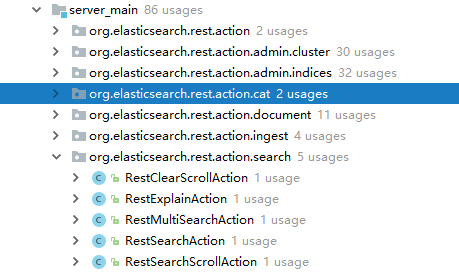
其具体实现为:RestSearchAction
    @Override

    public final void handleRequest(RestRequest request, RestChannel channel, NodeClient client) throws Exception {

        // prepare the request for execution; has the side effect of touching the request parameters

        final RestChannelConsumer action = prepareRequest(request, client);

        // validate unconsumed params, but we must exclude params used to format the response

        // use a sorted set so the unconsumed parameters appear in a reliable sorted order

        final SortedSet<String> unconsumedParams =

            request.unconsumedParams().stream().filter(p -> !responseParams().contains(p)).collect(Collectors.toCollection(TreeSet::new));

        // validate the non-response params

        if (!unconsumedParams.isEmpty()) {

            final Set<String> candidateParams = new HashSet<>();

            candidateParams.addAll(request.consumedParams());

            candidateParams.addAll(responseParams());

            throw new IllegalArgumentException(unrecognized(request, unconsumedParams, candidateParams, "parameter"));

        }

        usageCount.increment();

        // execute the action

        action.accept(channel);

    }
5.transport概述
The transport module is used for internal communication between nodes within the cluster. Each call that goes from one node to the other uses the transport module (for example, when an HTTP GET request is processed by one node, and should actually be processed by another node that holds the data).

The transport mechanism is completely asynchronous in nature, meaning that there is no blocking thread waiting for a response. The benefit of using asynchronous communication is first solving the C10k problem, as well as being the ideal solution for scatter (broadcast) / gather operations such as search in Elasticsearch.
6.tansport配置类TcpTransport
 public static final String TRANSPORT_SERVER_WORKER_THREAD_NAME_PREFIX = "transport_server_worker";

    public static final String TRANSPORT_CLIENT_BOSS_THREAD_NAME_PREFIX = "transport_client_boss";

    public static final Setting<List<String>> HOST =

        listSetting("transport.host", emptyList(), Function.identity(), Setting.Property.NodeScope);

    public static final Setting<List<String>> BIND_HOST =

        listSetting("transport.bind_host", HOST, Function.identity(), Setting.Property.NodeScope);

    public static final Setting<List<String>> PUBLISH_HOST =

        listSetting("transport.publish_host", HOST, Function.identity(), Setting.Property.NodeScope);

    public static final Setting<String> PORT =

        new Setting<>("transport.tcp.port", "9300-9400", Function.identity(), Setting.Property.NodeScope);

    public static final Setting<Integer> PUBLISH_PORT =

        intSetting("transport.publish_port", -1, -1, Setting.Property.NodeScope);

    public static final String DEFAULT_PROFILE = "default";

    // the scheduled internal ping interval setting, defaults to disabled (-1)

    public static final Setting<TimeValue> PING_SCHEDULE =

        timeSetting("transport.ping_schedule", TimeValue.timeValueSeconds(-1), Setting.Property.NodeScope);

    public static final Setting<Boolean> TCP_NO_DELAY =

        boolSetting("transport.tcp_no_delay", NetworkService.TCP_NO_DELAY, Setting.Property.NodeScope);

    public static final Setting<Boolean> TCP_KEEP_ALIVE =

        boolSetting("transport.tcp.keep_alive", NetworkService.TCP_KEEP_ALIVE, Setting.Property.NodeScope);

    public static final Setting<Boolean> TCP_REUSE_ADDRESS =

        boolSetting("transport.tcp.reuse_address", NetworkService.TCP_REUSE_ADDRESS, Setting.Property.NodeScope);

    public static final Setting<ByteSizeValue> TCP_SEND_BUFFER_SIZE =

        Setting.byteSizeSetting("transport.tcp.send_buffer_size", NetworkService.TCP_SEND_BUFFER_SIZE, Setting.Property.NodeScope);

    public static final Setting<ByteSizeValue> TCP_RECEIVE_BUFFER_SIZE =

        Setting.byteSizeSetting("transport.tcp.receive_buffer_size", NetworkService.TCP_RECEIVE_BUFFER_SIZE, Setting.Property.NodeScope);

    public static final Setting.AffixSetting<Boolean> TCP_NO_DELAY_PROFILE = affixKeySetting("transport.profiles.", "tcp_no_delay",

        key -> boolSetting(key, TcpTransport.TCP_NO_DELAY, Setting.Property.NodeScope));

    public static final Setting.AffixSetting<Boolean> TCP_KEEP_ALIVE_PROFILE = affixKeySetting("transport.profiles.", "tcp_keep_alive",

        key -> boolSetting(key, TcpTransport.TCP_KEEP_ALIVE, Setting.Property.NodeScope));

    public static final Setting.AffixSetting<Boolean> TCP_REUSE_ADDRESS_PROFILE = affixKeySetting("transport.profiles.", "reuse_address",

        key -> boolSetting(key, TcpTransport.TCP_REUSE_ADDRESS, Setting.Property.NodeScope));

    public static final Setting.AffixSetting<ByteSizeValue> TCP_SEND_BUFFER_SIZE_PROFILE = affixKeySetting("transport.profiles.",

        "send_buffer_size", key -> Setting.byteSizeSetting(key, TcpTransport.TCP_SEND_BUFFER_SIZE, Setting.Property.NodeScope));

    public static final Setting.AffixSetting<ByteSizeValue> TCP_RECEIVE_BUFFER_SIZE_PROFILE = affixKeySetting("transport.profiles.",

        "receive_buffer_size", key -> Setting.byteSizeSetting(key, TcpTransport.TCP_RECEIVE_BUFFER_SIZE, Setting.Property.NodeScope));

    public static final Setting.AffixSetting<List<String>> BIND_HOST_PROFILE = affixKeySetting("transport.profiles.", "bind_host",

        key -> listSetting(key, BIND_HOST, Function.identity(), Setting.Property.NodeScope));

    public static final Setting.AffixSetting<List<String>> PUBLISH_HOST_PROFILE = affixKeySetting("transport.profiles.", "publish_host",

        key -> listSetting(key, PUBLISH_HOST, Function.identity(), Setting.Property.NodeScope));

    public static final Setting.AffixSetting<String> PORT_PROFILE = affixKeySetting("transport.profiles.", "port",

        key -> new Setting<>(key, PORT, Function.identity(), Setting.Property.NodeScope));

    public static final Setting.AffixSetting<Integer> PUBLISH_PORT_PROFILE = affixKeySetting("transport.profiles.", "publish_port",

        key -> intSetting(key, -1, -1, Setting.Property.NodeScope));
7.配置使用Netty4Transport
    @Override

    protected void doStart() {

        boolean success = false;

        try {

            clientBootstrap = createClientBootstrap();

            if (NetworkService.NETWORK_SERVER.get(settings)) {

                for (ProfileSettings profileSettings : profileSettings) {

                    createServerBootstrap(profileSettings);

                    bindServer(profileSettings);

                }

            }

            super.doStart();

            success = true;

        } finally {

            if (success == false) {

                doStop();

            }

        }

    }
8.服务端启动TransportService
    @Override

    protected void doStart() {

        transport.addMessageListener(this);

        connectionManager.addListener(this);

        transport.start();

        if (transport.boundAddress() != null && logger.isInfoEnabled()) {

            logger.info("{}", transport.boundAddress());

            for (Map.Entry<String, BoundTransportAddress> entry : transport.profileBoundAddresses().entrySet()) {

                logger.info("profile [{}]: {}", entry.getKey(), entry.getValue());

            }

        }

        localNode = localNodeFactory.apply(transport.boundAddress());

        if (connectToRemoteCluster) {

            // here we start to connect to the remote clusters

            remoteClusterService.initializeRemoteClusters();

        }

    }
7.客户端启动TransportClient
    /**

     * Creates a new TransportClient with the given settings and plugins

     */

    public TransportClient(Settings settings, Collection<Class<? extends Plugin>> plugins) {

        this(buildTemplate(settings, Settings.EMPTY, plugins, null));

    }

private static ClientTemplate buildTemplate(Settings providedSettings, Settings defaultSettings,

                                                Collection<Class<? extends Plugin>> plugins, HostFailureListener failureListner) {

        if (Node.NODE_NAME_SETTING.exists(providedSettings) == false) {

            providedSettings = Settings.builder().put(providedSettings).put(Node.NODE_NAME_SETTING.getKey(), "_client_").build();

        }

        final PluginsService pluginsService = newPluginService(providedSettings, plugins);

        final Settings settings =

                Settings.builder()

                        .put(defaultSettings)

                        .put(pluginsService.updatedSettings())

                        .put(TcpTransport.FEATURE_PREFIX + "." + TRANSPORT_CLIENT_FEATURE, true)

                        .build();

        final List<Closeable> resourcesToClose = new ArrayList<>();

        final ThreadPool threadPool = new ThreadPool(settings);

        resourcesToClose.add(() -> ThreadPool.terminate(threadPool, 10, TimeUnit.SECONDS));

        final NetworkService networkService = new NetworkService(Collections.emptyList());

        try {

            final List<Setting<?>> additionalSettings = new ArrayList<>(pluginsService.getPluginSettings());

            final List<String> additionalSettingsFilter = new ArrayList<>(pluginsService.getPluginSettingsFilter());

            for (final ExecutorBuilder<?> builder : threadPool.builders()) {

                additionalSettings.addAll(builder.getRegisteredSettings());

            }

            SettingsModule settingsModule =

                    new SettingsModule(settings, additionalSettings, additionalSettingsFilter, Collections.emptySet());

            SearchModule searchModule = new SearchModule(settings, true, pluginsService.filterPlugins(SearchPlugin.class));

            IndicesModule indicesModule = new IndicesModule(Collections.emptyList());

            List<NamedWriteableRegistry.Entry> entries = new ArrayList<>();

            entries.addAll(NetworkModule.getNamedWriteables());

            entries.addAll(searchModule.getNamedWriteables());

            entries.addAll(indicesModule.getNamedWriteables());

            entries.addAll(ClusterModule.getNamedWriteables());

            entries.addAll(pluginsService.filterPlugins(Plugin.class).stream()

                                         .flatMap(p -> p.getNamedWriteables().stream())

                                         .collect(Collectors.toList()));

            NamedWriteableRegistry namedWriteableRegistry = new NamedWriteableRegistry(entries);

            NamedXContentRegistry xContentRegistry = new NamedXContentRegistry(Stream.of(

                    searchModule.getNamedXContents().stream(),

                    pluginsService.filterPlugins(Plugin.class).stream()

                            .flatMap(p -> p.getNamedXContent().stream())

                    ).flatMap(Function.identity()).collect(toList()));

            ModulesBuilder modules = new ModulesBuilder();

            // plugin modules must be added here, before others or we can get crazy injection errors...

            for (Module pluginModule : pluginsService.createGuiceModules()) {

                modules.add(pluginModule);

            }

            modules.add(b -> b.bind(ThreadPool.class).toInstance(threadPool));

            ActionModule actionModule = new ActionModule(true, settings, null, settingsModule.getIndexScopedSettings(),

                    settingsModule.getClusterSettings(), settingsModule.getSettingsFilter(), threadPool,

                    pluginsService.filterPlugins(ActionPlugin.class), null, null, null);

            modules.add(actionModule);

            CircuitBreakerService circuitBreakerService = Node.createCircuitBreakerService(settingsModule.getSettings(),

                settingsModule.getClusterSettings());

            resourcesToClose.add(circuitBreakerService);

            PageCacheRecycler pageCacheRecycler = new PageCacheRecycler(settings);

            BigArrays bigArrays = new BigArrays(pageCacheRecycler, circuitBreakerService);

            resourcesToClose.add(bigArrays);

            modules.add(settingsModule);

            NetworkModule networkModule = new NetworkModule(settings, true, pluginsService.filterPlugins(NetworkPlugin.class), threadPool,

                bigArrays, pageCacheRecycler, circuitBreakerService, namedWriteableRegistry, xContentRegistry, networkService, null);

            final Transport transport = networkModule.getTransportSupplier().get();

            final TransportService transportService = new TransportService(settings, transport, threadPool,

                networkModule.getTransportInterceptor(),

                boundTransportAddress -> DiscoveryNode.createLocal(settings, new TransportAddress(TransportAddress.META_ADDRESS, 0),

                    UUIDs.randomBase64UUID()), null, Collections.emptySet());

            modules.add((b -> {

                b.bind(BigArrays.class).toInstance(bigArrays);

                b.bind(PluginsService.class).toInstance(pluginsService);

                b.bind(CircuitBreakerService.class).toInstance(circuitBreakerService);

                b.bind(NamedWriteableRegistry.class).toInstance(namedWriteableRegistry);

                b.bind(Transport.class).toInstance(transport);

                b.bind(TransportService.class).toInstance(transportService);

                b.bind(NetworkService.class).toInstance(networkService);

            }));

            Injector injector = modules.createInjector();

            final TransportClientNodesService nodesService =

                new TransportClientNodesService(settings, transportService, threadPool, failureListner == null

                    ? (t, e) -> {} : failureListner);

            // construct the list of client actions

            final List<ActionPlugin> actionPlugins = pluginsService.filterPlugins(ActionPlugin.class);

            final List<Action> clientActions =

                    actionPlugins.stream().flatMap(p -> p.getClientActions().stream()).collect(Collectors.toList());

            // add all the base actions

            final List<? extends Action<?>> baseActions =

                    actionModule.getActions().values().stream().map(ActionPlugin.ActionHandler::getAction).collect(Collectors.toList());

            clientActions.addAll(baseActions);

            final TransportProxyClient proxy = new TransportProxyClient(settings, transportService, nodesService, clientActions);

            List<LifecycleComponent> pluginLifecycleComponents = new ArrayList<>(pluginsService.getGuiceServiceClasses().stream()

                .map(injector::getInstance).collect(Collectors.toList()));

            resourcesToClose.addAll(pluginLifecycleComponents);

            transportService.start();

            transportService.acceptIncomingRequests();

            ClientTemplate transportClient = new ClientTemplate(injector, pluginLifecycleComponents, nodesService, proxy,

                namedWriteableRegistry);

            resourcesToClose.clear();

            return transportClient;

        } finally {

            IOUtils.closeWhileHandlingException(resourcesToClose);

        }

    }
elasticSearch6源码分析(6)http和transport模块的更多相关文章
- 一个普通的 Zepto 源码分析(二) - ajax 模块
一个普通的 Zepto 源码分析(二) - ajax 模块 普通的路人,普通地瞧.分析时使用的是目前最新 1.2.0 版本. Zepto 可以由许多模块组成,默认包含的模块有 zepto 核心模块,以 ...
- 一个普通的 Zepto 源码分析(三) - event 模块
一个普通的 Zepto 源码分析(三) - event 模块 普通的路人,普通地瞧.分析时使用的是目前最新 1.2.0 版本. Zepto 可以由许多模块组成,默认包含的模块有 zepto 核心模块, ...
- jQuery 源码分析(十九) DOM遍历模块详解
jQuery的DOM遍历模块对DOM模型的原生属性parentNode.childNodes.firstChild.lastChild.previousSibling.nextSibling进行了封装 ...
- jQuery 源码分析(二十一) DOM操作模块 删除元素 详解
本节说一下DOM操作模块里的删除元素模块,该模块用于删除DOM里的某个节点,也可以理解为将该节点从DOM树中卸载掉,如果该节点有绑定事件,我们可以选择保留或删除这些事件,删除元素的接口有如下三个: e ...
- jQuery 源码分析(二十) DOM操作模块 插入元素 详解
jQuery的DOM操作模块封装了DOM模型的insertBefore().appendChild().removeChild().cloneNode().replaceChild()等原生方法.分为 ...
- jQuery 源码分析(十二) 数据操作模块 html特性 详解
jQuery的属性操作模块总共有4个部分,本篇说一下第1个部分:HTML特性部分,html特性部分是对原生方法getAttribute()和setAttribute()的封装,用于修改DOM元素的特性 ...
- jQuery 源码分析(十五) 数据操作模块 val详解
jQuery的属性操作模块总共有4个部分,本篇说一下最后一个部分:val值的操作,也是属性操作里最简单的吧,只有一个API,如下: val(vlaue) ;获取匹配元素集合中第一个元素的 ...
- jQuery 源码分析(十四) 数据操作模块 类样式操作 详解
jQuery的属性操作模块总共有4个部分,本篇说一下第3个部分:类样式操作部分,用于修改DOM元素的class特性的,对于类样式操作来说,jQuery并没有定义静态方法,而只定义了实例方法,如下: a ...
- elasticSearch6源码分析(1)启动过程
1.找到bin目录,下面有elasticSearch的sh文件,查看执行过程 exec \ "$JAVA" \ $ES_JAVA_OPTS \ -Des.path.home=&qu ...
随机推荐
- curl工具介绍和常用命令
curl是利用URL语法在命令行方式下工作的开源文件传输工具.它被广泛应用在Unix.Linux发行版中,并且有DOS和Win32.Win64的移植版本.curl是一个利用URL规则在命令行下工作的文 ...
- 2015-2016-1 学期《软件工程》学生名单-- PS:教材使用《构建之法》第二版 --邹欣著
1208053044 王威 男 1313023001 饶阳梅 女 1313023002 应蕾蕾 女 1313023004 袁立萍 女 1313023005 黎洋阳 女 1313023006 蒋欣 女 ...
- LogisticRegression in MLLib (PySpark + numpy+matplotlib可视化)
参考'LogisticRegression in MLLib' (http://www.cnblogs.com/luweiseu/p/7809521.html) 通过pySpark MLlib训练lo ...
- wpf根据X与Y轴获取内部值
效果图: 环境 Visual Studio ,.Net Framework 4.0 SDK 支持Windows XP,Windows Win7.. 实现方法: 创建ListBox设置ListBox.I ...
- C# 动态创建SQL数据库(二)
使用Entity Framework 创建数据库与表 前面文章有说到使用SQL语句动态创建数据库与数据表,这次直接使用Entriy Framwork 的ORM对象关系映射来创建数据库与表 一 新建项 ...
- How do I convert an IIR filter into a FIR filter in digital signal processing?
Maybe you were asking if there is some kind of design tool allowing to convert an IIR filter into an ...
- KVM虚拟机配置
KVM 全称是 Kernel-Based Virtual Machine.也就是说 KVM 是基于 Linux 内核实现的,KVM有一个内核模块叫 kvm.ko,只用于管理虚拟 CPU 和内存. 在 ...
- RabbitMQ在mac上的安装
1.官网下载rabbitmq-server-3.6.3, 地址http://www.rabbitmq.com/install-standalone-mac.html.2.tar -zxvf rabbi ...
- [JavaScript] 的异步编程之手写一个Gernerator的例子
<html> <head> <meta charset="UTF-8"> <title>Generator Demo</tit ...
- 移动一根火柴使等式成立js版本(递归)
修改成递归版本 思路: 1.设定规则数组,比如:1加一根火柴只可以变成7. 2.设定方法数组,比如:一个数增加了一根火柴,其他的数必然减少一根火柴. 3.增加Array方法,由元素名和方法,得到规则对 ...