
使用 IntraWeb (21) - 基本控件之 TIWTabControl
TIWTabControl 包含的是 TIWTabPage; 设计时通过右键菜单 Add Page 添加(再给页面添加东西时一定要先选定页面); 下面例子是动态添加的.
TIWTabControl 所在单元及继承链:
IWCompTabControl.TIWTabControl
主要成员:
property Pages: TList //TIWTabPage 对象的集合; 但它是 TList 类型, 使用前需转换下

property ActiveTabFont: TIWFont     //当前 Tab 标签的字体

property ActiveTabColor: TIWColor   //当前 Tab 标签的背景色

property InactiveTabFont: TIWFont   //其他 Tab 标签的字体

property InactiveTabColor: TIWColor //其他 Tab 标签的背景色

property ActivePage: Integer //当前页号; 如果需要设置它将导致提交, 官方给出了通过 js 进行本地设置的方法: IWTABCONTROL1.tabPane.setSelectedIndex(i);

property BorderOptions: TIWContainerBorderOptions //它的边框选项还是比较复杂的, 个人觉得: 如果需要边框还不如套个 TIWRegion

property LayoutMgr: TIWContainerLayout  //布局管理器, 它也可以用模板(它是从 TIWCustomRegion 继承的)

property Color: TIWColor  //

property OnChange: TNotifyEvent       //

property OnAsyncChange: TIWAsyncEvent //

procedure Submit(const AValue: string)   //

procedure pageAdded(APage: TIWTabPage)   //

procedure pageRemoved(APage: TIWTabPage) //

function CreateNewPage(const APageTitle: string; const APageName: string): TIWTabPage //
TIWTabPage:
{IWCompTabControl.TIWTabPage
测试:
{先在空白窗体上放 1 个 TIWTabControl, 3 个 TIWTabPage, 2 个 TIWButton}
procedure TIWForm1.IWAppFormCreate(Sender: TObject);
var
fPage1, fPage2, fPage3: TIWTabPage;
begin
//动态建立 3 个 TIWTabPage
fPage1 := IWTabControl1.CreateNewPage(' Page1 ');
fPage2 := IWTabControl1.CreateNewPage(' Page2 ');
fPage3 := IWTabControl1.CreateNewPage(' Page3 ');
//让 IWButton1 具备切换标签的功能
JavaScript.Add('var i = 0;'); //js 全局变量
IWButton1.ScriptEvents.HookEvent('onclick', 'i++; i%=3; IWTABCONTROL1.tabPane.setSelectedIndex(i);'); //IWTABCONTROL1 或换成 IWTABCONTROL1IWCL
IWTabControl1.Color := $efefef;
IWTabControl1.InactiveTabColor := $efefef;
IWTabControl1.ActiveTabColor := $0000ff;
IWGrid1.Parent := fPage1;
IWGrid2.Parent := fPage2;
IWGrid3.Parent := fPage3;
IWGrid1.RowCount := 3;
IWGrid1.ColumnCount := 4;
IWGrid1.BGColor := $ffeeee;
IWGrid1.CellPadding :=4;
IWGrid1.Align := alTop;
IWGrid2.RowCount := 4;
IWGrid2.ColumnCount := 5;
IWGrid2.BGColor := $eeeeff;
IWGrid2.CellPadding := 4;
IWGrid2.Align := alTop;
IWGrid3.RowCount := 5;
IWGrid3.ColumnCount := 6;
IWGrid3.BGColor := $eeffee;
IWGrid3.CellPadding := 4;
IWGrid3.Align := alTop;
end;
{测试 Pages 属性}
procedure TIWForm1.IWButton2Click(Sender: TObject);
begin
WebApplication.ShowMessage(TIWTabPage(IWTabControl1.Pages[0]).Title); // Page1
end;
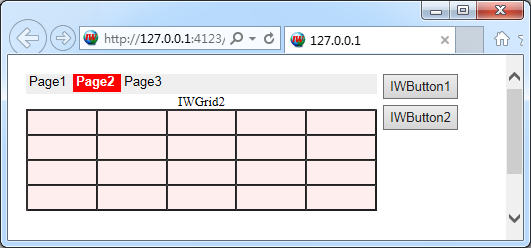
效果图:
使用 IntraWeb (21) - 基本控件之 TIWTabControl的更多相关文章
- 使用 IntraWeb (25) - 基本控件之 TIWRegion
这应该是 IW 中最重要的容器了, 和它同父的还有 TIWTabControl TIWRegion 所在单元及继承链: IWRegion.TIWRegion 主要成员: property Align: ...
- 使用 IntraWeb (24) - 基本控件之 TIWFileUploader、TIWFile
TIWFileUploader 是基于 Ajax 的上传控件, 最初是 Andrew Valums 开发, 从 IntraWeb XIV 纳入并替换 TIWFile. 虽然从组件面板上还能看到 TIW ...
- 使用 IntraWeb (29) - 基本控件之 TIWAutherList、TIWAutherINI、TIWAutherEvent
TIWAutherList //通过一组户名与密码验证登陆 TIWAutherINI //通过记录户名与密码信息的 #Auth.ini 文件验证登陆 TIWAutherEvent //通过其 OnCh ...
- 使用 IntraWeb (28) - 基本控件之 TIWTemplateProcessorHTML、TIWLayoutMgrHTML、TIWLayoutMgrForm
TIWTemplateProcessorHTML //使用外部的 html 文件做模板 TIWLayoutMgrHTML //直接输入 Html 文本做模板 TIWLayoutMgrForm //这应 ...
- 使用 IntraWeb (26) - 基本控件之 TIWMenu
TIWMenu 的任务是让原来的 TMainMenu 呈现在网页上, 通过其 AttachedMenu 属性关联一个 TMainMenu 是必需的. TIWMenu 所在单元及继承链: IWCompM ...
- 使用 IntraWeb (23) - 基本控件之 TIWTimer、TIWProgressBar、TIWProgressIndicator、TIWTimeEdit
TIWTimer //和 TTimer 没多大区别, 它的默认事件现在是异步的(OnAsyncTimer), 在网络上使用 OnTimer 肯定是非常糟糕的 TIWProgressBar //进度条 ...
- 使用 IntraWeb (22) - 基本控件之 TIWCalendar
TIWCalendar: 日历控件, 继承于 TIWCustomGrid, 所以它和 TIWGrid 共同属性特多. 它的 Cell 是 TIWCalendarCell 对象, 直接从 TIWGrid ...
- 使用 IntraWeb (20) - 基本控件之 TIWGrid
TIWGrid 最终通过 Html Table 呈现; 其每个 Cell 都是一个 TIWGridCell 对象, Cell 对象的 Control 属性非常好, 可以非常方便地嵌入其他控件. TIW ...
- 使用 IntraWeb (19) - 基本控件之 TIWTreeView
这是个饱受非议的控件; 我通过尝试, 理解了非议, 也能理解作者. 总之向作者的思路靠拢吧, 还是不错的. TIWTreeView 所在单元及继承链: IWCompTreeview.TIWTreeVi ...
随机推荐
- Redis实战(八)Redis的配置文件介绍
https://www.cnblogs.com/ysocean/p/9074787.html
- [转载]DOMContentLoaded与interactive
http://www.cnblogs.com/muxrwc/archive/2011/01/13/1934379.html ie中inline script执行时竟然第一次进入页面,doc.ready ...
- JavaScript继承详解(一)
面向对象与基于对象 几乎每个开发人员都有面向对象语言(比如C++.C#.Java)的开发经验. 在传统面向对象的语言中,有两个非常重要的概念 - 类和实例. 类定义了一类事物公共的行为和方法:而实例则 ...
- JQuery对CheckBox的一些相关操作
一.通过选择器选取CheckBox: 1.给CheckBox设置一个id属性,通过id选择器选取: <input type="checkbox" name="myB ...
- HttpClient与HttpUrlConnection下载速度比较
Android有两套http的API,刚开始使用网络编程时多少有些迷惑到底用哪个好呢?其实孰优孰劣无需再争论,google已经指出HttpUrlConnection是Android更优的选择,并在SD ...
- IE下常见兼容性问题总结
概述 本小菜平时主要写后台程序,偶尔也会去写点前端页面,写html.css.js的时候,会同时开着ie6.ie7.ie8.ie9.chrome.firefox等浏览器进行页面测试,和大部分前端开发一样 ...
- Codeforces 600E - Lomsat gelral 「$Dsu \ on \ tree$模板」
With $Dsu \ on \ tree$ we can answer queries of this type: How many vertices in the subtree of verte ...
- 输入操作遇到unknown error: cannot focus element
事件背景:写脚本遇到sendkey时报错unknown error: cannot focus element,仔细查了,元素定位什么的都没问题,通过js注入修改数据后,保存成功,但是再进入编辑状态查 ...
- 防雪崩利器:熔断器 Hystrix 的原理与使用
1.概述 分布式系统中经常会出现某个基础服务不可用造成整个系统不可用的情况, 这种现象被称为服务雪崩效应. 为了应对服务雪崩, 一种常见的做法是手动服务降级. 而Hystrix的出现,给我们提供了另一 ...
- 移动端console.log()调试
在微信或app进行开发的时候,没法直接查看console.log的输出内容,调试起来简直太痛苦了. 1.笨笨的方法 fiddler抓请求:追加dom节点,显示调试信息. var div =docume ...