
使用uni-app开发微信小程序之登录模块
从微信小程序官方发布的公告中我们可获知:小程序体验版、开发版调用 wx.getUserInfo 接口,将无法弹出授权询问框,默认调用失败,需使用 <button open-type="getUserInfo"></button> 引导用户主动进行授权操作:
1.当用户未授权过,调用该接口将直接报错
2.当用户授权过,可以使用该接口获取用户信息
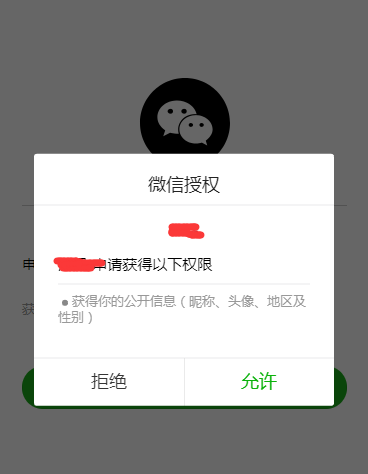
但在实际开发中我们可能需要弹出授权询问框,因此需要我们自己来写模拟授权弹框(主要是对 <button open-type="getUserInfo"></button>的包裹+用户是否是第一次授权判断来显示该页面),代码如下:
1.页面结构
<template>

    <view>

        <!-- #ifdef MP-WEIXIN -->

        <view v-if="isCanUse">

            <view>

                <view class='header'>

                    <image src='../../static/img/wx_login.png'></image>

                </view>

                <view class='content'>

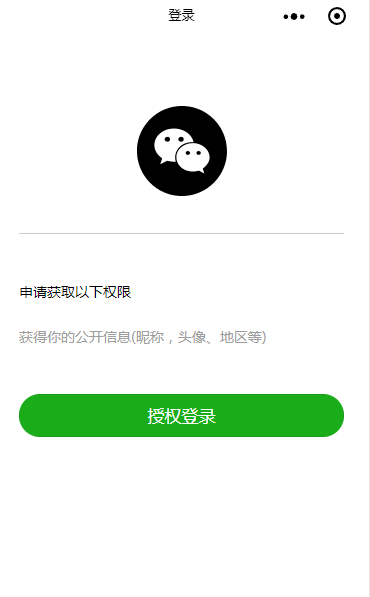
                    <view>申请获取以下权限</view>

                    <text>获得你的公开信息(昵称,头像、地区等)</text>

                </view>

                <button class='bottom' type='primary' open-type="getUserInfo" withCredentials="true" lang="zh_CN" @getuserinfo="wxGetUserInfo">

                    授权登录

                </button>

            </view>

        </view>

        <!-- #endif -->

    </view>

</template>
这里的isCanUse是用来记录当前用户是否是第一次授权使用的,wx_login.png图在底部下载获取即可。
2.样式
<style>

    .header {

        margin: 90rpx 0 90rpx 50rpx;

        border-bottom: 1px solid #ccc;

        text-align: center;

        width: 650rpx;

        height: 300rpx;

        line-height: 450rpx;

    }

    .header image {

        width: 200rpx;

        height: 200rpx;

    }

    .content {

        margin-left: 50rpx;

        margin-bottom: 90rpx;

    }

    .content text {

        display: block;

        color: #9d9d9d;

        margin-top: 40rpx;

    }

    .bottom {

        border-radius: 80rpx;

        margin: 70rpx 50rpx;

        font-size: 35rpx;

    }

</style>
3.脚本部分
<script>

    export default {

        data() {

            return {

                SessionKey: '',

                OpenId: '',

                nickName: null,

                avatarUrl: null,

                isCanUse: uni.getStorageSync('isCanUse')||true//默认为true

            };

        },

        methods: {

            //第一授权获取用户信息===》按钮触发

            wxGetUserInfo() {

                let _this = this;

                uni.getUserInfo({

                    provider: 'weixin',

                    success: function(infoRes) {

                        let nickName = infoRes.userInfo.nickName; //昵称

                        let avatarUrl = infoRes.userInfo.avatarUrl; //头像

                        try {

                            uni.setStorageSync('isCanUse', false);//记录是否第一次授权  false:表示不是第一次授权

                            _this.updateUserInfo();

                        } catch (e) {}

                    },

                    fail(res) {}

                });

            },

      //登录

                login() {

                let _this = this;

                uni.showLoading({

                    title: '登录中...'

                });

               // 1.wx获取登录用户code

                uni.login({

                    provider: 'weixin',

                    success: function(loginRes) {

                        let code = loginRes.code;

                        if (!_this.isCanUse) {

                            //非第一次授权获取用户信息

                            uni.getUserInfo({

                                provider: 'weixin',

                                success: function(infoRes) {
                       //获取用户信息后向调用信息更新方法

                                    let nickName = infoRes.userInfo.nickName; //昵称

                                    let avatarUrl = infoRes.userInfo.avatarUrl; //头像

                                        _this.updateUserInfo();//调用更新信息方法

                                }

                            });

                        }

                        //2.将用户登录code传递到后台置换用户SessionKey、OpenId等信息

                        uni.request({

                            url: '服务器地址',

                            data: {

                                code: code,

                            },

                            method: 'GET',

                            header: {

                                'content-type': 'application/json'

                            },

                            success: (res) => {

                                //openId、或SessionKdy存储//隐藏loading

                                uni.hideLoading();

                            }

                        });

                    },

                });

            },

         //向后台更新信息

            updateUserInfo() {

                let _this = this;

                uni.request({

                    url:'url' ,//服务器端地址

                    data: {

                        appKey: this.$store.state.appKey,

                        customerId: _this.customerId,

                        nickName: _this.nickName,

                        headUrl: _this.avatarUrl

                    },

                    method: 'POST',

                    header: {

                        'content-type': 'application/json'

                    },

                    success: (res) => {

                        if (res.data.state == "success") {

                            uni.reLaunch({//信息更新成功后跳转到小程序首页

                                url: '/pages/index/index'

                            });

                        }

                    }

                });

            }

        },

        onLoad() {//默认加载

            this.login();

        }

    }

</script>
4.最终效果如下:
wx_login.png图:

使用uni-app开发微信小程序之登录模块的更多相关文章
- 使用uni-app开发微信小程序
uni-app 开发微信小程序 前言 9月份,开始开发微信小程序,也曾调研过wepy/mpvue,考虑到后期跨端的需求,最终选择使用了uni-app,本文主要介绍如何使用uni-app搭建小程序项目, ...
- 使用uView UI+UniApp开发微信小程序
在前面随笔的介绍中,我们已经为各种框架,已经准备了Web API.Winform端.Bootstrap-Vue的公司动态网站前端.Vue&Element的管理前端等内容,基本都是基于Web A ...
- 使用uView UI+UniApp开发微信小程序--判断用户是否登录并跳转
在<使用uView UI+UniApp开发微信小程序>的随笔中,介绍了基于uView UI+UniApp开发微信小程序的一些基础知识和准备工作,其中也大概介绍了一下基本的登录过程,本篇随笔 ...
- 如何用TypeScript开发微信小程序
微信小程序来了!这个号称干掉传统app的玩意儿虽然目前处于内测阶段,不过目前在应用号的官方文档里已经放出了没有内测号也能使用的模拟器了. 工具和文档可以参考官方文档:https://mp.weixin ...
- wn-cli 像React组件开发一样来开发微信小程序
项目地址:wn-cli wn-cli wn-cli 像React组件开发一样来开发微信小程序 名字由来:wn -> weapp native 取第一个字母 Install npm install ...
- 利用WordPress REST API 开发微信小程序从入门到放弃
自从我发布并开源WordPress版微信小程序以来,很多WordPress网站的站长问有关程序开发的问题,其实在文章:<用微信小程序连接WordPress网站>讲述过一些基本的要点,不过仍 ...
- mpvue 应用 Vant Weapp框架开发微信小程序
今天在使用mpvue开发微信小程序的过程中需要实现一个底部上拉选择列表的功能,因为之前做过H5微信公众号的开发,使用的就是有赞的Vant-ui,所以第一时间就想到了有赞的Vant Weapp UI框架 ...
- Taro开发微信小程序
Taro开发微信小程序 https://www.cnblogs.com/rynxiao/p/9230237.html 了解Taro 听说Taro是从几个星期前开始的,在一次饭桌上,一个小伙伴说:&qu ...
- MPVUE - 使用vue.js开发微信小程序
MPVUE - 使用vue.js开发微信小程序 什么是mpvue? mpvue 是美团点评前端团队开源的一款使用 Vue.js 开发微信小程序的前端框架.框架提供了完整的 Vue.js 开发体验,开发 ...
随机推荐
- 打开RAD Studio XE5提示"displayNotification:内存不够"解决办法
操作方法: 在RAD Studio XE5快捷方式上鼠标右击选择属性,在弹出的快捷方式标签页中将目标(T):"C:\Program Files (x86)\Embarcadero\RAD S ...
- spring cloud和spring boot两个完整项目
spring cloud和spring boot两个完整项目 spring cloud 是基于Spring Cloud的云分布式后台管理系统架构,核心技术采用Eureka.Fegin.Ribbon.Z ...
- Docker Compose 配置文件详解
先来看一份 docker-compose.yml 文件,不用管这是干嘛的,只是有个格式方便后文解说: version: '2' services: web: image: dockercloud/he ...
- tomcat源码 Connector
Connector容器主要负责解析socket请求,在tomcat中的源码位于org.apache.catalina.connector和org.apache.coyote包路径下:通过上两节的分析, ...
- 关于JSON 与 对象 、集合 之间的转换
在开发过程中,经常需要和别的系统交换数据,数据交换的格式有XML.JSON等,JSON作为一个轻量级的数据格式比xml效率要高,XML需要很多的标签,这无疑占据了网络流量,JSON在这方面则做的很好, ...
- PREV-42_蓝桥杯_九宫幻方
问题描述 小明最近在教邻居家的小朋友小学奥数,而最近正好讲述到了三阶幻方这个部分,三阶幻方指的是将1~9不重复的填入一个3*3的矩阵当中,使得每一行.每一列和每一条对角线的和都是相同的. 三阶幻方又被 ...
- C++中sort函数小结
我们都知道,sort函数是C++标准库<algorithm>中的一个库函数.它的功能是对数组/容器中的元素进行排序.用法示例如下: 一.对数组进行排序 示例: int a[] = {1,3 ...
- Hadoop概念学习系列之再谈hadoop集群里的本地模式、伪分布模式和全分布模式(三十七)
能看懂博主我此博文,相信你已经有了一定基础了. 对于本地模式.伪分布模式和全分布模式的概念,这里,我不多赘述.太多资料和博客,随便在网上一搜就好. 比如<hadoop实战 第二版>陆嘉恒老 ...
- C#实现mongodb自增列的使用
创建一个集合存放_id db.createCollection("counters") 加入需要自增的字段 { "_id":"productid&qu ...
- LinkedList的自定义实现
一.背景 LinkedList双向链表: 代码: Node.java: package com.cy.collection; public class Node { Node previous; // ...