
Springboot学习02-webjars和静态资源映射规则
Springboot学习01-webjars和静态资源映射规则
前言
1-以前我们在IDEA中创建一个项目,添加web依赖包,我们现在是一个web应用,应该在man目录下面有一个webapp文件夹,将所有的页面都放在这里,这是我们以前的做法。
2-现在我们创建的这个项目中,没有这个webapp目录,但是SpringBoot给我们做了规定。在SpringBoot中对SpringMVC的相关配置都在 WebMvcAutoConfiguration 这个类中做了规定。
3-本文主要内容
- /webjars/** ,在 classpath:/META-INF/resources/webjars/ 找资源
- "/**" 访问当前项目的任何资源,都去(静态资源的文件夹)找映射
- 欢迎页; 静态资源文件夹下的所有index.html页面;被"/**"映射;
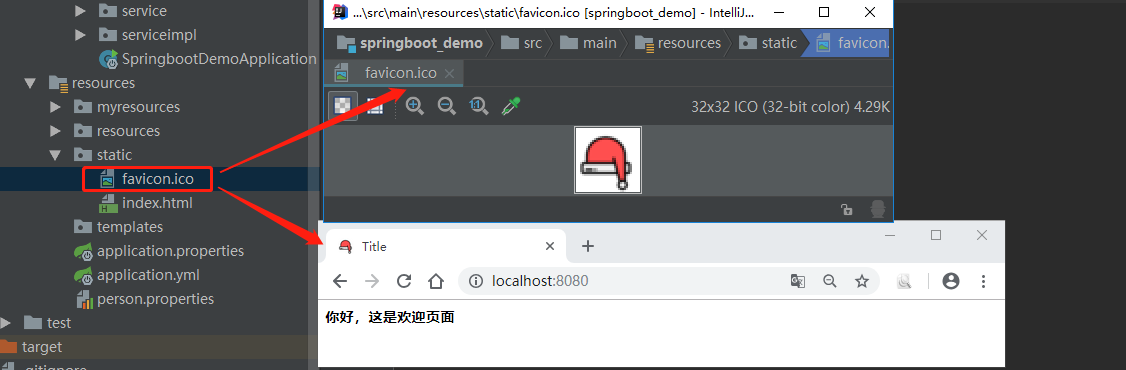
- favicon.ico :所有的 **/favicon.ico 都是在静态资源文件下找;
正文
1-/webjars/** ,在 classpath:/META-INF/resources/webjars/ 找资源
1-1-源码分析
public static class WebMvcAutoConfigurationAdapter implements WebMvcConfigurer, ResourceLoaderAware {

private final ResourceProperties resourceProperties;

    //1-配置静态访问资源

    public void addResourceHandlers(ResourceHandlerRegistry registry) {

        if (!this.resourceProperties.isAddMappings()) {

            logger.debug("Default resource handling disabled");

        } else {

            Duration cachePeriod = this.resourceProperties.getCache().getPeriod();

            CacheControl cacheControl = this.resourceProperties.getCache().getCachecontrol().toHttpCacheControl();

            if (!registry.hasMappingForPattern("/webjars/**")) {

                this.customizeResourceHandlerRegistration(registry.addResourceHandler(new String[]{"/webjars/**"})

                .addResourceLocations(new String[]{"classpath:/META-INF/resources/webjars/"})

                .setCachePeriod(this.getSeconds(cachePeriod)).setCacheControl(cacheControl));

            }

            String staticPathPattern = this.mvcProperties.getStaticPathPattern();

            //静态资源文件夹映射

            if (!registry.hasMappingForPattern(staticPathPattern)) {

                this.customizeResourceHandlerRegistration(registry.addResourceHandler(new String[]{staticPathPattern})

                .addResourceLocations(getResourceLocations(this.resourceProperties.getStaticLocations()))

                .setCachePeriod(this.getSeconds(cachePeriod)).setCacheControl(cacheControl));

            }

        }

    }

}
1-2-webjars:以jar包的方式引入静态资源,可以去http://www.webjars.org/ 这个网站选择自己的静态资源
1-2-1-去webjars官网获取自己需要的maven依赖
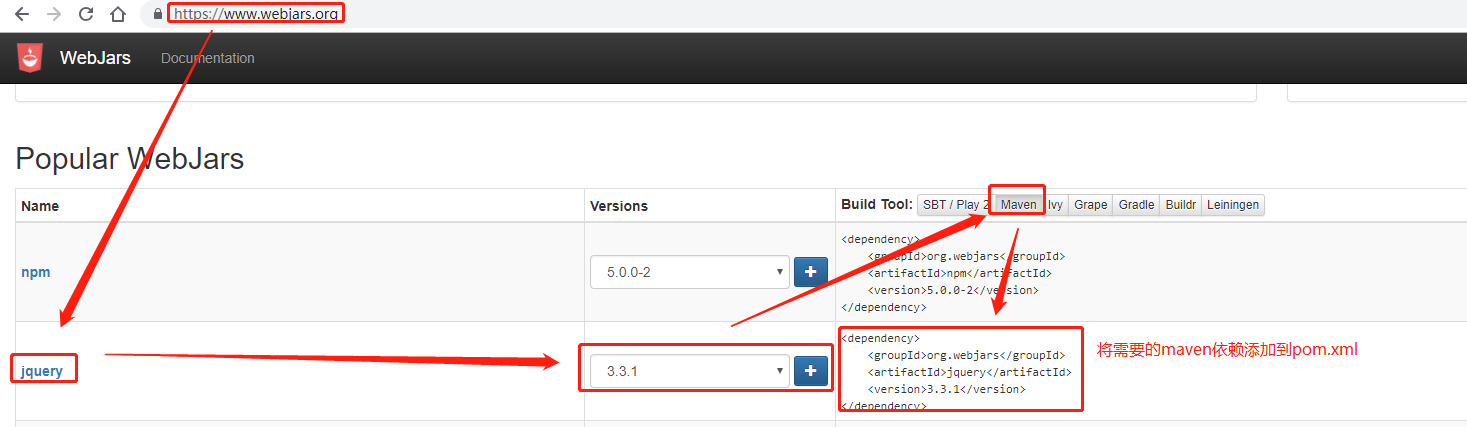
1-2-2-将maven依赖导入行pom.xml文件

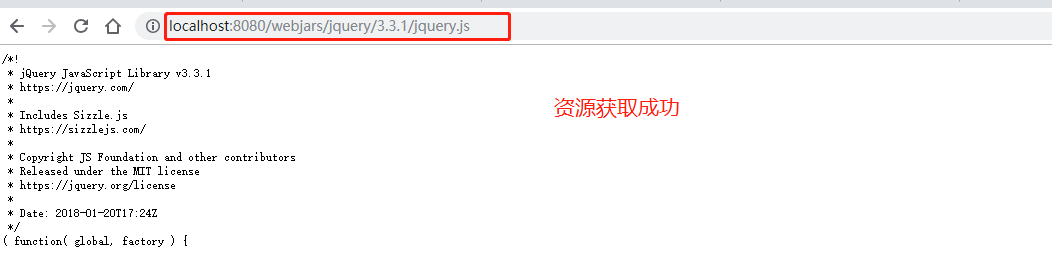
1-2-3-启动项目,测试是否可以获取jquery资源(示例路径:http://localhost:8080/webjars/jquery/3.3.1/jquery.js)
2-自定义静态文件的映射路径(意思为:我们把静态文件放在这些路径下面,就会被加载到)
2-1-默认映射路径:"classpath:/META-INF/resources/", "classpath:/resources/", "classpath:/static/", "classpath:/public/";优先级顺序为:META-INF/resources > resources > static > public
2-2-默认映射路径,源码出处
//ResourceProperties类

@ConfigurationProperties(

    prefix = "spring.resources",//如果要自己配置路径,在配资前缀为"spring.resources"

    ignoreUnknownFields = false

)

public class ResourceProperties {

    //声明了默认classpath资源路径为:{"classpath:/META-INF/resources/", "classpath:/resources/", "classpath:/static/", "classpath:/public/"}

    private static final String[] CLASSPATH_RESOURCE_LOCATIONS = new String[]{"classpath:/META-INF/resources/", "classpath:/resources/", "classpath:/static/", "classpath:/public/"};

}
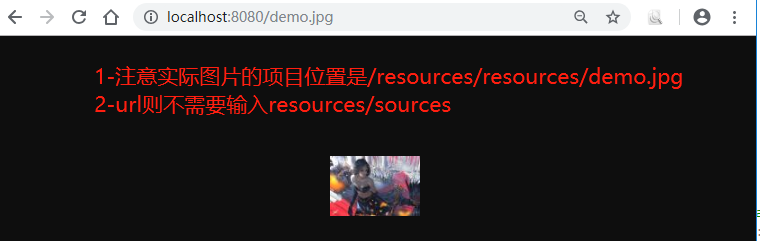
2-3-应用示例(http://localhost:8080/demo.jpg指的是依次去"classpath:/META-INF/resources/", "classpath:/resources/", "classpath:/static/", "classpath:/public/"去找demo.jpg图片)
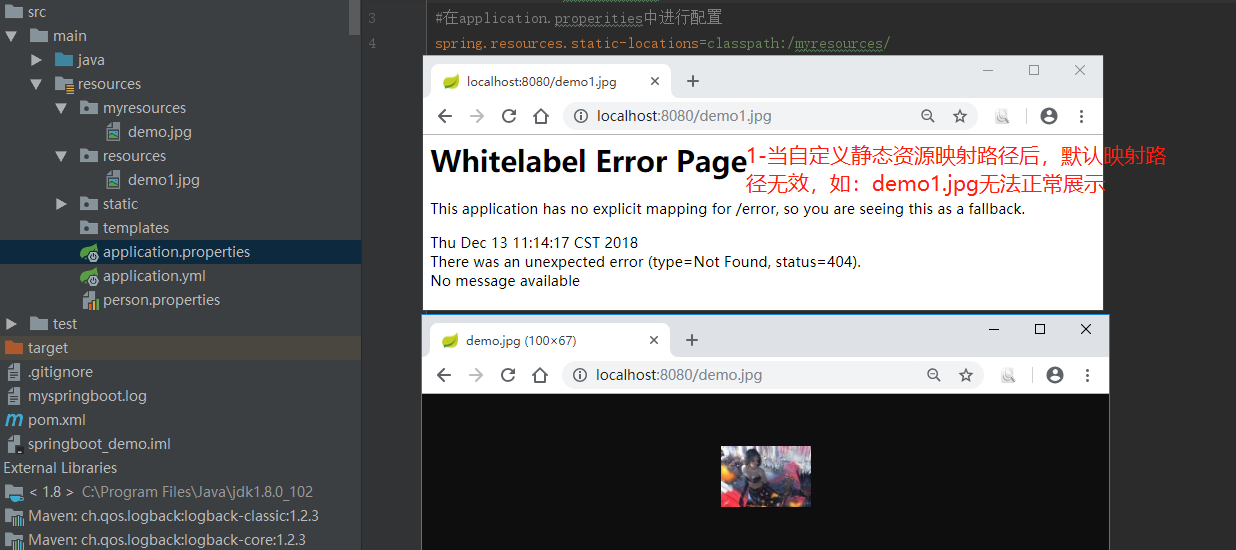
2-4-修改默认静态资源路径,方法一:配置spring.resources.static-locations参数
#在application.properities中进行配置,多个路径可以用逗号隔开

spring.resources.static-locations=classpath:/myresources/
2-5-修改默认静态资源路径,方法二:重写WebMvcConfigurerAdapter 中的addResourceHandlers方法,自定义映射路径
2-5-1-重写WebMvcConfigurerAdapter 中的addResourceHandlers方法,自定义映射路径
@Configuration

public class MyWebMvcConfigurerAdapter extends WebMvcConfigurerAdapter {

    /**

     * 配置静态访问资源

     * @param registry

     */

    @Override

    public void addResourceHandlers(ResourceHandlerRegistry registry) {

        registry.addResourceHandler("/mypath/**").addResourceLocations("classpath:/myresources/");

        super.addResourceHandlers(registry);

    }

}
2-5-2-应用示例
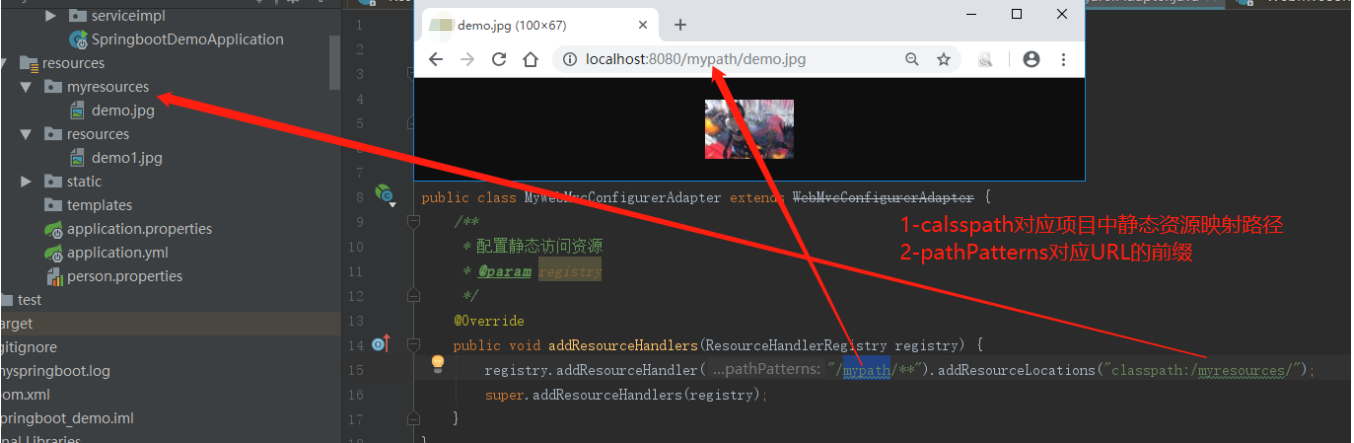
3-欢迎页面(当浏览器)
3-1-源码分析
public static class WebMvcAutoConfigurationAdapter implements WebMvcConfigurer, ResourceLoaderAware {

    private final ResourceProperties resourceProperties;

    //1-指定this.getWelcomePage(),见2

    @Bean

    public WelcomePageHandlerMapping welcomePageHandlerMapping(ApplicationContext applicationContext) {

        return new WelcomePageHandlerMapping(new TemplateAvailabilityProviders(applicationContext), applicationContext, this.getWelcomePage(), this.mvcProperties.getStaticPathPattern());

    }

    //2-去getIndexHtml()获取欢迎页面路径,见3

    private Optional<Resource> getWelcomePage() {

        String[] locations = getResourceLocations(this.resourceProperties.getStaticLocations());

        return Arrays.stream(locations).map(this::getIndexHtml).filter(this::isReadable).findFirst();

    }

    //3-默认欢迎页面在location(映射路径) + "index.html"

    private Resource getIndexHtml(String location) {

        return this.resourceLoader.getResource(location + "index.html");

    }

}
3-2-应用示例

4-favicon.ico
4-1-所有的 **/favicon.ico 都是在静态资源文件下找
4-1-应用示例
参看资料:
1-https://blog.csdn.net/baidu_36216018/article/details/79699084
2-https://www.cnblogs.com/java-synchronized/p/7091723.html
3-https://blog.csdn.net/javareact/article/details/77981769
Springboot学习02-webjars和静态资源映射规则的更多相关文章
- 尚硅谷springboot学习21-web开发-处理静态资源
SpringBoot对静态资源的映射规则 @ConfigurationProperties(prefix = "spring.resources", ignoreUnknownFi ...
- springboot静态资源映射规则
一.所有/webjars/**的请求,都会去classpath:/META-INF/resources/webjars/下的目录去找资源. 二.访问/**,即访问任何资源,如果没有controller ...
- SpringBoot学习5:访问静态资源
springboot默认从项目的resources里面的static目录下或者webapp目录下访问静态资源 方式一:在resources下新建static文件(文件名必须是static) 在浏览器中 ...
- Spring Boot笔记五: Web开发之Webjar和静态资源映射规则
目录 Webjar /** 访问当前项目的任何资源 欢迎页 标签页图标 Webjar 开始讲到Spring Boot的Web开发了,先介绍Webjar,这个其实就是把一些前端资源以jar包的形式导入到 ...
- SpringBoot之Web开发——webjars&静态资源映射规则
在webjars中找到需要引入的Maven依赖,添加到pom.xml中,即可自动导入相关依赖.
- SpringBoot:静态资源映射、定制404、配置icon
目录 静态资源映射规则 定制首页 定制错误页面 配置 icon 静态资源映射规则.定制首页.定制404页面.配置网站的图标 静态资源映射规则 SpringBoot中对于静态资源(css,js,img. ...
- springboot 2.X 在访问静态资源的的时候出现404的问题
通过idea快速搭建一个springboot项目: springboot版本2.1.6 在网上看的资料,springboot静态资源访问如下: "classpath:/META‐INF/re ...
- SpringBoot 配置静态资源映射
SpringBoot 配置静态资源映射 (嵌入式servlet容器)先决知识 request.getSession().getServletContext().getRealPath("/& ...
- springboot静态资源映射
springboot静态资源映射 WebMvcAutoConfiguration @Override public void addResourceHandlers(ResourceHandlerRe ...
随机推荐
- 爬虫--Scrapy框架课程介绍
Scrapy框架课程介绍: 框架的简介和基础使用 持久化存储 代理和cookie 日志等级和请求传参 CrawlSpider 基于redis的分布式爬虫 一scrapy框架的简介和基础使用 a) ...
- 10:处理 json
json 通用的数据类型, 所有的语言都认识.json 是字符串.key-value 必须使用双引号1. loads() 和 dumps() 的使用 json.loads() 将 json 字符串转换 ...
- 3:while、for 循环语句
循环就是重复的做一件事情.python 中的循环语句有 while 和 for. while 循环 while 循环必须得有一个计数器,否则会变成一个死循环. # 例如这段代码,这段程序运行之后会一直 ...
- 装饰者模式——Head First
一.定义 装饰者模式(Decorator Pattern)动态地将责任附加到对象上.若要扩展功能,装饰者提供了比继承更有弹性的替代方案. 二.类图 三.星巴兹饮料 //Component public ...
- 解决linux下访问https站点问题
pfx转jks:(注:因jks要求密码长度不能小于6位,所以申请pfx证书时,密码长度最好不小于6位) keytool -importkeystore -v -srckeystore ***.pfx ...
- 【x】 PAT/BasicLevel_C++/1002. 写出这个数 (20).cpp
C++中的to_string()函数[C++11支持] - Bravo Yeung-羊较瘦之自留地 - CSDN博客https://blog.csdn.net/lzuacm/article/detai ...
- 【374】Adobe Acrobat 操作技巧
1. 文件内容增减 参考:如何在PDF文件中删除页面 参考:如何旋转.移动.删除和重新编号 PDF 页面 双击PDF文档,并在预览程序中打开它. 如果在其他程序(如Adobe Reader)中打开文档 ...
- Windows查看指定端口是否占用和查看进程
Winodows上查看指定端口号的使用情况和占用进程以及终止所占用端口进程进程用到.下面主要描述如何操作. 1.查看所有端口占用情况 C:\Users\Administrator>netstat ...
- Linux tcpdump命令使用方法
tcpdump是Linux上常用的抓包命令,用于截取网络分组并输出分组内容,常用于网络问题分析和排查. tcpdump语法 tcpdump [-i 接口] [-nn] [-w 文件名] [-c 次数] ...
- iptables学习
droidwall.sh #!/system/bin/sh IPTABLES=iptables BUSYBOX=busybox GREP=grep ECHO=echo # Try to find bu ...