
android 线性布局
activity_main.xml线性布局
<?xml version="1.0" encoding="utf-8"?>

<LinearLayout xmlns:android="http://schemas.android.com/apk/res/android"

    xmlns:tools="http://schemas.android.com/tools"

    android:layout_width="match_parent"

    android:layout_height="match_parent"

    tools:context="com.hanqi.test6.MainActivity"

    android:orientation="vertical"

    android:gravity="center_horizontal"

    android:padding="16dp"

    >

    <!--

    orientation改方向   vertical垂直  horizontal水平

    gravity内部对齐方式   right居右   center整个屏幕居中

    padding 边距

    -->

    <LinearLayout

        android:layout_width="match_parent"

        android:layout_height="wrap_content"

        >

        <TextView

            android:layout_width="wrap_content"

            android:layout_height="wrap_content"

            android:text="账号:"

            />

        <EditText

            android:layout_width="match_parent"

            android:layout_height="wrap_content"

            android:hint="请输入用户名"/>

        <!--hint  提示输入信息-->

    </LinearLayout>

    <LinearLayout

        android:layout_width="match_parent"

        android:layout_height="wrap_content">

        <TextView

            android:layout_width="wrap_content"

            android:layout_height="wrap_content"

            android:text="密码:"

            />

        <EditText

            android:layout_width="match_parent"

            android:layout_height="wrap_content"

            android:hint="请输入密码"

            android:password="true"

            />

        <!--password  是否是密码框-->

    </LinearLayout>

    <LinearLayout

        android:layout_width="match_parent"

        android:layout_height="wrap_content"

        android:gravity="center_horizontal"

        >

        <Button

            android:layout_width="wrap_content"

            android:layout_height="wrap_content"

            android:text="登陆"

            android:layout_weight="1"

            />

        <!--layout_weight  权重-->

        <Button

            android:layout_width="wrap_content"

            android:layout_height="wrap_content"

            android:text="注册"

            android:id="@+id/button2"

            android:layout_weight="1"

            />

        <Button

            android:layout_width="wrap_content"

            android:layout_height="wrap_content"

            android:text="取消"

            android:layout_weight="1"

            />

    </LinearLayout>

</LinearLayout>
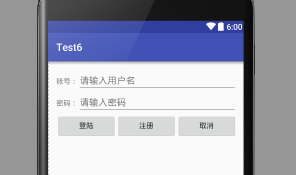
android 线性布局的更多相关文章
- Android线性布局(Linear Layout)
Android线性布局(Linear Layout) LinearLayout是一个view组(view group),其包含的所有子view都以一个方向排列,垂直或是水平方向.我们能够用androi ...
- Android 线性布局(LinearLayout)相关官方文档 - 指南部分
Android 线性布局(LinearLayout)相关官方文档 - 指南部分 太阳火神的漂亮人生 (http://blog.csdn.net/opengl_es) 本文遵循"署名-非商业用 ...
- Android 线性布局(LinearLayout)相关官方文档 - 布局參数部分
Android 线性布局(LinearLayout)相关官方文档 - 布局參数部分 太阳火神的漂亮人生 (http://blog.csdn.net/opengl_es) 本文遵循"署名-非商 ...
- android—-线性布局
android五大布局之线性布局. 1.线性布局的特点:各个子元素彼此连接,中间不留空白 而今天我们要讲解的就是第一个布局,LinearLayout(线性布局),我们屏幕适配的使用 用的比较多的就是L ...
- Android线性布局
线性布局 LinearLayout 是一个视图组,用于使所有子视图在单个方向(垂直或水平)保持对齐. 您可以使用 android:orientation 属性指定布局方向. LinearLayout ...
- Android线性布局和帧布局
第二次,本牛崽十分从容,今天咱们来讲讲Android Q之布局,我遇到的问题与自己学到的,大牛不要嘲笑哈,有错误可以指出来,本牛崽看到就改了. 今天我的学长跟我们开始了布局,布局看资料说好像有5种,又 ...
- [android] 线性布局和布局的组合
/****************2016年4月25日 更新******************************/ 知乎:对于开发者来说,Android 的开发者选项里有哪些实用的功能? 汤涛 ...
- Android 线性布局 LinearLayout
垂直布局 vertical <LinearLayout xmlns:android="http://schemas.android.com/apk/res/android" ...
- iOS - starckView 类似Android线性布局
同iOS以往每个迭代一样,iOS 9带来了很多新特性.UIKit框架每个版本都在改变,而在iOS 9比较特别的是UIStackView,它将从根本上改变开发者在iOS上创建用户界面的方式.本文将带你学 ...
随机推荐
- mysql-5.5.20预编译安装
1.MYSQL数据库概念 1)MYSQL是一款关系型数据库系统,数据之间有互相联系,互相的关联和调用的. 2)MYSQL数据用于存储:WEB网站用户名和密码等 3)MYSQL存储数据库是通过二维表格形 ...
- js基础-对象
对象是一组属性方法的无序集 除了字符串.数值类型.布尔类型.null.undefined 之外的其他都是对象类型 对象都是引用类型 Object类型对象.数组类型对象 如果一个普通函数前面加了new ...
- linux下arm汇编注释符
注意使用 @ 符 # 是整行注释符 @ 是行内注释符 以为 @ 是行内注释符,害我调试了半天.
- vue--公告轮播
html: <div class="news" v-if="news.length > 0" > <ul class="m ...
- 使用openshit在ubuntu14.04下一键部署openstack(juno版本)
一.基本介绍 本实验是在vmware workstation上虚拟机ubuntu14.04(64bit,desktop)上部署openstack(Juno版本).采用的工具是openshit.open ...
- mongodb数据到MySQL数据库 的迁移步骤
废话少说,直接上干货. 1.mongoexport -d shengyang -c testData -f _id,x,name,name1,name2 --type=csv -o new.csv 用 ...
- ubuntu下搭建node server的几个坑
[ubuntu下搭建node server的几个坑] 1.环境变量 process.env.PORT需要使用 export PORT=80设置 windows下是set PORT=80 2.命令连结 ...
- python文件操作 二
问题:在传输的时候对方不知道是以什么格式传给用户,传来传去彼此都忘了什么格式: 在编码的时候:utf8:是3个字符,gbk是2个字符,每个字符数字对应的字符,一段2进制串,如果10个字节全部都是中文, ...
- 跨时代的分布式数据库 – 阿里云DRDS详解(转)
原文章地址:https://www.csdn.net/article/a/2015-08-28/15827676 跨时代的分布式数据库 – 阿里云DRDS详解 发表于2015-08-28 18:39| ...
- JAVA声明一个对象数组
Student stu[]=new Student[N]; Student stu={new Student(),~~~}; JAVA类型转换 String转为float String转为INT