
iPhone开发过程中调试多次Release问题 message sent to deallocated
初级:第一步 为程序添加符号断点 malloc_error_break 方法如下。
目标效果:让程序崩溃时跳转到出错到那一行。但是往往达不到这个效果。不行就继续往下看。
At times, while running through your app, you might come across this warning on console:
MyApp(2121,0xb0185000) malloc: *** error for object 0x1068310: double free
*** set a breakpoint in malloc_error_break to debug
Even though you might feel that its not affecting your app, but its still annoying, and might cause some memory related issues as well.
So before going ahead, what is the compiler actually trying to tell you?
Well, its pretty simple, it is trying to tell you that the object at the memory location 0×1068310 is being freed twice, and it is trying to help you by saying that you may set a breakpoint in malloc_error_break to find more about this object.
There may be several reasons for something like this to happen, the foremost reason that I have found is programmers trying to free something that is already in the auto-release pool.
So how to fix this up?
It’s fairly simple, You need to set a “symbolic breakpoint” on malloc_error_break .
Go to Run > Breakpoints > Add Symbolic Breakpoint. Then paste malloc_error_break into the window.
Here are some screenshots to describe the process:

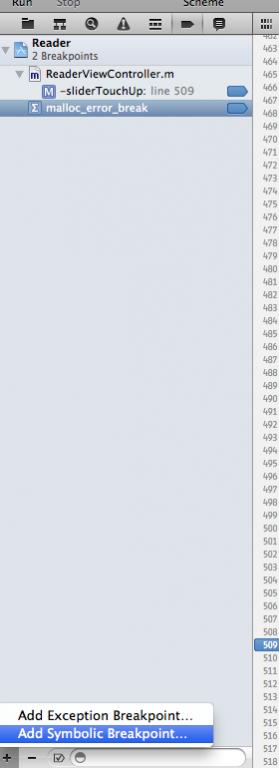
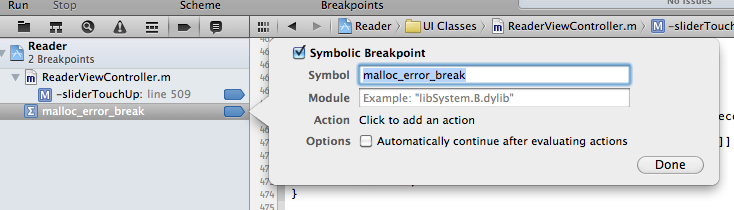
After that activate the breakpoints and simply run. and the app’s execution will stop at the point where it sees you freeing the variable the second time.
参考:http://blog.csdn.net/devday/article/details/6460929
中级:使用 malloc_history 14003 0xb47fc50 在终端中查看
步骤1:设置参数
做如下设置:
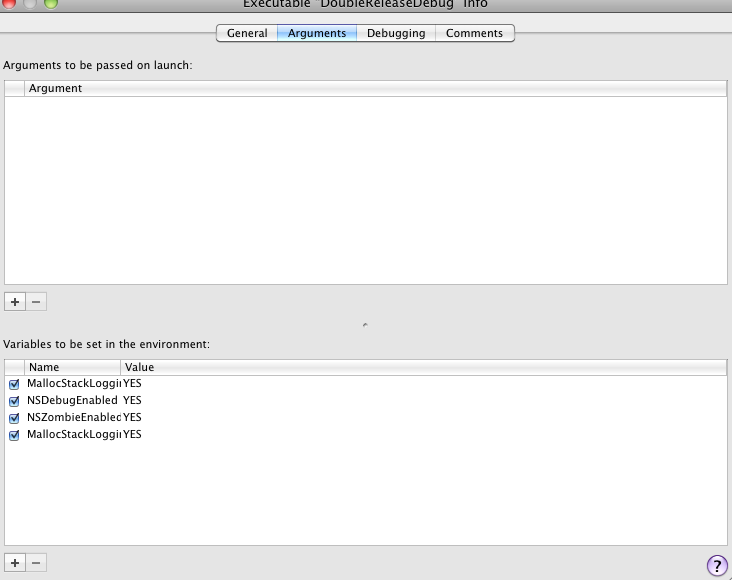
Project -> Edit active executable ->Argument
添加如下四个参数
NSDebugEnabled
NSZombieEnabled
MallocStackLogging
MallocStackLoggingNoCompact
并都设置为YES。具体如下图:
这个时候,如果有如下一段代码:
//重复释放一个变量
NSAutoreleasePool* pool = [[NSAutoreleasePool alloc] init];
NSData* data = [NSData dataWithBytes:"asklaskdxjgr" length:12];
[data release];
[pool release];
再Debug窗口会有如下的提示
2003-03-18 13:01:38.644 autoreleasebug[3939] *** *** Selector 'release'
sent to dealloced instance 0xa4e10 of class NSConcreteData.
虽然也能大致判断是哪种类型的变量重复释放了,但信息还不够多,当项目大,源码比较多的时候,也不太方便定位,
在console窗口运行如下命令可以得到更多信息:shell malloc_history <pid> <address>
第二步:在终端(terminal中)输入命令:malloc_history 3939 0xa4e10
就会出现更多的信息:
[dave@host193 Frameworks]$ malloc_history 3939 0xa4e10
Call [2] [arg=32]: thread_a0000dec |0x1000 | start | _start | main |
+[NSData dataWithBytes:length:] | NSAllocateObject | object_getIndexedIvars |
malloc_zone_calloc
这个时候就知道具体哪个函数出先问题了,从这里可以看到main里NSData出现问题了。
参考:iphone 内存管理的一些总结 很棒!
我的经验:
1、在终端中输入命令时,要保持xcode开启,且程序正卡在端点处。
2、我用到命令是 malloc_history <pid> <address> ,返回的结果是:
ALLOC 0xb47fc50-0xb47fc6f [size=]: thread_416c1a8 |start | main | UIApplicationMain | -[UIApplication _run] | CFRunLoopRunInMode | CFRunLoopRunSpecific | __CFRunLoopRun | __CFRunLoopDoSource1 | __CFRUNLOOP_IS_CALLING_OUT_TO_A_SOURCE1_PERFORM_FUNCTION__ | PurpleEventCallback | _PurpleEventCallback | _UIApplicationHandleEvent | -[UIApplication sendEvent:] | -[UIApplication handleEvent:withNewEvent:] | -[UIApplication _runWithURL:payload:launchOrientation:statusBarStyle:statusBarHidden:] | -[UIApplication _reportAppLaunchFinished] | +[CATransaction flush] | CA::Transaction::commit() | CA::Context::commit_transaction(CA::Transaction*) | CA::Layer::layout_and_display_if_needed(CA::Transaction*) | CA::Layer::layout_if_needed(CA::Transaction*) | -[CALayer layoutSublayers] | -[NSObject performSelector:withObject:] | -[UIView(CALayerDelegate) layoutSublayersOfLayer:] | -[UILayoutContainerView layoutSubviews] | -[UINavigationController __viewWillLayoutSubviews] | -[UINavigationController _startDeferredTransitionIfNeeded:] | -[UINavigationController _startTransition:fromViewController:toViewController:] | -[UINavigationController _updateScrollViewFromViewController:toViewController:] | -[UINavigationController _layoutViewController:] | -[UIViewController loadViewIfRequired] | -[SQHomePageViewController viewDidLoad] | -[SQHomePageViewController requestRecommendList] | -[RecommendList requestRecommendList] | -[SQHomePageAction requestHomePage] | -[SQBaseAction requestUrl:] | -[ASIHTTPRequest startSynchronous] | -[NSRunLoop(NSRunLoop) runMode:beforeDate:] | CFRunLoopRunInMode | CFRunLoopRunSpecific | __CFRunLoopRun | __CFRunLoopDoSources0 | __CFRUNLOOP_IS_CALLING_OUT_TO_A_SOURCE0_PERFORM_FUNCTION__ | _cfstream_shared_signalEventSync | _signalEventSync | ReadStreamClientCallBack | -[ASIHTTPRequest handleNetworkEvent:] | -[ASIHTTPRequest handleStreamComplete] | -[ASIHTTPRequest requestFinished] | -[NSObject(NSThreadPerformAdditions) performSelectorOnMainThread:withObject:waitUntilDone:] | -[NSObject(NSThreadPerformAdditions) performSelector:onThread:withObject:waitUntilDone:modes:] | -[ASIHTTPRequest reportFinished] | __27-[SQBaseAction requestUrl:]_block_invoke | -[SQBaseAction onSuccess:] | -[SQBaseAction validResponse:] | -[SQBaseAction parserJsonWithString:] | -[NSDictionary initWithDictionary:] | -[NSDictionary initWithDictionary:copyItems:] | -[__NSPlaceholderDictionary initWithObjects:forKeys:count:] | +[__NSDictionaryI __new:::::] | __CFAllocateObject2 | class_createInstance | calloc | malloc_zone_calloc
问题定位在红色函数中。
上面这段代码应该是完整地描述了,程序执行的全部过程。包括每一个类和每一个方法。非常有意思。
实际出错代码:
//将json 格式的原始数据转解析成数据字典

-(NSDictionary *)parserJsonWithString:(NSString *)str

{

    NSString *strJson = [self removeEscapeCodeFromString:str];

    SBJsonParser *sbJsonParser = [[[SBJsonParser alloc]init]autorelease];

    NSDictionary *tempDictionary = [[NSDictionary alloc]initWithDictionary:[sbJsonParser objectWithString:strJson]];

    return [tempDictionary autorelease]; //不必release或autorelease将自动释放

}
参考: message sent to deallocated instance 讲解的很详细,值得参考
其它信息:
message sent to deallocated instance问题的解决方法(gdb和lldb)

当出现message sent to deallocated instance的时候,一般伴随牛逼的BAD_ACCESS.是的,是某个对象release了两次。可是那么多的疑似对象,到底是哪一个?

使用xcode环境变量(添加方法请自行google)MallocStackLoggingNoCompact,NSZombieEnabled,MallocStackLogging这三个,值都设置成YES.寻求更详细的错误信息。

message sent to deallocated instance后会有一个内存地址,如:×,我们需要查看该地址的malloc history.查看方法,在原来的gdb下,使用”info malloc_history ד即可显示malloc记录。但是新版的Xcode 不再支持,怎么办呢?秀逗麻袋,我们还有terminal,使用终端的malloc_history命令,如”malloc_history  ד即可显示。其中的32009是该进程的pid,根据这个malloc记录,可以大致定位出错信息的代码位置。

(插一句,gdb或者lldb进行debug的向导:http://lldb.llvm.org/lldb-gdb.html)

其实,如果代码编写足够高效和有序的话,是不会出现这种烦人的问题的。还是代码重构问题。代码洁癖伤不起啊。

你好,请问pid具体是哪个进程的,通过活动监视器查看么?_是的,activity monitor

iPhone开发过程中调试多次Release问题 message sent to deallocated的更多相关文章
- vs2010 开发过程中调试时 有错误不中断
出现这个的原因是调试的设置有问题,修改下设置就好了. 修改方法:点击上边工具栏中 调试--异常 出现以下页面,把引发那列复选框全部勾上,点击确定就好了.
- iphone开发中数据持久化之——属性列表序列化(一)
数据持久化是应用程序开发过程中的一个基本问题,对应用程序中的数据进行持久化存储,有多重不同的形式.本系列文章将介绍在iphone开发过程中数据持久化的三种主要形式,分别是属性列表序列号.对象归档化以及 ...
- Eclipse中调试Android技巧
Android eclipse中程序调试 一:断点调试 用eclipse开发android程序的时,跟VS一样是可以断点单步调试的. 步骤如下. 1 设置断点:在编码窗体的左边框上用鼠标双击,或者右键 ...
- iOS开发中调试小技巧
对于软件开发而言,调试是必须学会的技能,重要性不言而喻.对于调试的技能,基本上是可以迁移的,也就是说你以前在其他平台上掌握的很多调试技巧,很多也是可以用在iOS开发中.不同语言.不同IDE.不同平台的 ...
- 在 Linux 平台中调试 C/C++ 内存泄漏方法(转)
由于 C 和 C++ 程序中完全由程序员自主申请和释放内存,稍不注意,就会在系统中导入内存错误.同时,内存错误往往非常严重,一般会带来诸如系统崩溃,内存耗尽这样严重的后果.本文将从静态分析和动态检测两 ...
- iOS - 开发中调试小技巧
对于软件开发而言,调试是必须学会的技能,重要性不言而喻.对于调试的技能,基本上是可以迁移的,也就是说你以前在其他平台上掌握的很多调试技巧,很多也是可以用在iOS开发中.不同语言.不同IDE.不同平台的 ...
- maven 中snapshot版本和release版本的区别
maven中的仓库分为两种,snapshot快照仓库和release发布仓库.snapshot快照仓库用于保存开发过程中的不稳定版本,release正式仓库则是用来保存稳定的发行版本.定义一个组件/模 ...
- SubSonic3.0 Demo1.0——应用了T4模版可减少开发过程中70%以上的代码量以及80%以上的出错率
应网友的要求,抽了点时间写了这个Demo,希望对2.2版想升级到3.0的朋友或正在使用3.0的朋友有所帮助.大家在使用Demo过程中如果发现什么问题或有什么建议,可以直接将Bug提交给我或告诉我,我会 ...
- 客户关系管理系统(CRM)的开发过程中使用到的开发工具总结
开发<客户关系管理系统(CRM)>软件过程,也就是一个标准的Winform程序的开发过程,我们可以通过这个典型的软件开发过程来了解目前的开发思路.开发理念,以及一些必要的高效率手段.本篇随 ...
随机推荐
- Java环境的搭建及用记事本来揭露下JDK到底做了些什么
和我一样的新手想学Java就从自己搭建环境开始,请看完这边文章,我搜集资料的整合. Java的标准版本是Java SE,所说的JDK(Java Development Kits)就是Java SE的开 ...
- 七、vue语法补充二(动态组件 & 异步组件、访问元素 & 组件、混入)
1..sync 修饰符 2.3.0+ 新增 vue 修饰符sync的功能是:当一个子组件改变了一个 prop 的值时,这个变化也会同步到父组件中所绑定.类似于v-model的效果 例子: this.$ ...
- 【前端node.js框架】node.js框架express
server.js /* 以下代码等下会有详细的解释 */ var express = require('express'); // 用来引入express模块 var app = express() ...
- [原创]win7环境下搭建eclipse+python+django开发环境
一)工具下载 a)eclipse(最新版4.3.1)官网下载地址 http://www.eclipse.org/downloads/ b)python (2.X版本)官网下载地址 http://pyt ...
- lnmp “.user.ini”无法删除解决方法
LNMP无法删除或更改权限,显示:rm: cannot remove `.user.ini’: Operation not permitted 无法删除“.user.ini”文件解决方法,运行后删除即 ...
- mongodb分页查询
Limit与Skip方法 MongoDB Limit() 方法 如果你需要在MongoDB中读取指定数量的数据记录,可以使用MongoDB的Limit方法,limit()方法接受一个数字参数,该参数指 ...
- winform解析json
在使用C#开发爬虫程序时,会遇到需要解析json字符串的情况.对于json字符串可以使用正则表达式的形式进行解析,更为方便的方法是使用Newtonsoft.Json来实现. Nuget添加应用包 在工 ...
- java 的反射机制
一:介绍 1.大纲 #1 允许程序在执行期间,调用反射API取得任何类的内部信息,并且可以直接操作任何对象的内部属性和方法. #2 学习反射,需要掌握的知识点: *实例化class类 *获取类的完整结 ...
- Python学习笔记之函数式编程
python中的高阶函数 高阶函数就是 变量名指向函数,下面代码中的变量abs其实是一个函数,返回数字的绝对值,如abs(-10) 返回 10 def add(x,y,f): return f(x) ...
- notepad++添加Compare插件
背景 两个文本文件内容要进行比较的时候就会用到比较的功能,notepad++绝对是不错的选择 x64版notepad++安装Compare插件 度说点击插件然后选择 "Plugin Mana ...