
ASP.NET Web API实践系列07,获取数据, 使用Ninject实现依赖倒置,使用Knockout实现页面元素和视图模型的双向绑定
本篇接着上一篇"ASP.NET Web API实践系列06, 在ASP.NET MVC 4 基础上增加使用ASP.NET WEB API",尝试获取数据。
在Models文件夹下创建Comment类:
namespace MvcApplication5.Models{public class Comment{public int ID { get; set; }public string Author { get; set; }public string Text { get; set; }public string Email { get; set; }}}
在Repository文件夹下创建ICommentRepository接口:
using System.Collections.Generic;using MvcApplication5.Models;namespace MvcApplication5.Repository{public interface ICommentRepository{IEnumerable<Comment> Get();bool TryGet(int id, out Comment comment);Comment Add(Comment comment);bool Delete(int id);bool Update(Comment comment);}}
在Repository文件夹下创建CommentRepository类,实现ICommentRepository接口:
using System.Collections.Generic;using System.Linq;using MvcApplication5.Models;namespace MvcApplication5.Repository{public class CommentRepository : ICommentRepository{private int nextID = 0;Dictionary<int, Comment> comments = new Dictionary<int, Comment>();public CommentRepository(){Add(new Comment{ID = 1,Text = @"I sat here trying really hard to think of something profound to write for my comment but was left with nothing interesting to say other than this droning on and on that I'm doing right now. But sometimes, droning on and on serves a purpose. For example, this comment appears more realistic without resorting to Lorem Ipsum.",Author = "Phil",Email = "haacked@gmail.com",});Add(new Comment{ID = 1,Text = "This is the best thing I've ever seen! And trust me, I've seen a lot. A whole lot.",Author = "Henrik",Email = "henrikn@microsoft.com"});Add(new Comment{ID = 2,Text = "Is this thing on? Because if it isn't on, we should really consider turning it on. Have you tried turning it on? I haven't. But you should consider it.",Author = "Eilon",Email = "elipton@microsoft.com"});Add(new Comment{ID = 3,Text = "My computer's cupholder doesn't work, can you help? I tried calling tech support, but they keep laughing and I don't understand why. It's really not helpful.",Author = "Glenn",Email = "gblock@microsoft.com"});}public IEnumerable<Comment> Get(){return comments.Values.OrderBy(c => c.ID);}public bool TryGet(int id, out Comment comment){return comments.TryGetValue(id, out comment);}public Comment Add(Comment comment){comment.ID = nextID++;comments[comment.ID] = comment;return comment;}public bool Delete(int id){return comments.Remove(id);}public bool Update(Comment comment){bool update = comments.ContainsKey(comment.ID);comments[comment.ID] = comment;return update;}}}
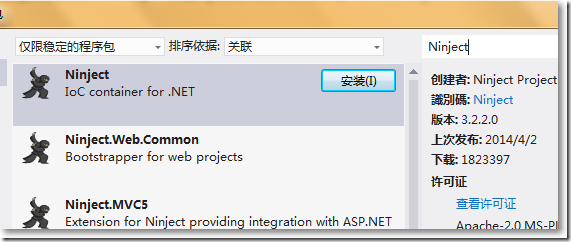
右键"引用",在"管理NuGet"程序包中搜索、安装Ninject。
在ASP.NET Web API中,DefaultHttpControllerActivator默认使用DependencyResolver对象去激活目标HttpControlle,通过实现IDependencyResolver接口可自定义DependencyResolver,从而把Ninject引入。
using System;using System.Collections.Generic;using System.Web.Http.Dependencies;using Ninject;namespace MvcApplication5.Extension{public class NinjectDependencyResolver : IDependencyResolver{private List<IDisposable> disposables = new List<IDisposable>();public IKernel Kernel { get; private set; }public NinjectDependencyResolver(NinjectDependencyResolver parent){this.Kernel = parent.Kernel;}public NinjectDependencyResolver(){this.Kernel = new StandardKernel();}public void Register<TFrom, TTo>() where TTo : TFrom{this.Kernel.Bind<TFrom>().To<TTo>();}public IDependencyScope BeginScope(){return new NinjectDependencyResolver(this);}public object GetService(System.Type serviceType){return this.Kernel.TryGet(serviceType);}public System.Collections.Generic.IEnumerable<object> GetServices(System.Type serviceType){foreach (var service in this.Kernel.GetAll(serviceType)){this.AddDisposableService(service);yield return service;}}public void Dispose(){foreach (IDisposable disposable in disposables){disposable.Dispose();}}private void AddDisposableService(object service){IDisposable disposable = service as IDisposable;if (disposable != null && !disposables.Contains(disposable)){disposables.Add(disposable);}}}}
在全局注册NinjectControllerFactory这个自定义控制器工厂。
protected void Application_Start(){AreaRegistration.RegisterAllAreas();......NinjectDependencyResolver dependencyResolver = new NinjectDependencyResolver();dependencyResolver.Register<ICommentRepository, CommentRepository>();GlobalConfiguration.Configuration.DependencyResolver = dependencyResolver;}
创建名称为CommentsController空的API控制器,编写如下:
using System;using System.Collections.Generic;using System.Linq;using System.Net;using System.Net.Http;using System.Web.Http;using MvcApplication5.Models;using MvcApplication5.Repository;using Ninject;namespace MvcApplication5.Controllers{public class CommentsController : ApiController{[Inject]public ICommentRepository CommentRepository { get; set; }#region 获取数据public IEnumerable<Comment> GetComments(){return CommentRepository.Get();}public Comment GetComment(int id){Comment comment;if (!CommentRepository.TryGet(id, out comment)){throw new HttpResponseException(new HttpResponseMessage(HttpStatusCode.NotFound));}return comment;}#endregion}}
在HomeController中提供一个Index视图。
using System.Web.Mvc;namespace MvcApplication5.Controllers{public class HomeController : Controller{public ActionResult Index(){return View();}}}
在Shared/_Layout.cshtml中:
<head><meta charset="utf-8" /><meta name="viewport" content="width=device-width" /><title>@ViewBag.Title</title>@Styles.Render("~/Content/css")<link href="~/Content/Demo.css" rel="stylesheet" /></head><body>@RenderBody()@Scripts.Render("~/bundles/jquery")@RenderSection("scripts", required: false)</body>
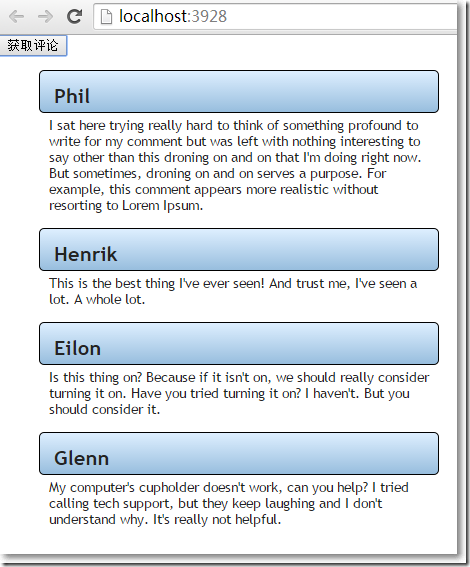
在Home/Index.cshtml视图中,通过Knockout在页面元素和页面视图模型间实现双向绑定,通过jQuery把从后台获取到的集合赋值给前端的页面视图模型的comments字段,遍历页面视图模型的comments,使用模版把内容显示出来。
@{ViewBag.Title = "Index";Layout = "~/Views/Shared/_Layout.cshtml";}<div><button id="getComments">获取评论</button></div><ul data-bind="template: { name: 'commentTemplate', foreach: comments }"></ul>@section scripts{<script src="~/Scripts/knockout-2.2.0.js"></script><script type="text/javascript">viewModel = {comments: ko.observableArray([])};ko.applyBindings(viewModel);$(function() {$('#getComments').on("click", function() {viewModel.comments([]);$.get('/api/comments', function (data) {viewModel.comments(data);});});});</script><script id="commentTemplate" type="text/html"><li class="comment"><header><div class="info"><strong><span data-bind="text: Author"></span></strong></div></header><div class="body"><p data-bind="text: Text"></p></div></li></script>}
参考资料:
http://www.cnblogs.com/artech/p/ioc-4-asp-net-web-api.html
https://code.msdn.microsoft.com/ASPNET-Web-API-JavaScript-d0d64dd7/sourcecode?
ASP.NET Web API实践系列07,获取数据, 使用Ninject实现依赖倒置,使用Knockout实现页面元素和视图模型的双向绑定的更多相关文章
- ASP.NET Web API实践系列04,通过Route等特性设置路由
ASP.NET Web API路由,简单来说,就是把客户端请求映射到对应的Action上的过程.在"ASP.NET Web API实践系列03,路由模版, 路由惯例, 路由设置"一 ...
- ASP.NET Web API实践系列05,消息处理管道
ASP.NET Web API的消息处理管道可以理解为请求到达Controller之前.Controller返回响应之后的处理机制.之所以需要了解消息处理管道,是因为我们可以借助它来实现对请求和响应的 ...
- ASP.NET Web API实践系列09,在Fiddler和控制台中模拟GET和POST请求
ASP.NET Web API本质是由一个进程托管的一组类,需要宿主,这个宿主可以是ASP.NET应用程序,可以是MVC项目,可以是控制台应用程序,也可以是自己定制的宿主. 在VS2012中创建一个& ...
- ASP.NET Web API实践系列02,在MVC4下的一个实例, 包含EF Code First,依赖注入, Bootstrap等
本篇体验在MVC4下,实现一个对Book信息的管理,包括增删查等,用到了EF Code First, 使用Unity进行依赖注入,前端使用Bootstrap美化.先上最终效果: →创建一个MVC4项目 ...
- ASP.NET Web API实践系列01,以ASP.NET Web Form方式寄宿
创建一个空的ASP.NET Web Form项目. 右键项目,添加新项,创建Web API控制器类,TestController. 删除掉TestController默认的内容,编写如下: using ...
- ASP.NET Web API实践系列06, 在ASP.NET MVC 4 基础上增加使用ASP.NET WEB API
本篇尝试在现有的ASP.NET MVC 4 项目上增加使用ASP.NET Web API. 新建项目,选择"ASP.NET MVC 4 Web应用程序". 选择"基本&q ...
- ASP.NET Web API实践系列03,路由模版, 路由惯例, 路由设置
ASP.NET Web API的路由和ASP.NET MVC相似,也是把路由放在RouteTable中的.可以在App_Start文件夹中的WebApiConfig.cs中设置路由模版.默认的路由模版 ...
- ASP.NET Web API实践系列11,如何设计出优秀的API
本篇摘自:InfoQ的微信公众号 在设计API的时候考虑的问题包括:API所使用的传输协议.支持的消息格式.接口的控制.名称.关联.次序,等等.我们很难始终作出正确的决策,很可能是在多次犯错之后,并从 ...
- ASP.NET Web API 2系列(三):查看WebAPI接口的详细说明及测试接口
引言 前边两篇博客介绍了Web API的基本框架以及路由配置,这篇博客主要解决在前后端分离项目中,为前端人员提供详细接口说明的问题,主要是通过修改WebApi HelpPage相关代码和添加WebAp ...
随机推荐
- MVC 控制器中传递dynamic(对象) 给视图
有时候不想重新定义一个实体,则使用 dynamic 来定义匿名类型. //匿名类型 传递到前台 Model dynamic viewModel = new { UserID = 5016 }; ret ...
- jexus docker
一.准备工作 1.init.sh 文件 #!/bin/bash # Stop your services function stop_svc { /usr/jexus/jws stop >/de ...
- Python外部脚本调用Django项目Model表
在实际生产中有时候会出现这种情况,原本运行了一个Django项目,后面又需要一些外部脚本进行辅助,而这些脚本又不希望集成到项目当中,但是又需要用到Django项目的Model,这时候是无法像在项目当中 ...
- Fiddler 常用功能总结
1.fiddler相关配置 2.如何抓包 移动端 ①保持手机和电脑处于同一网络中 ②设置手机的代理为电脑当前所处网络的IP,端口号为:8888,eg:10.12.1.64:8888. ③ 启动ap ...
- watch案例解析(element-ui el-select 无法选中问题剖析)
fire 读在最前面: 1.此文章衔接Vue 虚拟Dom 及 部分生命周期初探,相关整体知识点请先阅读后再继续本文阅读 问:子组件中明明有watch value,为什么this.$emit('inpu ...
- .NetCore关于Cap(RabbitMQ)结合MySql使用出现MySql相关类冲突问题解决办法
问题还原 引用了 DotNetCore.CAP.MySql MySql.Data.EntityFrameworkCore 在使用MySql相关对象的时候会出现如下冲突,在命名空间加入伪空间名称是不能解 ...
- http://blog.csdn.net/five3/article/details/7181521
首先来了解什么是multipart/form-data请求: 根据http/1.1 rfc 2616的协议规定,我们的请求方式只有OPTIONS.GET.HEAD.POST.PUT.DELETE.TR ...
- Ubuntu编译gdb-ARM调试环境
参考Qt可用的gdb编译,以及交叉编译gdbserver,以及配置QtCreator远程调试 编译脚本 如下: #!/bin/bash echo -e "\033[32m 正在执行步骤一:检 ...
- 入门NodeJS
入门NodeJS https://www.cnblogs.com/dotnetcrazy/p/10118756.html NodeJS 1.环境配置 之前讲ES6的时候有提过一部分Node的知识,简单 ...
- Ansible专题整理
Ansible 专题文章总览 Ansible小手册,仅供参考 文章如未明确说明实验环境,默认如下: OS:Centos 6.7 x86_64 Ansible: 2.1.2.0 Python: 2.6. ...