
微信破解,解密?How To Decrypt WeChat EnMicroMsg.db Database?
20元现金领取地址:http://jdb.jiudingcapital.com/phone.html
内部邀请码:C8E245J (不写邀请码,没有现金送)
国内私募机构九鼎控股打造,九鼎投资是在全国股份转让系统挂牌的公众公司,股票代码为430719,为“中国PE第一股”,市值超1000亿元。
原文地址:http://articles.forensicfocus.com/2014/10/01/decrypt-wechat-enmicromsgdb-database/
WeChat is a smartphone application where users can chat with their friends, share pictures, videos and audio chats. Users can also make free video calls and voice calls with their friends as long as they have Internet connection.
Recently, we received a request from the law enforcement agency to extract WeChat chat messages from an Android mobile phone.
Although this mobile phone model is supported by XRY (a mobile phone forensics tool), but it could not extract the WeChat chat messages. Only Whatsapp, and other text messages were successfully extracted.
We have also conducted keyword search using EnCase, but to no avail. Although we can see the chat messages directly from the mobile phone display, EnCase still cannot find the keyword that we searched for.
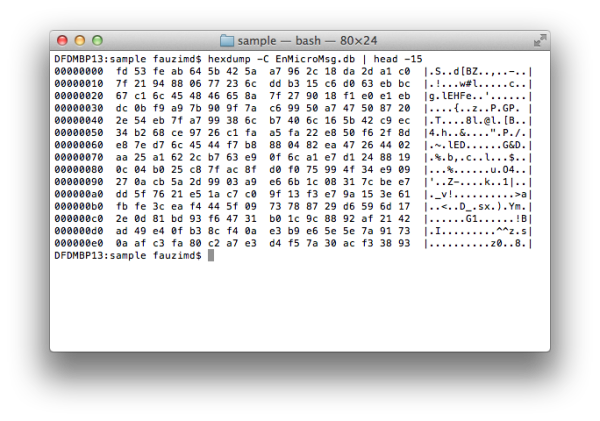
Figure 1: The encrypted data in EnMicroMsg.db
However, during the analysis in EnCase, we found a .DB file named, EnMicroMsg.db in the WeChat application folder. This file size is about 3.7MB.
This curiosity leads us to conduct a research on the Internet and we found that the file is an encrypted SQLite database file for WeChat chat messages.
EnMicroMsg.db and SQLCipher
EnMicroMsg.db is an encrypted SQLite database file that contains the WeChat chat messages. This file is encrypted using SQLCipher, an open source extension for SQLite database that provides transparent 256-bit AES encryption of database files.
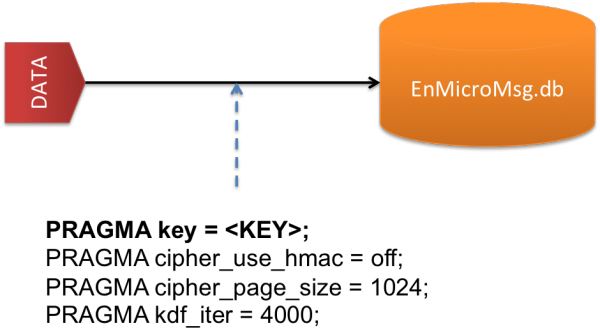
Figure 2: Parameters to decrypt EnMicroMsg.db file
Below are the parameters needed to encrypt and decrypt the data in the EnMicroMsg.db file.
- PRAGMA key = KEY;
- PRAGMA cipher_use_hmac = off;
- PRAGMA cipher_page_size = 1024;
- PRAGMA kdf_iter = 4000;
The simple explanations for these parameters are described below:
- PRAGMA key – Set the key to use with the database.
- PRAGMA cipher_use_hmac – Disable the usage of per-page HMAC checks for backwards compatibility with SQLCipher 1.1.x on a specific database.
- PRAGMA cipher_page_size – Alter the page size used for the database from the default of 1024 bytes to improve performance for some query types.
- PRAGMA kdf_iter – Change the number of iterations used with PBKDF2 key derivation.
Kindly go to SQLCipher API page for a better understanding about these parameters and their usage in SQLCipher.
KEY to decrypt EnMicroMsg.db
KEY is the most important parameter to decrypt the EnMicroMsg.db file. This KEY is generated from the MD5 hash, combination of IMEI and UIN (a unique identifier of the WeChat user). However, only the first 7-characters of the MD5 hash will be used as the KEY to decrypt it.
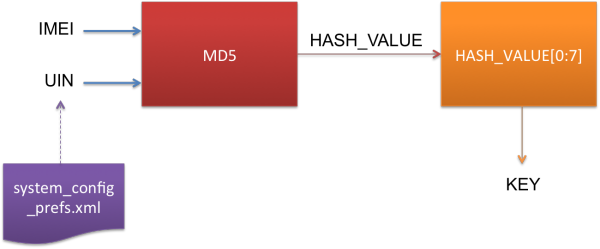
Figure 3: The process to generate the KEY
IMEI is the 15-digits unique number that you can usually get at the back of the mobile phone. Or you can enter *#06# to get the mobile phone IMEI number.
UIN is the unique identifier that you can get from the system_config_prefs.xml file in the WeChat application folder.
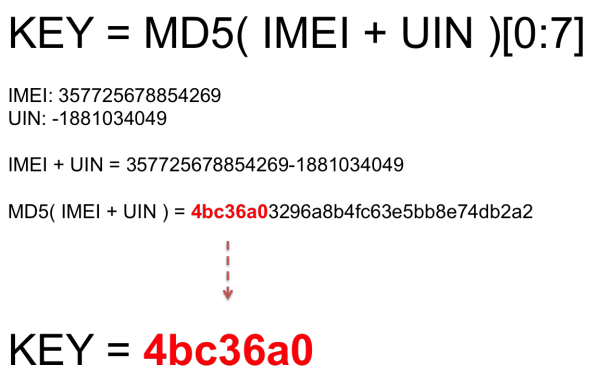
Figure 4: Example to generate the KEY
In short, the KEY generation can be summarized as follows:
KEY = MD5( IMEI + UIN )[ 0:7 ]
For an example, the IMEI number for the mobile phone is, 357725678854269 and the UIN number which you get fromsystem_config_prefs.xml file is, -1881034049.
- IMEI: 357725678854269
- UIN: -1881034049
So the MD5 hash value for these IMEI and UIN is, 4bc36a03296a8b4fc63e5bb8e74db2a2
Therefore the KEY to decrypt EnMicroMsg.db is, 4bc36a0.
Python script, fmd_wechatdecipher.py
To make it easier for you to decrypt this file, we have wrote a Python script, fmd_wechatdecipher.py, which you can use it in your lab.
This script runs on Python and you need to install an additional package, pysqlcipher. Pysqlcipher will allows you to use SQLCipher function in Python.
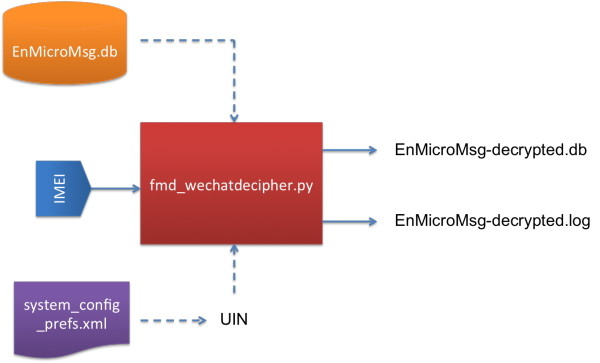
Figure 5: Input and Output for fmd_wechatdecipher.py script
Before you can use this script, there are several things that you need to know about fmd_wechatdecipher.py.
This script requires two input files and one input from the user.
The Input Files are:
- EnMicroMsg.db – The WeChat database file that contains the encrypted chat messages.
- system_config_prefs.xml – The WeChat file that contains the UIN number.
The Input that you need to enter:
- IMEI – The 15-digits IMEI number of the mobile phone
And the Output Files after you executed the script:
- EnMicroMsg-decrypted.db – Decrypted database file that contains WeChat chat messages.
- EnMicroMsg-decrypted.log – Log file that contains all information to decrypt the file such as IMEI, UIN, and KEY. It also includes with the MD5 and SHA1 hash values for EnMicroMsg-decrypted.db file.
How to use the script?
In order to use this script, you must put all the Input Files in the same folder with the Python script.
When the script prompts you to enter the IMEI number, just enter the correct IMEI number and it will generate the KEY and decryptEnMicroMsg.db file automatically.
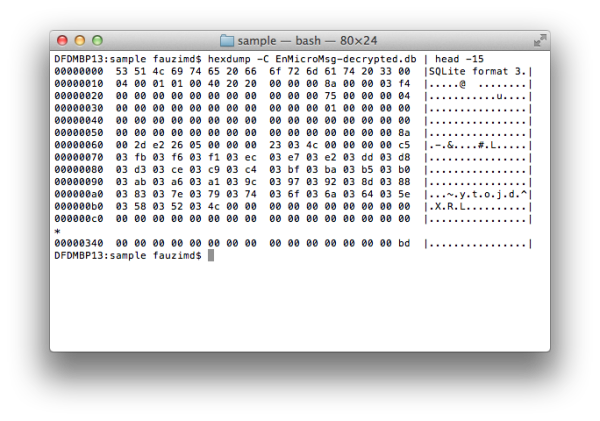
Figure 6: The decrypted data stored in EnMicroMsg-decrypted.db
Once the process is done, you will see two files are generated, EnMicroMsg-decrypted.db and EnMicroMsg-decrypted.log, in the same folder.
All the encrypted WeChat chat messages have been decrypted and are stored in the EnMicroMsg-decrypted.db file. You can extract the chat messages by using your favourite SQLite Browser to analyze this file.
References
- http://blog.emaze.net/2013/09/a-look-at-wechat-security.html
- https://www.zetetic.net/sqlcipher/sqlcipher-api
- https://pypi.python.org/pypi/pysqlcipher
- https://gist.github.com/scturtle/7248017
微信破解,解密?How To Decrypt WeChat EnMicroMsg.db Database?的更多相关文章
- how to extract and decrypt WeChat EnMicromsg.db on Android phone
One of my friend came to me with an Android phone. She saild somehting wrong with the hardware of he ...
- 【转】Android动态破解微信本地数据库(EnMicroMsg.db)
最近在公司接了一个任务,需要在几百台手机上安装一个app,目的是获取微信里面的通讯录,并且定时的把他发送到我们的服务器上.当时依次尝试的如下几个方案: 1.通过群控,将好友截图发送到服务端(pytho ...
- 微信发明人竟是他!也是WeChat/Line/WhatsApp的发明者
赵建文,很多人不知道他是谁:说到微信大家都耳熟能详吧?没错,他就是初始微信发明人,同时也是WeChat/Line/WhatsApp的发明者!正是他的专利<一种基于或囊括手机电话本的即时通讯方法和 ...
- 微信 AES 解密报错 Illegal key size 三种解决办法
微信 AES 解密报错 Illegal key size Java 环境 java version "1.8.0_151" Java(TM) SE Runtime Environm ...
- 《IDA Pro 代码破解解密》笔记一
博客地址:http://blog.csdn.net/qq1084283172/article/details/53158970 return 0; C语言返回0语句的汇编形式 Intel-32汇编: ...
- Ubuntu下编译SqlCipher以及解密微信数据库EnMicroMsg.db过程和坑
wget https://codeload.github.com/sqlcipher/sqlcipher/zip/v3.4.2 ./configure --enable-tempstore=yes C ...
- Windows主机SAM文件格式破解解密
文件格式如是下图这种格式: 那么就可以通过通过kali终端samdump2 + system + sam 生成出来通过hashcat -m 1000去跑,或者通过md5查询
- Mac查看及清理QQ、微信之前下载的图片、视频或DB等
之前写过一篇清理Mac空间的文章: Mac系统清理.占用空间大.空间不够.查看系统文件大小分布 其实这篇文章不是太全,有些资源还是清理不彻底,正好前段时间需要找微信下载的资源,其实可以算作空间清理的续 ...
- 微信公众号 拼团到期人数不足 db触发器 js触发器 剥离
w注意当页面多个先后到期或同时到期的团时的用户体验 w保证了每次加载这个页面会是的过期的团不显示,马上到期的团会在页面存活期间进行页面更新和db操作: 但是这依赖了团状态值的更新必须依赖于有客户端页面 ...
随机推荐
- 最完整的PS快捷键大全(绝对经典)
快速恢复默认值 有些不擅长Photoshop的朋友为了调整出满意的效果真是几经周折,结果发现还是原来的默认效果最好,这下傻了眼,后悔不该当初呀!怎么恢复到默认值呀?试着轻轻点按选项栏上的工具图标,然后 ...
- 在VMware上安装Ubuntu软件步骤与遇到的相关问题及解决方案
图解演示环境版本: 本机系统: WIN10 虚拟机:VMware Workstation 12(中文版) 安装目标:Ubuntu Desktop 12.04 LTS (请点击这里)先下载好iso镜像 ...
- Kaggle大数据竞赛平台入门
Kaggle大数据竞赛平台入门 大数据竞赛平台,国内主要是天池大数据竞赛和DataCastle,国外主要就是Kaggle.Kaggle是一个数据挖掘的竞赛平台,网站为:https://www.kagg ...
- c++中的类(class)
c++的class(类)使用方法 这几天一直在调splay之类的东西,突然想转指针...qwq 于是,我就在沙华大佬的帮助下,学了下一顿乱指( $ -> $ ),也就是class(类) 首先:c ...
- Redis五种数据类型-设置key的过期时间
1.redis命令客户端 [root@localhost bin]# ./redis-cli 127.0.0.1:6379> #是否运行着 127.0.0.1:6379> ping PON ...
- 【LOJ】#2495. 「AHOI / HNOI2018」转盘
题面 题解 考虑我肯定是从一个人出发,开始依次标记,而不会跳过某个人,因为如果我跳过了,那么我之后回来还需要标记它,比不上我等完它再一直走到最后(因为多了走一圈之后走回它的代价) 我们倍长整个序列,我 ...
- spring配置文件详解以及beans:beans标签
第一行的意思就是你这个文件的默认schema为security,所以你的beans定义就需要加上前缀beans 一般的定义文件默认都是beans: 下面是spring配置文件的详解: 转自:http: ...
- 修改MySQL中的数据
一:insert语句 1.介绍 在执行插入语句前,需要具有执行INSERT语句的INSERT权限. 2.准备环境 3.简单insert语句 4.插入多行 在这种形式中,每行的值列表用逗号分隔. 如果为 ...
- curl命令大全
curl 命令行工具的使用及命令参数说明 curl是一个开源的用于数据传输的命令行工具与库,它使用URL语法格式,支持众多传输协议,包括:HTTP.HTTPS.FTP.FTPS.GOPHER.TFTP ...
- wdatepicker默认时间为当前时间
$(document).ready(function() { alert(today()); document.getElementById("serviceTime").valu ...