
微信破解,解密?How To Decrypt WeChat EnMicroMsg.db Database?
20元现金领取地址:http://jdb.jiudingcapital.com/phone.html
内部邀请码:C8E245J (不写邀请码,没有现金送)
国内私募机构九鼎控股打造,九鼎投资是在全国股份转让系统挂牌的公众公司,股票代码为430719,为“中国PE第一股”,市值超1000亿元。
原文地址:http://articles.forensicfocus.com/2014/10/01/decrypt-wechat-enmicromsgdb-database/
WeChat is a smartphone application where users can chat with their friends, share pictures, videos and audio chats. Users can also make free video calls and voice calls with their friends as long as they have Internet connection.
Recently, we received a request from the law enforcement agency to extract WeChat chat messages from an Android mobile phone.
Although this mobile phone model is supported by XRY (a mobile phone forensics tool), but it could not extract the WeChat chat messages. Only Whatsapp, and other text messages were successfully extracted.
We have also conducted keyword search using EnCase, but to no avail. Although we can see the chat messages directly from the mobile phone display, EnCase still cannot find the keyword that we searched for.
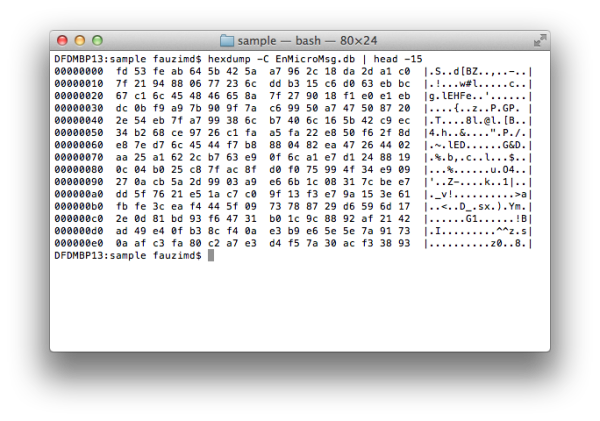
Figure 1: The encrypted data in EnMicroMsg.db
However, during the analysis in EnCase, we found a .DB file named, EnMicroMsg.db in the WeChat application folder. This file size is about 3.7MB.
This curiosity leads us to conduct a research on the Internet and we found that the file is an encrypted SQLite database file for WeChat chat messages.
EnMicroMsg.db and SQLCipher
EnMicroMsg.db is an encrypted SQLite database file that contains the WeChat chat messages. This file is encrypted using SQLCipher, an open source extension for SQLite database that provides transparent 256-bit AES encryption of database files.
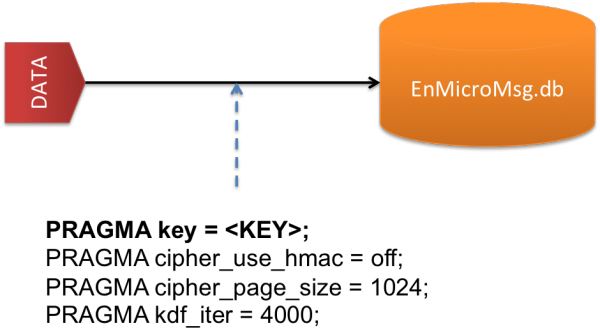
Figure 2: Parameters to decrypt EnMicroMsg.db file
Below are the parameters needed to encrypt and decrypt the data in the EnMicroMsg.db file.
- PRAGMA key = KEY;
- PRAGMA cipher_use_hmac = off;
- PRAGMA cipher_page_size = 1024;
- PRAGMA kdf_iter = 4000;
The simple explanations for these parameters are described below:
- PRAGMA key – Set the key to use with the database.
- PRAGMA cipher_use_hmac – Disable the usage of per-page HMAC checks for backwards compatibility with SQLCipher 1.1.x on a specific database.
- PRAGMA cipher_page_size – Alter the page size used for the database from the default of 1024 bytes to improve performance for some query types.
- PRAGMA kdf_iter – Change the number of iterations used with PBKDF2 key derivation.
Kindly go to SQLCipher API page for a better understanding about these parameters and their usage in SQLCipher.
KEY to decrypt EnMicroMsg.db
KEY is the most important parameter to decrypt the EnMicroMsg.db file. This KEY is generated from the MD5 hash, combination of IMEI and UIN (a unique identifier of the WeChat user). However, only the first 7-characters of the MD5 hash will be used as the KEY to decrypt it.
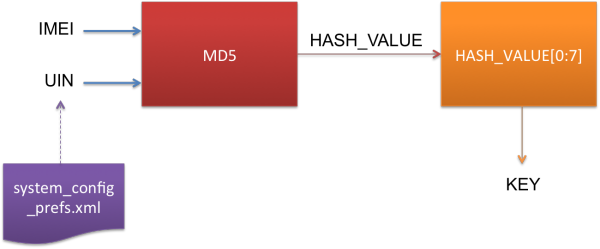
Figure 3: The process to generate the KEY
IMEI is the 15-digits unique number that you can usually get at the back of the mobile phone. Or you can enter *#06# to get the mobile phone IMEI number.
UIN is the unique identifier that you can get from the system_config_prefs.xml file in the WeChat application folder.
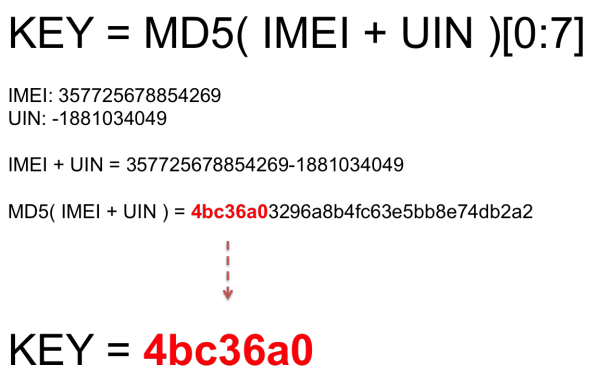
Figure 4: Example to generate the KEY
In short, the KEY generation can be summarized as follows:
KEY = MD5( IMEI + UIN )[ 0:7 ]
For an example, the IMEI number for the mobile phone is, 357725678854269 and the UIN number which you get fromsystem_config_prefs.xml file is, -1881034049.
- IMEI: 357725678854269
- UIN: -1881034049
So the MD5 hash value for these IMEI and UIN is, 4bc36a03296a8b4fc63e5bb8e74db2a2
Therefore the KEY to decrypt EnMicroMsg.db is, 4bc36a0.
Python script, fmd_wechatdecipher.py
To make it easier for you to decrypt this file, we have wrote a Python script, fmd_wechatdecipher.py, which you can use it in your lab.
This script runs on Python and you need to install an additional package, pysqlcipher. Pysqlcipher will allows you to use SQLCipher function in Python.
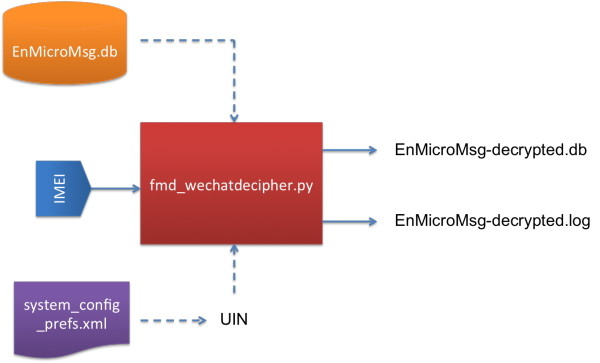
Figure 5: Input and Output for fmd_wechatdecipher.py script
Before you can use this script, there are several things that you need to know about fmd_wechatdecipher.py.
This script requires two input files and one input from the user.
The Input Files are:
- EnMicroMsg.db – The WeChat database file that contains the encrypted chat messages.
- system_config_prefs.xml – The WeChat file that contains the UIN number.
The Input that you need to enter:
- IMEI – The 15-digits IMEI number of the mobile phone
And the Output Files after you executed the script:
- EnMicroMsg-decrypted.db – Decrypted database file that contains WeChat chat messages.
- EnMicroMsg-decrypted.log – Log file that contains all information to decrypt the file such as IMEI, UIN, and KEY. It also includes with the MD5 and SHA1 hash values for EnMicroMsg-decrypted.db file.
How to use the script?
In order to use this script, you must put all the Input Files in the same folder with the Python script.
When the script prompts you to enter the IMEI number, just enter the correct IMEI number and it will generate the KEY and decryptEnMicroMsg.db file automatically.
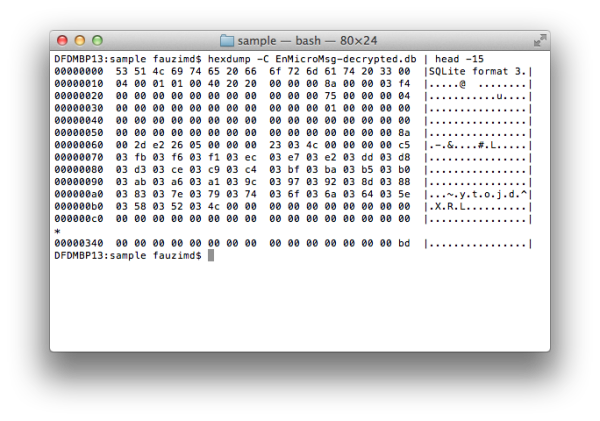
Figure 6: The decrypted data stored in EnMicroMsg-decrypted.db
Once the process is done, you will see two files are generated, EnMicroMsg-decrypted.db and EnMicroMsg-decrypted.log, in the same folder.
All the encrypted WeChat chat messages have been decrypted and are stored in the EnMicroMsg-decrypted.db file. You can extract the chat messages by using your favourite SQLite Browser to analyze this file.
References
- http://blog.emaze.net/2013/09/a-look-at-wechat-security.html
- https://www.zetetic.net/sqlcipher/sqlcipher-api
- https://pypi.python.org/pypi/pysqlcipher
- https://gist.github.com/scturtle/7248017
微信破解,解密?How To Decrypt WeChat EnMicroMsg.db Database?的更多相关文章
- how to extract and decrypt WeChat EnMicromsg.db on Android phone
One of my friend came to me with an Android phone. She saild somehting wrong with the hardware of he ...
- 【转】Android动态破解微信本地数据库(EnMicroMsg.db)
最近在公司接了一个任务,需要在几百台手机上安装一个app,目的是获取微信里面的通讯录,并且定时的把他发送到我们的服务器上.当时依次尝试的如下几个方案: 1.通过群控,将好友截图发送到服务端(pytho ...
- 微信发明人竟是他!也是WeChat/Line/WhatsApp的发明者
赵建文,很多人不知道他是谁:说到微信大家都耳熟能详吧?没错,他就是初始微信发明人,同时也是WeChat/Line/WhatsApp的发明者!正是他的专利<一种基于或囊括手机电话本的即时通讯方法和 ...
- 微信 AES 解密报错 Illegal key size 三种解决办法
微信 AES 解密报错 Illegal key size Java 环境 java version "1.8.0_151" Java(TM) SE Runtime Environm ...
- 《IDA Pro 代码破解解密》笔记一
博客地址:http://blog.csdn.net/qq1084283172/article/details/53158970 return 0; C语言返回0语句的汇编形式 Intel-32汇编: ...
- Ubuntu下编译SqlCipher以及解密微信数据库EnMicroMsg.db过程和坑
wget https://codeload.github.com/sqlcipher/sqlcipher/zip/v3.4.2 ./configure --enable-tempstore=yes C ...
- Windows主机SAM文件格式破解解密
文件格式如是下图这种格式: 那么就可以通过通过kali终端samdump2 + system + sam 生成出来通过hashcat -m 1000去跑,或者通过md5查询
- Mac查看及清理QQ、微信之前下载的图片、视频或DB等
之前写过一篇清理Mac空间的文章: Mac系统清理.占用空间大.空间不够.查看系统文件大小分布 其实这篇文章不是太全,有些资源还是清理不彻底,正好前段时间需要找微信下载的资源,其实可以算作空间清理的续 ...
- 微信公众号 拼团到期人数不足 db触发器 js触发器 剥离
w注意当页面多个先后到期或同时到期的团时的用户体验 w保证了每次加载这个页面会是的过期的团不显示,马上到期的团会在页面存活期间进行页面更新和db操作: 但是这依赖了团状态值的更新必须依赖于有客户端页面 ...
随机推荐
- HttpUrlConnection的setDoOutput与setDoInput的区别
httpUrlConnection.setDoOutput(true) httpUrlConnection.setDoInput(true) 这两个方法在develope的httpUrlConnect ...
- 记录一起k8s的service服务名解析灵异事件
故障现象: 基于alpine 3.7的镜像,构建的spring boot服务及eureka服务器. 在使用deployment和service文件部署到k8s集群之后, 在不同的pod内部,访问ser ...
- ngResource和REST介绍
ngResource和REST介绍 一.RESTful介绍 RESTful维基百科 REST(表征性状态传输,Representational State Transfer)是Roy Fielding ...
- fiddler抓https 关于证书一项
由于我之前电脑装过fiddler然后这次弄证书也没有理解明白,导致失败了.然后就百度到了下面的教程. https://www.cnblogs.com/joshua317/p/8670923.html ...
- 【LOJ】#2494. 「AHOI / HNOI2018」寻宝游戏
题面 题解 第\(i\)个数之前的符号是或那么记为0,是与就记为1,得到一个二进数x 然后按位分开考虑,如果这一行是1那么记为1,如果这一位数位0记为0,得到一个二进制数\(b_i\) 第\(N\)行 ...
- docker容器重启故障
问题 强杀docker进程后,重启docker.docker中的容器无法启动并报错,报错内容如下 docker restart ae1f7b2c2f15 Error response from dae ...
- 【LeetCode】151. Reverse Words in a String
Difficulty: Medium More:[目录]LeetCode Java实现 Description Given an input string, reverse the string w ...
- oj提交时常见错误归纳
Presentation Error: 常见的PE错误应该有以下的几种情况: 每行输出之后有空行 每两行输出之间有空行 一行中,每个输出数字(或字符串,等)之间有空格 一行中,每个输出数字(或字符串, ...
- java反射bean to bean
/** * Copyright © 2018 fwz Info. Tech Ltd. All rights reserved. * * @Package: com.sm.utils * @author ...
- html (第四本书第七章浮动参考)
课上1 <!DOCTYPE html> <html> <head lang="en"> <meta charset="UTF-8 ...