
如何给wp(Windows phone)中搜索关键字加亮?
问题来源
最近在群里看到群友讨论在wp中有个搜索功能,要求搜索关键字在搜索结果内容中加亮(即加颜色),由于wp中没有自带这样的控件,于是大家各抒自见,有人说用第三方控件,有人说用richtextbox,也有人说用textblock和run!那究竟哪种实现比较好呢?个人看法,当然是用textblock和run实现起来是最方便的!
实现要求
1、给出关键字(如:我,购物,菜鸟,技术),关键字可以一个或者多个,多个用英文逗号隔开
2、能在搜索结果中对关键字进行加亮
3、能自定义加亮的颜色
4、要求复用性高
实现思路
如果要实现上面三点需求,首先我们想到是使用用户控件实现起来最好了,第一,二,三点分别用一个依赖属性表示,而第四点,既然是用户控件,作为一个控件,当然复用性强!
所以使用用户控件是再适合不过了!
材料准备
首先当然是在vs中新建一个wp的项目,然后添加一个用户控件的页面,这个估计不用我多说了,大家都会的了!在这里我新增一个HighlightControl的用户控件页面,在界面上添加一个TextBlock,命名为tbResult,打开codebehind,分别添加三个依赖属性,分别是TextProperty(搜索结果),HighlightWordProperty(关键字),HighlightWordColorProperty(加亮颜色),然后添加对应的包装属性,再添加回调方法!这些应该不用详解吧,学过wpf或者silverlight对这些应该很了解了!如果不懂可以评论问问!
下面贴出用户控件codebehind相应代码
  public static readonly DependencyProperty TextProperty = DependencyProperty.Register("Text", typeof(string), typeof(HighlightControl), new PropertyMetadata(new PropertyChangedCallback(HighlightControl.OnTextChanged)));

         public static readonly DependencyProperty HighlightWordProperty = DependencyProperty.Register("HighlightWord", typeof(string), typeof(HighlightControl), new PropertyMetadata(new PropertyChangedCallback(HighlightControl.OnHighlightWordChanged)));

         public static readonly DependencyProperty HighlightWordColorProperty = DependencyProperty.Register("HighlightWordColor", typeof(SolidColorBrush), typeof(HighlightControl), new PropertyMetadata(new SolidColorBrush(Color.FromArgb(, , , )), new PropertyChangedCallback(HighlightControl.OnHighlightWordColorChanged)));

         public string Text

         {

             get

             {

                 return (string)base.GetValue(HighlightControl.TextProperty);

             }

             set

             {

                 base.SetValue(HighlightControl.TextProperty, value);

             }

         }

         public SolidColorBrush HighlightWordColor

         {

             get

             {

                 return (SolidColorBrush)base.GetValue(HighlightControl.HighlightWordColorProperty);

             }

             set

             {

                 base.SetValue(HighlightControl.HighlightWordColorProperty, value);

             }

         }

         public string HighlightWord

         {

             get

             {

                 return (string)base.GetValue(HighlightControl.HighlightWordProperty);

             }

             set

             {

                 base.SetValue(HighlightControl.HighlightWordProperty, value);

             }

         }

         private static void OnTextChanged(DependencyObject d, DependencyPropertyChangedEventArgs e)

         {

             HighlightControl control = d as HighlightControl;

             if (e.NewValue == e.OldValue)

             {

                 return;

             }

             HighlightControl.UpdateHighlight(control);

         }

         private static void OnHighlightWordChanged(DependencyObject d, DependencyPropertyChangedEventArgs e)

         {

             HighlightControl control = d as HighlightControl;

             HighlightControl.UpdateHighlight(control);

         }

         private static void OnHighlightWordColorChanged(DependencyObject d, DependencyPropertyChangedEventArgs e)

         {

             HighlightControl control = d as HighlightControl;

             HighlightControl.UpdateHighlight(control);

         }

         private static void UpdateHighlight(HighlightControl control)

         {

             if (control == null)

             {

                 return;

             }

             TextBlock textBlock = control.tbResult;

             if (textBlock.Inlines.Count() > )

             {

                 textBlock.Inlines.Clear();

             }

             //如果高亮为空,直接显示

             if (string.IsNullOrEmpty(control.HighlightWord))

             {

                 Run run = new Run();

                 run.Text = control.Text;

                 textBlock.Inlines.Add(run);

                 return;

             }

             string text = control.Text;

             if (string.IsNullOrEmpty(text))

             {

                 return;

             }

             TextBlock tempTextBlock = new TextBlock();//中间变量,方便run交换

             string[] hightwordArray = control.HighlightWord.Split(',');

             List<Run> listHightRun = new List<Run>();//添加已经加亮的run,方便判断

             for (int i = ; i < hightwordArray.Length; i++)

             {

                 if (hightwordArray[i] == "") continue;//这个是放在关键字中有"",导致死循环

                 if (i == )

                 {

                     for (int num = text.IndexOf(hightwordArray[i], ); num != -; num = text.IndexOf(hightwordArray[i], ))

                     {

                         //  MessageBox.Show(num.ToString());

                         if (num != )

                         {

                             Run run2 = new Run();

                             run2.Text = text.Substring(, num);

                             // textBlock.Inlines.Add(run2);

                             tempTextBlock.Inlines.Add(run2);

                         }

                         Run run3 = new Run();

                         run3.Text = text.Substring(num, hightwordArray[i].Length);

                         run3.Foreground = control.HighlightWordColor;

                         listHightRun.Add(run3);

                         //textBlock.Inlines.Add(run3);

                         tempTextBlock.Inlines.Add(run3);

                         text = text.Substring(num + hightwordArray[i].Length);

                         // MessageBox.Show(text);

                     }

                     if (!string.IsNullOrEmpty(text))

                     {

                         Run run4 = new Run();

                         run4.Text = text;

                         tempTextBlock.Inlines.Add(run4);//剩下没有被加亮的文字,加到一个run

                     }

                 }

                 else

                 {

                     // text = control.Text;

                     //  MessageBox.Show("要遍历textBlock长度:" + textBlock.Inlines.Count.ToString());

                     for (int j = ; j < textBlock.Inlines.Count; j++)

                     {

                         if (listHightRun.Any(h => h.Equals((textBlock.Inlines[j] as Run))))//如果是一个加亮的run,那就不需要遍历了

                         {

                             // MessageBox.Show("jin" + (textBlock.Inlines[j] as Run).Text);

                             Run runExist = (textBlock.Inlines[j] as Run);

                             textBlock.Inlines.Remove(textBlock.Inlines[j]);

                             tempTextBlock.Inlines.Add(runExist);

                             j--;

                             //  MessageBox.Show("移除元素后textBlock长度:" + textBlock.Inlines.Count + "  j: " + j);

                             continue;

                         }

                         string tempStr = (textBlock.Inlines[j] as Run).Text;

                         for (int num = tempStr.IndexOf(hightwordArray[i], ); num != -; num = tempStr.IndexOf(hightwordArray[i], ))

                         {

                             //MessageBox.Show("要遍历的字符串:"+tempStr);

                             //MessageBox.Show("关键字是否存在:"+num.ToString());

                             //MessageBox.Show("关键字:"+hightwordArray[i]);

                             if (num != )

                             {

                                 Run run2 = new Run();

                                 run2.Text = tempStr.Substring(, num);

                                 tempTextBlock.Inlines.Add(run2);

                             }

                             Run run3 = new Run();

                             run3.Text = tempStr.Substring(num, hightwordArray[i].Length);

                             run3.Foreground = control.HighlightWordColor;

                             listHightRun.Add(run3);

                             tempTextBlock.Inlines.Add(run3);

                             tempStr = tempStr.Substring(num + hightwordArray[i].Length);

                             // (textBlock.Inlines[j] as Run).Text = (textBlock.Inlines[j] as Run).Text.Substring(num + hightwordArray[i].Length);

                         }

                         if (!string.IsNullOrEmpty(tempStr))//剩下没有被加亮的文字,加到一个run

                         {

                             Run run4 = new Run();

                             run4.Text = tempStr;

                             tempTextBlock.Inlines.Add(run4);

                         }

                     }

                 }

                 textBlock.Inlines.Clear();

                 int k = ;

                 while (k < tempTextBlock.Inlines.Count)

                 {

                     Run tempRun = tempTextBlock.Inlines[k] as Run;

                     tempTextBlock.Inlines.Remove(tempTextBlock.Inlines[k]);

                     textBlock.Inlines.Add(tempRun);

                     k = ;

                 }

                 //tempTextBlock.Inlines.Clear();

             }

         }
测试页面代码
    <!--LayoutRoot 是包含所有页面内容的根网格-->

     <Grid x:Name="LayoutRoot" Background="Transparent">

         <Grid.RowDefinitions>

             <RowDefinition Height="Auto"/>

             <RowDefinition Height="*"/>

         </Grid.RowDefinitions>

         <!--TitlePanel 包含应用程序的名称和页标题-->

         <StackPanel x:Name="TitlePanel" Grid.Row="" Margin="12,17,0,28">

             <TextBlock Text="我的应用程序" Style="{StaticResource PhoneTextNormalStyle}" Margin="12,0"/>

             <TextBlock Text="页面名称" Margin="9,-7,0,0" Style="{StaticResource PhoneTextTitle1Style}"/>

         </StackPanel>

         <!--ContentPanel - 在此处放置其他内容-->

         <Grid x:Name="ContentPanel" Grid.Row="" Margin="12,0,12,0">

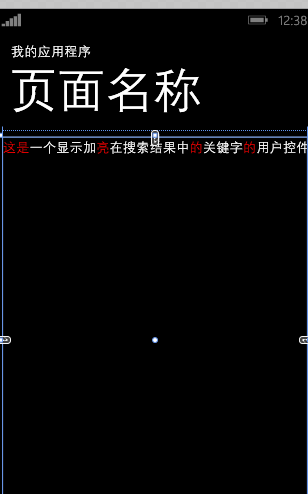
             <control:HighlightControl Text="这是一个显示加亮在搜索结果中的关键字的用户控件" HighlightWord="高,的,这是,测试,亮,段" HighlightWordColor="Red">

             </control:HighlightControl>

         </Grid>

     </Grid>
整个实现大概就是这样,最后截一张图给大家看看。
总结
问题总有解决的方法的,很多你看似是比较困难的事情,其实都是由最基础的知识去一步步分解出来解决的,所以善于思考,举一反三,才是快速解决问题的根本途径!
如何给wp(Windows phone)中搜索关键字加亮?的更多相关文章
- Linux:从文件中搜索关键字并显示行数(cat,grep函数)
假如有test1.txt的格式如下图所示: 有test2.txt的内容如下: 现需将test2.txt含有的关键字的行搜索出来并显示行数 则可以用到命令: cat test1.txt | grep - ...
- Linux vi 中搜索关键字
当你用vi打开一个文件后,因为文件太长,如何才能找到你所要查找的关键字呢? 在vi里可没有菜单-〉查找 不过没关系,可以在命令模式下敲斜杆( / )这时在状态栏(也就是屏幕左下脚)就出现了 “/” 然 ...
- Jquery在表格中搜索关键字
<!DOCTYPE html><html><head> <title>ddd</title></head><body> ...
- linux中在某个目录下多个文件中搜索关键字
有四种方法: find 文件目录 -name '*.*' -exec grep 'xxx' {} + -n 或是 find 文件目录 -name '*.*' | xargs grep 'xxx' -n ...
- 在 Angular 中实现搜索关键字高亮
在 Angular 中,我们不应该试图直接修改 DOM 的内容,当需要更新 DOM 内容的时候,应该修改的其实是我们的数据模型,也就是 $scope 中的数据,Angular 会帮助我们将修改之后的数 ...
- LoadRunner如何获得参数化中每个关键字的搜索响应时间
LoadRunner如何获得参数化中每个关键字的搜索响应时间 在测试搜索引擎时我们一般采用大量的搜索关键字,有时有必要了解在并发访问的情况下每个关键字的响应时间,一般如果不对脚本进行处理的话你可以获得 ...
- Asp.net 中高亮显示搜索关键字简单方法
今天用到搜索时的高亮显示,百度了一下,如下面: 1.替换关键字,对字体变色. public static string ReplaceRed(string strtitle, stri ...
- 搜索sqlserver 存储过程中的关键字
搜索sqlserver 存储过程中的关键字 select * from sys.all_sql_modules where definition like '%SP_NAME%'
- react项目中实现搜索关键字呈现高亮状态(一)
最近有个需求,在一个react项目中,实现搜索关键字呈现高亮状态.这个在普通的html文件中还好操作些,在react项目中有点懵逼了,因为react项目中很少操作dom,有点无从下手.但最后还是实现了 ...
随机推荐
- 爬虫模块之解决IO
一 asyncio模块 asyncio模块:主要是帮我们检测IO(只能是网路IO). @asyncio.coroutine:装饰器 tasks:任务列表 get_event_loop:起任务 run_ ...
- NCBI News
NCBI淘汰序列GI - 使用Accession.Version代替! 截至2016年9月,被称为“GI”的整数序列标识符将不再包括在NCBI支持的序列记录的GenBank,GenPept和FASTA ...
- 2019.02.09 bzoj1042: [HAOI2008]硬币购物(完全背包+容斥原理)
传送门 题意简述:有四种面值的硬币,现在qqq次询问(q≤1000)(q\le1000)(q≤1000),每次给出四种硬币的使用上限问最后刚好凑出sss块钱的方案数(s≤100000)(s\le100 ...
- linux 后台执行nohup 命令,终端断开无影响
nohup /root/start.sh & 在shell中回车后提示: [~]$ appending output to nohup.out原程序的的标准输出被自动改向到当前目录下的nohu ...
- Codeforces Round #536 (Div. 2) B. Lunar New Year and Food Ordering
#include <bits/stdc++.h> #define N 300010 #define PII pair<int, int> using namespace std ...
- vc6中向vs2010迁移的几个问题
vc6版本支持的库编译:CJ60lib 1. 用vs2010打开CJ60库的源码的dsw,强制打开 (1)设置项目属性的语言 因为,如果代码字符的编码集不一样,则会出现函数冲定义,参数冲突等问题,这可 ...
- windows 10 下配置安装node.js
环境配置 node.js windows10 25.5k 次阅读 · 读完需要 6 分钟 5 在去年就自己配置安装过node.js,但是使用npm安装模块时安装成功后调用require('mo ...
- PHP后台图片上传作品 接口
//把新图片添加到文件夹里 public function info($file=''){ $info = $file->validate(['ext'=>'jpg'])->rule ...
- Anroid 手机助手 详细解析 概述(二)
这篇主要说一下手机插入之后的一些动作. 1) 捕获窗口消息 插入拔出一个USB设备windows 会给所有的窗口发送特定的消息,只要我们捕获这些消息就可以处理设备插入和拔出.需要注意的是插入或者拔出 ...
- AngularJS $observe $watch
$observe $watch都可以用来监听值的变化,但是他们有显著的区别.$observe是用来监视DOM属性值的变化,而 $watch监视scope属性值的变化.AngularJS中的监听,都知道 ...