
C# 实现简单仿QQ登陆注册功能
闲来没事,想做一个仿QQ登陆注册的winform,于是利用工作之余,根据自己的掌握和查阅的资料,历时4天修改完成,新手水平,希望和大家共同学习进步,有不同见解希望提出!
废话不多说,进入正题:
先来看看我绘制的界面:
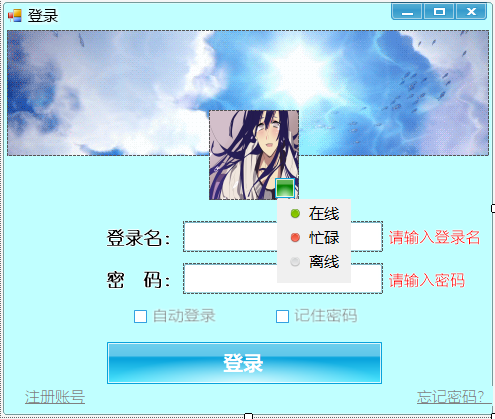

运用的CSkin控件完成的绘制,cskin和vs自带的控件其实差别不大,只是cskin美化更好一点,此外,cskin的验证码控件(skincode)很不错
再来看看代码:
public partial class Login : CCSkinMain

    {

        public Login()

        {

            InitializeComponent();

            //ControlBox = false;

            //取消最大化

            MaximizeBox = false;

            panel1.Visible = false;

            txtName.SkinTxt.TextChanged += SkinTxt_TextChanged;

            connectString = @"Data Source=E:\Works\Visual Studio 2017\Projects\SuiBianWanWan\SuiBianWanWan\bin\Debug\suibianwanwan.db;Pooling=true;FailIfMissing=false";

            conn = new SQLiteConnection(connectString);

            conn.Open();

        }

        private void SkinTxt_TextChanged(object sender, EventArgs e)

        {

            txtPassWord.Text = "";

            skinCheckBox1.Checked = false;

            skinCheckBox2.Checked = false;

        }

        string connectString = null;

        SQLiteConnection conn = null;

        //获取Configuration对象

        //这里得到的是exe.config文件的内容,不是app.config

        Configuration config = ConfigurationManager.OpenExeConfiguration(Application.ExecutablePath);

        string name = "";

        string passWord = "";

        string sign1 = "";

        string sign2 = "";

        string pic = "";

        //根据进行的设置更新config保存的数据

        public void AccessAppSetting(string name,string passsWord,string sign1,string sign2,string pic)

        {

            //删除<add>元素

            config.AppSettings.Settings.Remove("name");

            config.AppSettings.Settings.Remove("passWord");

            config.AppSettings.Settings.Remove("sign1");

            config.AppSettings.Settings.Remove("sign2");

            config.AppSettings.Settings.Remove("pic");

            //增加<add>元素

            config.AppSettings.Settings.Add("name", name);

            config.AppSettings.Settings.Add("passWord", passsWord);

            config.AppSettings.Settings.Add("sign1",sign1);

            config.AppSettings.Settings.Add("sign2", sign2);

            config.AppSettings.Settings.Add("pic", pic);

            //一定要记得保存,写不带参数的config.save()也可以

            config.Save(ConfigurationSaveMode.Modified);

            //刷新,否则程序读取的还是之前的值(可能已经装进内存)

            ConfigurationManager.RefreshSection("appSettings");

        }

        //密码加密

        public string getMD5(string s)

        {

            MD5 mD5 = MD5.Create();

            byte[] buffer = Encoding.GetEncoding("gbk").GetBytes(s);

            byte[] Md5Buffer = mD5.ComputeHash(buffer);

            string str = "";

            for (int i = 0; i < Md5Buffer.Length; i++)

            {

                str = str + Md5Buffer[i].ToString();

            }

            return str;

        }

        private void Form1_Load(object sender, EventArgs e)

        {

            //重绘头像框 变圆形 picturebox

            GraphicsPath gp = new GraphicsPath();

            gp.AddEllipse(skinPictureBox1.ClientRectangle);

            Region region = new Region(gp);

            skinPictureBox1.Region = region;

            gp.Dispose();

            region.Dispose();

            name = config.AppSettings.Settings["name"].Value;

            passWord = config.AppSettings.Settings["passWord"].Value;

            sign1 = config.AppSettings.Settings["sign1"].Value;

            sign2 = config.AppSettings.Settings["sign2"].Value;

            pic = config.AppSettings.Settings["pic"].Value;

            if (!string.IsNullOrEmpty(name))

            {

                txtName.Text = name;

                txtPassWord.Text = passWord;

                skinPictureBox1.ImageLocation = pic;

                skinCheckBox1.Checked = sign1.Trim() == "1" ? true : false;

                skinCheckBox2.Checked = sign2.Trim() == "2" ? true : false;

            }

            if (skinCheckBox1.Checked)

                btnLogin_Click(null,null);

        }

        private void btnLogin_Click(object sender, EventArgs e)

        {

            //登录验证

            SQLiteCommand cmd = new SQLiteCommand();

            cmd.Connection = conn;

            cmd.CommandText = "select * from userMessage where username =" + txtName.Text;

            try

            {

                SQLiteDataReader dr = cmd.ExecuteReader();

                DataTable dt = new DataTable();

                dt.Load(dr);

                string username = dt.Rows[0]["username"].ToString();

                string password = dt.Rows[0]["password"].ToString();

                if (string.IsNullOrEmpty(txtName.Text))

                {

                    skinLabel6.Visible = true;

                }

                else if (string.IsNullOrEmpty(txtPassWord.Text))

                {

                    skinLabel7.Visible = true;

                }

                else

                {

                    if (skinCheckBox2.Checked && sign2 == "")

                    {

                        if (getMD5(txtPassWord.Text) == password)

                        {

                            MessageBoxEx.Show("登陆成功");

                            if(skinCheckBox1.Checked)

                                AccessAppSetting(txtName.Text, getMD5(txtPassWord.Text), "1", "2", skinPictureBox1.ImageLocation);

                            else

                                AccessAppSetting(txtName.Text, getMD5(txtPassWord.Text), "", "2", skinPictureBox1.ImageLocation);

                        }

                        else

                            MessageBoxEx.Show("用户名或密码错误,请重新登陆");

                    }

                    else if (!skinCheckBox2.Checked && sign2 == "")

                    {

                        if(getMD5(txtPassWord.Text) == password)

                        {

                            MessageBoxEx.Show("登陆成功");

                            AccessAppSetting(txtName.Text, "", "", "", skinPictureBox1.ImageLocation);

                        }

                        else

                            MessageBoxEx.Show("用户名或密码错误,请重新登陆");

                    }

                    else if(sign2 != "" && skinCheckBox2.Checked)

                    {

                        if(txtName.Text == name && txtPassWord.Text == password)

                        {

                            MessageBoxEx.Show("登陆成功");

                            if(skinCheckBox1.Checked)

                                AccessAppSetting(txtName.Text, txtPassWord.Text, "1", "2", skinPictureBox1.ImageLocation);

                            else

                                AccessAppSetting(txtName.Text, txtPassWord.Text, "", "2", skinPictureBox1.ImageLocation);

                        }

                        else if(txtName.Text != name && getMD5(txtPassWord.Text) == password)

                        {

                            MessageBoxEx.Show("登陆成功");

                            if(skinCheckBox1.Checked)

                                AccessAppSetting(txtName.Text, getMD5(txtPassWord.Text), "1", "2", skinPictureBox1.ImageLocation);

                            else

                                AccessAppSetting(txtName.Text, getMD5(txtPassWord.Text), "", "2", skinPictureBox1.ImageLocation);

                        }

                        else

                            MessageBoxEx.Show("用户名或密码错误,请重新登陆");

                    }

                    else if (sign2 != "" && !skinCheckBox2.Checked)

                    {

                        if (txtName.Text == name && txtPassWord.Text == password)

                        {

                            MessageBoxEx.Show("登陆成功");

                            AccessAppSetting(txtName.Text, "", "", "", skinPictureBox1.ImageLocation);

                        }

                        else if (txtName.Text != name && getMD5(txtPassWord.Text) == password)

                        {

                            MessageBoxEx.Show("登陆成功");

                            AccessAppSetting(txtName.Text, "", "", "2", skinPictureBox1.ImageLocation);

                        }

                        else

                            MessageBoxEx.Show("用户名或密码错误,请重新登陆");

                    }

                }

             }

            catch (Exception)

            {

                MessageBoxEx.Show("用户名不存在,请前往注册");

                txtName.Text = "";

                txtPassWord.Text = "";

                skinCheckBox1.Checked = false;

                skinCheckBox2.Checked = false;

            }

        }

        //关于焦点的一些处理

        private void Form1_Click(object sender, EventArgs e)

        {

            panel1.Visible = false;

            if (!string.IsNullOrEmpty(txtName.Text))

            {

                skinLabel6.Visible = false;

            }

            if (!string.IsNullOrEmpty(txtPassWord.Text))

            {

                skinLabel7.Visible = false;

            }

        }

        private void txtPassWord_MouseEnter(object sender, EventArgs e)

        {

            if (!string.IsNullOrEmpty(txtName.Text))

            {

                skinLabel6.Visible = false;

            }

        }

        private void txtName_Validated(object sender, EventArgs e)

        {

            if (!string.IsNullOrEmpty(txtName.Text))

            {

                skinLabel6.Visible = false;

            }

        }

        private void txtPassWord_Validated(object sender, EventArgs e)

        {

            if (!string.IsNullOrEmpty(txtPassWord.Text))

            {

                skinLabel7.Visible = false;

            }

        }

        //自动登录

        private void skinCheckBox1_CheckedChanged(object sender, EventArgs e)

        {

            if (skinCheckBox1.Checked==true)

            {

                skinCheckBox2.Checked = true;

            }

        }

        //在线状态下拉实现

        private void btnState_Click(object sender, EventArgs e)

        {

            panel1.Visible = true;

        }

        private void ToolStripMenuItem0_Click(object sender, EventArgs e)

        {

            btnState.BaseColor = Color.Green;

            panel1.Visible = false;

        }

        private void toolStripMenuItem1_Click(object sender, EventArgs e)

        {

            btnState.BaseColor = Color.Red;

            panel1.Visible = false;

        }

        private void toolStripMenuItem2_Click(object sender, EventArgs e)

        {

            btnState.BaseColor = Color.Gray;

            panel1.Visible = false;

        }

        //换头像

        private void skinPictureBox1_Click(object sender, EventArgs e)

        {

            OpenFileDialog ofd = new OpenFileDialog();

            ofd.Title = "选择头像";

            ofd.Multiselect = false;

            ofd.InitialDirectory = @"E:\";

            ofd.Filter = "图片|*.jpg";

            ofd.ShowDialog();

            string path = ofd.FileName;

            skinPictureBox1.ImageLocation = path;

        }

        //注册页面

        private void linkLabel2_LinkClicked(object sender, LinkLabelLinkClickedEventArgs e)

        {

            Regist regist = new Regist();

            Hide();

            regist.Show();

        }

        private void Login_FormClosed(object sender, FormClosedEventArgs e)

        {

            Application.Exit();

        }

    }
public partial class Regist : CCSkinMain

    {

        public Regist()

        {

            InitializeComponent();

            MaximizeBox = false;

            connectString = @"Data Source=E:\Works\Visual Studio 2017\Projects\SuiBianWanWan\SuiBianWanWan\bin\Debug\suibianwanwan.db;Pooling=true;FailIfMissing=false";

            conn = new SQLiteConnection(connectString);

            conn.Open();

        }

        string connectString = null;

        SQLiteConnection conn = null;

        //密码加密

        public string getMD5(string s)

        {

            MD5 mD5 = MD5.Create();

            byte[] buffer = Encoding.GetEncoding("gbk").GetBytes(s);

            byte[] Md5Buffer = mD5.ComputeHash(buffer);

            string str = "";

            for (int i = 0; i < Md5Buffer.Length; i++)

            {

                str = str + Md5Buffer[i].ToString();

            }

            return str;

        }

        private void btnRegist_Click(object sender, EventArgs e)

        {

            if (string.IsNullOrEmpty(txtName.Text))

            {

                skinLabel6.Visible = true;

            }

            if (string.IsNullOrEmpty(txtPassWord.Text))

            {

                skinLabel4.Visible = true;

            }

            string skinCode = skinCode1.CodeStr;

            if (txtCheck.Text == skinCode)

            {

                MessageBoxEx.Show("恭喜你注册成功!");

                Hide();

                Login login = new Login();

                login.Show();

            }

            else

            {

                MessageBoxEx.Show("验证码错误,请重新输入");

            }

            try

            {

                SQLiteCommand cmd = new SQLiteCommand();

                cmd.Connection = conn;

                string password = getMD5(txtPassWord.Text);

                cmd.CommandText = "insert into userMessage values ('" + txtName.Text + "','" + password + "','" + txtPhone.Text + "')";

                cmd.ExecuteNonQuery();

            }

            catch (Exception)

            {

                MessageBoxEx.Show("用户名已存在");

            }

        }

        private void txtName_Validated(object sender, EventArgs e)

        {

            if(!string.IsNullOrEmpty(txtName.Text))

                skinLabel6.Visible = false;

            else

                skinLabel6.Visible = true;

        }

        private void txtPassWord_Validated(object sender, EventArgs e)

        {

            if (!string.IsNullOrEmpty(txtPassWord.Text))

                skinLabel4.Visible = false;

            else

                skinLabel4.Visible = true;

        }

        private void txtPhone_Validated(object sender, EventArgs e)

        {

            if (!string.IsNullOrEmpty(txtPhone.Text))

                skinLabel5.Visible = false;

            else

                skinLabel5.Visible = true;

        }

        private void Regist_FormClosed(object sender, FormClosedEventArgs e)

        {

            Login login = new Login();

            login.Show();

        }

    }
这里说一下数据库我用的SQLite,在此之前我也没有用过sqlite数据库,只知道是文件型数据库,我也是边学边用,发现其实挺好用的,十分方便,我用数据库可视化工具是SQLite Expert Personal,这里提一下,用sqlite数据库进行建表时,针对字符串类型最好用text类型,不要用varchar
最后,说一下我记住密码的方式,我用的是利用App.config 配置文件保存密码的方式来记录的,在winform加载的时候去读取config配置文件,判断是否记住了密码
好了,大概就是这些吧,希望给有兴趣的你提供了帮助,也欢迎大家一起探讨!!
C# 实现简单仿QQ登陆注册功能的更多相关文章
- Android Studio实现登陆注册功能之手机号验证
我们平常写的登陆注册功能,就是很普通的注册一个账号,设置密码,然后登录.这次,想写一个与之前稍微不一样的登陆注册界面,于是想到了手机号验证的方式. 现在我们市面上出现的很多app,都是采用的手机号注册 ...
- JS简单仿QQ聊天工具的制作
刚接触JS,对其充满了好奇,利用刚学到的一点知识,写了一个简单的仿QQ聊天的东西,其中还有很多的不足之处,有待慢慢提高. 功能:1.在输入框中输入内容,点击发送,即可在上方显示所输入内容. 2.点击‘ ...
- Android学习之仿QQ側滑功能的实现
如今项目越来越多的应用了滑动删除的功能,Android本来遵循的是长按删除,IOS定制的是滑动删除,不可否认滑动删除确实在客户体验上要好一点,所以看了非常多关于仿QQ滑动删除的样例,还是感觉代码家的A ...
- SpringBoot写一个登陆注册功能,和期间走的坑
文章目录 前言 1. 首先介绍项目的相关技术和工具: 2. 首先创建项目 3. 项目的结构 3.1实体类: 3.2 Mapper.xml 3.3 mapper.inteface 3.4 Service ...
- Apicloud_(模板)登陆注册功能模板
项目已托管到Github上 传送门 不需要使用任何图片资源,需要用到SHA1.js库文件, Apicloud_(接口验证)用户注册头部信息X-APICloud-AppKey生成 传送门 项目全代码放到 ...
- web_01Java ee实现登陆注册功能
Web Web_01版本: 实现功能 用户注册 用户登录 设计内容 数据库:mysql 服务器: tomact7 配置 : xml 页面 : jsp+html/css *重点: 数据库相关: 数据库操 ...
- Python学习笔记_02:使用Tkinter连接MySQL数据库实现登陆注册功能
1 环境搭建 1.1 Python安装 1.2 MySQL环境搭建 1.3安装MySQLdb 2 具体实现 2.1 登陆界面 2.2 注册界面 2.3 具体实现部分代码 1 环境搭建 1.1 P ...
- 安卓listView实现下拉刷新上拉加载滑动仿QQ的删除功能
大家对这些功能都是看的多了,然后对上拉刷新和下拉加载的原理都是非常清楚的,所以实现这功能其实也就是为了让大家能够从众多的同行们来进行比较学习而已,虽然即使是这样,但是面试的时候面试官还是会问你上拉和下 ...
- jsp+servlet+mysql简单实现用户登陆注册
原码,项目中遇到的错误,解决方法,文章最后有链接可以获取 项目简介 *有的网友说在修改和删除时会触发error,建议各位不要去把用户名命名为中文! 功能描述 登陆,注册,用户一览表,修改,删除,添加, ...
随机推荐
- Python编程笔记(第二篇)二进制、字符编码、数据类型
一.二进制 bin() 在python中可以用bin()内置函数获取一个十进制的数的二进制 计算机容量单位 8bit = 1 bytes 字节,最小的存储单位,1bytes缩写为1B 1KB = 10 ...
- java如何实现发邮件功能。
http://blog.sina.com.cn/s/blog_59ca2c2a01013800.html http://www.cnblogs.com/xdp-gacl/p/4216311.html
- 如何从平面设计转行到UI设计?
时代的变迁,科技的进步,工具的发展,薪资的差距,促使许多人转行的原因,但平面与界面两者之间有着哪些的差异呢?如果,想要转行又该具备哪些条件呢? 平面.界面设计之间的差异性 平面设计以『视觉』为主轴,强 ...
- linux-ubuntu 下R无法安装rjava模块的原因及解决方案
错误信息: 没有 /usr/lib/jvm/default-java/jre/bin/java 原因: R找不到java作为依赖 解决方案: (1) 如果你没有安装java,请先安装java. (2) ...
- 通过 Spring Security配置 解决X-Frame-Options deny 造成的页面空白 iframe调用问题
spring Security下,X-Frame-Options默认为DENY,非Spring Security环境下,X-Frame-Options的默认大多也是DENY,这种情况下,浏览器拒绝当前 ...
- 简易非阻塞http服务器
说明 需要理解阻塞和非阻塞的区别,特别要注意非阻塞和异步不是一个概念,这个很容易弄错.云盘里面netty的书会讲这几个方面的区别,nodejs深入浅出关于异步编程章节里面 ...
- Codeforces 1103 简要题解(持续更新)
文章目录 A题 B题 C题 D题 传送门 又一场原地爆炸的比赛. A题 传送门 简单思维题 题意:给一个4∗44*44∗4的格子图和一个01串,你要根据01串放1∗21*21∗2的木块,如果是0就竖放 ...
- 2019.01.14 codeforces685B. Kay and Snowflake(树形dp)
传送门 题意简述:给出一棵树,求每个子树的重心. 首先通过画图可以观察出一个性质,我们从叶子结点向根节点递推重心的话重心的位置是不会下降的. 然后由于一个点的重心要么是自己,要么在重儿子子树内,因此如 ...
- Java数组的初始化
1.动态初始化 数据类型 [] 变量名 = new 数据类型 [数组大小]; //数组的动态初始化 int [] arr = new int [3]; 2.静态初始化 数据类型 [] 变量名 = {元 ...
- Win7 VS2015及MinGW环境编译FFMPEG-20160326
因为又要弄MinGW了,所以顺便把FFMPEG编译了,文章主要参考这篇,防抽所以复制一遍,顺便加些自己的内容 http://blog.csdn.net/finewind/article/details ...